
Sarrera
This manual provides instructions for the proper setup, operation, and maintenance of your Calvas 2020B0-B1 remote control. This remote is designed to be compatible with Shaw LCD LED televisions, offering a convenient replacement or secondary control unit. Please read this manual thoroughly before using the device.

Irudia: Aurrealdea view of the Calvas 2020B0-B1 remote control.
Konfigurazioa
1. Bateriaren instalazioa
- Kokatu bateriaren konpartimendua urrutiko agintearen atzealdean.
- Press down on the latch and slide the battery cover off.
- Sartu bi AAA pila (ez daude barne), ziurtatuz terminal positiboa (+) eta negatiboa (-) konpartimentuaren barruko markekin behar bezala lerrokatuta daudela.
- Lerratu bateriaren estalkia berriro lekuan klik egin arte.

Irudia: Atzealdea view urrutiko agintea bateriaren konpartimentua irekita dagoela.
2. Quick Setup for TV Control
The remote features a quick setup function for initial pairing with your television. Follow these steps:
- Eduki sakatuta KONFIAZIOA button until the LED light blinks twice.
- Sakatu TELEBIDEAREN POTENTZIA botoia.
- Eduki sakatuta OK botoia.
- Askatu OK key when your TV turns off. This indicates successful pairing.
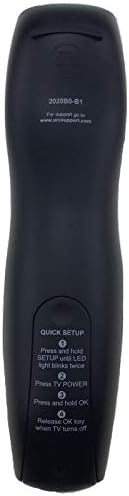
Image: Back of the remote control displaying quick setup instructions.
Note: If the TV does not turn off, repeat the steps or consult the TV's manual for specific remote programming codes if available.
Funtzionamendu-argibideak
The Calvas 2020B0-B1 remote control utilizes infrared (IR) technology. Ensure a clear line of sight between the remote's IR emitter and your TV's IR receiver for optimal performance.
Botoiaren funtzioak:
- POTENTZIA: Telebista pizten edo itzaltzen du.
- VOL +/-: Bolumena handitzen edo txikitzen du.
- CH +/-: Kanala gora edo behera aldatzen du.
- MUTU: Telebistaren audioa desaktibatu edo aktibatzen du.
- NUMBER PAD (0-9): Kanal zenbakiak zuzenean sartzen ditu.
- GIDA: Programaren gida bistaratzen du.
- MENUA: Telebistaren menu nagusira sartzen da.
- INFORMAZIOA: Uneko programari buruzko informazioa erakusten du.
- OK / Navigation Arrows: Confirms selections and navigates through menus.
- IRTEERA: Uneko menutik edo pantailatik irteten da.
- AZKENA: Aurrekora itzultzen da viewed kanala.
- DAY +/-: Navigates through days in the program guide.
- MUSIC / FAV: Accesses music channels or favorite channels (functionality may vary by TV model).
Mantentzea
Garbiketa:
- Garbitu urrutiko agintea zapi leun eta lehor batekin.
- Zikinkeria egoskorrerako, apur bat lehortuampeu zapi urarekin edo garbitzaile leun eta ez urratzaile batekin.
- Do not use harsh chemicals, solvents, or abrasive cleaning pads, as these can damage the remote's surface or internal components.
Bateria ordezkatzea:
- Replace batteries when the remote's response becomes sluggish or the LED indicator fails to light up.
- Always replace both batteries at the same time with new AAA batteries.
- Ez nahastu bateria zaharrak eta berriak, edo bateria mota desberdinak.
- Kendu pilak urrutiko agintea denbora luzez erabiliko ez baduzu, isuriak saihesteko.
Biltegiratzea:
- Gorde urrutiko agintea leku fresko eta lehor batean, eguzki-argitik eta muturreko tenperaturetatik babestuta.
- Saihestu urrutiko agintea erortzea edo gehiegizko hezetasunean jartzea.
Arazoak konpontzea
- Urrunekoek ez dute erantzuten:
- Egiaztatu bateriak behar bezala sartuta dauden eta ez daudela agortuta. Beharrezkoa bada, ordezkatu itzazu.
- Ensure there is a clear line of sight between the remote and the TV's IR receiver. Remove any obstructions.
- Try re-pairing the remote with the TV using the "Quick Setup" steps.
- Only some buttons work:
- This might indicate a partial pairing issue or a specific button malfunction. Try re-pairing the remote.
- Clean the remote's surface, especially around the unresponsive buttons, to ensure no debris is interfering.
- Funtzionamendu-eremu laburra:
- Ordeztu pilak berriekin.
- Ziurtatu argi-iturri indartsuek (eguzki-argia edo fluoreszentezko argi distiratsuak adibidez) ez dutela infragorri seinalea oztopatzen.
Zehaztapenak
| Marka | puntu burusoilak |
| Modelo zenbakia | 2020B0-B1 (Mfr Part Number: CLS-D41D8CD98F00B204E9800998ECF8427E) |
| Gailu bateragarriak | Television (Shaw LCD LED TVs) |
| Konektibitate Teknologia | Infragorriak (IR) |
| Kontrolagailu mota | Botoien Kontrola |
| Onartutako gailuen gehienezko kopurua | 1 |
| Gehienezko irismena | 10 metro |
| Ezaugarri Berezia | Diseinu ergonomikoa |
Bermearen informazioa
This product is typically covered by a limited warranty provided by the seller or manufacturer. Please refer to your purchase documentation or contact the retailer directly for specific warranty terms and conditions. Keep your proof of purchase for any warranty claims.
Laguntza
For further assistance, technical support, or inquiries regarding your Calvas 2020B0-B1 remote control, please contact the seller or manufacturer through the platform where the product was purchased. Provide your model number (2020B0-B1) and any relevant purchase details when seeking support.