
1. Sarrera
Thank you for choosing the Dacom Athlete G05 Bluetooth Headset. This manual provides comprehensive instructions to help you set up, operate, and maintain your new wireless headphones. Please read this manual carefully before use to ensure optimal performance and longevity of your device.
2. Paketearen edukia
Egiaztatu behean zerrendatutako elementu guztiak zure paketean sartuta daudela:
- 1 x Dacom Athlete G05 Bluetooth Headset
- 1 x USB kargatzeko kablea
- 1 x Erabiltzailearen eskuliburua (dokumentu hau)
3. Produktua amaitu daview
The Dacom Athlete G05 is a wireless stereo earphone designed for sports and running, featuring a comfortable in-ear design with ear hooks for secure fit. It connects via Bluetooth V4.1.
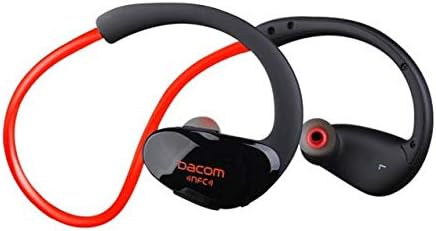
3.1. irudia: Aurrealdea view of the Dacom Athlete G05 Bluetooth Headset, showing the earbud and ear hook design.
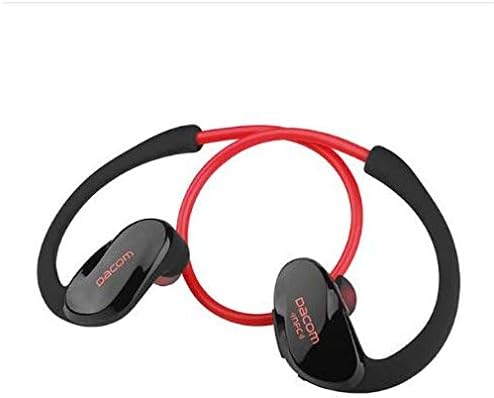
3.2. irudia: Atzekoa view of the Dacom Athlete G05 Bluetooth Headset, illustrating the connecting cable between the two earbuds.
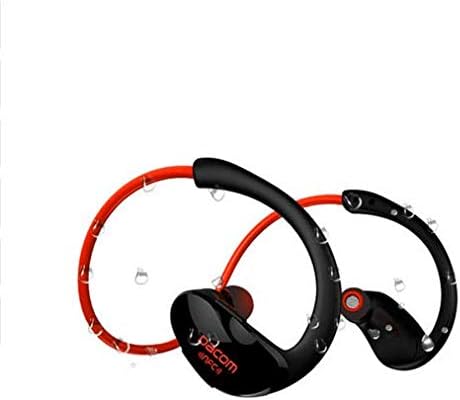
3.3. irudia: Dacom Athlete G05 Bluetooth Headset demonstrating water resistance, suitable for sports activities.
4. Konfigurazioa
4.1 Entzungailuak kargatzea
Before first use, fully charge your Dacom Athlete G05 headset. A full charge typically takes approximately 1.5 to 2 hours.
- Connect the provided USB charging cable to the charging port on the headset.
- Connect the other end of the USB cable to a power adapter (DC5V 150mAh output recommended) or a computer's USB port.
- The battery indicator light will illuminate during charging and change color or turn off once fully charged.
A fully charged headset provides approximately 8 hours of talk time or music playback, and up to 180 hours of standby time.
4.2 Bluetooth parekatzea
To connect your headset to a Bluetooth-enabled device (e.g., smartphone, tablet):
- Ziurtatu entzungailuak guztiz kargatuta eta itzalita daudela.
- Press and hold the multi-function button on the headset until the Bluetooth indicator light flashes red and blue alternately, indicating it is in pairing mode.
- Gailuan, gaitu Bluetootha eta bilatu eskuragarri dauden gailuak.
- Select "Dacom Athlete G05" (or similar name) from the list of found devices.
- Pasahitza eskatzen badizute, idatzi "0000" (lau zero).
- Once paired, the Bluetooth indicator light will flash blue slowly or turn solid blue, and you will hear a confirmation tone.
The headset supports Bluetooth V4.1 and profiles such as Headset, Handsfree, A2DP, AVRC, and APT-X.
5. Funtzionamendu-argibideak
5.1 Piztu/Itzali
- Piztu: Press and hold the multi-function button for approximately 3 seconds until the indicator light flashes blue and you hear a power-on tone.
- Itzali: Press and hold the multi-function button for approximately 5 seconds until the indicator light flashes red and you hear a power-off tone.
5.2 Deien kudeaketa
- Erantzun deia: Dei bat sartzean, sakatu labur funtzio anitzeko botoia.
- Amaitu deia: Sakatu labur funtzio anitzeko botoia dei batean zehar.
- Deia baztertu: Dei bat sartzen duzunean, sakatu eta eutsi funtzio anitzeko botoia 2 segundoz.
- Berriz markatu azken zenbakia: Dei batean ez zaudenean, sakatu bi aldiz funtzio anitzeko botoia.
5.3 Musika erreproduzitzea
- Erreproduzitu/Pausatu: Sakatu labur funtzio anitzeko botoia.
- Hurrengo ibilbidea: Sakatu luze Bolumen + botoia.
- Aurreko pista: Sakatu luze Bolumenaren botoia -.
- Bolumena igo: Sakatu labur Bolumen + botoia.
- Bolumena jaitsi: Sakatu labur Bolumenaren botoia -.
Note: The headset features touch control for various functions.
6. Mantentzea eta Zainketa
- Keep the headset dry. Do not expose it to extreme temperatures or humidity.
- Garbitu entzungailuak eta kargatzeko kontaktuak aldizka zapi leun eta lehor batekin.
- Saihestu entzungailuak erortzea edo kolpe gogorren eraginpean jartzea.
- Gorde entzungailua leku fresko eta lehor batean erabiltzen ez duzunean.
- Ez saiatu entzungailuak desmuntatzen edo aldatzen, horrek bermea baliogabetuko baitu.
7. Arazoak
| Arazoa | Irtenbide posiblea |
|---|---|
| Aurikularrak ez dira pizten. | Ensure the headset is fully charged. Connect to a power source and try again. |
| Ezin da gailuarekin parekatu. |
|
| Soinurik ez edo bolumen baxua. |
|
| Konexio etengabea. |
|
8. Zehaztapenak
| Ezaugarri | Xehetasuna |
|---|---|
| Produktuaren izena | Athlete sports Bluetooth headset |
| Modelo zenbakia | G05 |
| Bluetooth bertsioa | V4.1 |
| Bluetooth klasea | 2. klasea |
| Onartutako Profiles | Headset, Handsfree, A2DP, AVRC, APT-X |
| Kargatzeko sarrera | DC5V 150mAh (Power adapter output) |
| Bateria mota | High-performance lithium polymer battery |
| Hitzaldi Denbora | 8 ordu gutxi gorabehera |
| Jolas Denbora | 8 ordu gutxi gorabehera |
| Egonean Denbora | 180 ordu gutxi gorabehera |
| Audio-maiztasunaren barrutia | 20Hz-20kHz |
| BT Radio Frequency | 2.400-2.481 GHz |
| Irteerako inpedantzia | 16Ω 3mW |
| Sentikortasuna | 100-105 dB |
| Entzungailuen forma-faktorea | Belarrian |
| Konektibitate Teknologia | Haririk gabekoa |
| Kontrol-metodoa | Ukitu |
| Materiala | Plastikoa |
| Kolorea | Gorria |
9. Bermea eta Laguntza
Dacom products are manufactured to the highest quality standards. For warranty information or technical support, please refer to the warranty card included with your purchase or visit the official Dacom webgunea. Gorde erosketaren egiaztagiria bermearen erreklamazioetarako.