
1. Sarrera
Thank you for choosing the iProven DTR-1835 Digital Oral Thermometer. This device is designed to provide fast, accurate, and reliable temperature measurements for adults, children, and infants. Its flexible tip ensures comfort during use, and the integrated smiley fever indicator offers a clear visual interpretation of readings. Please read this manual thoroughly before using the thermometer to ensure proper operation and to maintain its accuracy and longevity.

Image 1: iProven DTR-1835 Digital Thermometer and its packaging, highlighting key features like fast and accurate readings, smiley indicator, and flexible tip.
2. Segurtasun informazioa
- The iProven DTR-1835 thermometer contains no mercury, making it safe for use with children and adults.
- Keep the thermometer out of reach of small children to prevent accidental ingestion of small parts.
- Ez hozkatu termometroaren punta.
- Axillary (underarm) measurement is not recommended as it may not provide reliable or accurate readings.
- Consult a medical professional for any health concerns or if you have questions about temperature readings.
3. Produktuaren ezaugarriak
The iProven DTR-1835 Digital Thermometer is equipped with several features designed for user convenience and accuracy:
- Irakurketa sistema azkarra: Provides temperature readings in approximately 20 seconds.
- Zehaztasun handia: Measures with an accuracy of ± 0.1 ℃ / ± 0.2 ℉.
- Aholku malgua: Ensures comfortable and safe measurement.
- Smiley Fever Indicator: Visually indicates if the reading is normal, slightly elevated, or elevated.
- Diseinu iragazgaitza: Allows for easy cleaning under running water.
- Botoi bakarreko funtzionamendua: Simple to use with a single power button.
- Last Reading Memory: Automatically stores the last measured temperature.
- Fahrenheit/Celsius etengailua: Easily switch between temperature units.
- Itzaltze automatikoa: Conserves battery life by turning off automatically after a period of inactivity.
- Bateria baxuaren alerta: Bateria aldatu behar denean jakinarazten dizu.
- Protective Hardcase: Included for hygienic storage.

Image 2: Visual breakdown of the iProven DTR-1835 thermometer's key features and functions.
4. Konfigurazioa
4.1 Hasierako Erabilera
- The thermometer comes with a battery pre-installed.
- Before first use, and after each subsequent use, clean the thermometer tip as described in the 'Maintenance' section.
- Sakatu pizteko botoia (⑂) to turn on the thermometer. A short beep will sound, and the display will show the last measured temperature for 2 seconds, followed by 'L℃' or 'L℉' with a flashing degree symbol, indicating it is ready for measurement.
4.2 Switching Between Fahrenheit and Celsius
To switch between Fahrenheit (℉) and Celsius (℃):
- With the thermometer turned off, press and hold the power button for approximately 3 seconds until the display shows '℃' or '℉'.
- Release the button, and the unit will be set to the desired scale.
5. Funtzionamendu-argibideak
The iProven DTR-1835 supports oral and rectal temperature measurement. Axillary measurement is not recommended due to potential inaccuracies.

3. irudia: Amaituview of temperature measurement methods and their suitability.
5.1 Oral Measurement (Recommended for ages 4+)
- Ensure the thermometer is clean.
- Sakatu pizteko botoia (⑂) termometroa pizteko.
- Place the flexible tip of the thermometer under the tongue, in one of the two heat pockets at the base of the tongue.
- Close your mouth and hold the thermometer in place. Avoid talking or moving during measurement.
- Wait for the thermometer to beep, indicating the measurement is complete (approximately 20 seconds).
- Remove the thermometer and read the temperature displayed.
5.2 Rectal Measurement (Recommended for children under 4)
Rectal measurement is generally considered the most accurate method for infants and young children.
- Ensure the thermometer is clean.
- Aplikatu uretan disolbagarri den lubrifikatzaile kantitate txiki bat (adibidez, petrolio-gelatina) punta malguan.
- Sakatu pizteko botoia (⑂) termometroa pizteko.
- Gently insert the lubricated tip into the rectum, no more than half an inch (1.25 cm). Do not force the thermometer.
- Eutsi termometroari bere lekuan bip egin arte (20 segundo inguru).
- Remove the thermometer carefully and read the temperature displayed.
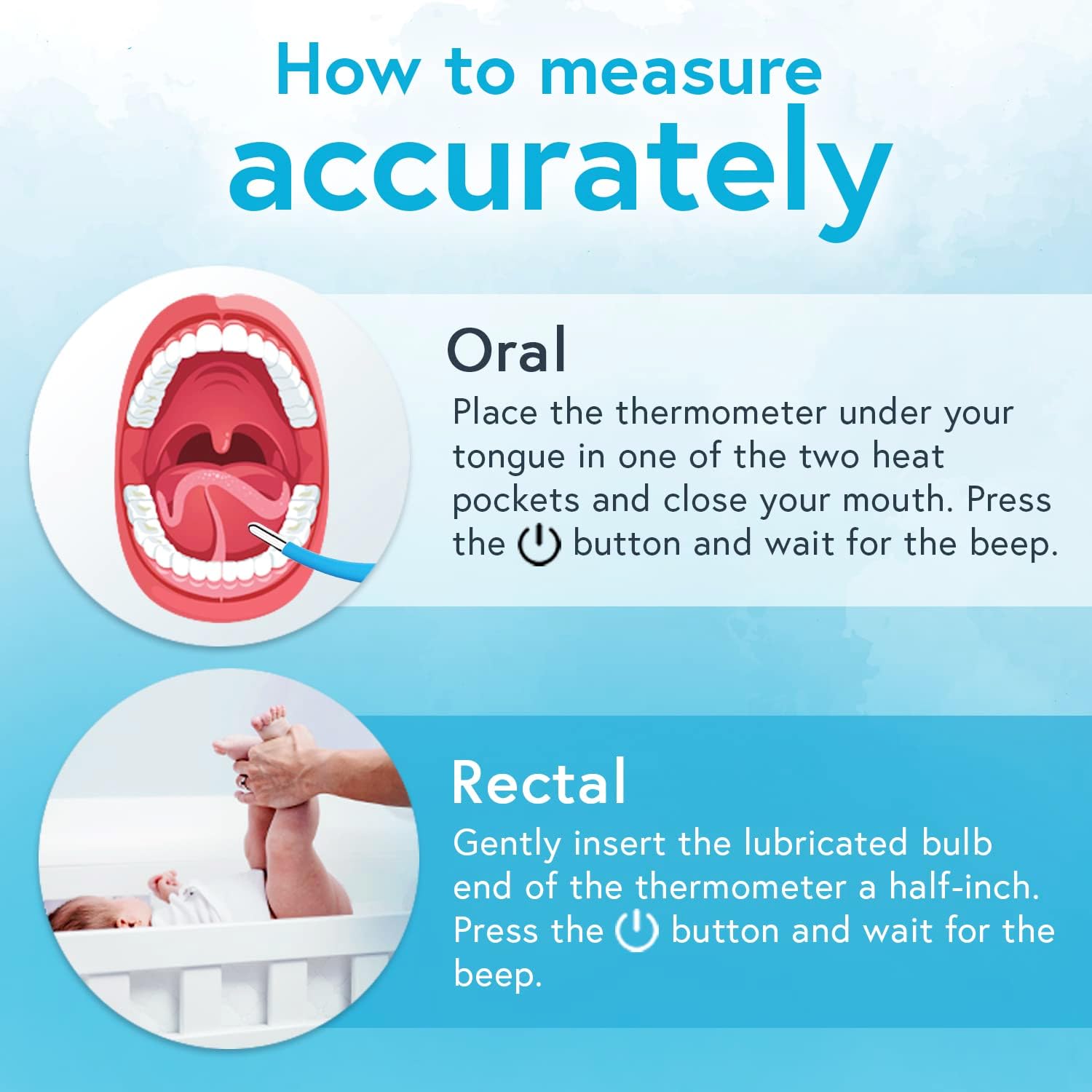
Image 4: Step-by-step visual guide for oral and rectal temperature measurement.
6. Understanding Readings
6.1 Smiley Fever Indicator
The DTR-1835 features a visual smiley indicator to help interpret temperature readings:
- Aurpegi Alaia: Tenperatura normala adierazten du.
- Aurpegi neutroa: Tenperatura apur bat igo dela adierazten du.
- Sad Face: Indicates an elevated temperature (fever).
Always consult a medical professional for accurate diagnosis and advice, especially if a fever is indicated.
6.2 Last Reading Memory
When you turn on the thermometer, it will briefly display the last measured temperature before entering measurement mode. This allows you to track changes in temperature over time.
7. Mantentzea
7.1 Garbiketa
The thermometer is waterproof, making cleaning simple and hygienic:
- After each use, wipe the thermometer tip with a soft cloth or cotton swab moistened with rubbing alcohol (70% isopropyl alcohol).
- Alternatively, you can wash the tip under running tap water with a mild soap.
- Garbitu ondo ur garbiarekin.
- Dry the thermometer completely with a clean, soft cloth before storing.
- Do not immerse the entire thermometer in water for extended periods.
7.2 Biltegiratzea
Store the thermometer in its protective hardcase in a cool, dry place, away from direct sunlight and extreme temperatures. Keep it out of reach of children.
7.3 Bateria ordezkatzea
When the low battery indicator appears on the display, the battery needs to be replaced. Refer to the product packaging or contact customer support for specific battery type and replacement instructions.
8. Arazoak
- No Display / Thermometer won't turn on: Egiaztatu bateria behar bezala instalatuta dagoen edo ordezkatu behar den.
- Irakurketa okerrak: Ensure the thermometer tip is properly placed (oral or rectal) and held steady during measurement. Avoid talking or moving during oral measurement. Ensure the thermometer is clean.
- 'Lo' or 'Hi' on Display: 'Lo' indicates a temperature below the measurable range, and 'Hi' indicates a temperature above the measurable range. Ensure proper contact and placement.
- Errore-mezua: If an error message appears, turn the thermometer off and then on again. If the error persists, contact customer support.
9. Zehaztapenak
| Ezaugarri | Zehaztapena |
|---|---|
| Modelo zenbakia | DTR-1835 |
| Neurketa-eremua | 32.0℃ - 42.9℃ (89.6℉ - 109.2℉) |
| Zehaztasuna | ± 0.1℃ (35.5℃ - 42.0℃) ± 0.2℉ (95.9℉ - 107.6℉) |
| Neurketa-denbora | Gutxi gorabehera. 20 segundo |
| Bistaratzeko mota | LCDa |
| Energia iturria | Bateriaren bidez |
| Produktuaren neurriak | 22.86 x 0.03 x 0.03 cm |
| Elementuaren pisua | 50 g |
| Ezaugarri bereziak | Fast Reading System, Flexible tip, High Accuracy, No mercury, Smiley Fever Indicator |
10. Bermea eta Laguntza
For warranty information, technical support, or any questions regarding your iProven DTR-1835 Digital Oral Thermometer, please refer to the warranty card included with your product or visit the official iProven website. You may also contact iProven customer service directly for assistance.


