
1. Sarrera
This manual provides essential information for the safe and efficient installation, operation, and maintenance of the IFM D100/DY34-A Speed Controller. This device is designed for pulse rate and rotational speed control in industrial applications, operating on 110/120 VAC power. Please read this manual thoroughly before attempting to install or operate the unit.
2. Segurtasun informazioa
OHARRA: Deskarga elektrikoaren arriskua. Instalazioa eta mantentze-lanak langile kualifikatuek bakarrik egin behar dituzte.
- Always disconnect power before installing, wiring, or performing maintenance on the device.
- Ziurtatu lurra egokia deskarga elektrikoa saihesteko.
- Egiaztatu hornidura voltage matches the device's specified voltage (110/120 VAC).
- Do not operate the device in environments exceeding its specified temperature or humidity limits.
- Protect the device from moisture and corrosive substances.
- Refer to local and national electrical codes for all wiring and installation procedures.
3. Produktua amaitu daview
The IFM D100/DY34-A is a compact speed controller designed for precise monitoring and control of rotational speeds or pulse rates. It features robust construction suitable for industrial environments.
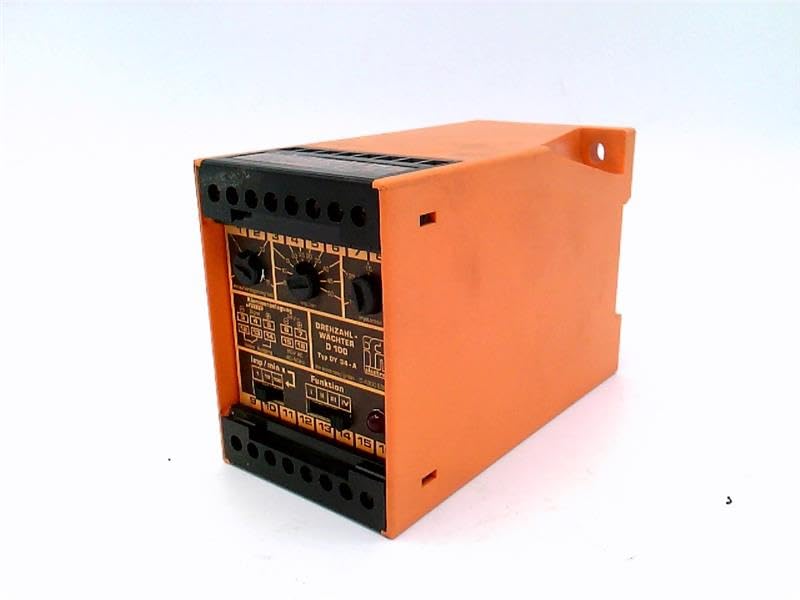
1. irudia: Aurrealdea view of the IFM D100/DY34-A Speed Controller. The image shows the orange casing, black terminal blocks at the top and bottom, and control dials on the front panel labeled for functions like "DREHZAHL-WACHTER D 100" (Rotational Speed Monitor D 100) and "Funktion" (Function).
Osagai nagusiak honako hauek dira:
- Terminal blokeak: For power input, sensor connections, and output signals.
- Kontrol-markagailuak: Used for setting parameters such as speed thresholds and operating modes.
- Adierazle argiak: (If visible/implied) For status indication (e.g., power, output active, error).
4. Konfigurazioa
4.1 Muntaketa
The controller is typically mounted on a DIN rail within an electrical enclosure. Ensure adequate ventilation around the unit to prevent overheating.
- Securely attach the unit to a standard DIN rail.
- Ensure sufficient clearance for wiring and heat dissipation.
4.2 Kableatua
Refer to the wiring diagram provided on the unit or in the detailed technical documentation for specific connections. General wiring steps include:
- Elikatze-iturria: Connect the 110/120 VAC power supply to the designated terminals. Observe correct polarity if applicable.
- Sentsore sarrera: Connect the pulse or rotational speed sensor to the input terminals. Ensure the sensor type (e.g., NPN, PNP) is compatible with the controller.
- Irteerako konexioak: Connect the control output(s) to the driven device (e.g., motor contactor, alarm).
- Lurreratzea: Connect the protective earth ground to the designated ground terminal.
CAUTION: Incorrect wiring can damage the device or connected equipment. Double-check all connections before applying power.
5. Funtzionamendu-argibideak
5.1 Hasierako piztea
- After completing all wiring, apply power to the unit.
- Observe any power indicator lights to confirm the unit is receiving power.
5.2 Parametroen ezarpena
The D100/DY34-A features adjustable parameters via its front panel dials. These typically include:
- Set Point (Threshold): Adjust this dial to set the desired speed or pulse rate at which the output will activate or deactivate.
- Hysteresis/Window: (If available) Adjust to prevent rapid switching of the output when the input signal fluctuates around the set point.
- Funtzio hautatzailea: Select the operating mode (e.g., overspeed, underspeed, window function).
Consult the detailed technical manual for precise instructions on calibrating and setting each parameter for your specific application.
5.3 Funtzionamendua
Once configured, the controller continuously monitors the input signal from the connected sensor. When the monitored speed or pulse rate crosses the set threshold, the corresponding output will change state according to the selected function.
6. Mantentzea
The IFM D100/DY34-A Speed Controller is designed for reliable operation with minimal maintenance. However, periodic checks are recommended.
- Garbiketa: Keep the unit clean and free from dust and debris. Use a soft, dry cloth for cleaning. Do not use abrasive cleaners or solvents.
- Konexioak: Aldian-aldian egiaztatu kableatu-konexioak estutasuna eta korrosio-zantzurik dagoen egiaztatzeko.
- Ingurumen-baldintzak: Ziurtatu funtzionamendu-ingurunea tenperatura eta hezetasun-tarte jakin batzuen barruan mantentzen dela.
WARNING: Disconnect all power before performing any maintenance or cleaning.
7. Arazoak
If the speed controller is not functioning as expected, consider the following common issues:
| Arazoa | Kausa posiblea | Irtenbidea |
|---|---|---|
| Ez dago potentzia adierazle argirik | Ez dago energia-iturririk; kableatu okerra; fusiblea erreta. | Check power source; verify wiring connections; replace fuse if necessary. |
| Irteera ez da aktibatzen/desaktibatzen | Incorrect set point; faulty sensor; incorrect function setting; wiring error. | Adjust set point; check sensor operation; verify function selector; inspect output wiring. |
| Irakurketa ezegonkorrak | Sensor interference; loose connections; faulty sensor. | Check sensor cabling for shielding; tighten connections; test or replace sensor. |
If problems persist after attempting these solutions, contact IFM technical support or a qualified service technician.
8. Zehaztapenak
The following specifications are for the IFM D100/DY34-A Speed Controller:
- Eredua: D100/DY34-A
- Sarrera boltage: 110 / 120 VAC
- Funtzioa: Pulse Rate/Rotational Speed Control
- Elementuaren pisua: 1.84 kilo
- Fabrikatzailea: EFECTOR (IFM)
- ASIN: B07RRL4XY3
- Lehenengo eskuragarri: 21ko otsailaren 2025a
9. Bermea eta Laguntza
For information regarding warranty coverage, technical support, or service, please refer to the official IFM website or contact your local IFM distributor. Keep your purchase receipt and product serial number handy when contacting support.
Oharra: Bermearen baldintza espezifikoak eskualdearen eta erosketa-dataren arabera alda daitezke.