
Amazon Echo Show 8 (1st Gen, 2019 release)
Echo Show 8 (1st Gen) User Manual
Your comprehensive guide to setting up, operating, and maintaining your Amazon Echo Show 8.
Sarrera
The Amazon Echo Show 8 (1st Gen, 2019 release) is a smart display designed to enhance your daily life with Alexa. Featuring an 8-inch HD screen and stereo sound, it allows you to manage your day, connect with loved ones through video calls, enjoy entertainment, control smart home devices, and personalize your experience. This manual provides detailed instructions to help you get the most out of your device.
Kutxan dagoena
Upon unboxing your Echo Show 8, ensure all components are present:
- Echo Show 8 gailua
- Power adapter (30W) with cable (4.9 ft.)
- Hasierako gida azkarra
Konfigurazioa
Setting up your Echo Show 8 is a straightforward process, often simplified by Amazon Wi-Fi simple setup technology.
- Piztu: Konektatu korronte-egokitzailea zure Echo Show 8era eta entxufe batera. Gailua automatikoki piztuko da.
- Hizkuntza hautaketa: Jarraitu pantailan agertzen diren argibideei nahiago duzun hizkuntza hautatzeko.
- Wi-Fi konexioa: Select your Wi-Fi network from the list and enter the password. The Echo Show 8 supports dual-band Wi-Fi (802.11a/b/g/n/ac).
- Amazon kontuaren saioa hasteko: Log in with your Amazon account credentials. If you don't have one, you will be prompted to create one.
- Gailuaren erregistroa: Your device will register to your Amazon account.
- Time Zone and Location: Confirm your time zone and location settings.
- Tutoriala: The device may offer a brief tutorial on how to navigate and use its features.
Alexa aplikazioa Fire OS, Android eta iOS gailuekin bateragarria da eta zure bidez ere eskuragarri dago. web browser for further management and customization.
Echo Show 8 erabiltzea
The Echo Show 8 can be operated using voice commands with Alexa or through its touch screen interface.
Ahots-komandoak (Alexa)
Simply say "Alexa" followed by your command. Exampbesteak beste:
- "Alexa, zer eguraldi dago?"
- "Alexa, erreproduzitu musika."
- "Alexa, call [contact name]."
- "Alexa, show me my photos."
- "Alexa, turn off the lights."

Image: Echo Show 8 displaying current weather conditions, demonstrating its ability to provide glanceable information.
Ukipen-pantailaren nabigazioa
Swipe down from the top of the screen to access quick settings and the home menu. Swipe left from the right edge to view cards with suggestions and information. Tap on icons and options to interact with the device.
Ezaugarriak
The Echo Show 8 offers a wide range of features to simplify and enrich your daily routines:
- Video Calling & Messaging: Connect with friends and family who have the Alexa app or an Echo device with a screen. Make announcements to other devices in your home.

Image: A user making a video call on the Echo Show 8, highlighting its communication capabilities.
- Entretenimendua: Ask Alexa to show you movie trailers, TV shows, movies, or the news. Listen to radio stations, podcasts, and audiobooks.
- Etxe adimenduna kontrola: Voice control compatible devices or manage them on the easy-to-use display. Ask Alexa to show you security cameras, control lights, and adjust thermostats.

Image: The Echo Show 8 displaying a live feed from a nursery camera, illustrating its smart home monitoring feature.
- Pertsonalizazioa: Show off your albums from Amazon Photos. Customize your home screen. Create morning routines to start your day.
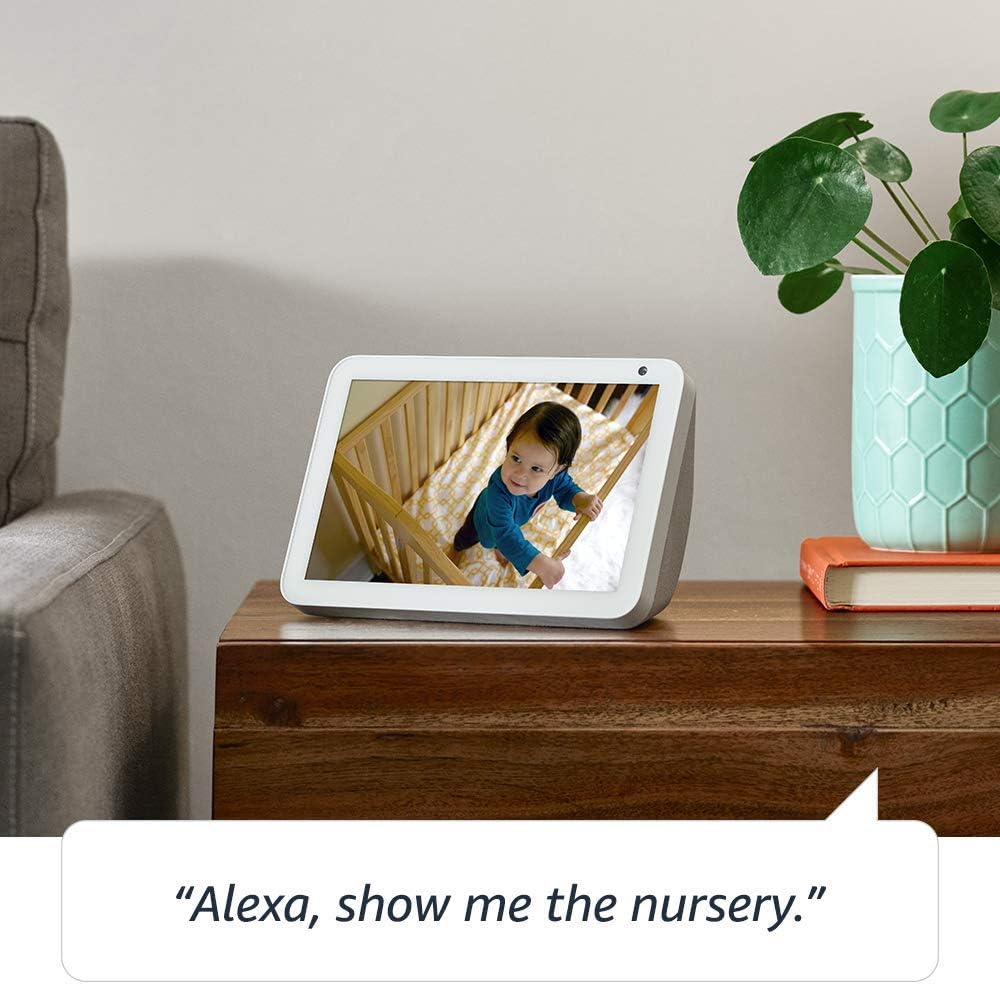
Image: The Echo Show 8 displaying a scenic photo from a user's Amazon Photos album, demonstrating its personalization options.
- Daily Assistance: Cook along to step-by-step recipes. Easily update to-do lists and calendars. Glance at weather and traffic on your way out.
Pribatutasun Ezaugarriak
The Echo Show 8 is designed with privacy in mind, offering several controls:
- Mikrofonoa/Kamera itzaltzeko botoia: Electronically disconnect the microphones and camera with one press of a button.
- Kameraren obturadore integratua: Slide the built-in shutter to physically cover the camera lens.

Image: A finger activating the physical camera shutter on the Echo Show 8, demonstrating a privacy control feature.
- Esnatzeko Hitzaren Teknologia: Alexa devices are designed to detect only your chosen wake word (e.g., "Alexa").
- Streaming adierazleak: Visual indicators show when Alexa is streaming your request to the cloud.
- Ahots-grabaketen kudeaketa: egiteko gaitasuna view and delete your voice recordings through the Alexa app or Alexa Privacy Hub.
For more information, visit the Alexa Privacy Hub.
Mantentzea
Zure Echo Show 8-ren iraupena eta errendimendu optimoa bermatzeko, jarraitu mantentze-jarraibide hauek:
- Garbiketa: Use a soft, lint-free cloth to clean the screen and exterior. Avoid abrasive cleaners or sprays directly on the device.
- Lekua: Jarri gailua gainazal egonkor eta lau batean, eguzki-argitik, bero-iturrietatik eta hezetasunetik urrun. Ziurtatu aireztapen egokia dagoela.
- Software eguneraketak: The device automatically receives software updates. Ensure it is connected to Wi-Fi to receive these updates, which improve performance and add new features.
Arazoak konpontzea
If you encounter issues with your Echo Show 8, try the following steps:
- Potentziarik gabe:
- Ziurtatu korronte-egokitzailea ondo konektatuta dagoela bai gailura bai funtzionatzen duen entxufe batera.
- Saiatu beste korronte bat.
- Wi-Fi konexioaren arazoak:
- Egiaztatu zure Wi-Fi pasahitza zuzena dela.
- Berrabiarazi zure Wi-Fi bideratzailea eta modema.
- Hurbildu Echo Show 8 zure Wi-Fi bideratzailera.
- Alexak ez du erantzuten:
- Ensure the microphone is not muted (check the microphone/camera off button).
- Argi eta bolumen normalean hitz egin.
- Saiatu gailua berrabiarazten segundo batzuetan deskonektatuz eta berriro konektatuz.
- Pantailaren arazoak:
- Pantailak ez badu erantzuten, saiatu gailua berrabiarazten.
- Ensure the screen is clean and free of smudges.
- Fabrikaren berrezarpena: As a last resort, you can perform a factory reset. This will erase all your personal data and settings. To do this, go to Settings > Device Options > Reset to Factory Defaults.
Zehaztapenak
| Ezaugarri | Xehetasuna |
|---|---|
| Tamaina | 7.9”x 5.4”x 3.9” (200mm x 135mm x 99mm) |
| Pisua | 36.6 oz (1037 gramo) |
| Bistaratzea | 8.0” ukipen-pantaila |
| Kamera | 1MP camera with built-in shutter |
| Wi-Fi konexioa | Dual-band Wi-Fi supports 802.11a/b/g/n/ac Wi-Fi networks. Does not support connecting to ad-hoc (or peer-to-peer) Wi-Fi networks. |
| Bluetooth konexioa | Audio Banaketa Pro aurreratuafile (A2DP) support for audio streaming from your mobile device to Echo Show 8 or from Echo Show 8 to your Bluetooth speaker. Audio/Video Remote Control Profile (AVRCP) konektatutako gailu mugikorren ahots-kontrolerako. Esku libreko ahots-kontrola ez da onartzen Mac OS X gailuekin. PIN kodeak behar dituzten Bluetooth bozgorailuak ez dira onartzen. |
| Audioa | 2.0” (52 mm) neodymium speakers with passive bass radiator |
| Sistemaren eskakizunak | Echo Show 8 comes ready to connect to your WiFi. The Alexa app is compatible with Fire OS, Android, and iOS devices and also accessible via your web browser. Supported operating systems. Certain skills and services may require subscription or other fees. |
| Prozesadorea | MediaTek MT 8163 |
| Hizkuntza | Alexak ingelesez eta gaztelaniaz hitz egiten du |
Irisgarritasun Ezaugarriak
The Echo Show 8 includes various accessibility features to personalize Alexa to your abilities:
- Sakatu Alexa-ra: Sartu Alexara pantailako teila edo teklatu baten bidez ukipen bidez.
- Entzute Egokitzailea: Alexak erantzun aurretik hitz egiten amaitzeko denbora gehiago ematen du.
- Hitz egiteko nahiago den tasa: Kontrolatu Alexak zein azkar edo motel hitz egiten duen.
- Alexa azpitituluak, deien azpitituluak, azpititulu itxiak: Eman testu-oin-irudiak onartutako edukiarentzat.
- Erakutsi eta kontatu: Helps customers who are blind or visually impaired identify products by saying “Alexa, what am I holding.”
- AhotsaView Pantaila irakurgailua: Enables access for customers who are blind or visually impaired.
- Pantaila-lupa: Enables zooming in/out and panning around the screen.
- Jakinarazi gertu dagoenean: Plays notification sounds when you’re detected near your Echo device.
- Kindle-n ozen irakurtzeko: Alexak zure Kindle liburuak ozen irakur ditzake.
- Denbora errealeko testua: Enables typing live text in a video call.
- Beste ezarpen batzuen artean, Koloreen alderantzikatzea, Koloreen zuzenketa, Soinua eskatu eta gehiago daude.
To enable these features, go to Settings → Accessibility on your Echo Show 8.
Bermea eta Laguntza
Your Certified Refurbished Echo Show 8 comes with a 1-year limited warranty and service, similar to a new device. Use of Echo Show 8 is subject to Amazon's terms and conditions.
For further assistance, visit the Amazon Device Support page or contact Amazon Customer Service.
Ask a question about this manual
Ask about setup, troubleshooting, compatibility, parts, safety, or missing instructions. Manuals+ will review the question and use this page’s manual context to help answer it.