
1. Sarrera
This manual provides essential information for the proper use and maintenance of your Zentality C-710 10-inch Dual SIM Tablet. Please read this guide thoroughly before operating the device to ensure optimal performance and longevity. Keep this manual for future reference.
2. Produktua amaitu daview
The Zentality C-710 is a 10-inch Android tablet designed for communication and multimedia. It features dual SIM card support for cellular connectivity, a Quad-Core processor, 1GB RAM, and 16GB of internal storage. The device includes front and rear cameras, Bluetooth, and a vibrant IPS LCD display.
2.1 Gailuaren osagaiak
Familiarize yourself with the tablet's physical features and controls.

1. irudia: Aurretik eta atzetik view of the Zentality C-710 Tablet, showing the screen, cameras, and rear casing.
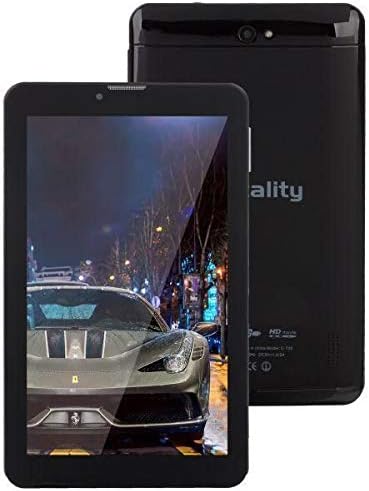
2. irudia: Aurrealdea view of the Zentality C-710 Tablet with the screen displaying an image, highlighting the display area.
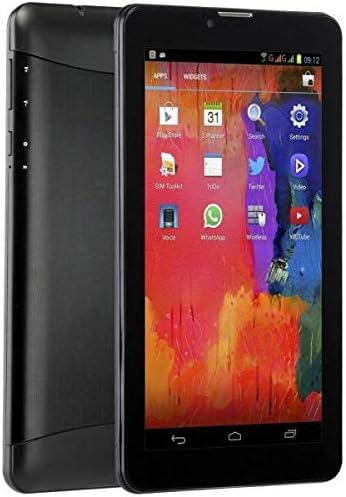
3. irudia: Aldea view of the Zentality C-710 Tablet, illustrating the placement of physical buttons and ports.
3. Konfigurazioa
3.1 Bateria kargatzea
Before first use, fully charge the tablet's battery. Connect the provided charger to the tablet's charging port and plug it into a power outlet. The battery indicator on the screen will show charging status. A full charge typically takes several hours.
3.2 SIM txartelak sartzea
The Zentality C-710 supports dual SIM cards for cellular network access. Locate the SIM card slot(s) on the side or back of the tablet. Carefully insert your standard or micro SIM cards into the designated slots, ensuring they are correctly oriented as indicated by the diagram near the slot. Close the tray securely.
3.3 MicroSD txartel bat sartzea
To expand storage, insert a microSD card (up to 32GB, not included) into the dedicated slot. Ensure the card is oriented correctly before gently pushing it in until it clicks into place.
3.4 Piztu/Itzaltzea
To power on, press and hold the Power button until the Zentality logo appears. To power off, press and hold the Power button until the power options menu appears, then select 'Power off'.
3.5 Hasierako konfigurazioa
Upon first power-on, follow the on-screen prompts to select your language, connect to a Wi-Fi network, set up your Google account, and configure other basic settings.
4. Funtzionamendua
4.1 Ukipen-pantailaren keinuak
Navigate your tablet using standard Android touchscreen gestures:
- Sakatu: Hautatu elementu bat edo ireki aplikazio bat.
- Eduki ukituta: Sartu testuinguru-menuetara edo mugitu ikonoak.
- Pasatu hatza: Pantailetan edo zerrendetan zehar joan.
- Pixka bat: Irudiak handitu edo txikitu eta web orrialdeak.
4.2 Wi-Fira konektatzea
Joan zaitez Ezarpenak > Sarea eta internet > Wi-Fi. Turn Wi-Fi on, then select your desired network from the list and enter the password if required.
4.3 Bluetooth gailuetara konektatzea
Joan zaitez Ezarpenak > Konektatutako gailuak > Bluetooth. Turn Bluetooth on, then select 'Pair new device' and choose your device from the list to connect.
4.4 Making Calls (3G)
With an active SIM card, you can make and receive calls. Open the 'Phone' application, dial the number, and press the call button.
4.5 Kamera erabiltzea
Open the 'Camera' application. Tap the shutter button to take photos. Switch between front and rear cameras using the camera toggle icon. Adjust settings like flash and mode as needed.
4.6 Aplikazioak kudeatzea
Download new applications from the Google Play Store. To uninstall an app, tap and hold its icon on the home screen or app drawer, then drag it to the 'Uninstall' option.
5. Mantentzea
5.1 Tableta garbitzea
Use a soft, lint-free cloth to clean the screen and body of the tablet. Avoid using harsh chemicals or abrasive materials, which can damage the display or finish. For stubborn smudges, slightly dampGarbitu oihal bat urarekin edo elektronikarako diseinatutako pantaila-garbitzaile batekin.
5.2 Bateria zaintzea
To prolong battery life, avoid extreme temperatures. Do not leave the tablet charging for extended periods after it's full. If storing the tablet for a long time, ensure the battery is charged to about 50%.
5.3 Software eguneraketak
Egiaztatu eta instalatu sistemaren eguneraketak aldizka, zure tabletak azken funtzioak, segurtasun-adabakiak eta errendimendu-hobekuntzak dituela ziurtatzeko. Joan honera Ezarpenak > Sistema > Sistemaren eguneraketa.
6. Arazoak
6.1 tableta ez da pizten
Ensure the battery is sufficiently charged. Connect the charger and wait a few minutes before attempting to power on again. If the issue persists, try a different charger or contact support.
6.2 Wi-Fi konexio arazoak
Check if Wi-Fi is enabled in settings. Restart your tablet and your Wi-Fi router. Ensure you are entering the correct password. If the problem continues, try forgetting the network and reconnecting.
6.3 Errendimendu motela
Close unnecessary background applications. Clear cache data from apps in Settings > Apps & notifications > [App Name] > Storage & cache > Clear cache. Consider uninstalling unused apps or performing a factory reset as a last resort (back up your data first).
6.4 App Crashes
Ensure the app is updated to its latest version. Clear the app's cache and data (this will reset the app). If the issue persists, uninstall and reinstall the app.
7. Zehaztapenak
| Ezaugarri | Zehaztapena |
|---|---|
| Marka | Zentality |
| Ereduaren izena | C-710 |
| Bistaratzeko pantailaren tamaina | 10 hazbetekoa |
| Bistaratzeko mota | IPS LCD |
| Sistema eragilea | Android |
| Prozesadorea | Quad-Core |
| Instalatutako RAM tamaina | 1 GB |
| Memoria Biltegiratzeko Ahalmena | 16 GB |
| Cellular Network Technology | 3G |
| Number of SIM Cards | SIM bikoitza |
| Konektagarritasun mota | Cellular, Bluetooth |
| Atzeko kameraren bereizmena | 5 megapixelekoa |
| Aurrealdea Webkamaren ebazpena | 1.3 megapixelekoa |
| Bateria Edukiera | 4000 mAh |
| Kolorea | Beltza |
| Elementuaren pisua | 940 gramo |
| Paketearen neurriak | 27.4 x 27 x 3.8 cm |
| Eskuragarri dagoen lehen data | 23ko uztailaren 2019a |
8. Bermea eta Laguntza
For warranty information and technical support, please refer to the documentation included with your purchase or visit the official Zentality webgunea. Gorde erosketaren egiaztagiria bermearen erreklamazioetarako.