
Sarrera
This manual provides essential information for setting up, operating, maintaining, and troubleshooting your VAIO SX12 laptop. Please read this manual thoroughly to ensure proper use and to maximize the performance and longevity of your device.

1. irudia: Aurrealdea view of the VAIO SX12 laptop with the screen open.
Konfigurazioa
1. Despaketatzea eta Hasierako Ikuskapena
Kontu handiz atera osagai guztiak paketetik. Egiaztatu 'Zer dago kutxan' atalean zerrendatutako elementu guztiak daudela eta kalterik gabe daudela. Elementuren bat falta bada edo kaltetuta badago, jarri harremanetan bezeroarentzako arreta-zerbitzuarekin.
- VAIO SX12 Laptop
- AC egokigailua
- Garbiketa Oihala
2. Korronte-egokitzailea konektatzea
Connect the AC adapter to the power input port on the laptop and then plug the adapter into a wall outlet. The battery will begin charging automatically.
3. Hasierako piztea
Press the power button located on the top right of the keyboard. The laptop will boot up and guide you through the initial Windows 10 Pro setup process.
Funtzionamendua
1. Teklatua eta ukipen-panela
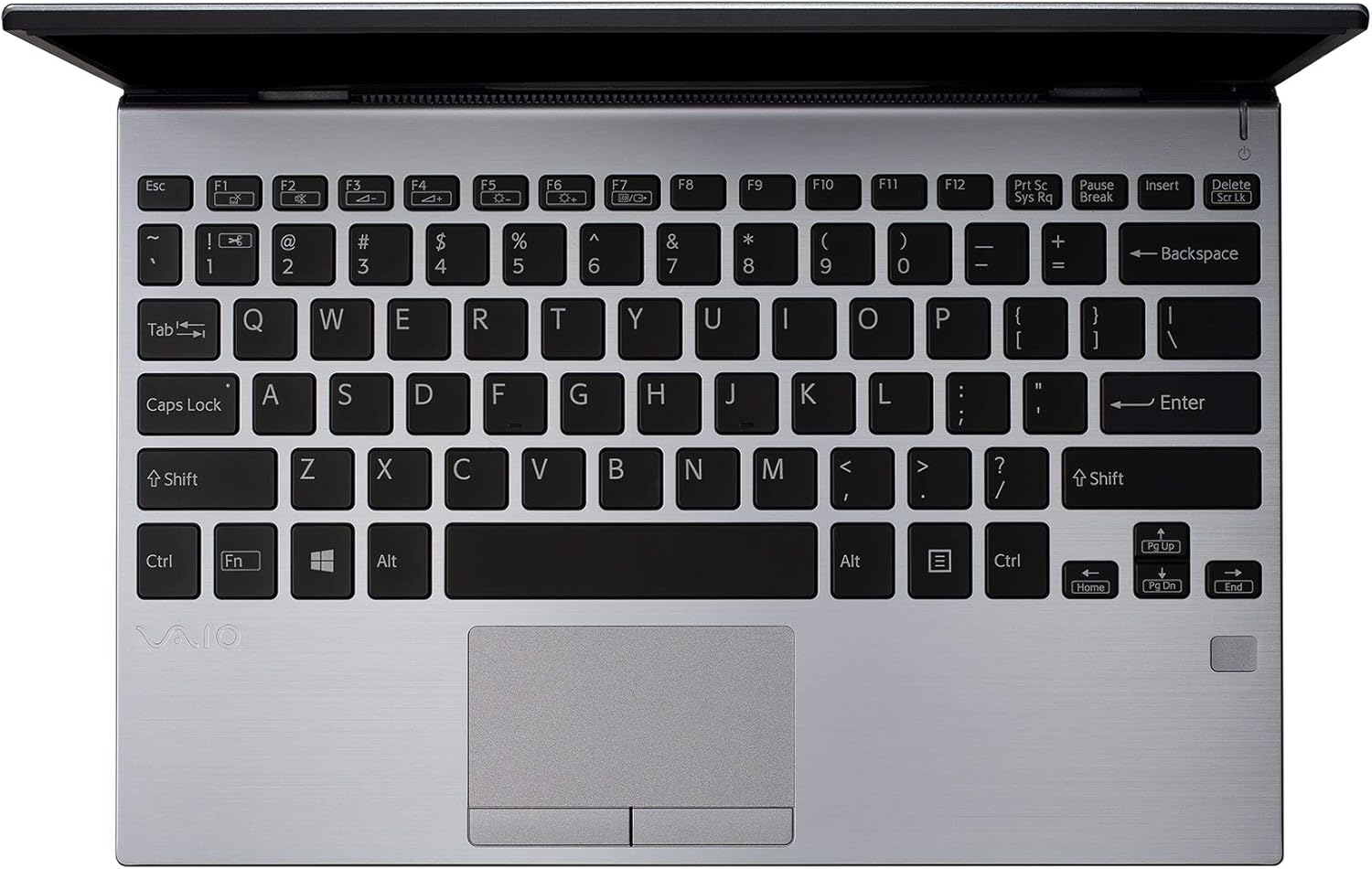
2. irudia: Goitik behera view of the VAIO SX12 keyboard and touchpad.
The VAIO SX12 features a full-sized keyboard and a precision touchpad. Familiarize yourself with the function keys (F1-F12) which control various system settings such as screen brightness, volume, and wireless connectivity.
- Funtzio-teklak: Use the 'Fn' key in combination with F1-F12 for secondary functions.
- Ukipen-panela: Supports multi-touch gestures for scrolling, zooming, and navigating.
2. Periferikoak konektatzea
The VAIO SX12 offers a variety of ports for connecting external devices.

3. irudia: Ezkerreko aldea view of the VAIO SX12, showing the power input, USB ports, HDMI, Ethernet, and VGA ports.

4. Irudia: Eskuineko aldea view of the VAIO SX12, showing the SD card slot, USB ports, and audio jack.
- USB atakak: Connect USB devices such as external drives, keyboards, or mice.
- HDMI ataka: Kanpoko pantaila edo proiektore batera konektatu.
- VGA ataka: Connect to older external displays or projectors.
- Ethernet ataka: Konektatu kablezko sare batera.
- SD txartelaren zirrikitua: Insert an SD card for data transfer.
- Audio Jack: Konektatu entzungailuak edo kanpoko bozgorailuak.
Mantentzea
1. Ordenagailu eramangarria garbitzea
- Use the provided cleaning cloth or a soft, lint-free cloth to wipe the screen and exterior surfaces.
- Ez erabili produktu kimiko gogorrik, garbitzaile urratzailerik edo disolbatzailerik.
- Ziurtatu ordenagailu eramangarria itzalita eta deskonektatuta dagoela garbitu aurretik.
2. Bateria zaintzea
- Bateriaren iraupena luzatzeko, saihestu bateria maiz erabat deskargatzea.
- Denbora luzez erabiltzen ez baduzu, gorde ordenagailu eramangarria leku fresko eta lehor batean.
- The battery is internal and not user-replaceable. Contact authorized service for battery replacement.
3. Software eguneraketak
Egiaztatu eta instalatu aldizka sistema eragilearen eta kontrolatzaileen eguneraketak errendimendu eta segurtasun optimoak bermatzeko.
Arazoak konpontzea
1. Ordenagailu eramangarria ez da pizten
- Ziurtatu korronte-egokitzailea ondo konektatuta dagoela ordenagailu eramangarrira eta funtzionatzen duen entxufe batera.
- Egiaztatu entxufea funtzionatzen duela beste gailu bat konektatuz.
- Bateria guztiz agortuta badago, utzi gutxienez 30 minutuz kargatzen pizten saiatu aurretik.
2. Pantaila arazoak
- If the screen is blank, try adjusting the brightness using the function keys.
- If an external monitor is connected, ensure the display output is correctly configured (e.g., duplicate, extend).
- Berrabiarazi ordenagailu eramangarria.
3. Peripheral Not Recognized
- Ensure the peripheral is properly connected to the correct port.
- Try connecting the peripheral to a different port or another computer to rule out device malfunction.
- Check the device manager in Windows for driver issues.
Zehaztapenak
| Ezaugarri | Zehaztapena |
|---|---|
| Ereduaren izena | VAIO SX12 |
| Elementuaren eredu-zenbakia | VJS121C11L |
| Prozesadorea | Intel Core i5-8265U (3.9 GHz max) |
| RAM | 8 GB LPDDR3 |
| Disko gogorra | 512 GB PCIe SSDa |
| Sistema eragilea | Windows 10 Pro |
| Pantailaren tamaina | 12.5 hazbete |
| Pantailaren bereizmena | 1920 x 1080 pixel (Full HD) |
| Txartel grafikoa | Intel Graphics integratua |
| Haririk gabeko konexioa | 802.11a/b/g/n/ac, Bluetooth |
| USB 3.0 Portuak | 4 |
| Elementuaren pisua | 1.97 kilo |
| Produktuaren neurriak | 11.3 x 8 x 0.62 hazbete |
| Kolorea | Zilarrezkoa |
| Pilak | 1 litio ioizko bateria (barne) |
Bermea eta Laguntza
For warranty information and technical support, please refer to the documentation included with your product or visit the official VAIO support webgunea. Gorde erosketa-agiria erosketaren frogagiri gisa berme-erreklamazioetarako.