
1. Sarrera
Eskerrik asko Nooie Smart Wi-Fi Plug aukeratzeagatik. Eskuliburu honek zure entxufe adimenduna modu seguru eta eraginkorrean erabiltzeko informazio garrantzitsua eskaintzen du. Irakurri arretaz instalatu eta erabili aurretik, eta gorde etorkizunean erreferentzia gisa.
Nooie Smart Wi-Fi Plug-ak etxeko tresnak urrunetik kontrolatzeko aukera ematen dizu Nooie aplikazioaren bidez, Amazon Alexa edo Google Home-rekin ahots-komandoak erabiliz, eta funtzionamendu automatizaturako ordutegiak eta tenporizadoreak ezartzeko. Bere diseinu trinkoa eta dotorea dela eta, edozein etxeko ingurune modernotan ezin hobeto integratzen da.
2. Segurtasun informazioa
Funtzionamendu segurua bermatzeko eta kalteak saihesteko, jarraitu segurtasun neurri hauek:
- Barruko erabilera soilik: Gailu hau barruko erabilerarako eta leku lehorretan diseinatuta dago. Ez jarri uraren, hezetasunaren edo hezetasun handiaren eraginpean.
- Balorazio elektrikoa: Ez gainditu 10A-ko gehienezko karga-korrontea. Gehiegizko kargak gehiegi berotu eta gailuari edo konektatutako tresnei kalte egin diezaieke.
- Instalazio egokia: Ziurtatu entxufe adimenduna guztiz sartuta dagoela entxufe elektriko estandar batean. Ez sartu behartuta entxufe bateraezina den batean.
- Haurren Segurtasuna: Mantendu gailua haurren eskura ez dagoen leku batean. Erabili aplikazioko Haurren Blokeoa funtzioa nahi gabeko erabilera saihesteko.
- Garbiketa: Deskonektatu gailua entxufetik garbitu aurretik. Erabili zapi lehor eta leun bat gainazala garbitzeko. Ez erabili garbitzaile likidorik.
- Desmihiztatu: Ez saiatu gailua desmuntatzen, konpontzen edo aldatzen. Honek bermea baliogabetuko du eta segurtasun arriskuak sor ditzake.
- Funtzionamendu-tenperatura: Erabili gailua gomendatutako tenperatura-tartean (normalean 0 °C eta 40 °C artean).
3. Produktuaren ezaugarriak
- Diseinu trinkoa: Tamaina txikiak bigarren entxufea beste gailu batzuetarako libre geratzen dela ziurtatzen du.
- Urruneko kontrola: Kontrolatu konektatutako gailuak edonondik zure telefonoan dagoen Nooie aplikazioa erabiliz.
- Ahots kontrola: Eskurik gabeko funtzionamendurako Amazon Alexa eta Google Home-rekin bateragarria.
- Ordutegia eta tenporizadorea: Ezarri ordutegi pertsonalizatuak eta atzerako kontaketa tenporizadoreak etxetresna elektrikoak automatikoki pizteko/itzaltzeko.
- Haurrentzako blokeoa: Haurrak ustekabean erortzea eragozten duampentxufearen ezarpenekin bat etorriz.
- Gailua partekatzea: Partekatu zure entxufe adimendunen kontrola familiako kideekin.
- Energiaren jarraipena: (Irudiak inplizituki adierazten duen funtzioa) Konektatutako gailuen energia-kontsumoa jarraitu eta kontrolatu.
- Segurtasun Ziurtagiria: FCC eta ELT-k kalitate eta segurtasunerako onartua.
4. Konfigurazioa eta instalazioa
Jarraitu urrats hauek zure Nooie Smart Wi-Fi entxufea konfiguratzeko:
- Konektatu: Sartu Nooie Smart Wi-Fi entxufea entxufe elektriko estandar batean. Ziurtatu ondo sartuta dagoela.
- Deskargatu aplikazioa: Deskargatu doako 'Nooie' aplikazioa App Store-tik (iOS) edo Google Play Store-tik (Android).
- Sortu kontua: Ireki Nooie aplikazioa eta erregistratu kontu berri bat lortzeko edo hasi saioa dagoeneko baduzu.
- Gehitu gailua: Aplikazioan, sakatu '+' ikonoa gailu berri bat gehitzeko. Hautatu 'Entxufe adimenduna' gailuen zerrendatik.
- Konektatu wifira: Jarraitu aplikazioko argibideei entxufe adimenduna zure 2.4 GHz-ko Wi-Fi sarera konektatzeko. Oharra: Entxufe adimendunak 2.4 GHz-ko Wi-Fia soilik onartzen du.
- Parekatzea: Aplikazioak parekatze prozesuan zehar gidatuko zaitu. Horrek normalean entxufeko botoia sakatu eta eutsi behar du adierazle-argia keinuka hasi arte, eta gero aplikazioan baieztatu.
- Gailuaren izena aldatu: Behin parekatuta, zure entxufe adimendunaren izena alda dezakezu errazago identifikatzeko (adibidez, 'Egongela L'amp', 'Kafe-makina').

Irudia: Lau Nooie Wi-Fi entxufe adimendunen multzoa, diseinu trinkoa erakusten duena.

Irudia: Nooie entxufe adimendunaren tamaina trinkoa (5.5 cm x 5.5 cm) eta bere funtzioak adierazten dituzten ikonoak erakusten dituen ilustrazioa: 2.4G WLAN, gailuak partekatzea, ahots-kontrola, haurren blokeoa, urrutiko agintea eta ordutegia eta tenporizadorea.
5. Funtzionamendu-argibideak
5.1 Urrutiko kontrola Nooie aplikazioaren bidez
Behin zure entxufe adimenduna Nooie aplikaziora konektatuta dagoenean, Interneteko konexioa duen edozein lekutatik kontrola dezakezu:
- Ireki Nooie aplikazioa.
- Hautatu nahi duzun entxufe adimenduna zure gailuen zerrendatik.
- Sakatu pizteko ikonoa konektatutako gailua pizteko edo itzaltzeko.
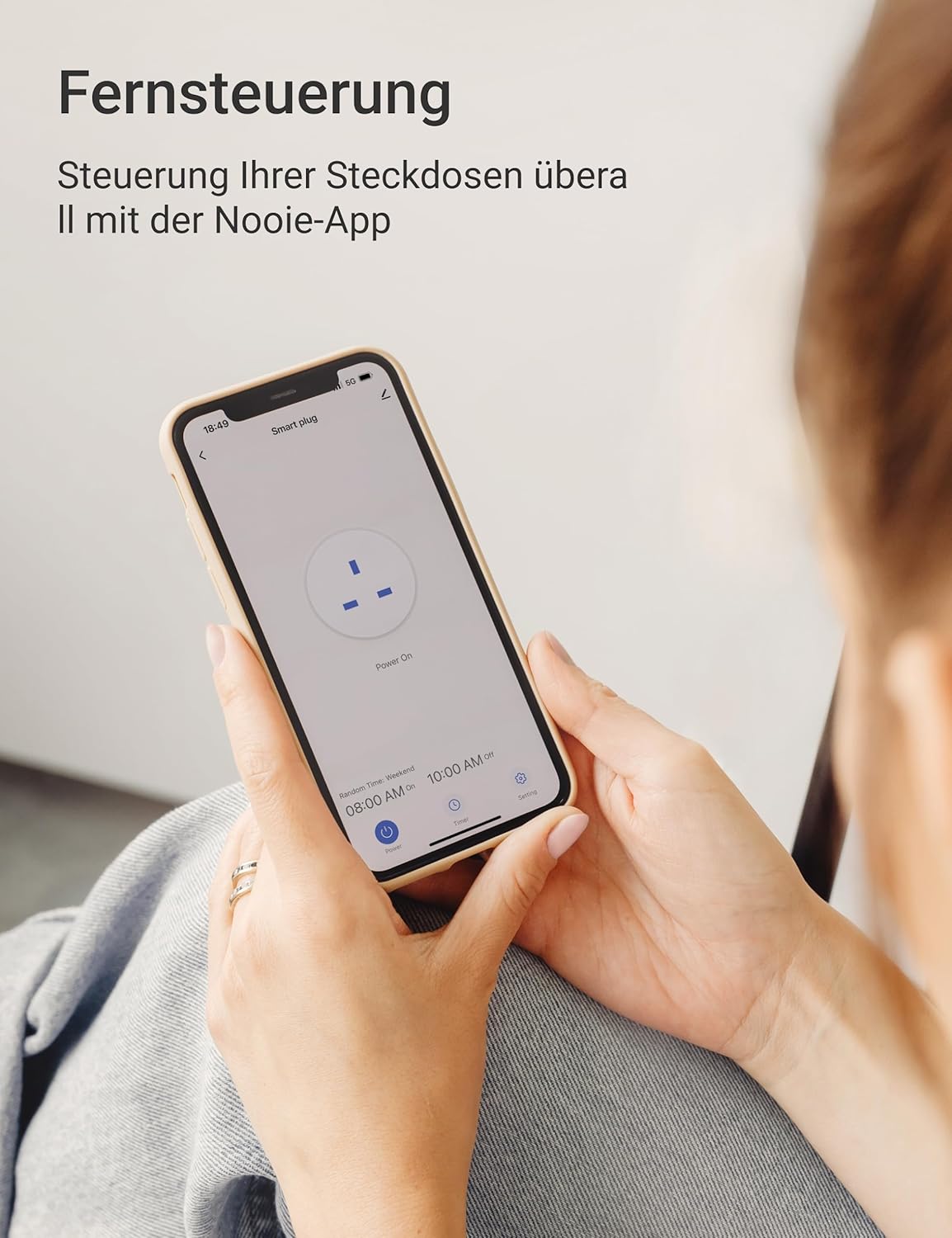
Irudia: Nooie aplikazioaren interfazea erakusten duen telefono adimendun bat eskuan duen pertsona bat, entxufe adimendunaren urrutiko kontrola erakusten.
5.2 Ahots-kontrola (Alexa/Google Home)
Integratu zure Nooie entxufe adimenduna Amazon Alexa edo Google Home-rekin ahots-kontrol erosoa lortzeko:
- Ziurtatu zure Alexa edo Google Home gailua konfiguratuta dagoela eta zure entxufe adimendunaren Wi-Fi sare berera konektatuta dagoela.
- Ireki Alexa edo Google Home aplikazioa.
- Gaitu 'Nooie' trebetasuna/ekintza.
- Lotu zure Nooie kontua eskatzen zaizunean.
- Bilatu gailuak. Zure entxufe adimenduna agertu beharko litzateke.
- Orain ahots-komandoak erabil ditzakezu, adibidez, "Alexa, piztu Egongela L"amp" or "Hey Google, itzali kafe-makina."

Irudia: Nooie entxufe adimendun bat Amazon Echo Dot bat gertu duen entxufe batera konektatuta, ahots-kontrolaren funtzionaltasuna erakusten duena. Testuak Alexa eta Google Assistant-ekin bateragarritasuna adierazten du.
5.3 Ordutegi eta Tenporizadore Funtzioak
Automatizatu zure gailuak ordutegi eta tenporizadore pertsonalizatuekin:
- Programazioa: Nooie aplikazioan, hautatu zure entxufe adimenduna eta joan 'Ordutegia' atalera. Ezarri ordu zehatzak entxufea piztu edo itzaltzeko asteko egun hautatuetan. Adibidezampalegia, programatu kafe-makina astean zehar goizeko 8:00etan pizteko.
- Tenporizadorea: Erabili 'Tenporizadorea' funtzioa entxufea denbora jakin baten ondoren (adibidez, 5 minutu, ordu 1) itzaltzeko atzerako kontaketa bat ezartzeko.
- Begizta-tenporizadorea: Sortu begizta-tenporizadore bat gailua behin eta berriz piztu eta itzaltzeko tarte jakin batzuetan. Hau erabilgarria da akuarioko argiak bezalako aplikazio espezifikoetarako.
- Bidaiatzeko modua: Simulatu etxean presentzia bat, entxufea konfiguratuz gailuak ausaz piztu eta itzaltzeko kanpoan zauden bitartean.

Irudia: Entxufe adimendun bat pizteko/itzaltzeko hainbat ordutegi programatu erakusten dituen telefono adimendunaren pantaila, sukaldeko atzealde baten aurrean, programazio funtzioa erakusten.

Irudia: Nooie entxufe adimendun bat konektatutaamp, urre-arrainentzako ontzi bat lehen planoan, pizteko/itzaltzeko ziklo errepikakorretarako 'Loop Timer' funtzioa ilustratzen duena.
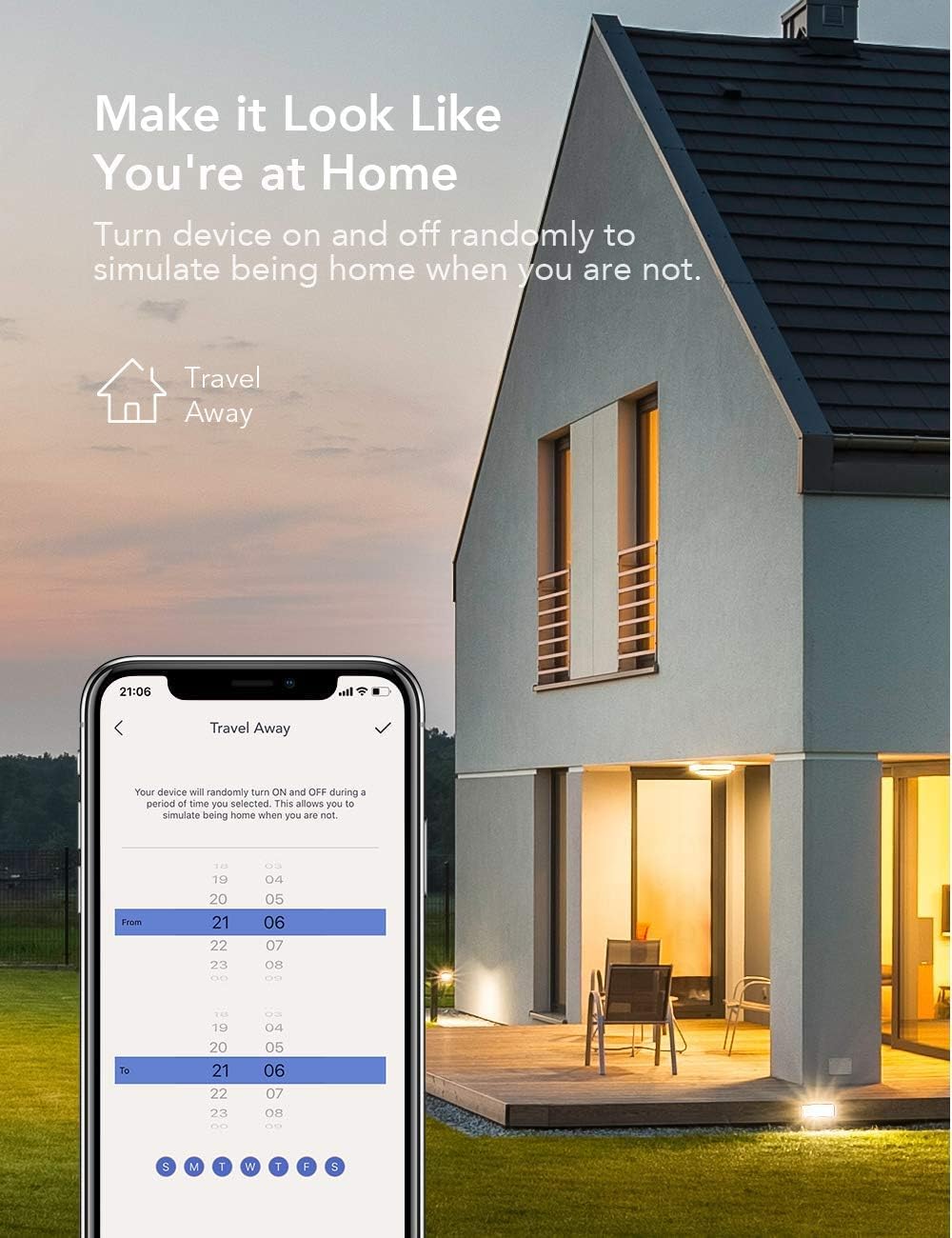
Irudia: 'Bidaiatu kanpoan' ordutegia erakusten duen telefono adimendun baten pantaila, gauez argiztatutako etxe bat atzealdean duela, entxufe adimendunak okupazioa nola simula dezakeen erakusten duena.
5.4 Haurren blokeoa eta gailuak partekatzea
- Haurrentzako blokeoa: Aktibatu funtzio hau Nooie aplikazioan haurrek entxufe adimendunaren ezarpenetan nahi gabe aldaketak egitea saihesteko.
- Gailua partekatzea: Partekatu zure entxufe adimendunen kontrola familiako kideekin. Aplikazioan, joan gailuaren ezarpenetara eta hautatu 'Partekatu gailua' beste batzuk zure etxetresna elektrikoak kontrolatzera gonbidatzeko.

Irudia: Bi pertsona beren telefonoei begira, 'Partekatu sarbidea familia osoarekin' eta 'Gailuak partekatzea' dioen testuarekin, erabiltzaile anitzeko kontrol funtzioa ilustratuz.
5.5 Energiaren monitorizazioa
Nooie aplikazioak zure entxufe adimendunera konektatutako gailuen energia-kontsumoa kontrolatzeko funtzio bat eskain dezake. Horri esker, erabilera jarraitu eta energia aurrezteko arloak identifikatu ahal izango dituzu.

Irudia: Nooie entxufe adimenduna entxufe batera konektatuta dagoela hainbat egunetan energia-kontsumoa erakusten duen grafikoa, energia monitorizatzeko gaitasuna erakusten duena.
6. Mantentzea
Nooie Smart Wi-Fi entxufeak mantentze-lan minimoa behar du. Jarraitu jarraibide hauek:
- Garbiketa: Deskonektatu beti entxufe adimenduna hormako entxufetik garbitu aurretik. Erabili zapi leun eta lehor bat gainazala garbitzeko. Ez erabili garbitzaile urratzailerik, disolbatzailerik edo produktu kimiko gogorrik, hauek plastikoa kaltetu baitezakete.
- Biltegiratzea: Gailua denbora luzez gordetzen baduzu, deskonektatu eta gorde leku fresko eta lehor batean, eguzki-argitik eta tenperatura altuetatik babestuta.
- Ikuskapena: Aldian-aldian egiaztatu entxufea kalteen zantzurik dagoen ikusteko, hala nola pitzadurak, hari higatuak edo konexio solteak. Kalteren bat aurkitzen baduzu, utzi berehala erabiltzeari eta jarri harremanetan bezeroarentzako arreta-zerbitzuarekin.
7. Arazoak
Nooie Smart Wi-Fi Plug-arekin arazoak badituzu, jo ezazu honako arazo eta irtenbide ohikoenei:
| Arazoa | Kausa posiblea | Irtenbidea |
|---|---|---|
| Entxufe adimenduna ez da pizten/itzaltzen | Korronterik ez, entxufea ez dago guztiz sartuta, gailua matxuratuta. | Egiaztatu entxufea. Ziurtatu entxufea ondo sartuta dagoela. Saiatu beste entxufe batekin. |
| Ezin da wifira konektatu | Wi-Fi pasahitz okerra, 5 GHz-ko Wi-Fi sarea, seinale ahula, bideratzailearen arazoak. | Ziurtatu 2.4 GHz-ko Wi-Fi sare batera konektatzen ari zarela. Egiaztatu berriro zure Wi-Fi pasahitza. Gerturatu entxufea bideratzailera. Berrabiarazi bideratzailea. |
| Ahots kontrola ez dabil | Gailuaren izen okerra, Nooie trebetasuna/ekintza ez dago gaituta, kontua ez dago lotuta. | Egiaztatu gailuaren izena Nooie aplikazioan eta ahots-laguntzailearen aplikazioan. Ziurtatu 'Nooie' trebetasuna/ekintza gaituta dagoela eta zure kontuak lotuta daudela. Saiatu gailuak berriro aurkitzen. |
| Ordutegiak/Tenporizadoreak ez dira aktibatzen | Ezarpen okerrak, entxufea lineaz kanpo, ordu-eremuaren arazoak. | Egiaztatu ordutegiaren/tenporizadorearen ezarpenak Nooie aplikazioan. Ziurtatu entxufe adimenduna linean dagoela. Egiaztatu telefonoaren ordu-zonaren ezarpenak. |
| Aplikazioak ez du erantzuten | Aplikazioaren akatsa, sareko arazoa, aplikazioaren bertsio zaharkitua. | Itxi aplikazioa eta ireki berriro. Egiaztatu telefonoaren Interneteko konexioa. Eguneratu Nooie aplikazioa azken bertsiora. |
Irtenbide hauek probatu ondoren arazoa konpontzen ez bada, jarri harremanetan Nooie bezeroarentzako arreta-zerbitzuarekin laguntza gehiago jasotzeko.
8. Zehaztapenak
| Atributua | Balioa |
|---|---|
| Modelo zenbakia | 673869934634 |
| Fabrikatzailea | Intxaurra |
| Paketearen neurriak | 22.9 x 9 x 5.9 cm |
| Elementuaren pisua | 336 gramo |
| Funtzionamendu modua | Automatikoa |
| Egungo balorazioa | 10 A |
| Kontaktu mota | Normalean itxita |
| Konektore mota | Entxufe elektriko estandarra |
| Aldatu mota | TRIAC |
| Terminala | Torlojua |
| Materiala | Plastikoa |
| Zirkuitu Mota | 1 modua |
| Muntatze Mota | Muntatzerik ez |
| Jatorrizko Herrialdea | Txina |
9. Bermea eta Laguntza
Nooie produktuak kalitate estandar gorenekin diseinatu eta fabrikatzen dira. Bermearen estaldurari buruzko informazioa lortzeko, kontsultatu zure produktuarekin batera datorren berme txartela edo bisitatu Nooie webgune ofiziala. webgunea.
Laguntza teknikoa behar baduzu, zure produktuari buruzko galderarik baduzu edo arazoak konpontzen laguntza behar baduzu, jarri harremanetan Nooie bezeroarentzako arreta-zerbitzuarekin, haien zerbitzu ofizialaren bidez. webgunea edo Nooie aplikazioan emandako harremanetarako informazioa.
Azken eguneratzeak, maiz egiten diren galderak eta laguntza-baliabideak ikusteko, bisitatu: www.nooie.com


