
Sarrera
This manual provides detailed instructions for the Fintie Ultrathin Wireless Bluetooth Keyboard. Designed for portability and versatility, this keyboard offers a comfortable typing experience with a backlit feature, compatible with a wide range of devices including iPad, Samsung tablets, iPhones, and Android devices.

The Fintie Ultrathin Wireless Bluetooth Keyboard paired with a tablet, demonstrating its compact design and backlit keys.
Paketearen edukia
Mesedez, egiaztatu elementu guztiak zure paketean daudela:
- 1 x Fintie Backlit Bluetooth Keyboard
- 1 x USB kargatzeko kablea
- 1 x Erabiltzailearen eskuliburua
Ezaugarriak
- Bateragarritasun zabala: Compatible with iOS and Android operating systems supporting Bluetooth, including iPad Pro 13-in (M4), iPad Air 13-in (M4), iPad Pro 12.9 (6th/5th/4th/3rd/2nd/1st Gen), iPad Air, iPad 10th Gen, Galaxy Tab S8 Plus/S7 FE/S7 Plus, iPhone, and other smartphones and tablets.
- 7 koloretako atzeko argia: Elegant LED backlight with 7 color options and 2 adjustable brightness levels, ideal for typing in low light conditions or at night.
- Erantzuteko gakoak: Real "hard" laptop-style keyboard with high-end ABS material and a scissor mechanism underneath each key for tactile response, promoting faster and more accurate typing.
- Bateriaren iraupen luzea: Built-in 500mAh rechargeable lithium battery provides up to 100 hours of uninterrupted usage, or 3 hours of non-stop use with the backlight activated.
- Haririk gabeko konektagarritasuna: Utilizes Bluetooth 5.0 technology for high-speed connection and a signal distance of up to 33ft (10m).
- Ultra-Slim and Portable: Sleek, compact size and light weight allow for easy portability in a backpack, suitcase, or handbag.

The keyboard features 7 distinct backlight colors, enhancing visibility and personalization.
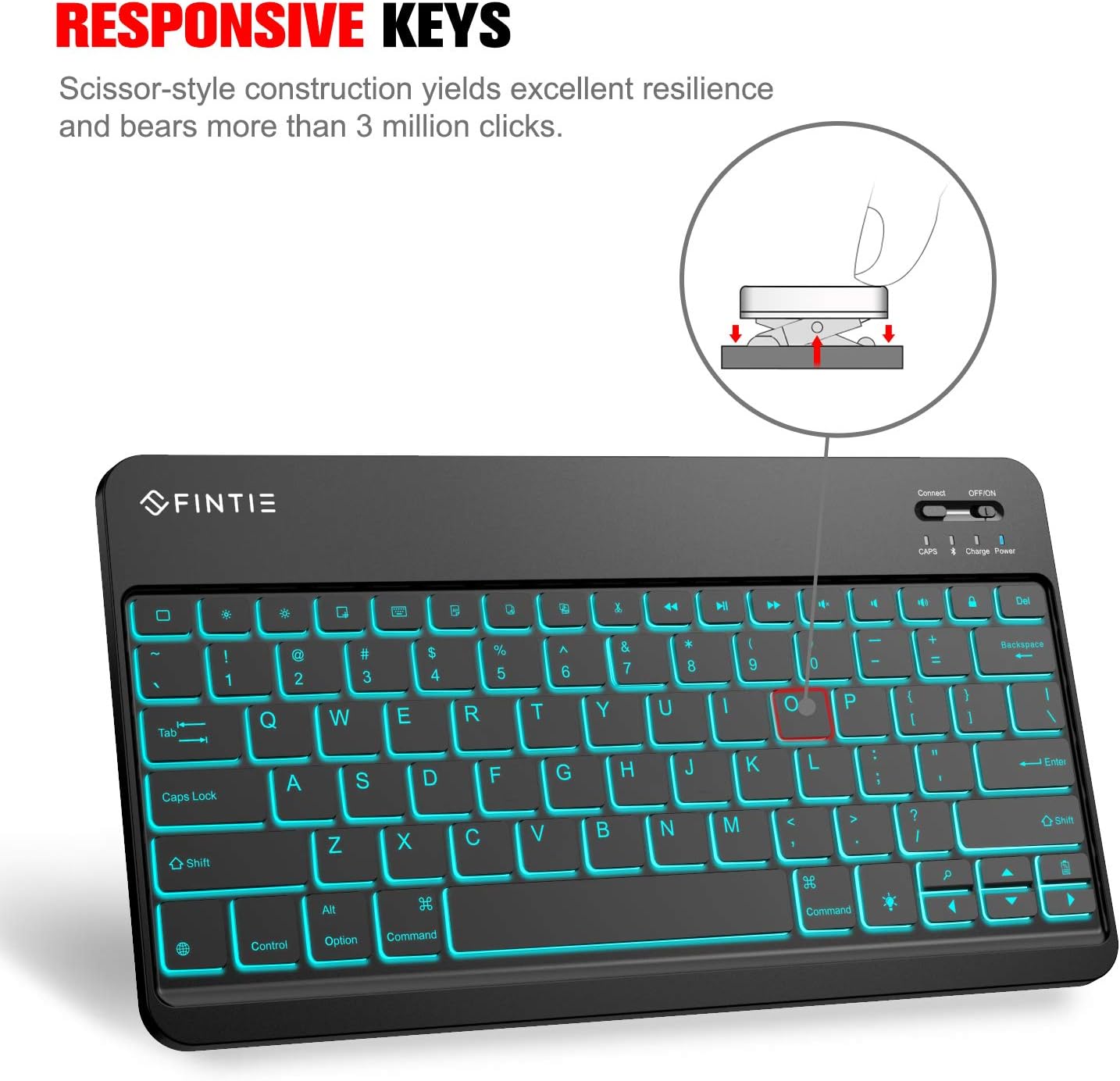
Illustration of the responsive scissor-style key construction, designed for durability and tactile feedback.
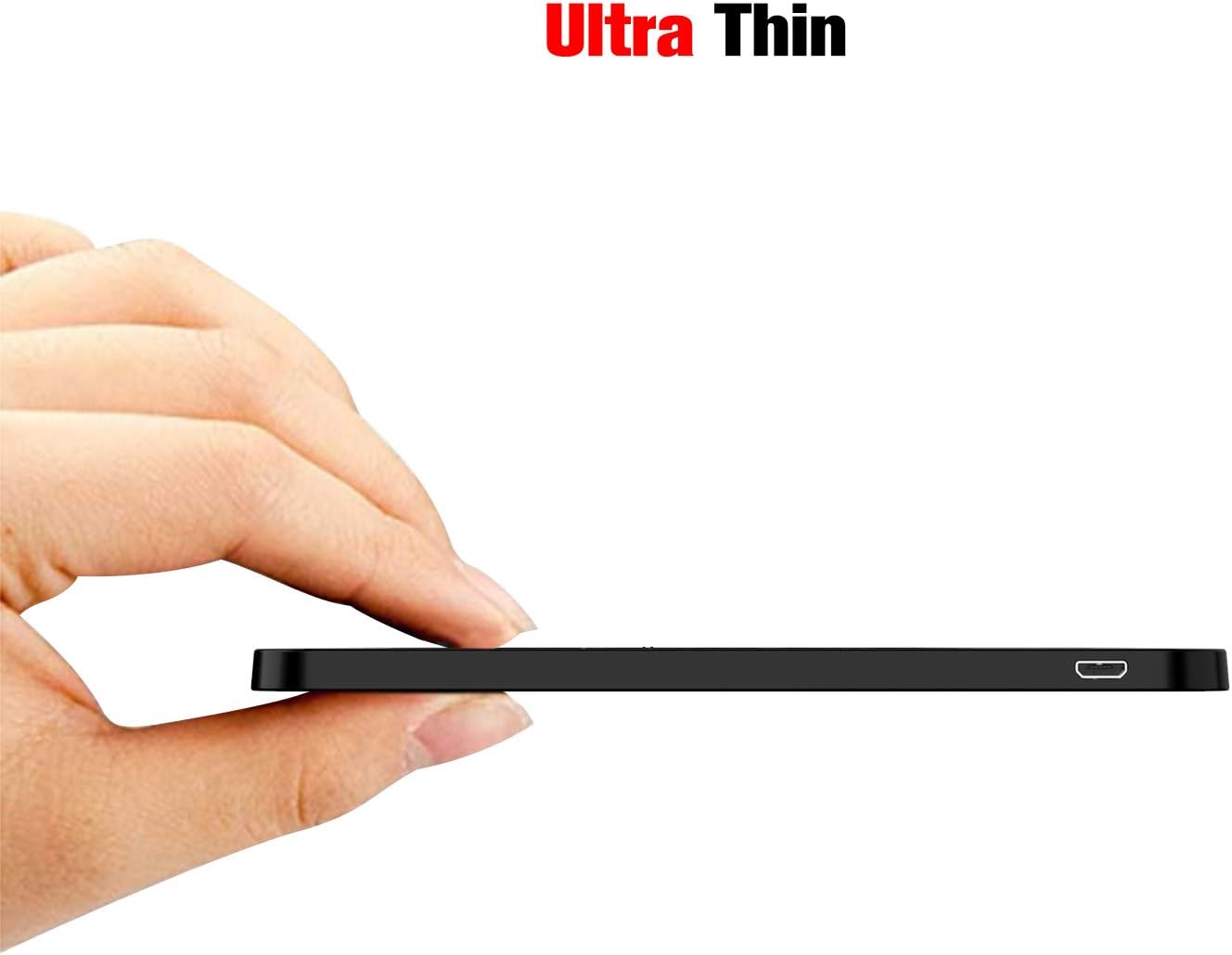
Alde bat view profesional ultra-mehea nabarmenduzfile of the Fintie keyboard, making it highly portable.
Konfigurazioa
1. Teklatua kargatzea
Before first use, or when the battery is low, charge the keyboard using the supplied USB charging cable. Connect the small end of the USB cable to the charging port on the keyboard and the larger end to a USB power source (e.g., computer USB port, USB wall adapter).

The keyboard's charging port with the USB cable connected, indicating it is being recharged.
The charge indicator light will illuminate during charging and turn off when fully charged.
2. Bluetooth parekatzea
- Ziurtatu teklatua kargatuta dagoela.
- Slide the ON/OFF switch on the keyboard to the "ON" position. The power indicator light will turn on.
- Press the "Connect" button on the keyboard. The Bluetooth indicator light will start blinking, indicating the keyboard is in pairing mode.
- On your device (tablet, smartphone, etc.), go to Bluetooth settings and turn Bluetooth on.
- Bilatu available Bluetooth devices. The keyboard will appear as "Bluetooth Keyboard" or similar.
- Hautatu teklatua zerrendatik parekatzea hasteko. Baliteke zure gailuak pantailan agertzen den kode bat teklatua erabiliz sartzeko eskatzea, eta ondoren Sartu sakatu.
- Once successfully paired, the Bluetooth indicator light on the keyboard will stop blinking and remain solid or turn off, depending on the model.

The keyboard is compatible with various iOS devices, demonstrating its broad connectivity.
Funtzionamendu-argibideak
Atzeko argiaren kontrola
The keyboard features an adjustable backlight for enhanced visibility in various lighting conditions.
- Turning On/Adjusting Brightness: Sakatu "(Light icon)" key (often located near the top right of the keyboard).
- First press: Turns on the backlight.
- Second press: Increases brightness.
- Third press: Turns off the backlight.
- Changing Backlight Colors: Sakatu "(Light icon)" key simultaneously with the "Up" or "Down" arrow keys to cycle through the 7 optional backlight colors.
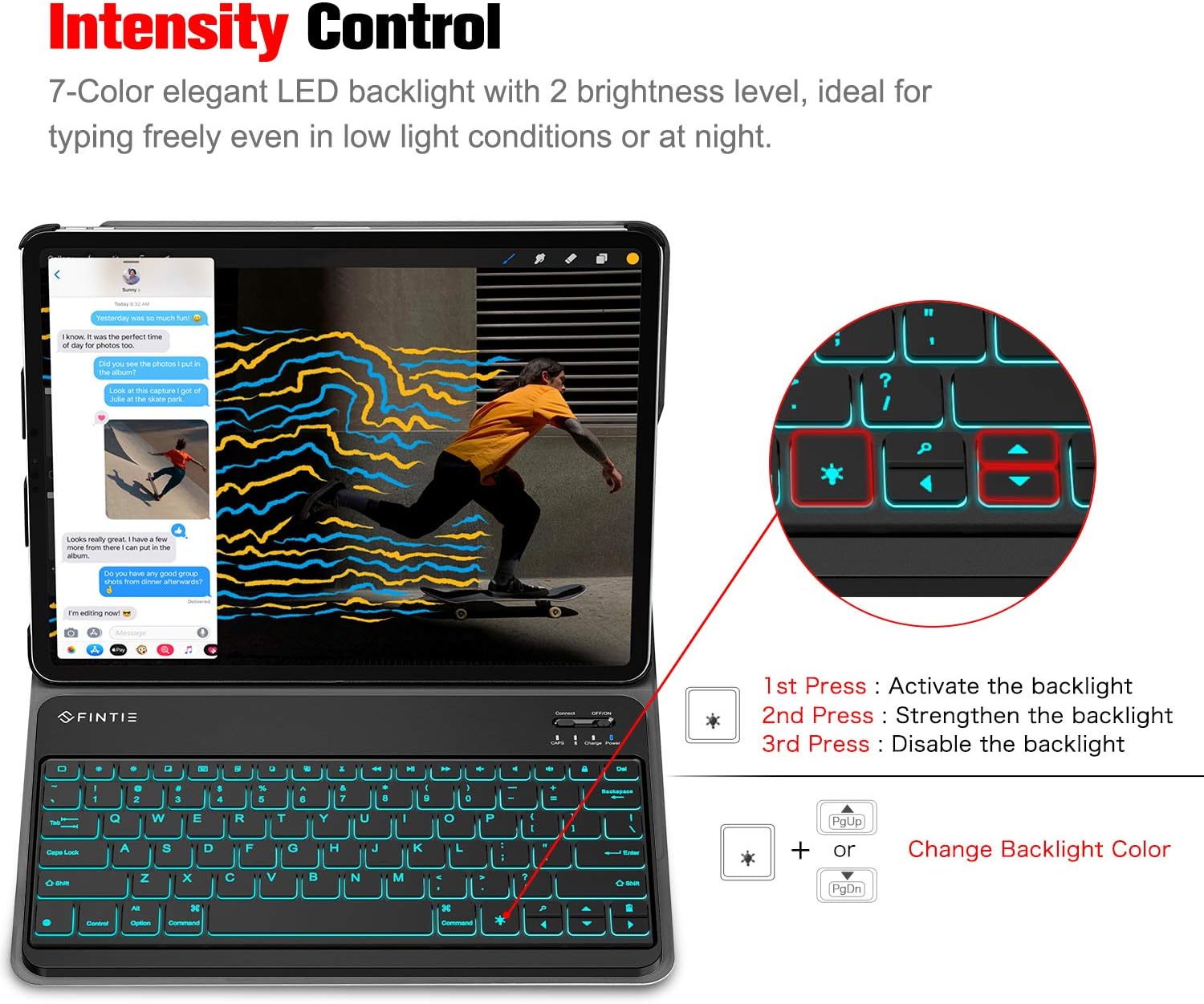
Visual guide for controlling the backlight intensity and changing colors using specific key combinations.
Oharra: The backlight will automatically turn off when the keyboard is idle to conserve power. The backlight will also turn off when the battery level is less than 20%. The backlight function will not work until the keyboard is successfully paired with a device.
Mantentzea
To ensure the longevity and optimal performance of your Fintie Bluetooth Keyboard, follow these maintenance guidelines:
- Garbiketa: Erabili lipurrik gabeko zapi leun bat dampened with water or a mild cleaning solution to wipe the surface of the keyboard. Avoid excessive moisture. Do not use harsh chemicals or abrasive cleaners.
- Biltegiratzea: Gorde teklatua leku fresko eta lehor batean, eguzki-argitik, tenperatura altuetatik eta hezetasun handitik babestuta.
- Manipulazioa: Avoid dropping the keyboard or subjecting it to strong impacts. Do not place heavy objects on the keyboard.
- Kargatzen: Only use the provided USB charging cable or a certified equivalent. Do not attempt to charge the keyboard with damaged cables or chargers.
Arazoak konpontzea
If you encounter issues with your Fintie Bluetooth Keyboard, refer to the following common solutions:
- Teklatua ez da konektatzen/parekatzen:
- Ziurtatu teklatua guztiz kargatuta dagoela.
- Make sure the keyboard's ON/OFF switch is in the "ON" position.
- Egiaztatu Bluetootha gaituta dagoela zure gailuan.
- Ensure the keyboard is in pairing mode (Bluetooth indicator blinking). Press the "Connect" button if it's not.
- Hurbildu teklatua zure gailura.
- Forget/remove the keyboard from your device's Bluetooth list and attempt to re-pair.
- Restart both the keyboard (turn off and on) and your device.
- Atzeko argia ez dabil:
- Ensure the keyboard is fully charged (backlight turns off below 20% battery).
- Confirm the keyboard is successfully paired with your device. The backlight will not function until paired.
- Sakatu "(Light icon)" key to activate the backlight.
- Giltzak ez dute erantzuten:
- Egiaztatu bateriaren maila eta kargatu behar izanez gero.
- Ensure the keyboard is still connected via Bluetooth.
- Berrabiarazi teklatua eta zure gailua.
Zehaztapenak
| Ezaugarri | Xehetasuna |
|---|---|
| Produktuaren neurriak | 10.67 x 5.87 x 0.24 hazbete (10.67"L x 5.87"Z x 0.24"A) |
| Elementuaren pisua | 10.4 ontza |
| Fabrikatzailea | Fintie |
| ASIN | B07WSVWDP3 |
| Pilak | 1 produktuaren bateria espezifikoa behar da (barne) |
| Konektibitate Teknologia | Bluetooth 5.0 |
| Teklatuaren deskribapena | Ergonomia |
| Ezaugarri bereziak | Bluetooth, Argiztapena, Haririk gabekoa |
| Kolorea | Beltza |
| Materiala | Akrilonitrilo Butadieno Estirenoa (ABS) |
| Dakarten osagaiak | USB kablea |
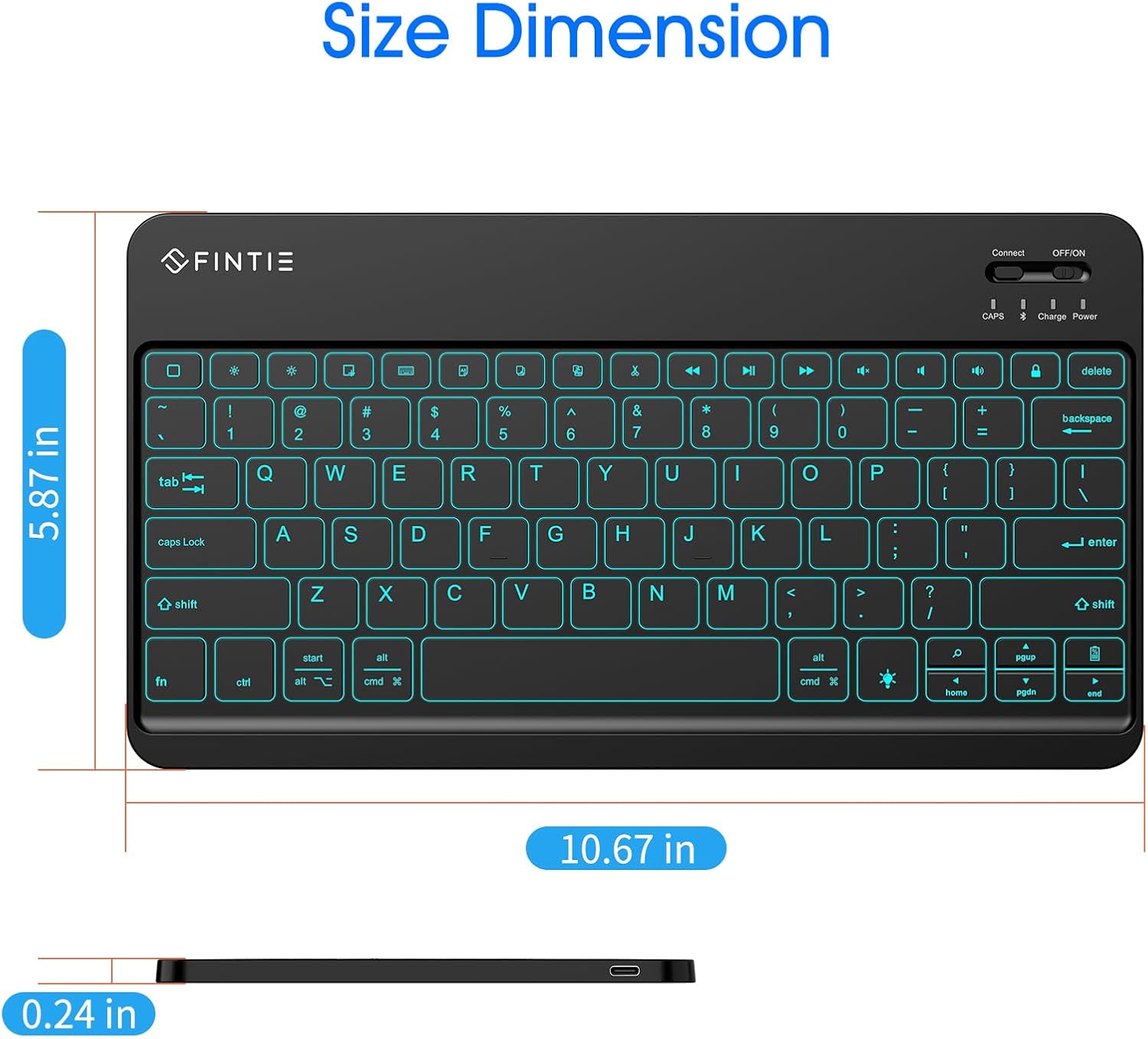
Detailed dimensions of the Fintie Ultrathin Wireless Bluetooth Keyboard.
Bermea eta Laguntza
Specific warranty details for this product are not provided in this manual. For information regarding warranty coverage, returns, or technical support, please contact Fintie customer service directly or visit their official website. You can also refer to the seller's return policy on the platform where the product was purchased.
For additional information and products, you may visit the FINTIE Store on Amazon.


