
1. Sarrera
This manual provides essential information for the safe and efficient operation of your Eurom DryBest 30 WiFi dehumidifier. Please read these instructions carefully before use and retain them for future reference. This appliance is designed to reduce humidity levels in indoor environments, improving air quality and preventing issues related to excessive moisture.
2. Segurtasun-argibideak
Beti jarraitu segurtasun neurri hauek sute, deskarga elektriko edo lesio arriskua murrizteko.
- Ziurtatu elikadura hornidura boltage unitateko balorazio-etiketarekin bat dator.
- Ez erabili hezetasun-kentzailea kablea edo entxufea hondatuta badago.
- Mantendu tresna bero-iturrietatik, eguzki-argitik eta material sukoietatik urrun.
- Ez blokeatu airearen sarrera edo irteera. Mantendu gutxienez 20 cm-ko distantzia unitatearen inguruan.
- Inoiz ez sartu objekturik aire-irtenguneetan.
- Deskonektatu unitatea garbiketa, mantentze-lanak edo erabiltzen ez denean.
- Do not use the appliance in bathrooms or other excessively wet environments where it could come into contact with water.
- Tresna hau ez da gaitasun fisiko, sentsorial edo mental murriztua duten edo esperientzia eta ezagutza falta duten pertsonek (haurrak barne) erabiltzeko, baldin eta haien segurtasunaz arduratzen den pertsona batek gailuaren erabilerari buruz gainbegiratu edo jarraibiderik eman ez badu.
- Haurrak gainbegiratu behar dira aparatuarekin jolasten ez dutela ziurtatzeko.
- Hornidura-kablea hondatuta badago, fabrikatzaileak, bere zerbitzu-agenteak edo antzeko gaikuntza duten pertsonek ordeztu beharko dute arriskurik ekiditeko.
3. Produktua amaitu daview
The Eurom DryBest 30 WiFi is a powerful and efficient dehumidifier designed for domestic use. It features a quiet operation and can be controlled via WiFi for convenience.
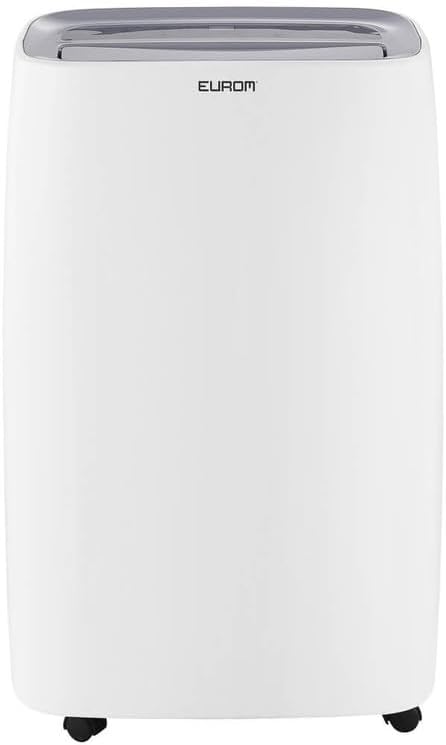
3.1. irudia: Aurrealdea view of the Eurom DryBest 30 WiFi dehumidifier. This image displays the unit's overall appearance, highlighting its modern white casing and integrated handles for portability.
3.1 Osagai nagusiak
- Kontrol-panela: Located on the top of the unit for easy access to settings and indicators.
- Aire irteera: Top-mounted grille for expelling dry air.
- Aire-sarrera/iragazkia: Rear-mounted for drawing in humid air, equipped with a removable air filter.
- Ur depositua: Ur kondentsatua biltzeko depositu kendugarria.
- Etengabeko drainatze irteera: Port for connecting a hose for continuous drainage.
- Gurpilak: Wheels at the base for easy movement.
4. Konfigurazioa
4.1 Paketatzea
- Kontu handiz atera hezetasun-kentzailea bere paketetik.
- Kendu ontziratzeko material guztiak, zinta itsasgarria edo babes-filmak barne.
- Egiaztatu unitatea kalterik dagoen. Kaltetuta badago, ez erabili eta jarri harremanetan zure saltzailearekin.
4.2 Jartzea
- Place the dehumidifier on a firm, level surface to prevent vibration and water leakage.
- Ensure there is at least 20 cm (8 inches) of space around the unit for proper airflow. Do not place it against a wall or furniture that could obstruct the air inlets or outlets.
- For optimal performance, place the unit in the center of the room or area requiring dehumidification.
- Saihestu unitatea beroa sortzen duten tresnen ondoan edo eguzki-argiaren eraginpean jartzea.
4.3 Energia-konexioa
- Entxufatu korronte-kablea lurreko hartune elektriko batean.
- Ensure the outlet meets the electrical requirements of the unit (230V, 50Hz).
4.4 Drainatze Aukerak
The dehumidifier offers two drainage methods: manual tank emptying or continuous drainage.
4.4.1 Eskuzko hustuketa (ur-depositua)
- When the water tank is full, the "FULL" indicator light will illuminate, and the unit will automatically stop operating.
- Kontu handiz atera ur-depositua unitatearen aurrealdetik.
- Hustu bildutako ura.
- Slide the empty water tank back into its position until it clicks securely. The unit will resume operation.
4.4.2 Drainatze Jarraitua
- For continuous operation without emptying the tank, connect a suitable drain hose (not included) to the continuous drain outlet at the back of the unit.
- Ensure the hose is sloped downwards to allow gravity to drain the water into a floor drain or larger container.
- Egiaztatu mahuka-konexioa ondo lotuta dagoela ihesak saihesteko.
4.5 WiFi konfigurazioa
The DryBest 30 WiFi can be controlled remotely via a smartphone app.
- Download the "Eurom Smart" app (or similar specified app) from your device's app store.
- Follow the in-app instructions to register an account and add your dehumidifier.
- Ensure your dehumidifier is powered on and the WiFi indicator light is blinking, indicating pairing mode.
- Once connected, the WiFi indicator light will become solid.
5. Funtzionamendu-argibideak

5.1. irudia: Control Panel of the Eurom DryBest 30 WiFi. This image details the various buttons and indicators for operating the dehumidifier.
5.1 Kontrol-panela amaituview
- POWER botoia: Unitatea pizten edo itzaltzen du.
- MODE botoia: Cycles through operating modes (e.g., Auto, Continuous, Laundry).
- GORA/BEHERA botoiak: Adjust desired humidity level or timer settings.
- SPEED botoia: Selects fan speed (High, Low).
- TIMER botoia: Pizte edo itzaltze automatikoaren tenporizadorea ezartzen du.
- SWING botoia: Activates or deactivates the oscillating air outlet.
- PONPA botoia: Activates the internal pump for continuous drainage (if applicable and hose connected).
- BLOKATU botoia: Haurren blokeo funtzioa ustekabeko aldaketak saihesteko.
- WIFI adierazlea: WiFi konexioaren egoera erakusten du.
- FULL Indicator: Ur-depositua beteta dagoenean pizten da.
- LAUNDRY Indicator: Illuminates when Laundry mode is active.
- FAN Indicator: Illuminates when fan is operating.
5.2 Oinarrizko funtzionamendua
- Piztu: Sakatu BOTEREA button. The unit will start in its default or last-used mode.
- Ezarri nahi den hezetasuna: Erabili UP eta BEHERA buttons to set the target humidity level (e.g., 40% - 60% relative humidity is generally recommended). The unit will operate until this level is reached, then cycle on and off to maintain it.
- Aukeratu modua: Sakatu MODUA button to choose between different operating modes.
- Modu automatikoa: The unit automatically adjusts operation based on the ambient humidity.
- Etengabeko modua: The unit runs continuously regardless of humidity level. Ideal for very damp conditions or for use with continuous drainage.
- Garbiketa modua: Designed to quickly dry clothes indoors. The unit operates at high fan speed and continuous dehumidification.
- Doitu haizagailuaren abiadura: Sakatu ABIADURA button to toggle between High and Low fan speeds.
- Ezarri tenporizadorea: Sakatu tenporizadorea botoia, gero erabili UP eta BEHERA to set the desired operating duration (e.g., 2 hours, 4 hours).
- Swing funtzioa: Sakatu Swing button to activate the oscillating louvers, distributing dry air more evenly.
- Haurrentzako blokeoa: Eduki sakatuta BLOKATU button for a few seconds to activate/deactivate the child lock.
- Itzali: Sakatu BOTEREA botoia berriro unitatea itzaltzeko.

5.2. irudia: Dehumidifier in use, illustrating its application for drying laundry. The image shows the unit positioned near a clothes rack, indicating its effectiveness in reducing drying times indoors.
6. Mantentzea
Mantentze-lan erregularrak zure deshezegailuaren errendimendu optimoa bermatzen du eta bizitza luzatzen du.
6.1 Aire-iragazkia garbitzea
Aire-iragazkia bi astean behin garbitu behar da, edo maizago, erabileraren eta airearen kalitatearen arabera.
- Deskonektatu hezegailuaren entxufea korronte-hartunetik.
- Kendu aire-iragazkia unitatearen atzealdetik.
- Gently vacuum any dust or debris from the filter. For heavy dirt, wash the filter with lukewarm water and a mild detergent.
- Rinse thoroughly and allow the filter to air dry completely before reinstalling. Do not expose to direct sunlight or high heat.
- Sartu berriro iragazki lehorra unitatean.
6.2 Ur depositua garbitzea
Garbitu ur-depositua aldizka lizun eta onddoen hazkuntza saihesteko.
- Deskonektatu unitatea.
- Kendu eta hustu ur depositua.
- Garbitu depositua ur epelarekin eta detergente leun batekin. Ondo garbitu.
- Lehortu depositua guztiz unitatean berriro sartu aurretik.
6.3 Biltegiratzea
Deshezegailua denbora luzez erabiliko ez bada:
- Deskonektatu unitatea eta hustu ur-depositua.
- Garbitu aire-iragazkia eta unitatearen kanpoaldea.
- Allow the unit to dry for at least 24 hours in a well-ventilated area to prevent mold growth inside.
- Gorde hezegailu-gailua zutik leku fresko eta lehor batean, eguzki-argitik eta muturreko tenperaturetatik babestuta.
7. Arazoak
Bezeroarentzako arreta-zerbitzura deitu aurretik, jo ezazu arazo ohikoenei buruzko gida honetara.
| Arazoa | Kausa posiblea | Irtenbidea |
|---|---|---|
| Unitatea ez da pizten. | No power, power cord loose, water tank full. | Check power connection, ensure tank is empty and correctly inserted. |
| No water collected / Low dehumidification. | Humidity level too low, air filter clogged, room temperature too low, unit size too small for area. | Increase desired humidity setting, clean air filter, ensure room temperature is above 5°C (41°F), close doors/windows. |
| Unitatea zaratatsua da. | Unitatea ez dago gainazal mailakatu batean, aire-iragazkia buxatuta dago. | Place on a flat, stable surface. Clean air filter. |
| Unitatetik ura isurtzen da. | Water tank not inserted correctly, continuous drain hose loose or blocked. | Reinsert water tank properly. Check continuous drain hose for secure connection and obstructions. |
| WiFi konexio arazoak. | Incorrect app, poor WiFi signal, incorrect pairing procedure. | Ensure correct app is used, check router and signal strength, repeat WiFi setup steps. |
8. Zehaztapenak
| Ezaugarri | Zehaztapena |
|---|---|
| Ereduaren izena | DryBest 30 WiFi |
| Erreferentzia Zenbakia | 1052 |
| Marka | Eurom |
| Deshumidifikazio Ahalmena | 30 litro/24 ordu |
| Energia-kontsumoa | 580 W |
| Aire-fluxuaren Ahalmena | 350 m³/orduko |
| Zarata Maila | <47 dBA |
| Neurriak (L x W x H) | 64.2 x 43.1 x 30.1 cm |
| Pisua | 15.5 kg |
| Ur deposituaren bolumena | 6 Liters / 10 Liters (depending on mode/configuration) |
| Ezaugarri bereziak | Silent operation, Adjustable humidity control, WiFi connectivity |
| Erabilera gomendatua | Etxekoak |
| Kolorea | Zuria |
9. Bermea eta Laguntza
For warranty information, please refer to the terms and conditions provided at the time of purchase or contact your retailer. If you encounter any issues not covered in the troubleshooting section, or require further assistance, please contact Eurom customer support or your authorized dealer.
Gorde erosketa-agiria erosketaren frogagiri gisa, berme-erreklamazioetarako.