
Sarrera
Thank you for choosing the Zelotes F-35 2.4GHz Vertical Wireless Rechargeable Gaming Mouse. This ergonomic mouse is designed to provide a comfortable and efficient user experience, reducing wrist strain during extended use. Featuring multiple connectivity options and customizable buttons, it is ideal for both productivity and gaming on various devices.
Produktuaren Ezaugarriak
- Diseinu bertikal ergonomikoa: Positions the hand in a natural handshake posture to minimize wrist and forearm strain.
- Konexio multimodala: Supports 2.4GHz wireless via USB dongle, Bluetooth 1, and Bluetooth 2 for versatile device pairing.
- Bateria kargagarria: Built-in rechargeable battery for convenience.
- DPI erregulagarria: Up to 2400 DPI for precise cursor control, suitable for various tasks and gaming.
- 6 botoi programagarriak: Includes left/right click, scroll wheel, DPI button, and forward/backward buttons for enhanced functionality.
- Sentsore optikoa: Reliable and accurate tracking on most surfaces.
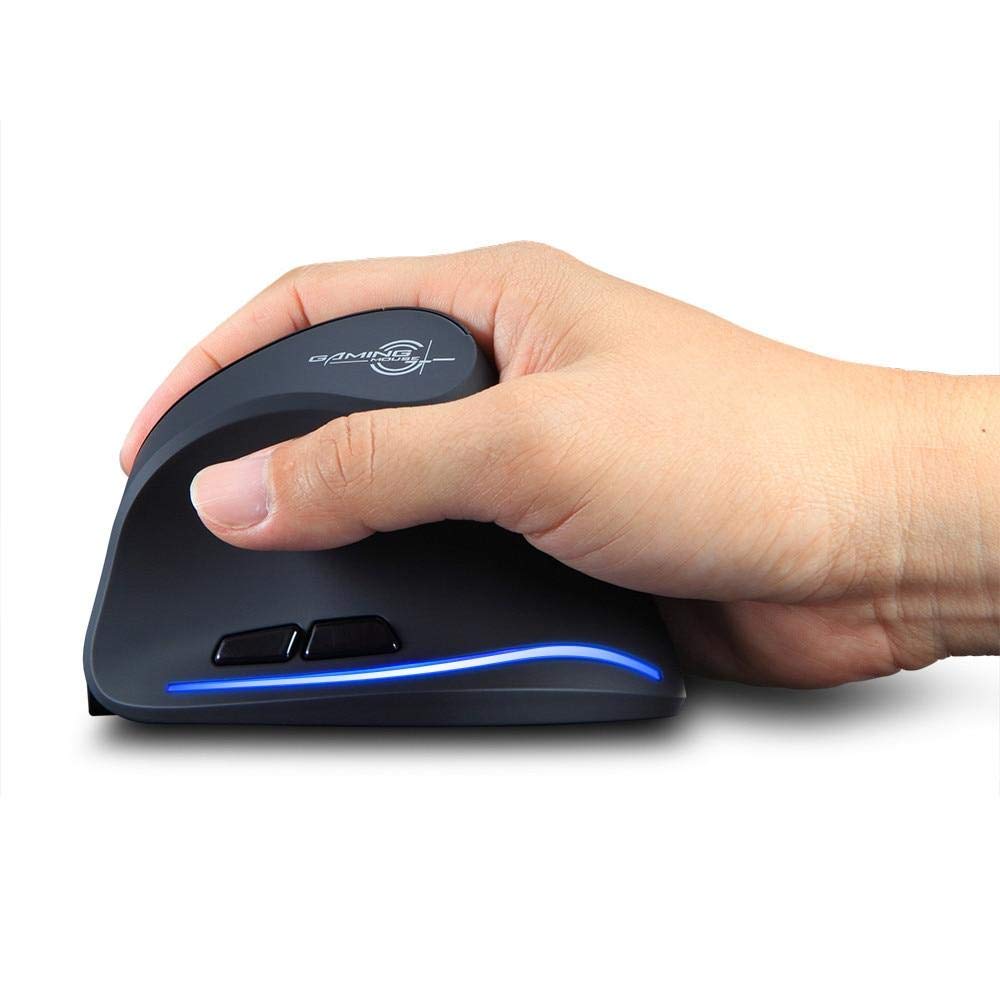
Image: The Zelotes F-35 Vertical Wireless Gaming Mouse, showcasing its unique ergonomic shape and illuminated accents.

Image: A visual comparison illustrating the natural hand position with a vertical mouse versus the twisted wrist position with a traditional horizontal mouse, highlighting the ergonomic benefits.
Konfigurazio Argibideak
- Piztu: Bilatu saguaren behealdean dagoen ON/OFF etengailua eta irristatu 'ON' posiziora.
- Hautatu konexio modua: The mouse supports three connection modes: 2.4GHz wireless (via USB dongle), Bluetooth 1, and Bluetooth 2. Use the 'Mode Switch' button on the bottom of the mouse to cycle through these options. The corresponding indicator light will illuminate.
- 2.4 GHz haririk gabeko konexioa:
- Remove the USB receiver dongle from its storage slot on the bottom of the mouse.
- Konektatu USB hargailua zure ordenagailuko edo ordenagailu eramangarriko USB ataka erabilgarri batean.
- Sagua automatikoki konektatu beharko litzateke.
- Bluetooth Connection (BT1/BT2):
- Switch the mouse to either Bluetooth 1 or Bluetooth 2 mode using the 'Mode Switch'.
- On your computer or laptop, go to Bluetooth settings and search for new devices.
- Select 'Zelotes F-35' from the list of available devices to pair.

Image: The underside of the Zelotes F-35 mouse, highlighting the ON/OFF switch, mode switch, and the integrated storage slot for the 2.4GHz USB receiver dongle.
Funtzionamendu-argibideak
The Zelotes F-35 mouse features 6 buttons designed for intuitive control and enhanced productivity:
- Ezkerreko klik botoia: Klik egiteko funtzio nagusia.
- Eskuineko botoiarekin klik egiteko: Bigarren mailako klik funtzio estandarra.
- Korritzeko gurpila: Scroll up or down for navigation. Can also be pressed for a middle-click function.
- DPI doikuntza botoia: Located near the scroll wheel, press to cycle through different DPI settings (e.g., 800/1200/1600/2400) to adjust cursor sensitivity.
- Aurrera egiteko botoia: Located on the thumb rest, typically navigates forward in web nabigatzaileak edo file esploratzaileak.
- Atzera botoia: Located on the thumb rest, typically navigates backward in web nabigatzaileak edo file esploratzaileak.
Karga eta bateria
The Zelotes F-35 mouse is equipped with a rechargeable battery for continuous use.
- Kargatzeko ataka: The mouse features a USB-C charging port, typically located at the front base of the mouse.
- Kargatzen: Connect the provided USB-C cable to the mouse and the other end to a USB power source (e.g., computer USB port, wall adapter).
- Bateria adierazlea: The mouse may have an indicator light to show charging status or low battery. Refer to the product packaging for specific indicator behavior.
- Bateriaren iraupena: The average battery life is approximately 12 months, depending on usage.
Mantentzea
- Garbiketa: Erabili zapi leun eta lehor bat saguaren gainazala garbitzeko. Zikinkeria egoskorra bada, garbitu zapi pixka bat.amp oihal bat erabil daiteke, barneko osagaietan hezetasunik ez sartzeko ziurtatuz.
- Sentsoreen zainketa: Jarraipen zehatza bermatzeko, mantendu saguaren beheko aldean dagoen sentsore optikoa garbi eta hautsik edo hondakinik gabe.
- Biltegiratzea: When not in use for extended periods, turn off the mouse to conserve battery life. Store the USB receiver in its designated slot to prevent loss.
Arazoak konpontzea
- Saguak ez du erantzuten:
- Ziurtatu sagua piztuta dagoela.
- Egiaztatu bateriaren maila eta kargatu behar izanez gero.
- For 2.4GHz connection, ensure the USB receiver is securely plugged into the computer.
- For Bluetooth connection, ensure Bluetooth is enabled on your device and the mouse is correctly paired. Try re-pairing if issues persist.
- Jarraipen zehaztugabea:
- Garbitu saguaren beheko aldean dagoen sentsore optikoa.
- Ensure you are using the mouse on a suitable surface (non-reflective, non-glass).
- Doitu DPI ezarpena maila eroso batera.
- Konexio-etenaldiak:
- Ensure the mouse is within the effective range of your device (typically up to 10 meters for wireless).
- Gutxitu beste haririk gabeko gailuen interferentziak.
Zehaztapenak
| Ezaugarri | Xehetasuna |
|---|---|
| Marka | Zelotes |
| Eredua | F-35 |
| Mota | 2.4 GHz Haririk gabekoa, Bluetootha |
| Eragiketa modua | Opto-elektronikoa |
| Botoi kopurua | 6 |
| Arrabolen kopurua | 1 |
| Eskuen Orientazioa | Eskuin |
| Interfaze mota | USBa |
| DPI | 2400 |
| Ezaugarri Berezia | Rechargeable, Wireless |
| Mugimenduen detekzioa | Optikoa |
| Gailu bateragarriak | Ordenagailu eramangarria, Ordenagailu pertsonala |
| Sistema eragilea | Linux, Windows 7 (and newer) |
| Bateriaren batez besteko bizitza | 12 hilabete |
| Energia iturria | Bateriaren bidez |
| Kolorea | Beltza |
| Jatorrizko Herrialdea | Txina |
Bermea eta Laguntza
For warranty information and technical support, please refer to the documentation included with your product or visit the official Zelotes webgunea. Produktua erosi duzun saltzailearekin ere harremanetan jar zaitezke laguntza jasotzeko.