
1. Sarrera
This manual provides essential information for the setup, operation, and maintenance of your Xtrfy K4 RGB Mechanical Gaming Keyboard. Please read these instructions carefully to ensure optimal performance and longevity of your device. The Xtrfy K4 RGB is designed for high-performance gaming and typing, featuring durable mechanical switches and customizable RGB illumination.
2. Paketearen edukia
Egiaztatu elementu guztiak zure paketean daudela:
- Xtrfy K4 RGB Mechanical Gaming Keyboard
- USB kablea (erantsita)
- Erabiltzailearen eskuliburua (dokumentu hau)
3. Konfigurazioa
Follow these steps to set up your Xtrfy K4 RGB keyboard:
- Deskonprimitu teklatua: Kontu handiz atera teklatua bere paketetik.
- Konektatu ordenagailura: Plug the attached USB-A cable from the keyboard into an available USB port on your computer. The keyboard is plug-and-play and does not require additional drivers for basic functionality.
- Lekua: Position the keyboard comfortably on your desk. Ensure stable placement for optimal use.
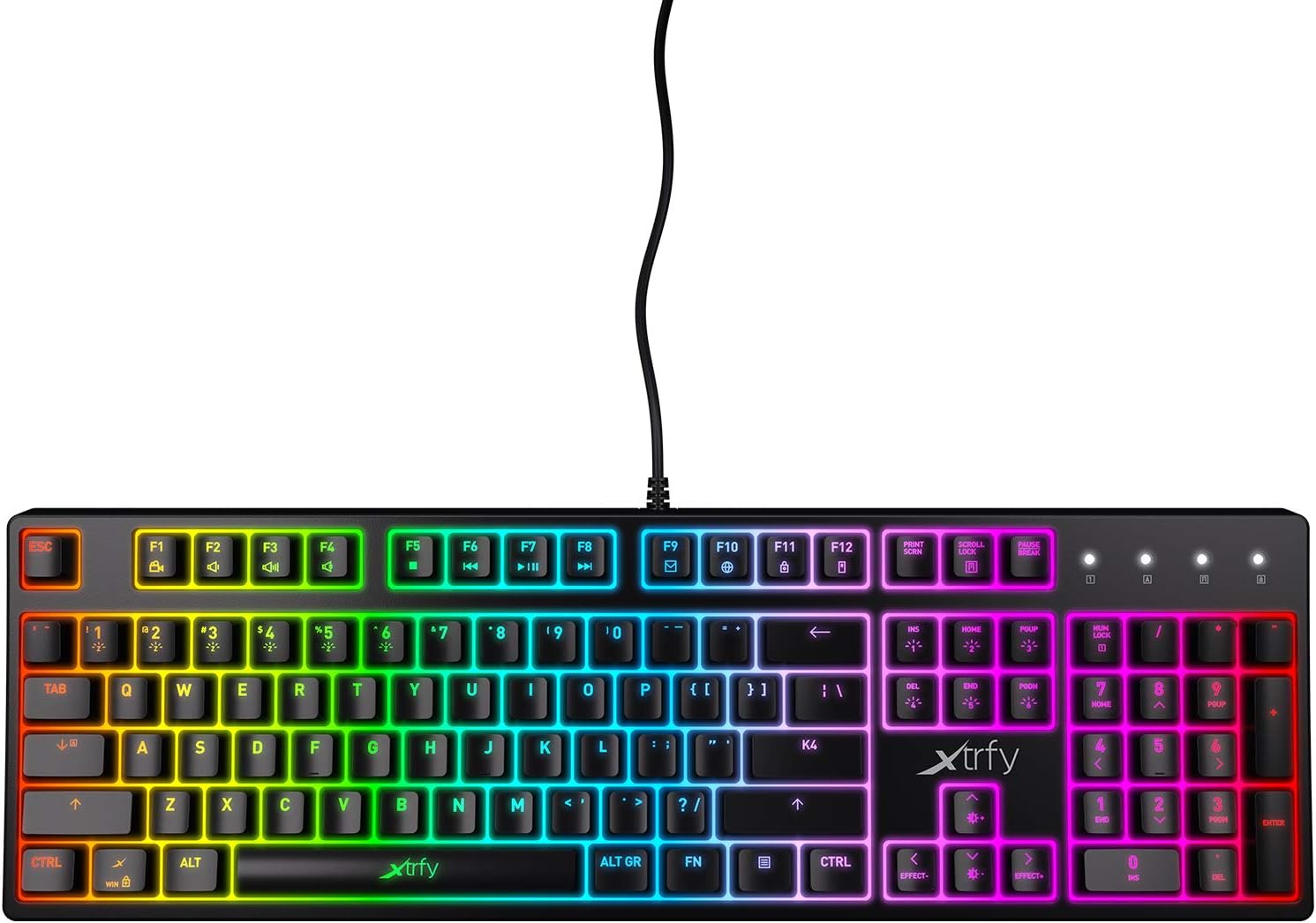
3.1. irudia: Goitik behera view of the Xtrfy K4 RGB keyboard, showing key layout and attached USB cable.
4. Funtzionamendu-argibideak
4.1 Oinarrizko teklatuaren funtzioak
The Xtrfy K4 RGB functions as a standard mechanical keyboard. All keys are pre-programmed for their respective characters and functions. It features full N-key rollover and a 1000 Hz polling rate for precise and responsive input.
4.2 RGB Illumination Control
The keyboard features customizable RGB illumination. Use the Function (FN) key in combination with specific keys to adjust lighting effects, brightness, and colors. Refer to the keycap legends for specific lighting controls.
- FN + F1-F12: These keys often control media functions or system shortcuts. Specific functions are indicated by icons on the keycaps.
- FN + Gezi-teklak: Typically used to adjust brightness or change lighting directions/patterns.
- FN + Insert/Home/Page Up/Delete/End/Page Down: These keys are commonly used to cycle through different RGB lighting modes and effects.

Figure 4.1: The Xtrfy K4 RGB keyboard showcasinbere RGB argiztapen pertsonalizagarria.
5. Mantentzea
Mantentze egokiak zure teklatuaren iraupena eta errendimendua bermatzen ditu:
- Garbiketa: Erabili zapi leun eta lehor bat teklatuaren gainazala garbitzeko. Garbiketa sakonago bat egiteko, erabili aire konprimatua teklatuen arteko hautsa eta hondakinak kentzeko. Saihestu produktu kimiko gogorrak edo material urratzaileak erabiltzea.
- Tekla-tapoiak kentzea (aurreratua): If necessary, keycaps can be carefully removed using a keycap puller for thorough cleaning. Exercise caution to avoid damaging the switches.
- Biltegiratzea: Erabiltzen ez duzunean, gorde teklatua leku garbi eta lehor batean, eguzki-argitik eta muturreko tenperaturetatik urrun.
6. Arazoak
If you encounter issues with your Xtrfy K4 RGB keyboard, refer to the following common solutions:
- Teklatuak ez du erantzuten:
- Ziurtatu USB kablea ondo konektatuta dagoela bai teklatuan bai ordenagailuan.
- Saiatu teklatua beste USB ataka batera konektatzen.
- Berrabiarazi ordenagailua.
- RGB argiztapena ez dabil/okerra:
- Check if the lighting is turned off or set to a very low brightness using the FN key combinations.
- Hirugarrenen argiztapen-kontrolerako aplikazioak erabiltzen ari bazara, ziurtatu ez dagoela software-gatazkarik.
- Giltzak ez dira erregistratzen:
- Garbitu kaltetutako teklaren eremua etengailua oztopatzen egon daitekeen edozein hondakin kentzeko.
- If the issue persists, contact Xtrfy support.
7. Zehaztapenak
| Ezaugarri | Xehetasuna |
|---|---|
| Marka | Xtrfy |
| Modelo zenbakia | XG-K4-RGB-R-US |
| Seriea | K4 RGB |
| Teklatuaren deskribapena | Mekanikoa |
| Teklaren etengailuak | Mechanical key switches (e.g., Kailh Red, depending on variant) |
| Argiztapena | Customizable RGB |
| Bozketa-tasa | 1000 Hz |
| N-teklaren birjartzea | N-giltza osoko biraketa |
| Konektibitatea | USB-A (Corded Electric) |
| Gailu bateragarriak | PC/Mac |
| Elementuaren pisua | 2.2 libra (gutxi gorabehera 1 kg) |
| Produktuaren neurriak (LxWxH) | 17.44" x 17.44" x 1.54" (gutxi gorabehera 44.3 x 44.3 x 3.9 cm) |
| Kolorea | Beltza |
8. Bermea eta Laguntza
Xtrfy products are manufactured to high standards and come with a limited warranty. For specific warranty terms and conditions, please refer to the official Xtrfy webwebgunean edo jarri harremanetan bere bezeroarentzako laguntzarekin.
For technical assistance, troubleshooting beyond this manual, or warranty claims, please visit the official Xtrfy support page or contact their customer service directly. Keep your purchase receipt as proof of purchase.
Lineako laguntza: www.xtrfy.com/support


