
1. Sarrera
This manual provides comprehensive instructions for the IMILAB CMSXJ16A Smart Home Security Camera, a product of XIAOMI. It covers setup, operation, maintenance, and troubleshooting to ensure optimal performance and security monitoring. Please read this manual carefully before using the product and retain it for future reference.
2. Produktua amaitu daview
2.1 Paketearen edukia
Egiaztatu elementu guztiak paketean daudela:
- IMILAB Home Security Camera Basic x 1
- Argibide eskuliburua x 1
- Potentzia kablea x 1
- Power Adapter (UK/EU/US) x 1
- Wall Mounting Package x 1 (includes screws and wall plugs)
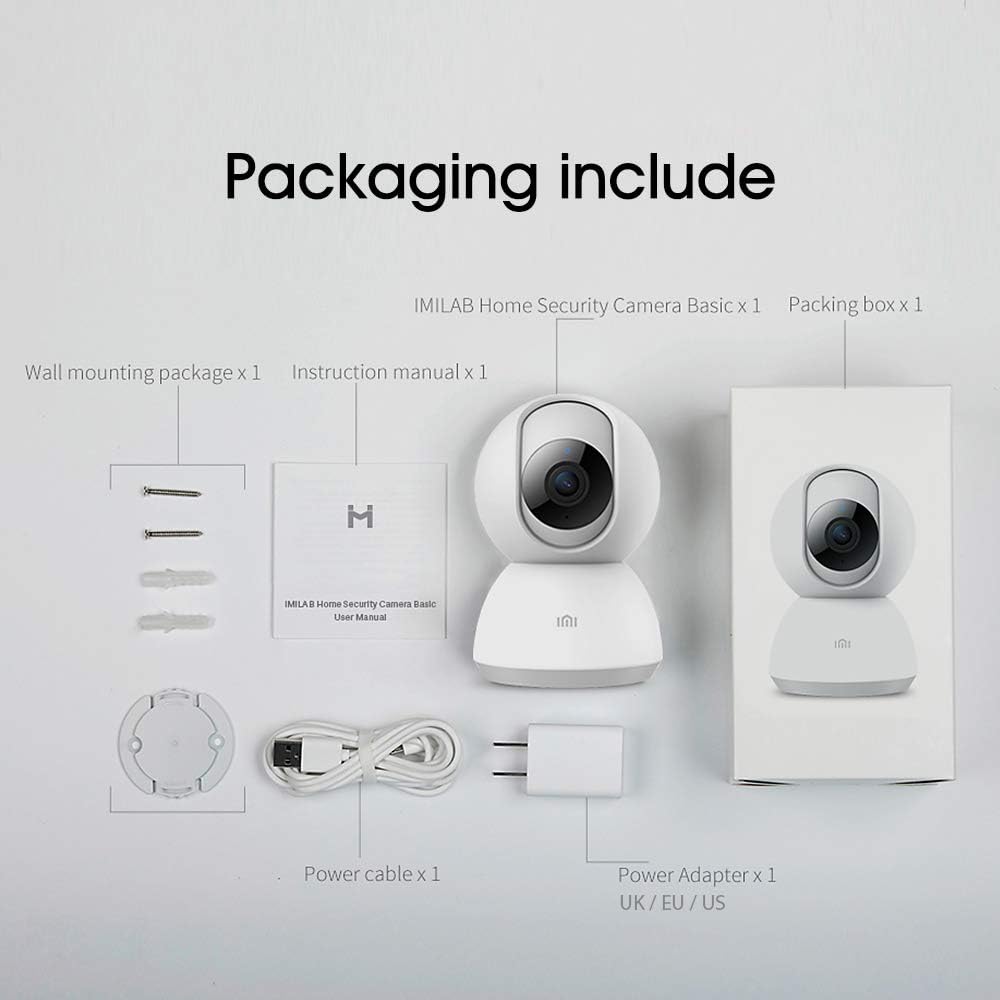
Image: Contents of the IMILAB CMSXJ16A camera package.
2.2 Kameraren osagaiak
The IMILAB CMSXJ16A camera features a compact, spherical design with a rotating base for 360-degree coverage. Key components include the lens, microphone, speaker, status indicator light, and power port.

Irudia: Aurrealdea view of the IMILAB CMSXJ16A camera.
2.3 Ezaugarri nagusiak
- FHD (1080P) Resolution: Provides clear and detailed image quality.
- 360°ko biraketa: Panorama eskaintzen du viewing for comprehensive area coverage.
- Glare-Free Night Vision: Equipped with F2.1 aperture and 8x 940mm infrared LEDs for a visible distance of 10m.
- True Color Night Vision: Maintains full color in low light conditions, even at 100 lumens.
- AI Giza Detekzioa: Advanced AI reduces unnecessary alerts by 70% for more accurate notifications.
- Crying Baby Notification: Alerts you to the sound of a crying baby.
- Biltegiratze aukera anitz: Supports cloud storage, up to 64GB Micro TF card, and NAS storage.
- H.265 bideo kodeketa: Efficiently compresses video, saving storage space while maintaining quality.
3. Konfigurazioa
3.1 Piztea
- Konektatu elikatze-kablea kameraren elikatze-atakara.
- Entxufatu korronte-egokigailua entxufe elektriko estandar batean.
- The camera will power on, and the status indicator light will begin to flash, indicating it is ready for connection.
3.2 Aplikazioaren instalazioa
Download the official IMILAB Home Security app from your smartphone's app store. The app is compatible with Android 4.4 and above, and iOS 8.0 and above.
- Bilatu "IMILAB Home Security" in the Google Play Store (for Android) or Apple App Store (for iOS).
- Deskargatu eta instalatu aplikazioa.
- Ireki aplikazioa eta jarraitu pantailako argibideei kontu bat sortzeko edo saioa hasteko.
3.3 Wi-Fira konektatzea
Follow the in-app instructions to connect your camera to your home Wi-Fi network. This typically involves scanning a QR code generated by the app with the camera's lens.
3.4 Kamera muntatzea
The camera supports wall mounting. Use the provided wall mounting package for secure installation.
- Aukeratu muntatzeko leku egokia, eremu garbi bat ziurtatuz. view eta korronte-hartunerako sarbidea.
- Use the mounting base as a template to mark drill holes on the wall.
- Zuloak egin eta hormako takoak sartu.
- Secure the mounting base to the wall with screws.
- Attach the camera to the mounting base.
4. Funtzionamendu-argibideak
4.1 Bizi View eta urruneko kontrola
Once connected, open the IMILAB Home Security app to access the live video feed from your camera. You can remotely control the camera's 360-degree rotation to view different areas of your space.

Image: Live view of the camera feed on mobile devices, demonstrating H.265 encoding efficiency.
4.2 Gaueko ikusmena
The camera automatically switches to night vision mode in low light conditions. It features glare-free infrared night vision and true color night vision for clear visibility even in very dim environments.

Image: Demonstration of glare-free and true color night vision capabilities.
4.3 AI Human Detection and Notifications
The camera utilizes AI to detect human movement, significantly reducing false alarms from pets or other non-human movements. You will receive precise notifications on your smartphone when human activity is detected.

Image: AI movement notification interface in the mobile application.
4.4 Crying Baby Detection
Enable the crying baby detection feature in the app to receive alerts if the camera detects the sound of a baby crying, providing an additional layer of monitoring for nurseries.
4.5 Bideo grabaketa eta biltegiratzea
The camera supports real-time video recording with multiple storage options:
- Hodeiko biltegiratzea: Subscribe to cloud services for secure off-site storage of your recordings.
- Micro TF Card: Insert a Micro TF card (up to 64GB, not included) into the camera for local storage.
- NAS biltegiratzea: Connect the camera to a Network Attached Storage (NAS) device for expanded local storage capabilities.
4.6 H.265 Video Encoding
The camera uses H.265 video encoding, which allows for more efficient compression of video files. This means you can save the same quality video with approximately 50% less file size compared to H.264, optimizing storage and bandwidth usage.
5. Mantentzea
Kameraren iraupena eta errendimendu optimoa bermatzeko, jarraitu mantentze-jarraibide hauek:
- Garbiketa: Garbitu kameraren lentea eta gorputza oihal leun eta lehor batekin. Ez erabili produktu kimiko gogorrik edo garbitzaile urratzailerik.
- Lekua: Ensure the camera is placed in a stable environment, away from direct sunlight, extreme temperatures, and high humidity.
- Firmware eguneraketak: Egiaztatu aplikazioa aldizka firmware eguneratzeak eskuragarri dauden, zure kamerak azken funtzioak eta segurtasun hobekuntzak dituela ziurtatzeko.
6. Arazoak
If you encounter issues with your IMILAB CMSXJ16A camera, refer to the following common solutions:
- Kamera ez da konektatzen: Ensure your Wi-Fi network is 2.4GHz (5GHz is not supported). Check Wi-Fi signal strength. Restart the camera and your router.
- Irudiaren kalitate eskasa: Clean the camera lens. Ensure adequate lighting in the environment. Check your internet connection speed.
- Jakinarazpenik ez: Verify that notifications are enabled in both the camera app settings and your smartphone's system settings. Check network connectivity.
- Kamera lineaz kanpo: Check the power connection. Ensure your Wi-Fi network is active and the camera is within range. Restart the camera.
- Micro TF Card Not Detected: Ensure the card is inserted correctly. Format the card through the app if it's new or has issues. Use a compatible Micro TF card (up to 64GB).
7. Zehaztapenak
| Ezaugarri | Zehaztapena |
|---|---|
| Modelo zenbakia | CMSXJ16A |
| Neurriak (L x W x H) | 10.8 x 7.6 x 7.6 cm |
| Pisua | 211 gramo |
| Bideo Ebazpena | 1080p (FHD) |
| ren eremua View / Angle of View | 360 gradu |
| Gaueko Ikusmenaren Distantzia | 10 metro |
| LED infragorriak | 8 x 940 mm |
| Irekiera | F2.1 |
| Konektibitate Teknologia | Wired, Wireless (Wi-Fi 2.4GHz) |
| Energia iturria | Mains Powered (via 5V, 5W adapter) |
| Gailu bateragarriak | Smartphone (Android 4.4+, iOS 8.0+) |
| Biltegiratze-aukerak | Cloud, Micro TF Card (max 64GB), NAS |
| Bideo Harrapaketa formatua | MP4 (H.265 encoding) |
| Barruan/Kanpoan erabilera | Barruan |
| Muntatze Mota | Hormako Muntaia |
8. Bermea eta Laguntza
For warranty information and technical support, please refer to the official IMILAB webwebgunera edo jarri harremanetan bezeroarentzako arreta-zerbitzura. Gorde erosketa-agiria erosketaren frogagiri gisa berme-erreklamazioetarako.