
1. Sarrera
This manual provides instructions for the FocalTop N2QAYB000953 replacement remote control. This remote is designed to function as a direct replacement for the original Panasonic Blu-ray Player remote control models N2QAYB000953, compatible with DMP-BDT360, DMP-BDT361, DMP-BDT460, and DMP-BDT460PS Blu-ray players.
No programming is required for this remote control. Simply insert batteries, and it is ready for use.
2. Konfigurazioa
2.1 Bateriaren instalazioa
- Kokatu bateriaren konpartimendua urrutiko agintearen atzealdean.
- Irristatu bateriaren konpartimentuaren estalkia beherantz irekitzeko.
- Insert two (2) AAA alkaline batteries (not included), ensuring the positive (+) and negative (-) terminals align correctly with the markings inside the compartment.
- Irristatu bateriaren konpartimentuaren estalkia berriro bere lekuan klik egin arte.

2.1. irudia: Bateriaren konpartimentua estalkia kenduta, bateriaren kokapena erakusten duena.
Oharra: Ensure batteries are inserted with correct polarity. Incorrect installation may prevent the remote from functioning.
3. Urruneko agintea funtzionatzea
The FocalTop N2QAYB000953 remote control is designed for intuitive operation of your compatible Panasonic Blu-ray Player. Point the remote directly at the Blu-ray player's infrared sensor for optimal performance.
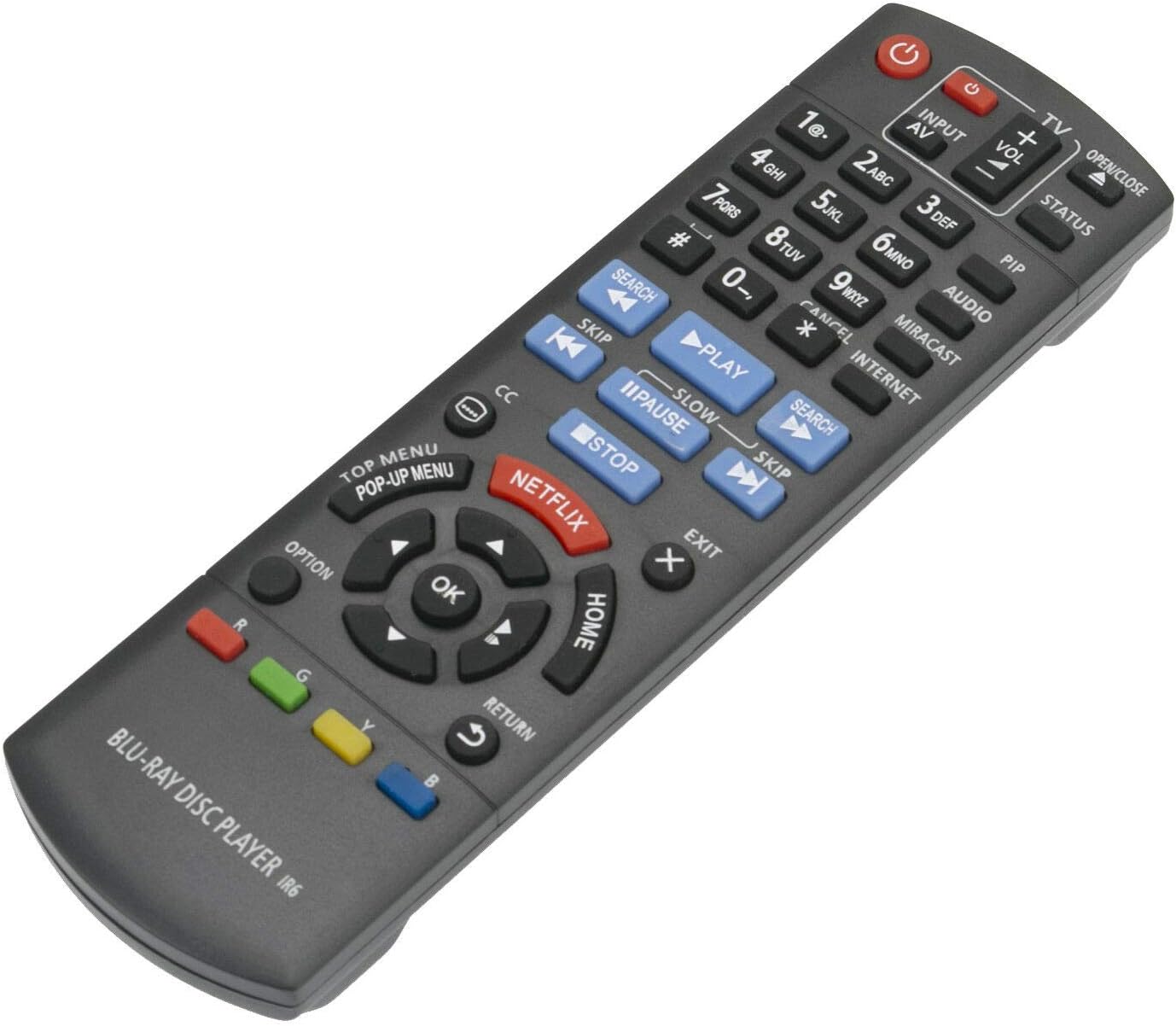
3.1. irudia: Aurrealdea view urrutiko agintearen botoien diseinuarekin.
3.1 Funtzio nagusiak
- Boterea (⏻): Blu-ray erreproduzitzailea piztu edo itzaltzen du.
- Input/AV: Selects the input source on your television.
- Bolumena (+/-): Adjusts the volume of the connected audio system (if supported by the Blu-ray player's HDMI-CEC or similar function).
- Zenbaki-botoiak (0-9): Used for direct track selection or entering numerical data.
- Jolastu(▶), Pausa (⏸), Gelditu (■): Ohiko multimedia erreprodukzio-kontrolak.
- Saltatu (⏭), Search (⏮): Navigate between tracks or fast-forward/rewind.
- Directional Pad (Up, Down, Left, Right) & OK: Menuetan nabigatzen du eta aukeraketak berresten ditu.
- ETXEA: Returns to the main menu of the Blu-ray player.
- GOIKO MENUA/LAISTERKAKO MENUA: Accesses the disc's top menu or pop-up menu.
- NETFLIX: Direct access button for the Netflix application.
- ITZULERA: Aurreko pantailara edo menura itzultzen da.
- AUKERA: Displays options relevant to the current screen or playback.
- Kolore-botoiak (gorria, berdea, horia, urdina): Used for specific functions within menus or applications, as indicated on-screen.
4. Mantentzea
- Garbiketa: Garbitu urrutiko agintea oihal leun eta lehor batekin. Ez erabili garbitzaile likidorik edo material urratzailerik.
- Bateria ordezkatzea: Replace batteries when the remote's response becomes sluggish or stops working. Always replace both batteries at the same time with new ones of the same type (AAA alkaline).
- Biltegiratzea: Urrutiko agintea denbora luzez erabiliko ez baduzu, kendu pilak isuriak eta kalteak saihesteko.
- Ingurumena: Avoid exposing the remote to extreme temperatures, direct sunlight, or high humidity.
5. Arazoak
| Arazoa | Kausa posiblea | Irtenbidea |
|---|---|---|
| Urruneko kontrola ez dabil. |
|
|
| Some buttons do not respond. |
|
|
| Urrutiko agintea tarteka funtzionatzen du. |
|
|
6. Zehaztapenak
- Eredua: N2QAYB000953
- Marka: FocalTop
- Bateragarritasuna: Panasonic Blu-ray Player models DMP-BDT360, DMP-BDT361, DMP-BDT460, DMP-BDT460PS
- Konektibitate Teknologia: Infragorriak (IR)
- Kontroladore mota: Botoien Kontrola
- Energia iturria: 2 x AAA bateria alkalino (ez daude barne)
- Ezaugarri berezia: Diseinu ergonomikoa
7. Bermea eta Laguntza
This product is a replacement remote control. For specific warranty information or technical support, please refer to the documentation provided by the original seller or contact FocalTop directly. No explicit warranty information is provided within this manual.