
Daikin BRC1HHDW
Daikin Madoka Thermostat BRC1HHDW User Manual
Model: BRC1HHDW | Brand: Daikin
Sarrera
The Daikin Madoka BRC1HHDW Thermostat is a wired remote control designed to manage your indoor climate. It features an intuitive interface for direct selection of setpoints and operational modes. This manual provides detailed instructions for the installation, operation, maintenance, and troubleshooting of your Madoka thermostat.
Ezaugarri nagusiak hauek dira:
- Diseinu saritua
- Erabiltzaile-interfazea
- Daikin blue eye indicator
- Pertsonalizagarria den pantaila
- Physical On/Off button
- Simplified setup and programming via the Madoka Assistant App
- Setpoint limitation functionality
- Regulation of domestic hot water temperature
Produktua amaituview

1. irudia: Aurrealdea view of the Madoka Thermostat. It features a large circular black display with a blue LED ring, showing a temperature of 21°C. Below the temperature, there are touch controls for decreasing, confirming, and increasing balioak.

2. irudia: Aldeko profile of the Madoka Thermostat mounted on a white wall. This view emphasizes its compact and sleek design, integrating seamlessly into the environment.

3. irudia: The Madoka Thermostat integrated into a modern bathroom. The thermostat is mounted on a light-colored wall, blending with the interior design. A person is visible in the background, suggesting its use in a residential setting.

4. irudia: A user holding a smartphone displaying the Madoka Assistant App, with the Madoka Thermostat visible on the wall. This illustrates the convenience of controlling and programming the thermostat remotely via the dedicated mobile application.
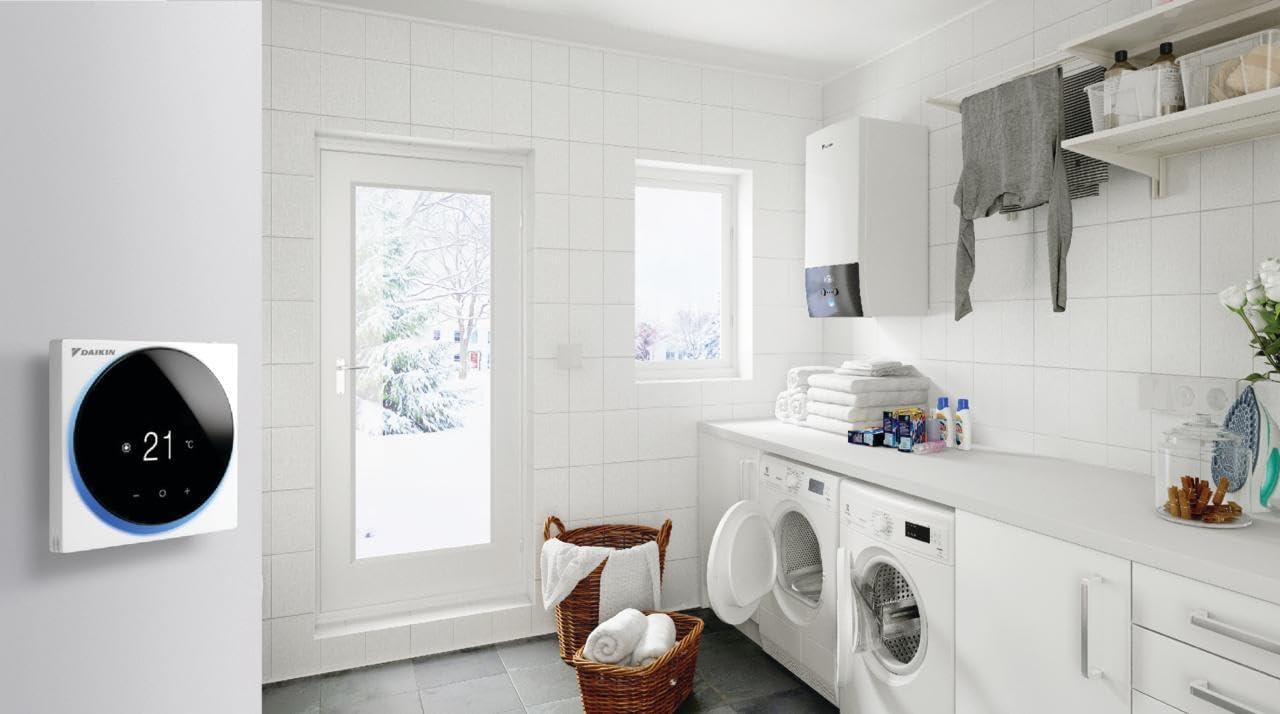
5. irudia: The Madoka Thermostat installed in a utility or laundry room, demonstrating its suitability for various environments. The room also features a washing machine, dryer, and a Daikin Altherma heat pump unit, indicating a complete Daikin system integration.
Konfigurazioa eta Instalazioa
The Madoka BRC1HHDW Thermostat is a wired unit. Professional installation is recommended to ensure proper wiring and functionality with your Daikin Altherma system.
Instalazio aurreko kontrol-zerrenda:
- Ensure power to the heating/cooling system is turned off at the main breaker.
- Verify compatibility with your existing Daikin Altherma system.
- Gather necessary tools (screwdriver, wire strippers, drill if mounting new).
Muntaketa:
The thermostat is designed for wall mounting. Its dimensions are 85 x 85 mm. Choose a location away from direct sunlight, drafts, or heat sources for accurate temperature readings.
Kableatua:
Connect the thermostat to the indoor unit of your Daikin Altherma system according to the wiring diagram provided in the main system's installation manual. The thermostat operates on 230 Volts.
Initial Setup with Madoka Assistant App:
For advanced settings and simplified programming, download the Madoka Assistant App on your smartphone. The app facilitates quick and easy setup, including:
- Programming schedules
- Setting setpoint limitations
- Configuring operational parameters
Funtzionamendu-argibideak
Oinarrizko funtzionamendua:
- Piztu/Itzali: Use the physical On/Off button on the thermostat to turn the unit on or off.
- Tenperaturaren doikuntza: Use the '+' and '-' buttons on the display to adjust the desired temperature setpoint.
- Modu aukeraketa: The thermostat allows selection of various operating modes: automatic, heating, cooling, dehumidification, and fan-only. Refer to the display icons for current mode indication.
- Airflow Direction/Fan Speed: Depending on your system configuration, you can select the direction of the airflow or adjust the fan speed directly from the thermostat interface.
Advanced Operation (via Madoka Assistant App):
The Madoka Assistant App provides comprehensive control and customization options:
- Programazioa: Create and manage daily or weekly heating/cooling schedules to optimize comfort and energy savings.
- Setpoint Limits: Set minimum and maximum temperature limits to prevent extreme settings.
- Domestic Hot Water Control: Regulate the temperature of your domestic hot water if connected to a compatible Daikin Altherma system.
- Energia aurreztea: Utilize programming features to enhance energy efficiency.
Mantentzea
The Daikin Madoka Thermostat requires minimal maintenance to ensure optimal performance and longevity.
Garbiketa:
- Garbitu astiro pantaila eta casing leun, lehor edo apur bat d batekinamp oihal.
- Do not use abrasive cleaners, solvents, or chemical sprays, as these can damage the surface and internal components.
Sentsoreen zainketa:
Ensure the area around the thermostat is free from obstructions (e.g., furniture, curtains) that could block airflow to the internal temperature sensor, leading to inaccurate readings.
Firmware eguneraketak:
Periodically check the Madoka Assistant App for any available firmware updates for your thermostat. Updates can improve performance, add new features, or resolve issues.
Arazoak konpontzea
| Arazoa | Kausa posiblea | Irtenbidea |
|---|---|---|
| Termostatoaren pantaila hutsik dago. | Ez dago energia-iturririk; kableatu solteak; barne-akatsa. | Check main power breaker. Ensure wiring connections are secure. If problem persists, contact qualified service personnel. |
| Tenperatura irakurketa okerra. | Thermostat located near heat source/draft; sensor obstructed. | Relocate thermostat if possible. Remove any obstructions around the unit. |
| System not responding to thermostat commands. | Communication error; system fault; incorrect mode selected. | Verify the correct operating mode is selected. Check wiring connections. Consult your Daikin Altherma system manual for system-specific troubleshooting. |
| Madoka Assistant App not connecting. | Bluetooth/Wi-Fi issue; app not updated; thermostat not in pairing mode. | Ensure Bluetooth/Wi-Fi is enabled on your smartphone. Update the app to the latest version. Follow app instructions to put the thermostat into pairing mode. |
For issues not listed here or if solutions do not resolve the problem, please contact Daikin customer support or a certified technician.
Zehaztapenak
- Eredua: BRC1HHDW
- Marka: Daikin
- Kolorea: Zuria
- Neurriak: 85 x 85 mm
- Energia iturria: Kableatua
- liburukiatage: 230 Volt
- Elementuaren pisua: Approximately 1 Kilogram
- Bateragarritasuna: Designed for Daikin Altherma systems
Bermea eta Laguntza
Bermearen informazioa:
Daikin products typically come with a standard manufacturer's warranty. Please refer to the warranty card included with your product or visit the official Daikin website for specific warranty terms and conditions applicable to the BRC1HHDW model in your region. Keep your proof of purchase for warranty claims.
Bezeroarentzako laguntza:
For technical assistance, service requests, or further inquiries, please contact Daikin customer support. You can find contact details on the official Daikin website or through your local Daikin dealer.
Daikin Official Webgunea: www.daikin.eu