
1. Sarrera
Eskerrik asko erosketagatik.asing the Moukey MAMP1 220W Bluetooth Dual Channel Power Ampargitzaile. Hau amplifier is designed to provide powerful and versatile audio amplification for various applications, including karaoke, home theater systems, and general audio playback. It features multiple input options, Bluetooth 5.0 connectivity, and intuitive controls for an enhanced audio experience. Please read this manual thoroughly before use to ensure proper operation and to maximize the product's performance.
2. Segurtasun-argibideak
Deskarga elektrikoak, suteak edo unitateari kalteak ekiditeko, jarraitu segurtasun neurri hauek:
- Ez jarri unitate hau euri edo hezetasunera.
- Ez ireki c-a.asing. Ez dago erabiltzaileak konpondu beharreko piezarik barruan. Konponketa guztiak langile kualifikatuen esku utzi.
- Ziurtatu elikadura hornidura boltage-k unitatean zehaztutako eskakizunak betetzen ditu.
- Place the unit on a stable, flat surface with adequate ventilation. Do not block ventilation openings.
- Keep the unit away from heat sources, direct sunlight, and excessive dust.
- Disconnect the power plug from the outlet if the unit will not be used for an extended period.
- Ez erabili unitatea esku bustiekin.
3. Paketearen edukia
Egiaztatu elementu guztiak paketean daudela:
- Moukey MAMP1 Potentzia Amplifier Unitatea
- Urruneko Kontrola
- FM antena
- Erabiltzailearen eskuliburua (dokumentu hau)
4. Produktua amaitu daview
4.1 Aurreko paneleko kontrolak eta funtzioak
The front panel provides access to all primary controls and input ports for easy operation.

Image: Detailed diagram of the Moukey MAMP1 front panel, highlighting each control and port with corresponding numbers.
- Switch potentziala: Unitatea pizten edo itzaltzen du.
- USB / SD Slot: Audioa erreproduzitzeko. files from USB drives (max 32GB) or SD cards (max 16GB).
- Modu botoia: Sarrera moduen artean txandakatzen da (Bluetooth, USB, SD, AUX, FM).
- BT botoia: Directly switches to Bluetooth mode.
- Prev Button: Aurreko pistara/irteerara salto egiten du.
- Erreproduzitu/Pausatu botoia: Audioaren erreprodukzioa erreproduzitzen edo pausatzen du.
- Hurrengo botoia: Hurrengo pistara/geltokira salto egiten du.
- LED pantaila: Shows current mode, track information, or frequency.
- Folder / Track: Navigates through folders or tracks on USB/SD.
- Master bolumen botoia: Irteerako bolumen orokorra doitzen du.
- Aurikularrak Jack: 3.5mm output for monitor headphones.
- Microphone 1 Input: 6.35 mm-ko jack-a mikrofonoa konektatzeko.
- Microphone 2 Input: 6.35 mm-ko jack-a bigarren mikrofono bat konektatzeko.
- Mikrofonoaren bolumen botoia: Adjusts the volume of connected microphones.
- Oihartzunaren botoia: Mikrofonoen oihartzun efektua kontrolatzen du.
- Baxua: Maiztasun baxuko audio irteera doitzen du.
- Treble botoia: Maiztasun handiko audio irteera doitzen du.
- Oreka-mantoa: Ezkerreko/eskuineko kanalaren balantzea doitzen du.
- Sarrera AUX jack: 3.5 mm-ko sarrera kanpoko audio gailuetarako.
- Sarrera hautatzailea: Rotary switch to select between CD, AUX, DVD, and MP3/W inputs.
4.2 Atzeko panelaren konexioak
The rear panel houses the main audio input and output connections.

Irudia: Atzealdea view of the Moukey MAMP1 amplifier, showing all input and output ports.

Image: Detailed diagram of the Moukey MAMP1 rear panel, highlighting each connection point.
- Audio Input for DVD (RCA): Connect DVD players or other audio sources.
- Audio Input for CD (RCA): Connect CD players or other audio sources.
- Line Out Jack (RCA): Beste batekin konektatzeko. ampbiziagoa edo grabatzeko gailua.
- FM antena-konektorea: Konektatu barneko FM antena irrati-harrerarako.
- Speaker Output Jacks: Connect passive speakers (4-16 Ohm impedance).
- Potentzia kablearen sarrera: Konektatu AC korronte kablea.
5. Konfigurazioa
5.1 Jartzea
Jarri amplifier on a flat, stable surface. Ensure there is sufficient space around the unit for proper ventilation to prevent overheating.
5.2 Energia-konexioa
Connect the power cable to the Power Cable Input on the rear panel of the amplifier, then plug the other end into a suitable AC power outlet (115V AC).
5.3 Bozgorailuen konexioa
MAMP1 amplifier supports two sets of passive speakers with an impedance of 4-16 Ohms. Use appropriate speaker wire to connect your speakers to the Speaker Output Jacks on the rear panel.

Image: Diagram illustrating how to connect speakers to the amplifier's binding posts.
- Rotate and loosen the speaker knob on the binding post.
- Insert the bare wire (remove approximately 10mm of insulation) into the hole. Ensure correct polarity (+ to + and - to -).
- Tighten the knobs to secure the wires firmly.
5.4 Input Device Connection
Connect your audio sources (CD player, DVD player, tuner, etc.) to the corresponding RCA Audio Input jacks on the rear panel. For microphones, use the 6.35mm jacks on the front panel. For 3.5mm AUX devices, use the front panel AUX Input Jack.
6. Funtzionamendu-argibideak
6.1 Piztu/Itzali
Sakatu Pizteko etengailua aurrealdeko panelean pizteko. amplifier on or off. The LED display will illuminate when the unit is powered on.
6.2 Sarrera hautatzea
Erabili Modu botoia on the front panel or the remote control to cycle through available input sources (Bluetooth, USB, SD, AUX, FM). Alternatively, use the Sarrera hautatzailea knob on the front panel for RCA inputs (CD, AUX, DVD, MP3/W).
6.3 Bolumen kontrola
- Master bolumena: Biratu Master Bolumen Knob to adjust the overall output level of the ampbiziagoa.
- Mikrofonoaren bolumena: Erabili Mikrofonoaren bolumena to control the volume of connected microphones independently.
6.4 Tonu kontrola
Adjust the audio characteristics using the Baxu Knob eta Treble Knob to suit your preference. The Oreka-eskutokia allows adjustment of the left and right channel output levels.

Image: Close-up of the Moukey MAMP1 showing the Bass and Treble adjustment knobs.
6.5 Echo Control
Biratu Echo Knob to add or reduce the echo effect on the microphone inputs, suitable for karaoke applications.
6.6 Bluetooth parekatzea
Bluetooth gailu bat konektatzeko:
- Sakatu BT botoia or cycle through modes until "BLUE" appears on the LED display.
- Gaitu Bluetooth-a zure telefonoan, tabletan edo ordenagailuan.
- Bilatu "Moukey MAMP1" in your device's Bluetooth settings and select it to pair.
- Once paired, you can stream audio wirelessly. Playback will temporarily pause during phone calls to protect privacy.
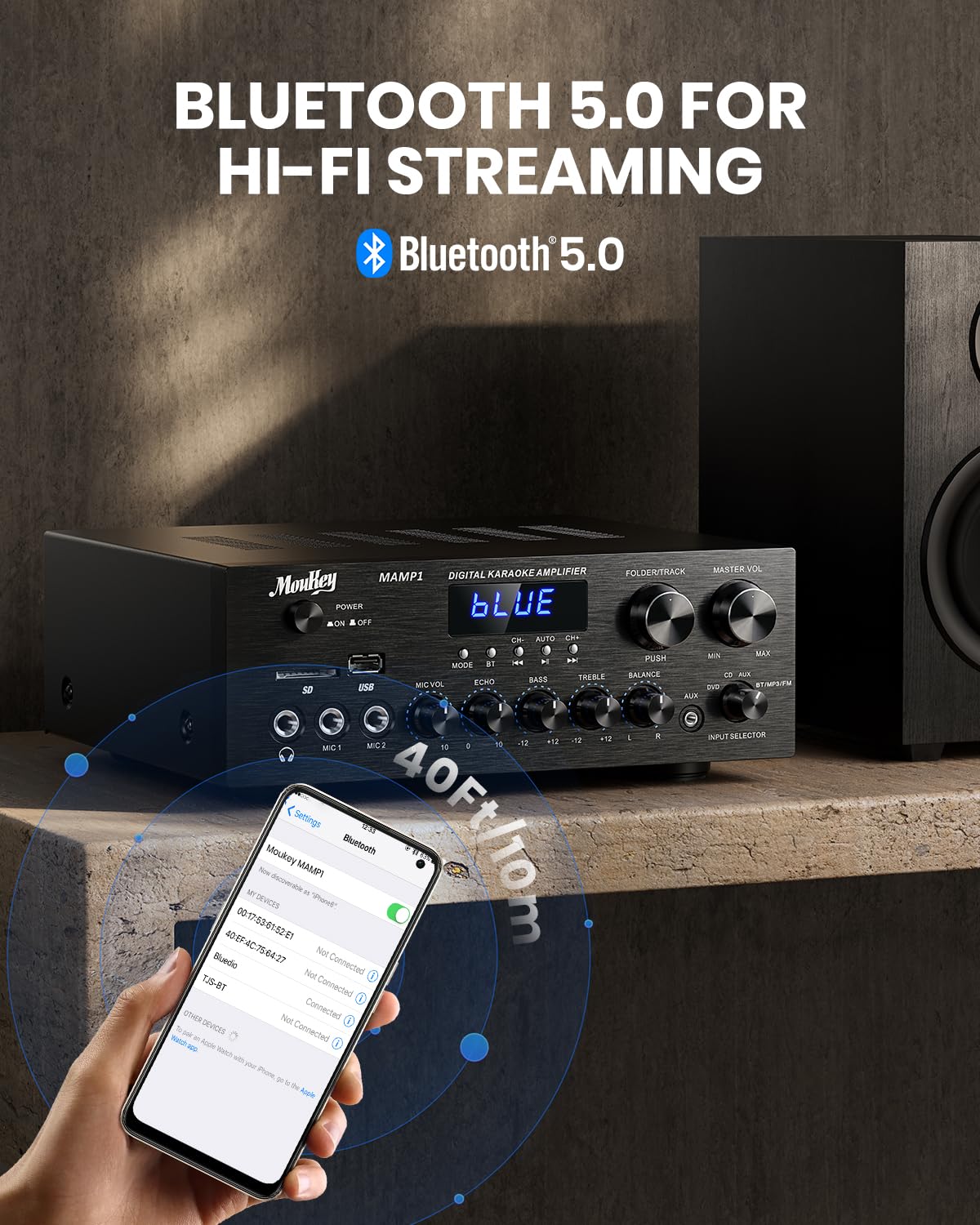
Image: The Moukey MAMP1 amplifier displaying "BLUE" on its screen, indicating Bluetooth mode, with a smartphone showing pairing options.
6.7 USB/SD erreprodukzioa
Insert a USB drive (max 32GB) or SD card (max 16GB) into the respective slot on the front panel. The ampLifigailuak automatikoki USB/SD modura aldatuko da eta erreprodukzioa hasiko da. Erabili Aurrekoa, Erreproduzitu/Pausatu, Hurrengoa, eta Folder/Track erreprodukzioa kontrolatzeko botoiak.
6.8 FM Irratia
Ensure the FM antenna is connected to the rear panel. Select FM mode using the Modu botoia. Erabili Aurrekoa eta Hurrengoa buttons to tune to radio stations. The LED display will show the current frequency.
7. Mantentzea
Zure errendimendua eta itxura mantentzeko ampbiziagoa:
- Garbiketa: Erabili zapi leun eta lehor bat unitatearen kanpoaldea garbitzeko. Ez erabili garbitzaile likidorik edo produktu kimiko urratzailerik.
- Aireztapena: Ziurtatu aireztapen-irekidurak hautsik eta hondakinik gabe daudela.
- Biltegiratzea: Unitatea denbora luzez gordetzen baduzu, deskonektatu korrontetik eta gorde leku fresko eta lehor batean.
8. Arazoak
If you encounter issues with your Moukey MAMP1 amplifier-a, jo ezazu hurrengo taulara arazo eta irtenbide ohikoenak ikusteko:
| Arazoa | Kausa posiblea | Irtenbidea |
|---|---|---|
| Botererik ez | Power cable not connected; Power outlet faulty; Power switch off. | Ensure power cable is securely connected. Try a different power outlet. Press the power switch to ON. |
| Ez dago soinu irteerarik | Incorrect input selected; Volume too low; Speakers not connected; Speaker wires loose; Mute function active. | Select the correct input source. Increase Master Volume. Check speaker connections and polarity. Ensure mute is off. |
| Bluetootha ez da konektatzen | Amplifier not in Bluetooth mode; Device too far; Device already paired to another unit. | Ziurtatu amplifier is in Bluetooth mode ("BLUE" on display). Move device closer to amplifier. Disconnect from other devices. |
| Mikrofonoa ez dabil | Microphone not connected; Mic volume too low; Echo knob set to minimum. | Connect microphone securely. Increase Microphone Volume. Adjust Echo knob. |
| USB/SD erreprodukzio arazoak | Onartu gabe file format; USB drive/SD card corrupted; Capacity exceeded. | Ziurtatu audioa files are in supported formats (e.g., MP3). Try a different USB drive/SD card. Check capacity limits (USB max 32G, SD max 16G). |
Irtenbide hauek probatu ondoren arazoa konpontzen ez bada, jarri harremanetan bezeroarentzako arreta-zerbitzuarekin.
9. Zehaztapenak
| Ezaugarri | Zehaztapena |
|---|---|
| Marka | Moukey |
| Eredua | MAMP1 |
| Irteera Potentzia | 220 Watt |
| Kanalak | 2 |
| liburukiatage | 115 voltio (AC) |
| Bozgorailuaren inpedantzia | 4-16 Ohm |
| Bluetooth bertsioa | 5.0 |
| Bluetooth barrutia | 12 metro baino gehiago (40 oin) |
| USB/SD txartelaren euskarria | USB: Max 32GB, SD: Max 16GB |
| Neurriak (L x W x H) | 25cm x 21.3cm x 9.5cm (approx. 10in x 8in x 4in) |
| UPC | 715802779039 |
| Jatorrizko Herrialdea | Txina |

Image: The Moukey MAMP1 amplifier with its dimensions labeled.
10. Bermea eta Laguntza
This Moukey MAMP1 Potentzia Amplifier bat dator 1 urteko bermea erosketa-datatik aurrera. Berme honek fabrikazio-akatsak eta erabilera normalaren pean egindako lana estaltzen ditu.
Bermeak ez ditu estaltzen:
- Damage caused by accident, abuse, misuse, flood, fire, or other natural causes.
- Damage caused by unauthorized modification or repair.
- Damage caused by improper installation or connection.
- Cosmetic damage, such as scratches, dents, and broken plastic on ports.
For warranty claims or technical support, please contact the retailer where you purchased the product or visit the official Moukey website for contact information. Please have your purchase receipt and product model number (MAMP1) ready when contacting support.