
Andoer HDV-201LM
Andoer HDV-201LM 1080p Digital Video Camera User Manual
Model: HDV-201LM
1. Sarrera
This manual provides detailed instructions for the safe and effective use of your Andoer HDV-201LM Digital Video Camera. Please read this manual thoroughly before operating the device and retain it for future reference.
The Andoer HDV-201LM is a 1080p Full HD digital video camera featuring a 5-megapixel CMOS sensor, capable of capturing video at 1920x1080p at 30 frames per second and still images up to 24 megapixels (interpolated). It includes a 16X digital zoom, a 3.0-inch TFT-LCD screen with 270-degree rotation, and supports external accessories via a hot shoe mount.
2. Paketearen edukia
Egiaztatu behean zerrendatutako elementu guztiak zure paketean sartuta daudela. Elementuren bat falta bada edo hondatuta badago, jarri harremanetan zure saltzailearekin.
- 1 x Andoer HDV-201LM Digital Video Camera
- 1 x Kamera-poltsa
- 2 x Rechargeable 3.7V 800mAh Batteries (one pre-installed)
- 1 x USB kablea
- 1 x AV kablea
- 1 x Urruneko kontrola
- 1 x Camera User Manual (English)
- 1 x 0.39X Wide-Angle Lens
- 1 x Kanpoko Mikrofonoa
- 1 x Microphone Connection Cable
- 1 x Microphone User Manual (Chinese)
Note: A memory card is not included. A Class 10 or higher SD card (up to 32GB) is strongly recommended for optimal performance.
3. Piezen identifikazioa
Familiarize yourself with the various components of your digital video camera.

3.1. irudia: Aurrealdea view of the Andoer HDV-201LM camera with attached wide-angle lens and external microphone.

3.2. irudia: Xehetasuna views highlighting the hot shoe mount, control buttons, battery compartment, and 1/4-inch tripod thread.
- Lentea: Main optical component for capturing images and videos.
- LCD pantaila: 3.0-inch TFT-LCD display for viewing and menu navigation. Rotates 270 degrees.
- Pizteko botoia: Kamera piztu edo itzaltzen du.
- Record/Stop Button: Bideo-grabaketa abiarazten edo gelditzen du.
- Argazkiaren botoia: Irudi finkoak hartzen ditu.
- Zoom Lever (W/T): Adjusts digital zoom (Wide/Telephoto).
- Menuko botoia: Kameraren ezarpenetara sartzen da.
- Nabigazio botoiak: Menuetan nabigatzeko eta hautatzeko erabiltzen da.
- Zapata beroaren euskarria: For attaching external accessories like microphones or LED lights.
- Tripodearen haria: 1/4-inch thread for mounting the camera on a tripod.
- Bateriaren konpartimendua: Bateria kargagarria gordetzen du.
- SD txartelaren zirrikitua: Memoria txartela sartzeko.
- USB ataka: For connecting to a computer or charging.
- AV irteera: For connecting to a television.
- LED betegarri-argia: Argiztapen gehigarria ematen du argi gutxiko baldintzetan.
4. Konfigurazioa
4.1. Bateria kargatzea
- Ireki bateriaren konpartimenduaren estalkia.
- Insert the provided 3.7V 800mAh battery, ensuring correct polarity. If an insulator tab is present, remove it before insertion.
- Itxi bateriaren konpartimenduaren estalkia.
- Connect the camera to a power source using the USB cable. The charging indicator will illuminate.
- Guztiz kargatuta dagoenean, adierazle-argia aldatu edo itzali egingo da.
4.2. Memoria Txartela sartzea
- Ziurtatu kamera itzalita dagoela.
- Kokatu SD txartelaren zirrikitua.
- Insert a Class 10 or higher SD card (up to 32GB) into the slot until it clicks into place.
- To remove, gently press the card until it springs out.
4.3. Attaching the Wide-Angle Lens
- Remove the protective cap from the camera lens.
- Carefully screw the 0.39X wide-angle lens onto the camera's main lens thread until secure.

Figure 4.1: The camera with the 0.39X super wide-angle lens attached, demonstrating its expanded field of view.
4.4. Attaching the External Microphone
- Slide the external microphone into the hot shoe mount on top of the camera.
- Connect the microphone cable to the camera's external microphone input port.
5. Kameraren funtzionamendua
5.1. Piztu/Itzaltzea
- To power on, open the LCD screen or press the Boterea botoia.
- To power off, close the LCD screen or press and hold the Boterea botoia.
5.2. Bideoak grabatzea
- Ensure the camera is in video mode (indicated on the LCD screen). If not, press the Modua aldatzeko botoia.
- Sakatu Grabatu/Gelditu button to start recording. A red indicator will typically flash.
- Sakatu Grabatu/Gelditu botoia berriro grabaketa gelditzeko.
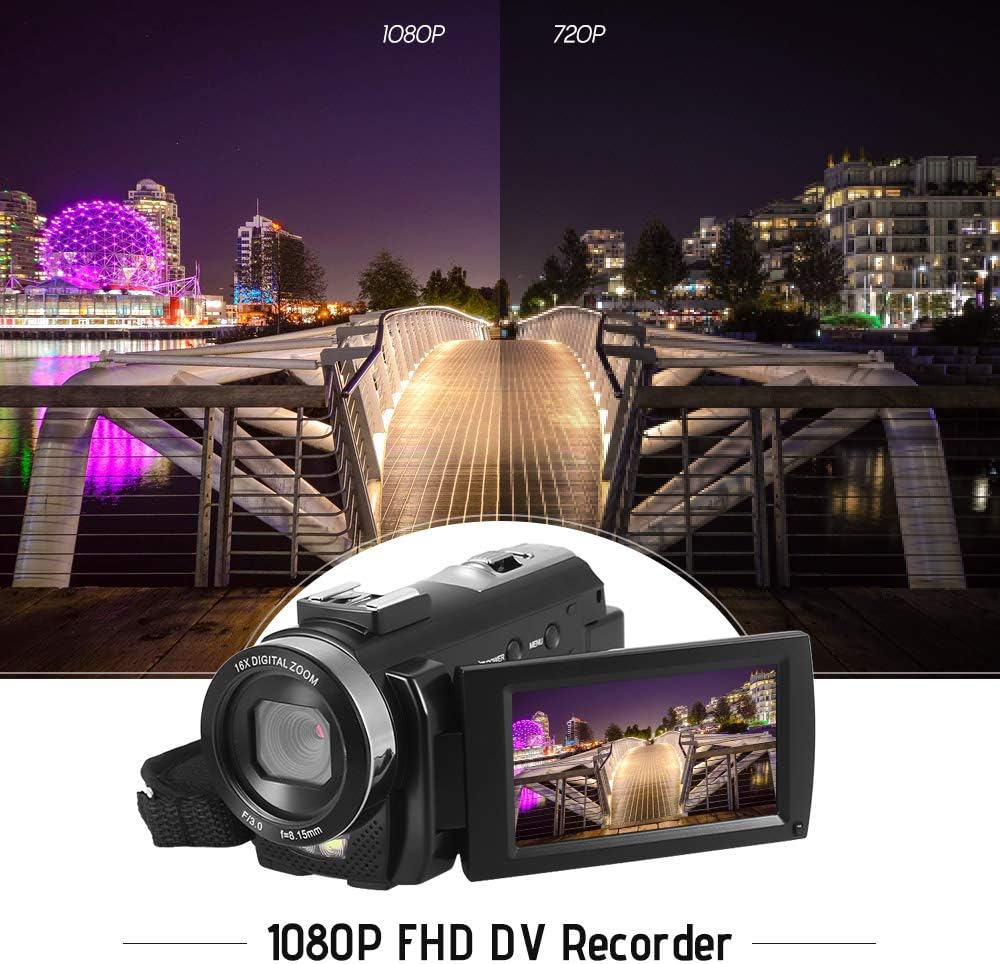
Figure 5.1: The camera is capable of recording in 1080p Full HD and 720p HD resolutions.
5.3. Argazkiak ateratzea
- Ensure the camera is in photo mode. If not, press the Modua aldatzeko botoia.
- Enkoadratu zure argazkia LCD pantaila erabiliz.
- Sakatu Argazkia button to capture an image.
5.4. Zoom digitala erabiltzea
- Erabili W (Zabala) eta T (Teleobjektiboa) lever to adjust the 16X digital zoom.

Figure 5.2: The camera's 16X digital zoom allows for closer views of subjects.
5.5. Menuaren ezarpenak
- Sakatu Menua botoia ezarpenetara sartzeko.
- Use the navigation buttons to scroll through options such as:
- Zurien balantzea: Auto, Daylight, Cloudy, Fluorescent, Tungsten.
- Eszena modua: Auto, Night, Portrait, Landscape, Backlight, Sport, Party, Beach, High Sensitivity.
- Filmatzeko modua: Single, Continuous.
- Esposizio: Adjust ±3.0EV.
- Tenporizadorea: Off, 2s, 5s, 10s.
- Itzali automatikoa: Off, 1min, 3min, 5min.
- Hizkuntza: English, German, French, Spanish, Italian, Turkish, Russian, Portuguese, Dutch, Simplified Chinese, Traditional Chinese, Japanese, Polish.
- Beste funtzio batzuk: Face Detection, Smile Capture, Beauty Face, Anti-Shake.
- Sakatu OK or Grabatu/Gelditu botoia hautaketak berresteko.
- Sakatu Menua botoia berriro irteteko.
5.6. Telebista batera konektatzea
- Use the provided AV cable to connect the camera's AV output to your television's AV input.
- Select the correct AV input channel on your TV to view camera content.
6. Mantentzea
6.1. Kamera garbitzea
- Erabili zapi leun eta lehor bat kameraren gorputza garbitzeko.
- Lentearentzat eta LCD pantailarentzat, erabili lenteak garbitzeko oihal eta disoluzio espezializatu bat. Saihestu produktu kimiko gogorrak.
6.2. Biltegiratzea
- Gorde kamera leku fresko eta lehor batean, eguzki-argitik eta muturreko tenperaturetatik babestuta.
- Kendu bateria denbora luzez kamera erabiliko ez bada.
7. Arazoak
| Arazoa | Kausa posiblea | Irtenbidea |
|---|---|---|
| Kamera ez da pizten. | Bateria agortuta dago edo ez da behar bezala sartu. | Charge the battery fully. Ensure the battery is inserted with correct polarity and the insulator tab is removed. |
| Ezin da bideoa grabatu edo argazkiak atera. | Memoria txartela beteta dago, sartu gabe edo hondatuta dago. | Insert a memory card. Delete unnecessary files or format the card (this will erase all data). Replace the card if corrupted. |
| Bideo/irudi kalitate eskasa. | Insufficient lighting, dirty lens, or incorrect settings. | Ensure adequate lighting. Use the LED fill light if necessary. Clean the lens. Adjust white balance and scene mode settings. |
| Kamera blokeatu egiten da edo ez du erantzuten. | Softwarearen akatsa edo bateria baxua. | Remove and reinsert the battery to reset the camera. Ensure the battery is charged. |
8. Zehaztapenak
| Ezaugarri | Zehaztapena |
|---|---|
| Marka | Andoer |
| Eredua | HDV-201LM |
| Irudi-sentsorea | 5 megapixeleko CMOS sentsorea |
| Bideo Ebazpena | 1920x1080P (FHD 30fps), 1280x720 (HD 30fps), 640x480 (VGA 30fps), 320x240 (VGA 30fps) |
| Bideo formatua | AVI |
| Irudien Ebazpena | 24MP (Interpolated), 20MP (Interpolated), 16MP (Interpolated), 12MP (Interpolated), 10MP (Interpolated), 7M Wide (Interpolated), 5MP, 3MP, 2M Wide, VGA |
| Irudi formatua | JPG |
| Zoom digitala | 16X |
| Lentea | ff (F/3.0 f=8.15mm) |
| Max Aperture | 8.15 F |
| LCD pantaila | 3.0-inch TFT-LCD (16:9), 270-degree rotation |
| Biltegiratzea | SD txartela (32 GB arte, 10. klasea gomendatzen da) |
| Konektibitatea | USB 2.0, AV Output (NTSC/PAL) |
| Elikatze Hornidura | 1 x 3.7V 800mAh bateria kargagarria |
| Urruneko Kontrol Bateria | 1 x 3V CR2025 bateria |
| Sistema eragilearen euskarria | Windows XP/Vista/7/8/10 |
| Ezaugarri bereziak | Anti-shake, Face Detection, Smile Capture, Beauty Face, Self-Timer, LED Fill Light, Hot Shoe Mount |
| Neurriak | 13.5 x 5.5 x 6.5 cm (5.3 x 2.2 x 2.6 in) |
| Pisua | 273g (9.6oz) with battery |
| Kolorea | Beltza |
9. Bermea eta Laguntza
Bermeari buruzko informazioa eta laguntza teknikoa lortzeko, kontsultatu erosketarekin batera emandako dokumentazioa edo jarri harremanetan zure saltzailearekin. Gorde erosketaren frogagiria bermearen erreklamazioetarako.
Ask a question about this manual
Ask about setup, troubleshooting, compatibility, parts, safety, or missing instructions. Manuals+ will review the question and use this page’s manual context to help answer it.