
Sarrera
The EVOLVEO EASYPHONE FM is a user-friendly mobile phone designed for straightforward communication. It features large, separated keys, a clear display, and essential functions to ensure ease of use. This manual provides instructions for setting up, operating, and maintaining your device.
1. Paketearen edukia
Mesedez, egiaztatu paketea elementu hauek dituen:
- EVOLVEO EASYPHONE FM Mobile Phone
- Kargatzeko kaia
- AC egokigailua
- Li-ion 1000 mAh Battery
- Erabiltzailearen eskuliburua
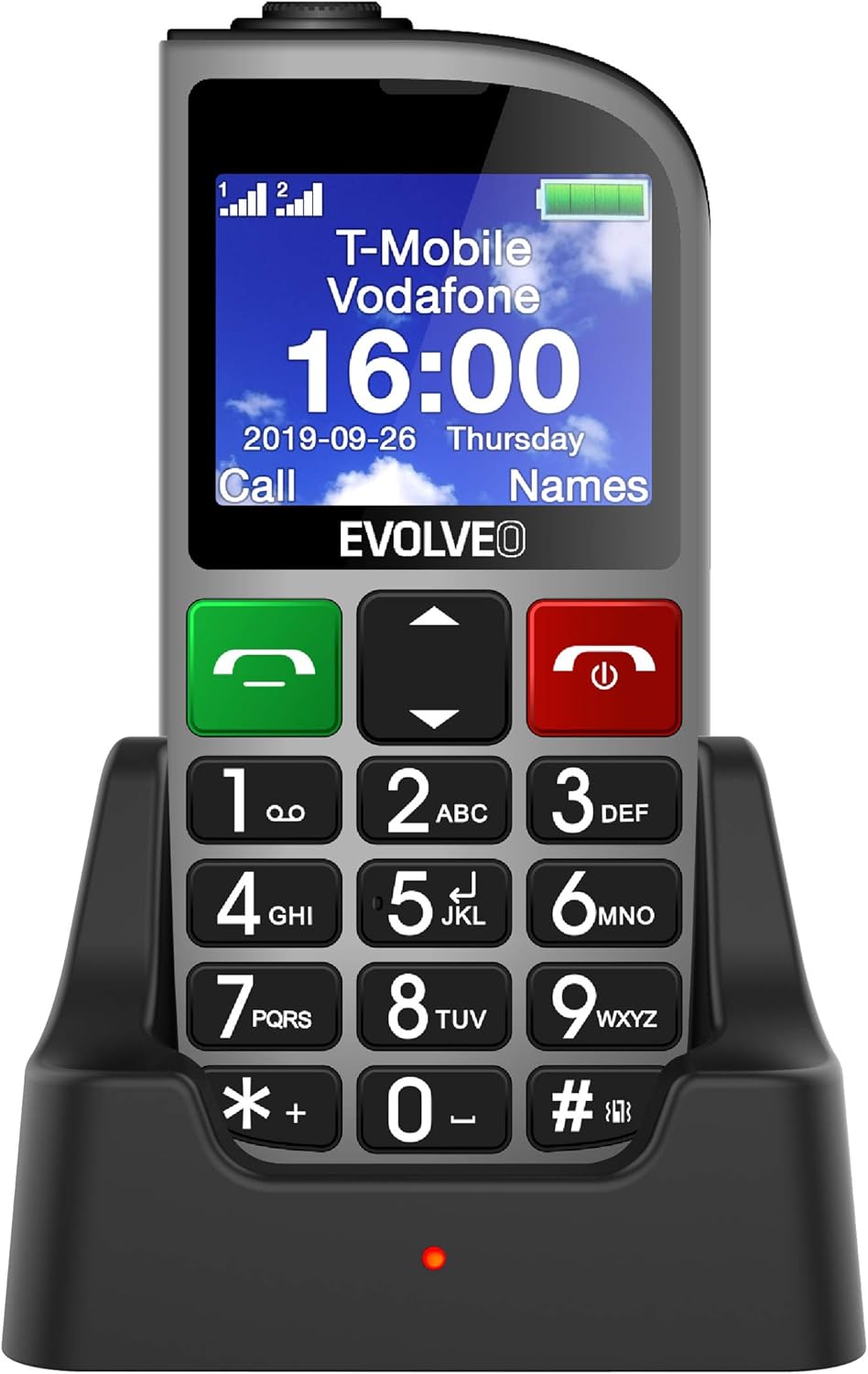
1.1. irudia: EVOLVEO EASYPHONE FM placed in its charging dock. The phone features a large display showing time and network information, with prominent green call and red end call buttons, and a numeric keypad below.
2. Konfigurazioa
2.1. Bateria instalatzea eta kargatzea
- Kendu telefonoaren atzeko estalkia.
- Insert the Li-ion 1000 mAh battery, ensuring the contacts align correctly.
- Jarri atzeko estalkia.
- Connect the AC adapter to the charging dock.
- Place the phone into the charging dock. The charging indicator light will illuminate.
- Utzi telefonoa guztiz kargatzen lehen aldiz erabili aurretik.
2.2. SIM txartela(k) sartzea
The phone supports two SIM cards (Dual SIM) for GSM/GPRS 850/900/1800/1900 MHz networks.
- Ziurtatu telefonoa itzalita dagoela.
- Kendu atzeko estalkia eta bateria.
- Locate the SIM card slots.
- Insert your SIM card(s) into the designated slots, ensuring correct orientation.
- Sartu berriro bateria eta atzeko estalkia.
2.3. Inserting a MicroSDHC Card
You can expand the phone's storage for music, photos, and other files by inserting a MicroSDHC card.
- Ziurtatu telefonoa itzalita dagoela.
- Kendu atzeko estalkia eta bateria.
- Locate the MicroSDHC card slot.
- Gently insert the MicroSDHC card until it clicks into place.
- Sartu berriro bateria eta atzeko estalkia.
3. Funtzionamendu-argibideak
3.1. Piztu/Itzali
- Pizteko: Sakatu eta eutsi botoiari Deia Amaitzeko Gorria/Piztea botoia pantaila argitu arte.
- Itzaltzeko: Sakatu eta eutsi botoiari Deia Amaitzeko Gorria/Piztea botoia sakatu itzaltzeko aukerak agertu arte, eta ondoren baieztatu.

3.1. irudia: Aurrealdea view of the EVOLVEO EASYPHONE FM, highlighting the large display, call buttons, and numeric keypad for easy dialing.
3.2. Deiak egitea eta jasotzea
- Dei bat egitea: Dial the number using the numeric keypad and press the Dei Berdea botoia.
- Markaketa bizkorra: The phone supports quick access to 8 popular contacts. Assign numbers to keys 2-9 for speed dialing. Press and hold the assigned key to dial.
- Dei bat jasotzea: Sakatu Dei Berdea Sarrerako dei bati erantzuteko botoia.
- Dei bat amaitzea: Sakatu Deia Amaitzeko Gorria/Piztea button to end an active call.
3.3. SMS mezuak bidaltzea eta jasotzea
The separated keyboard keys facilitate easy writing of SMS messages.
- Navigate to the Messaging menu.
- Hautatu "Mezua idatzi" SMS berri bat idazteko.
- Sartu hartzailearen zenbakia edo aukeratu kontaktuetatik.
- Idatzi zure mezua teklatua erabiliz.
- Sakatu "Bidali" mezua bidaltzeko.
3.4. Bolumenaren kontrola
Adjust the call and ringtone volume using the dedicated volume control button located on the left side of the phone.

3.2. irudia: Left side of the phone, showing the volume control buttons and the FM radio activation button.
3.5. SOS Larrialdi Botoia
The SOS button, located on the back of the device, allows for quick emergency calls and messages.
- Before use, configure up to five emergency contact numbers in the phone settings.
- Larrialdi batean, sakatu eta eutsi botoiari SOS botoia.
- The phone will automatically dial the predefined emergency numbers sequentially and send an emergency message to these contacts.

3.3. irudia: Atzekoa view of the EVOLVEO EASYPHONE FM, showing the prominent red SOS emergency button and the camera lens.
3.6. FM Irratia
The phone includes an FM radio with a dedicated activation button.
- To turn on the FM radio, press the independent FM button on the side of the device.
- The radio can play in the background, allowing you to use other phone functions.
- During an incoming or outgoing call, the radio will automatically mute and resume playback after the call ends.
3.7. Linterna
A powerful flashlight is integrated into the phone, activated by a dedicated button.
- Press the dedicated flashlight button on the side of the phone to turn the flashlight on or off.

3.4. irudia: Right side of the phone, showing the dedicated flashlight button.
3.8. Beste Ezaugarri batzuk
- Kamera: The phone includes a VGA camera for basic photo capture.
- Musika erreproduzitzailea: Erreproduzitu musika files stored on your MicroSDHC card.
- Digital Recorder (Dictaphone): Ahots-oharrak grabatu.
- Egutegia: Jarrai data eta gertaera garrantzitsuen jarraipena.
- Iratzargailua: Ezarri alarmak abisuetarako.
- Kalkulagailua: Oinarrizko kalkuluak egitea.
- Lupa: Utilize the screen as a magnifying glass.
4. Mantentzea
4.1. Gailua garbitzea
- Use a soft, dry cloth to clean the phone's surface and screen.
- Avoid using liquid cleaners or abrasive materials, as they may damage the device.
- Ziurtatu hezetasunik ez dela sartzen kargatzeko atakan edo beste irekiduretan.
4.2. Bateria zaintzea
- Bateriaren iraupena luzatzeko, saihestu telefonoa tenperatura altuen eraginpean jartzea.
- Charge the battery regularly, but avoid overcharging or letting it completely drain for extended periods.
- Telefonoa denbora luzez erabiliko ez baduzu, kargatu bateria % 50 inguru gorde aurretik.
5. Arazoak
If you encounter issues with your EVOLVEO EASYPHONE FM, refer to the following common problems and solutions:
5.1. Phone Does Not Turn On
- Ziurtatu bateria behar bezala instalatuta eta kargatuta dagoela.
- Connect the phone to the charger and wait a few minutes before attempting to power it on again.
- Egiaztatu bateriaren kontaktuak garbi dauden.
5.2. Ezin ditut deiak egin edo jaso
- Check if the SIM card(s) are correctly inserted and activated.
- Ensure you have network coverage.
- Verify that the phone is not in airplane mode (if applicable).
- Check your account balance or subscription status with your service provider.
5.3. FM Radio Not Working
- Ziurtatu FM seinale ona duen eremu batean zaudela.
- Check if the FM radio is properly activated using its dedicated button.
5.4. Pantaila arazoak
- If the display is dim, check the brightness settings.
- If the screen is unresponsive, try restarting the phone.
6. Zehaztapenak
| Marka | Eboluzioa |
| Eredua | EASYPHONE FM |
| Bistaratzeko tamaina | 1.8 hazbetekoa |
| Bistaratzeko ebazpena | 320 x 240 px |
| Teknologia Zelularra | 2G (GSM/GPRS 850/900/1800/1900 MHz) |
| SIM laguntza | SIM bikoitza |
| Konektibitatea | Bluetooth, 3.5 mm-ko jack-a |
| Bateria | Li-ioi 1000 mAh |
| Neurriak | 130 × 61 × 16.5 mm |
| Pisua | 105 g (bateriarekin) |
| Kamera | VGA |
| Biltegiratze-hedapena | MicroSDHC txartelaren zirrikitua |
Oharra: zehaztapenak aldez aurretik jakinarazi gabe alda daitezke.
7. Bermea eta Laguntza
For warranty information and technical support, please refer to the warranty card included in your package or visit the official Evolveo webgunea. Gorde erosketaren egiaztagiria bermearen erreklamazioetarako.


