
Sarrera
This manual provides comprehensive instructions for the setup, operation, and maintenance of your Kensington ClickSafe Universal Combination Laptop Lock, Model K68106WW. Please read these instructions carefully before using the product to ensure proper functionality and security.
Paketearen edukia
- Kensington ClickSafe Universal Combination Laptop Lock
- Universal Adapters (T-bar, Nano, Wedge-shaped)
- Argibide eskuliburua (dokumentu hau)
Konfigurazioa
1. Identifying Your Laptop Security Slot
The ClickSafe Universal Lock is designed to fit standard T-bar, nano, and wedge-shaped security slots found on most laptops. Examine your laptop's security slot to determine its type. The lock comes with various adapters to ensure compatibility.

Image: The Kensington ClickSafe lock head positioned next to a laptop's security slot, illustrating how the lock aligns with the port.

Image: The Kensington ClickSafe lock head displayed alongside three different universal adapters, demonstrating its compatibility with various laptop security slot types.
2. Zure konbinazioa ezartzea
Your lock is factory-set to a default combination, typically 0-0-0-0. To set your personal combination:
- Ensure the lock is disengaged and the current combination is set to the opening code (factory default or previous personal code).
- Locate the reset button or mechanism on the lock body. This is often a small button that requires a pen tip or similar pointed object to press.
- Eduki sakatuta berrezarri botoia.
- While holding the reset button, rotate the dials to your desired new 4-digit combination.
- Askatu berrezarri botoia. Zure konbinazio berria ezarrita dago.
- Garrantzitsua: Write down your new combination and store it in a secure, memorable location. Kensington does not retain user combinations. For master-coded versions, IT administrators may have a master key or code to reset forgotten combinations.
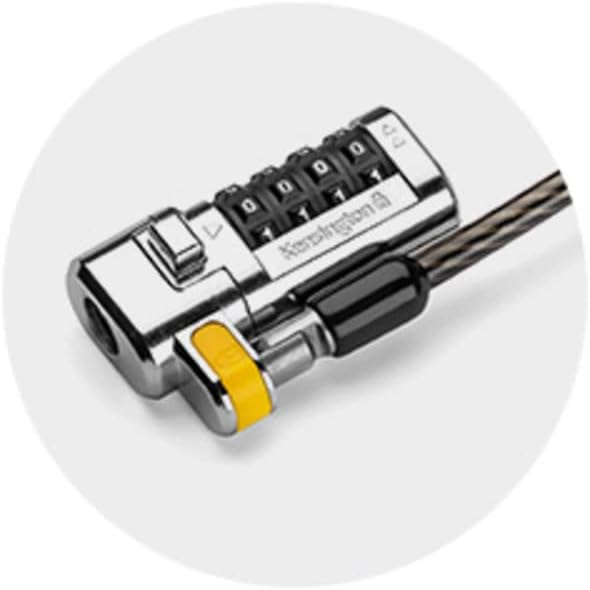
Irudia: Gertutik view of the Kensington ClickSafe lock head, highlighting the four combination dials used for setting and entering the security code.
Funtzionamendu-argibideak
1. Attaching the Lock to Your Laptop
- Ensure the correct adapter is installed on the lock head for your laptop's security slot type.
- Loop the carbon steel cable around a secure, immovable object (e.g., a desk leg, heavy furniture).
- Align the lock head with your laptop's security slot.
- Push the lock head firmly into the security slot until you hear a "click." This indicates the ClickSafe mechanism has engaged and the lock is secured. The combination does not need to be entered to attach the lock.
- Gently pull on the lock head to ensure it is securely fastened.

Image: The Kensington ClickSafe laptop lock securely attached to the security slot of a laptop, with the cable looped around a stationary object.
2. Detaching the Lock from Your Laptop
- Rotate the combination dials to your personal 4-digit combination.
- Press the release button or mechanism on the lock head.
- Gently pull the lock head out of the laptop's security slot.
3. Pivot and Rotate Cable Feature
The lock features a special hinge that allows the cable to pivot and rotate 360 degrees. This provides flexible movement and easier positioning of your laptop without straining the cable or the security slot.

Image: A close-up of the Kensington ClickSafe lock head, showing circular arrows indicating its pivot and rotate functionality for flexible cable movement.
Mantentzea
- Keep the lock mechanism clean and free from dust and debris.
- Saihestu giltzarrapoa tenperatura altuen edo produktu kimiko gogorren eraginpean jartzea.
- Periodically check the cable for any signs of wear or damage. If the cable is damaged, replace the lock immediately.
- Do not attempt to lubricate the lock mechanism with oil-based products, as this can attract dirt and impair functionality.
Arazoak konpontzea
- Blokeoa ez da sartzen: Ensure the correct adapter is used for your laptop's security slot. Push the lock head firmly until you hear a click.
- Cannot detach lock: Verify that the correct combination is entered. Ensure the release button is fully pressed.
- Forgotten combination: If you have forgotten your personal combination, and your lock is part of a master-coded system, contact your IT administrator for assistance. Otherwise, there is no way to reset the combination without the master code.
- Cable damage: If the carbon steel cable shows signs of fraying or damage, discontinue use and replace the lock.
Zehaztapenak
| Marka | Kensington |
| Modelo zenbakia | K68106WW |
| Blokeo mota | Combination Lock (Master Coded) |
| Kablearen luzera | 1.8 m (5.91 ft) |
| Kable Materiala | Carbon Steel with Plastic Sheath |
| Gailua onartzen da | Notebooks with T-bar, Nano, or Wedge-shaped security slots |
| Elementuaren neurriak (L x W x H) | 28 x 16 x 3 zentimetro |
| Elementuaren pisua | 249 g |
| UPC | 085896681069 |

Image: A detailed cross-section illustrating the multiple strands of carbon steel wire within the protective plastic sheath of the security cable.
Bermea eta Laguntza
The Kensington ClickSafe Universal Combination Laptop Lock is covered by a 2 urteko bermea erosketa-datatik aurrera. Berme honek ohiko erabileran materialen eta eskulanen akatsak estaltzen ditu.
For technical support, warranty claims, or further assistance, please visit the official Kensington website or contact Kensington customer service. Refer to the contact information provided with your product packaging or on the Kensington webgunea.
Fabrikatzailearen harremanetarako informazioa: Kensington, PE C0B 1M0, CA


