
1. Produktua amaitu daview
The Alecto WS-1560 is a wireless weather station designed to provide accurate indoor and outdoor environmental data. Featuring a clear color display and a remote outdoor sensor, it offers comprehensive weather information and additional useful functions for your home.
Ezaugarri nagusiak:
- Measures indoor and outdoor temperature and humidity.
- Long-range wireless outdoor sensor (up to 100 meters).
- 5.7-inch well-lit color display with animated weather forecast icons.
- Temperature and ice alarm functions.
- Erlojua errepikatzeko funtzioarekin.
- Memory function for latest and highest readings.
- Moon phase indicator, date, day, and time display.
- Battery-operated main unit and outdoor sensor with backup batteries.

Figure 1.1: Alecto WS-1560 Main Unit and Wireless Outdoor Sensor.
2. Paketearen edukia
Ensure all components are present and in good condition upon unpacking:
- Alecto WS-1560 Main Unit (Indoor Display)
- Haririk gabeko kanpoko sentsorea
- Erabiltzailearen eskuliburua
- (Power adapter and batteries may be included depending on package)
Video 2.1: Illustrative video showing typical weather station components and basic setup. (Note: This video is for a related product and may not show the exact Alecto WS-1560 model.)
3. Konfigurazioa eta instalazioa
3.1. Bateriaren instalazioa
Both the main unit and the outdoor sensor require batteries for operation. Ensure you use the correct type and polarity.
- Kanpoko sentsorea:
- Open the battery compartment on the back of the wireless outdoor sensor.
- Insert 2x AA batteries (not included) according to the polarity markings (+/-).
- Itxi bateriaren konpartimendua ongi.
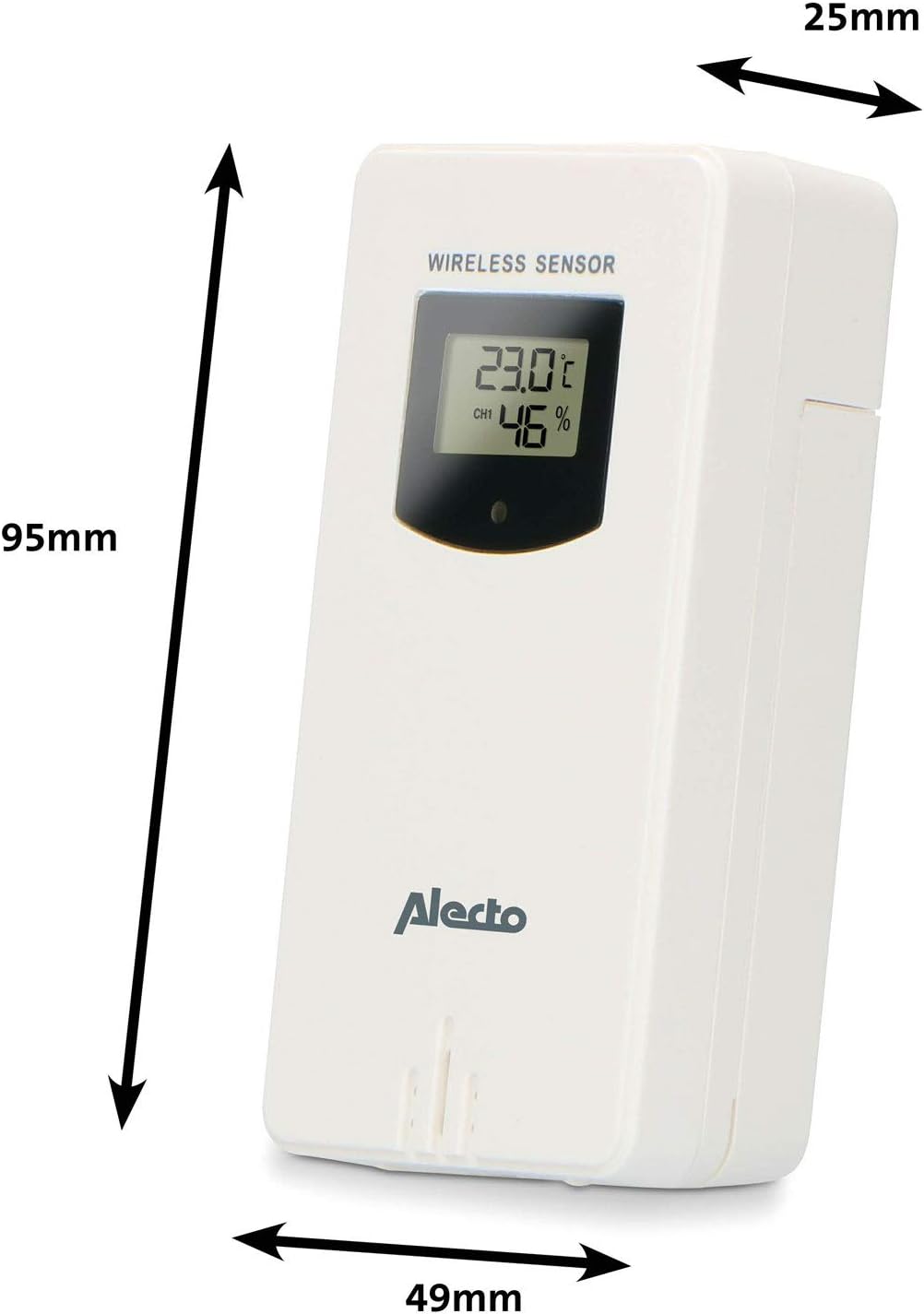
Figure 3.1: Wireless Outdoor Sensor dimensions and battery compartment location.
- Unitate nagusia:
- Ireki unitate nagusiaren atzealdean dagoen bateriaren konpartimentua.
- Insert 2x AA batteries (not included) according to the polarity markings (+/-). These serve as backup batteries.
- Itxi bateriaren konpartimendua ongi.
- Connect the main unit to a power outlet using the provided power adapter (if included).

Figure 3.2: Main Unit dimensions and power input.
3.2. Sentsoreak jartzea
For accurate outdoor readings, proper placement of the wireless sensor is crucial:
- Place the sensor in a shaded area, away from direct sunlight, to prevent inaccurate temperature readings.
- Ensure good air circulation around the sensor.
- Mount the sensor vertically, approximately 1.5 to 2.5 meters (5 to 8 feet) above the ground.
- Avoid placing the sensor near heat sources (e.g., vents, windows) or moisture sources.
- The maximum transmission range is 100 meters (328 feet) in open air. Walls and other obstacles will reduce this range.

3.3. irudia: Adibample of outdoor sensor placement on a wall.
3.3. Pairing the Sensor with the Main Unit
The main unit and sensor should automatically pair once both are powered on. If pairing does not occur:
- Ensure both units have fresh batteries and are within range.
- Press the "TX" button inside the outdoor sensor's battery compartment to manually send a signal.
- On the main unit, you may need to initiate a search for the outdoor sensor (refer to the "Operation" section for specific button functions).
4. Funtzionamendua
4.1. Bistaratu diseinua
5.7 hazbeteko koloretako pantailak ikuspegi garbia eskaintzen duview of all measured data. Key areas include:
- Kanpoko tenperatura eta hezetasuna: Displays current outdoor conditions.
- Barruko tenperatura eta hezetasuna: Displays current indoor conditions.
- Animated Weather Forecast: Icons predict upcoming weather (sunny, partly cloudy, cloudy, rainy, snowy).
- Ordua eta data: Current time, day, and date.
- Presio barometrikoa: Uneko presio atmosferikoa.
- Ilargiaren fasea: Ilargiaren egungo fasearen irudikapen grafikoa.
- Temperature/Ice Alarm Indicators: Alerts for specific temperature thresholds or potential ice conditions.

4.1. irudia: Xehetasuna view of the main unit's color display.
4.2. Botoiaren funtzioak
The main unit features several buttons for setting and adjusting functions. Common buttons include:
- SET: Enters setup mode for time, date, and other settings.
- JARRAIBIDEAK: Switches between display modes or confirms settings.
- UP/DOWN (or +/-): Adjusts values during setup or cycles through channels.
- ALARMA: Sets or activates the alarm function.
- MEM: Displays maximum/minimum temperature and humidity records. Long press to clear records.
- SNOOZE/LIGHT: Activates snooze during an alarm or adjusts backlight brightness.
Video 4.2: Illustrative video demonstrating various features and settings of a weather station. (Note: This video is for a related product and may not show the exact Alecto WS-1560 model.)
4.3. Ordua eta data ezartzea
- Press and hold the "SET" button until the time display starts flashing.
- Use the "UP" or "DOWN" buttons to adjust the hour, then press "SET" to confirm and move to minutes.
- Errepikatu minutuetarako, urterako, hilabeterako eta egunerako.
- Press "SET" again to exit the setting mode.
4.4. Alarma ezarpenak
- Press the "ALARM" button once to view iratzargailuaren ordua.
- Press and hold the "ALARM" button until the alarm time starts flashing.
- Use the "UP" or "DOWN" buttons to set the desired alarm hour and minute.
- Press "ALARM" to confirm.
- To activate/deactivate the alarm, press the "ALARM" button briefly when the alarm time is displayed. An alarm icon will appear/disappear.
4.5. Max/Min Records
The weather station automatically records the maximum and minimum temperature and humidity values over a 24-hour period.
- Press the "MEM" button briefly to view the maximum recorded values.
- Press "MEM" again to view gutxieneko erregistratutako balioak.
- Press "MEM" a third time to return to current readings.
- To clear the records, press and hold the "MEM" button for a few seconds.
5. Mantentzea
- Garbiketa: Wipe the display and unit surfaces with a soft, damp oihal. Ez erabili garbitzaile edo disolbatzaile urratzailerik.
- Bateria ordezkatzea: Replace batteries in both the main unit and the outdoor sensor when the low battery indicator appears on the display. Always replace all batteries at the same time with new ones of the same type.
- Sentsoreen zainketa: Periodically check the outdoor sensor for debris or obstructions that might affect its readings. Ensure it remains in a shaded, well-ventilated area.
6. Arazoak
| Arazoa | Kausa posiblea | Irtenbidea |
|---|---|---|
| No outdoor temperature/humidity reading (or "---" displayed) |
|
|
| Tenperatura/hezetasun irakurketa zehaztugabeak |
|
|
| Pantaila iluna edo hutsik dago |
|
|
7. Zehaztapenak
| Modelo zenbakia | WS-1560 |
| Marka | Alecto |
| Energia iturria (unitate nagusia) | Power Adapter (if included) + 2x AA batteries (backup) |
| Energia iturria (kanpoko sentsorea) | 2x AA bateria |
| Produktuaren neurriak (unitate nagusia) | 5.1 x 16.5 x 12.3 cm |
| Produktuaren pisua | 440 g |
| Wireless Sensor Range | 100 metro arte (aire zabalean) |
| Bistaratzeko tamaina | 5.7 hazbete / 14.5 cm |
| Jatorria | Txina |
8. Bermea eta Laguntza
For warranty information, technical support, or service inquiries, please refer to the warranty card included with your product or visit the official Alecto webgunea. Gorde erosketa-agiria erosketaren frogagiri gisa.
Alecto Webgunea: www.alecto.nl (General Alecto website, specific support page may vary)