
1. Sarrera
Thank you for choosing the Kaiser KSW-5004 Rechargeable Bluetooth Speaker. This portable speaker is designed to deliver clear audio with versatile connectivity options, including Bluetooth, USB, Micro SD, and AUX input. It also features an auxiliary RGB light and KSR-Link technology for wireless stereo pairing. This manual provides essential information for safe and efficient use of your speaker.
2. Segurtasun informazioa
- Irakurri argibide guztiak gailua erabili aurretik.
- Keep the speaker away from water, moisture, and high temperatures.
- Ez saiatu bozgorailua desmuntatzen, konpontzen edo aldatzen. Horrek bermea baliogabetuko du.
- Erabili emandako kargatzeko kablea edo baliokide ziurtatu bat soilik.
- Saihestu bateria muturreko tenperaturetara edo eguzki-argitara zuzenean jartzea.
- Garbitu bozgorailua zapi leun eta lehor batekin. Ez erabili garbitzaile likidorik edo aerosolik.
3. Paketearen edukia
Mesedez, egiaztatu paketea elementu hauek dituen:
- Kaiser KSW-5004 Rechargeable Bluetooth Speaker
- USB kargatzeko kablea
- Erabiltzailearen eskuliburua
4. Produktua amaitu daview
Aurrealdea View

4.1. irudia: Aurrealdea view of the KSW-5004 speaker, showcasing the speaker grille and RGB light ring.
Goiko kontrol panela

Figure 4.2: Top panel controls including buttons for 'LUCES' (Lights), 'MODO LINK' (Mode/Link), Play/Pause, and Volume/Track navigation.
Rear Connection Panel
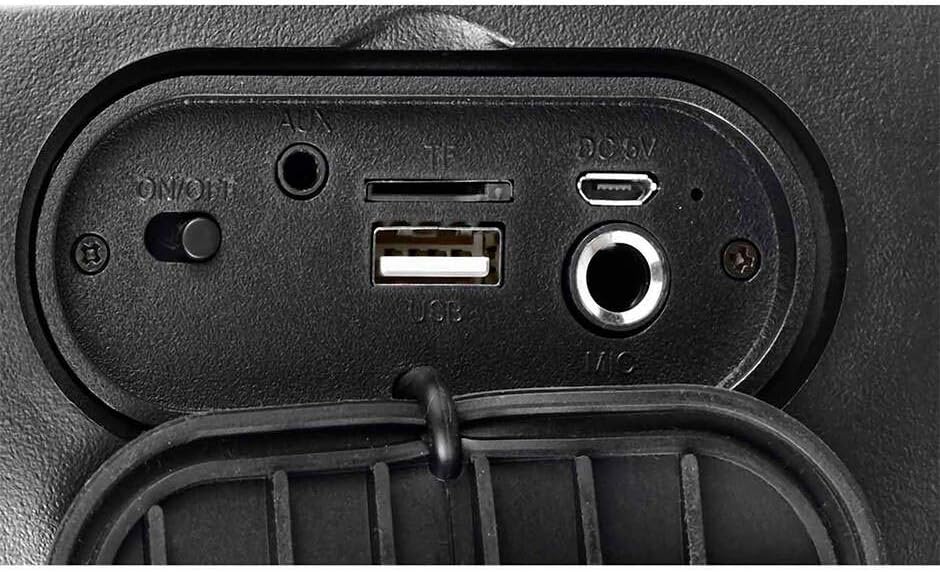
Figure 4.3: Rear connection panel with ON/OFF switch, AUX input, TF (Micro SD) card slot, USB port, DC 5V charging port, and Microphone input.
5. Konfigurazioa
5.1 Bozgorailua kargatzea
Before first use, fully charge the speaker. Connect the provided USB charging cable to the DC 5V port on the speaker and the other end to a USB power adapter (not included) or a computer's USB port. The charging indicator will illuminate during charging and turn off when fully charged.
5.2 Piztu/Itzaltzea
Kokatu ON/OFF switch on the rear connection panel. Slide the switch to the ON bozgorailua pizteko posiziora irristatu. OFF itzaltzeko posizioa.
6. Funtzionamendu-argibideak
6.1 Bluetooth parekatzea
- Piztu bozgorailua. Automatikoki Bluetooth parekatze moduan sartuko da, argi keinukari batek edo soinu-abisu batek adierazita.
- Gaitu Bluetooth-a zure gailu mugikorrean (telefono adimenduna, tableta, ordenagailu eramangarria).
- Bilatu eskuragarri dauden Bluetooth gailuak eta hautatu "KSW-5004" zerrendatik.
- Once connected, the speaker will emit a confirmation tone, and the light indicator will become solid.
6.2 KSR-Link (True Wireless Stereo - TWS)
To pair two KSW-5004 speakers for a stereo sound experience:
- Ensure both KSW-5004 speakers are powered on and not connected to any Bluetooth device.
- Bozgorailuetako batean, sakatu eta eutsi botoiari "MODO LINK" button. The speaker will emit a pairing tone.
- Bi bozgorailuak automatikoki konektatuko dira elkarri. Konektatu ondoren, baieztapen-tonu bat entzungo da.
- Now, enable Bluetooth on your device and connect to the primary speaker (the one you pressed the 'MODO LINK' button on). Both speakers will play audio in stereo.
6.3 USB / Mikro SD erreprodukzioa
Insert a USB flash drive or a Micro SD card (TF card) into the corresponding port on the rear connection panel. The speaker will automatically detect the storage device and begin playing audio files. Erabili Aurrekoa/Bolumena jaitsi eta Hurrengoa/Bolumena igo pistak nabigatzeko botoiak.
6.4 AUX sarrera
Konektatu kanpoko audio gailu bat (adibidez, MP3 erreproduzitzailea, ordenagailu eramangarria) AUX port using a 3.5mm audio cable (not included). The speaker will automatically switch to AUX mode. Use the connected device to control playback.
6.5 RGB argiaren kontrola
Sakatu "LUCES" button on the top control panel to cycle through different RGB light modes or to turn the light off.
6.6 Volume and Track Control
- Sakatu Aurrekoa/Bolumena jaitsi botoia (K-) to decrease volume. Press and hold to go to the previous track.
- Sakatu Hurrengoa/Bolumena igo botoia (K+) to increase volume. Press and hold to go to the next track.
- Sakatu Erreproduzitu/Pausatu botoia (||) audioa erreproduzitzeko edo pausatzeko.
7. Mantentzea
- Garbitu bozgorailua zapi leun, lehor eta lihorik gabeko batekin.
- Ez erabili garbitzaile urratzailerik, argizaririk edo disolbatzailerik.
- Gorde bozgorailua leku fresko eta lehor batean denbora luzez erabiltzen ez duzunean.
- Recharge the battery periodically if not used for a long time to maintain battery health.
8. Arazoak
| Arazoa | Kausa posiblea | Irtenbidea |
|---|---|---|
| Bozgorailuak ez du pizten. | Bateria agortuta dago. | Kargatu bozgorailua guztiz. |
| Ez dago soinurik bozgorailutik. | Volume is too low or muted. Incorrect input source. | Increase volume on speaker and connected device. Ensure correct mode (Bluetooth, USB, SD, AUX) is selected. |
| Bluetooth gailua ezin da parekatu. | Speaker not in pairing mode. Bluetooth is off on device. Device is too far. | Ensure speaker is in pairing mode. Turn on Bluetooth on your device. Move device closer to speaker (within 10m). |
| KSR-Link (TWS) not working. | Speakers already paired to other devices. | Ensure both speakers are unpaired from any other Bluetooth devices before initiating KSR-Link pairing. |
| USB/Micro SD playback issues. | Onartu gabe file format. Corrupted media. | Ziurtatu audioa files are in a supported format (e.g., MP3). Try a different USB drive or Micro SD card. |
9. Zehaztapenak
| Ezaugarri | Zehaztapena |
|---|---|
| Eredua | KSW-5004 |
| Irteera Potentzia | 10W RMS |
| Bozgorailuaren tamaina | 4 hazbetekoa |
| Bluetooth bertsioa | 5.0 |
| Bluetooth barrutia | Gehienez 10 metro |
| Konektibitatea | Bluetooth, USB, Micro SD (TF), AUX (3.5mm) |
| Energia iturria | Bateriaren bidez |
| Bateriaren iraupena | Up to 10 hours (at moderate volume) |
| Neurriak (L x W x H) | 16.2 x 14.7 x 24.3 cm |
| Pisua | 1.16 kg |
| Kolorea | Beltza |
| Ezaugarri bereziak | RGB Light, KSR-Link (TWS), Water Resistant |
| Gailu bateragarriak | Ordenagailu eramangarria, MP3 erreproduzitzailea, telefono adimenduna, tableta |

Figure 9.1: KSW-5004 speaker with indicated dimensions.
10. Bermea eta Laguntza
For warranty information or technical support, please refer to the warranty card included with your product or contact Kaiser customer service directly. Keep your purchase receipt as proof of purchase.