
Sarrera
Eskerrik asko erosketagatik.asing the VOKSUN S300 Portable Bluetooth Vinyl Record Player. This device is designed to provide a unique and versatile audio experience, allowing you to enjoy your vinyl collection and digital music with ease. This manual will guide you through the setup, operation, and maintenance of your record player to ensure optimal performance and longevity.
Mesedez, irakurri arretaz eskuliburu hau produktua erabili aurretik eta gorde ezazu etorkizunean erreferentzia gisa.
Segurtasun-argibideak
To prevent fire or shock hazards, observe the following precautions:
- Ez jarri unitatea euri edo hezetasunera.
- Ez erabili unitate hau uraren ondoan.
- Garbitu zapi lehor batekin bakarrik.
- Ez blokeatu aireztapen-irekidurak. Instalatu fabrikatzailearen argibideen arabera.
- Ez instalatu bero-iturri inongo ondoan, esate baterako, erradiadoreak, bero-erregistroak, sukaldeak edo beste aparatu batzuk (barne ampberoa sortzen duten argitzaileak).
- Babestu korronte-kablea ibiltzetik edo atxilotzetik, batez ere entxufeetan, erosotasun-harguneetan eta unitatetik irteteko puntuan.
- Erabili soilik fabrikatzaileak zehaztutako eranskinak/osagarriak.
- Deskonektatu unitatea tximista-ekaitzetan edo denbora luzez erabiltzen ez baduzu.
- Jarri zerbitzu-zerbitzu guztiak zerbitzu-pertsonal kualifikatuari. Zerbitzua egin behar da unitatea edozein modutan hondatu denean, hala nola elikadura-kablea edo entxufea hondatuta dagoenean, likidoa isuri denean edo objektuak unitatean erori direnean, unitatea euri edo hezetasunaren eraginpean egon denean, ez du normalean funtzionatzen. , edo erori egin da.
Paketearen edukia
Egiaztatu elementu guztiak zure paketean sartuta daudela:
- VOKSUN S300 Portable Bluetooth Vinyl Record Player
- Elikatze-moldagailua
- USB kablea
- 3.5 mm-ko AUX kablea
- Argibide eskuliburua
Produktua amaituview
Atzeko panelaren konexioak
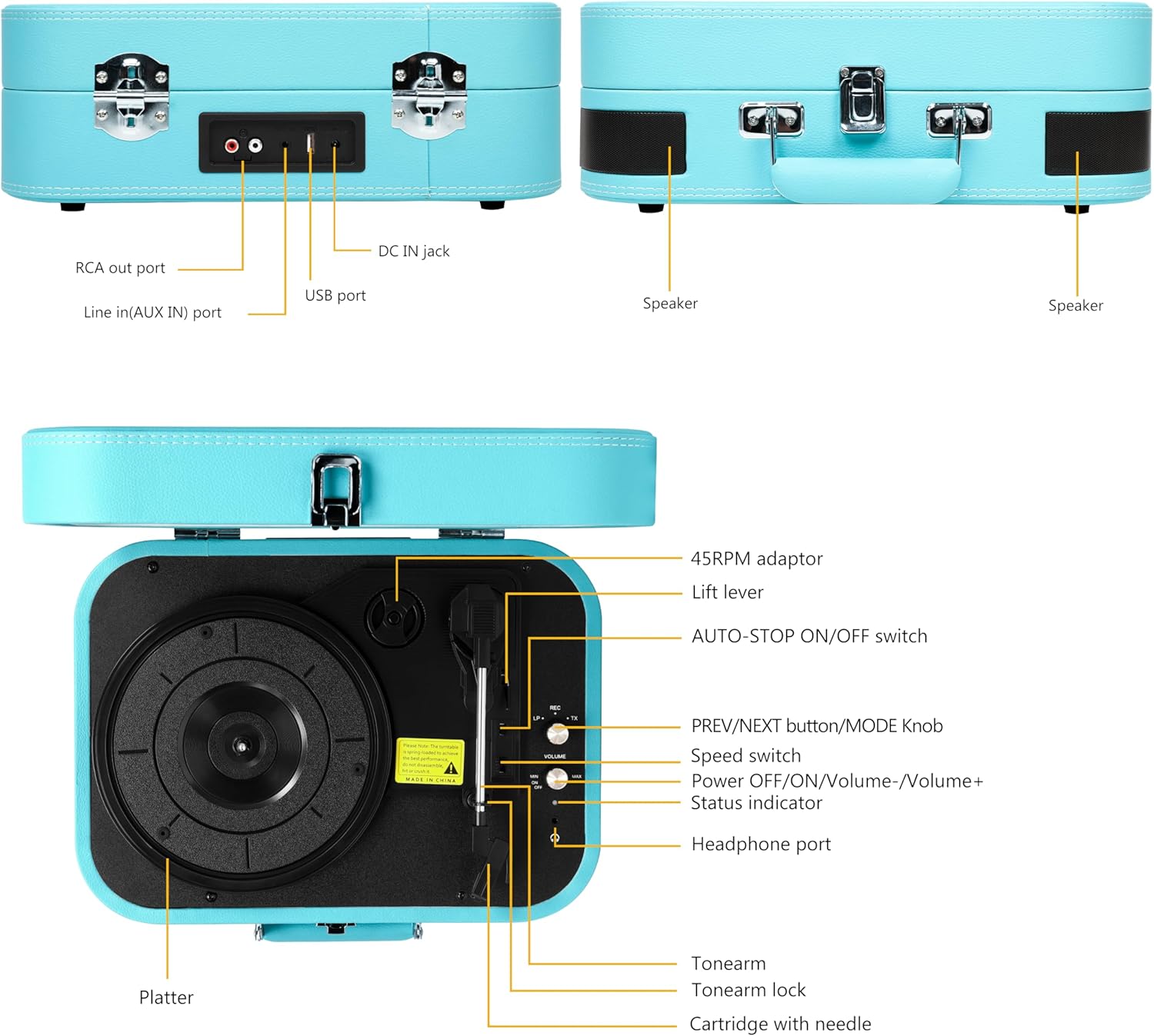
This image displays the rear panel of the record player, highlighting the RCA output for external speakers, the AUX input for connecting external audio devices, the DC IN jack for power, and the USB port for playback and recording.
- RCA Out Port: Connects to external speakers for enhanced audio output.
- Line In (AUX IN) Port: Connects external audio devices (e.g., smartphones, MP3 players) via a 3.5mm cable.
- DC IN Jack: Power input for the record player.
- USB ataka: MP3 erreproduzitzeko. files from a USB flash drive or recording vinyl to MP3.
Top Panel Controls and Components

This image illustrates the top view of the record player, detailing the platter, tonearm assembly, speed selector, and various control buttons and ports.
- 45RPM Adaptor: Used for playing 45 RPM records with a large center hole.
- Igogailua: Tonearma altxatzen eta jaisten du.
- AUTO-STOP ON/OFF Switch: Enables or disables the auto-stop function at the end of a record.
- PREV/NEXT Button / MODE Knob: Controls track selection (USB/Bluetooth) and switches between input modes (Vinyl, Bluetooth, AUX, USB).
- Abiadura etengailua: Selects playback speed (33-1/3, 45, 78 RPM).
- Power OFF/ON / Volume-/Volume+ Knob: Unitatea piztu/itzali eta bolumena doitzen du.
- Egoera adierazlea: LED light indicating current mode or status.
- Aurikularren ataka: Entzungailuak konektatzen ditu pribatuan entzuteko.
- Tonu-besoa: Kartutxoa eta arkatza eusten ditu.
- Tonearm Lock: Secures the tonearm when not in use or during transport.
- Cartridge with Needle: Reads the grooves of the vinyl record.
- Platerua: Erregistroak jartzen diren gainazal birakaria.
Konfigurazioa
1. Deskargatzea
Carefully remove the record player from its packaging. Retain the packaging for future transport or storage. Ensure all components listed in the 'Package Contents' section are present.
2. Energia-konexioa
- Konektatu korronte-egokitzailea disko-erreproduzitzailearen atzealdeko DC IN hartunera.
- Plug the other end of the power adapter into a suitable wall outlet.
3. Hasierako kokapena
Place the record player on a stable, level surface away from direct sunlight, heat sources, and excessive dust or vibrations. Ensure adequate ventilation around the unit.
Funtzionamendu-argibideak
1. Basic Vinyl Playback
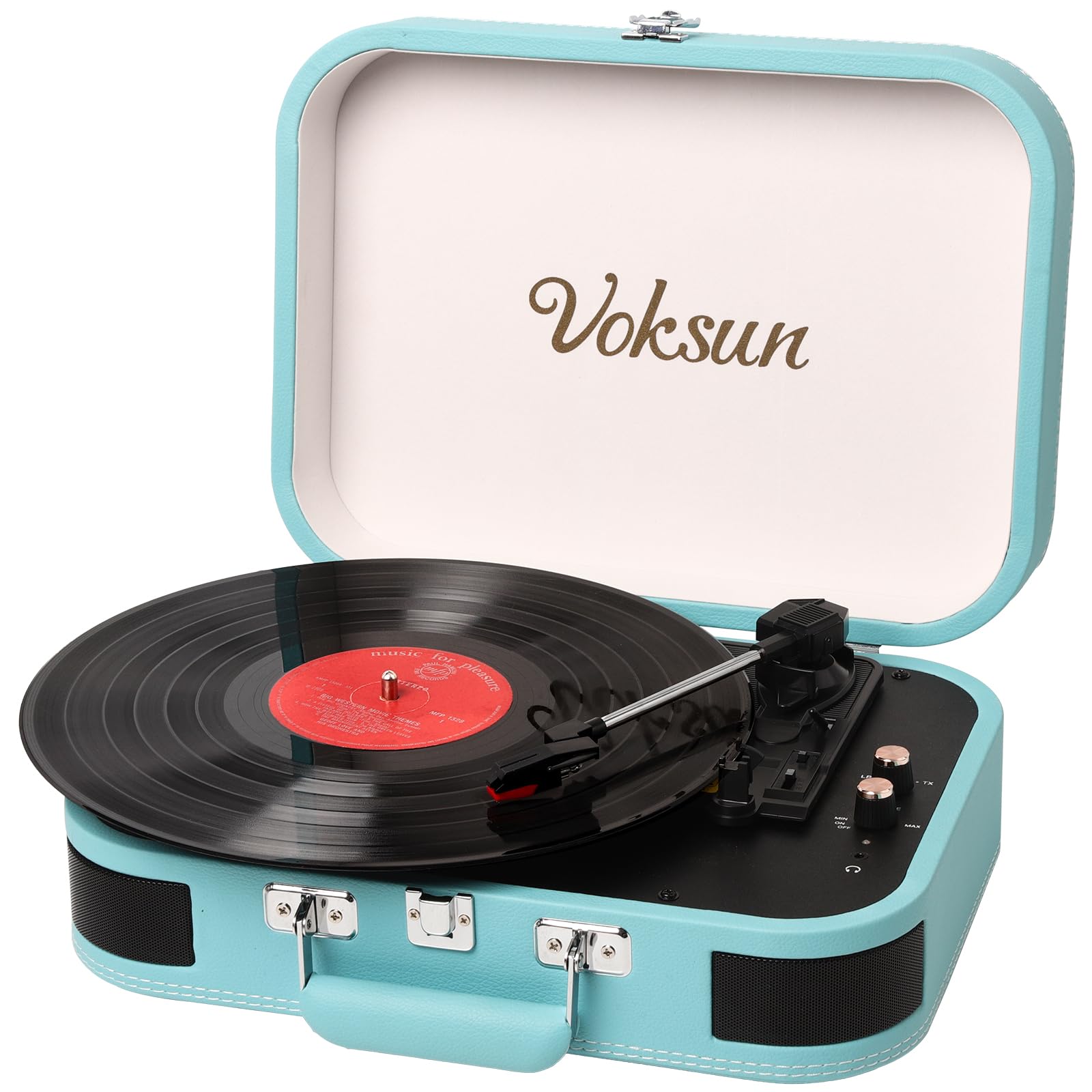
This image shows the record player in an open position with a vinyl record placed on the platter, illustrating its readiness for playing music.
- Ireki disko-jogailuaren tapa.
- Turn the Power OFF/ON/Volume knob clockwise to power on the unit. The status indicator will light up.
- Jarri binilozko disko bat erretiluan.
- Select the appropriate speed (33-1/3, 45, or 78 RPM) using the Speed Switch, matching your record's speed. Use the 45RPM adaptor if necessary for 45 RPM records.
- Release the Tonearm Lock.
- Lift the Tonearm using the Lift Lever.
- Carefully position the stylus over the desired track of the record.
- Gently lower the Tonearm using the Lift Lever. The record will begin to play.
- Adjust the volume using the Power OFF/ON/Volume knob.
- At the end of the record, if the AUTO-STOP switch is ON, the platter will stop rotating automatically. If OFF, it will continue to rotate.
- To stop playback manually, lift the tonearm, return it to its rest, and engage the tonearm lock.
2. Bluetooth modua
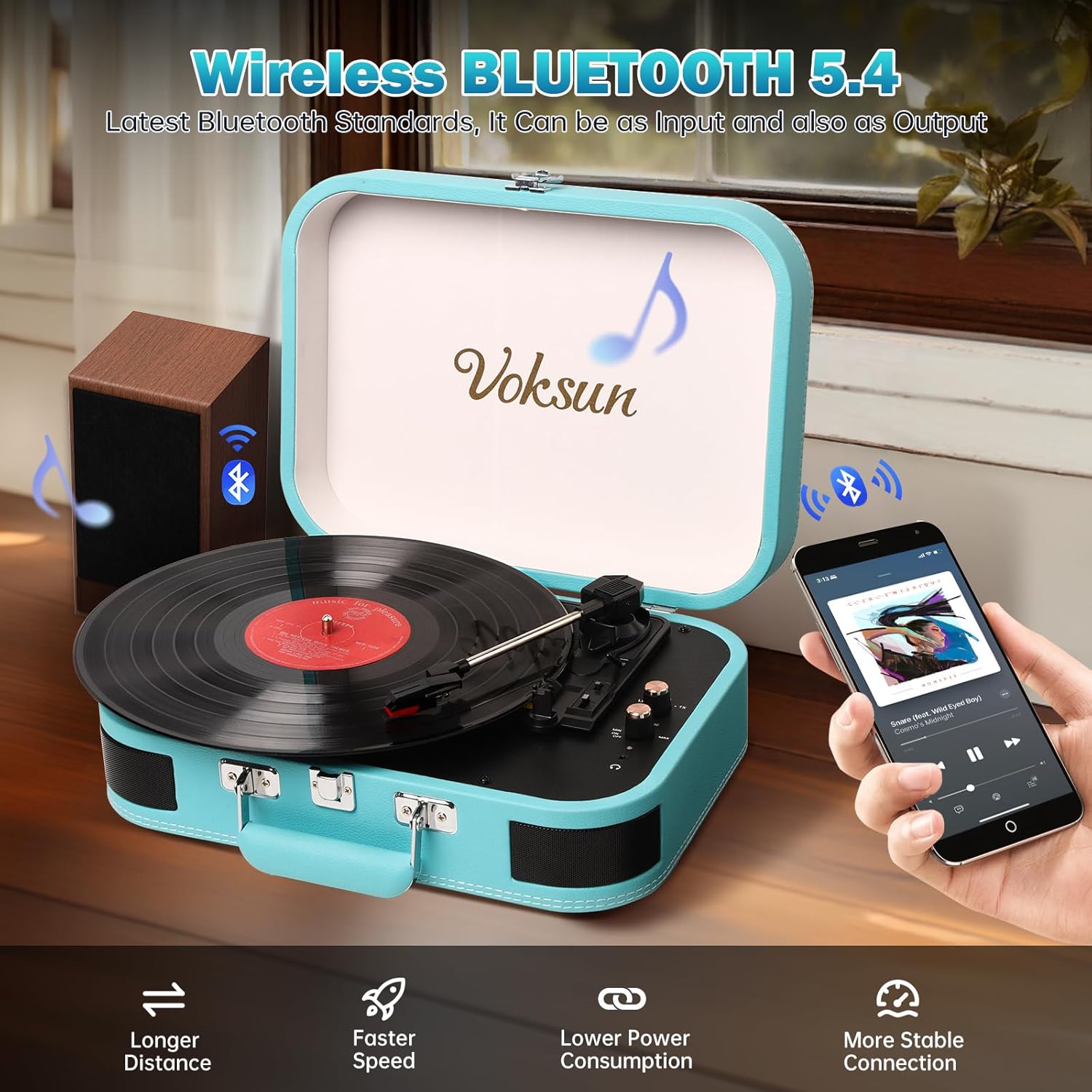
This image demonstrates the record player's Bluetooth connectivity, showing a smartphone wirelessly streaming music to the unit.
- Piztu disko-jogailua.
- Rotate the MODE knob to select Bluetooth mode. The status indicator will flash blue, indicating pairing mode.
- Gaitu Bluetooth-a zure telefonoan edo beste Bluetooth gaitutako gailu batean.
- Bilatu "VOKSUN" in your device's Bluetooth list and select it to pair.
- Once paired, the status indicator will stop flashing and remain solid blue.
- You can now play music from your device through the record player's speakers. Adjust volume on both the record player and your device.
3. AUX sarrera

This image illustrates the use of the 3.5mm AUX IN and Headphone ports, showing a user enjoying music with headphones and an AUX cable connected.
- Piztu disko-jogailua.
- Connect one end of the 3.5mm AUX cable to the AUX IN port on the rear of the record player.
- Connect the other end of the AUX cable to the headphone jack of your external audio device (e.g., smartphone, MP3 player).
- Rotate the MODE knob to select AUX mode.
- Play music from your external device. The audio will be routed through the record player's speakers.
- Adjust volume on both the record player and your external device.
4. USB erreprodukzioa
- Piztu disko-jogailua.
- Sartu MP3 audioa duen USB flash unitate bat files into the USB port on the rear of the record player.
- Rotate the MODE knob to select USB mode.
- The record player will automatically begin playing the MP3 files USB unitatetik.
- Use the PREV/NEXT buttons to skip tracks.
- Adjust the volume using the Power OFF/ON/Volume knob.
5. Vinyl to MP3 Recording

This diagram visually explains how to transform audio from vinyl records into WAV format files, which are then saved to a USB flash drive.
- Ensure a USB flash drive is inserted into the USB port.
- Start playing a vinyl record as described in 'Basic Vinyl Playback'.
- While the record is playing, press and hold the MODE knob for a few seconds until the status indicator changes, indicating recording has started.
- The record player will convert the vinyl audio into MP3 files and save them to the connected USB drive.
- To stop recording, press the MODE knob again.
6. External Speaker Connection (RCA)

This image provides a clear visual guide for connecting the record player to external speakers via RCA output, as well as other portable audio devices.
- Connect RCA cables (not included) to the RCA Out ports on the rear of the record player.
- Konektatu RCA kableen beste muturra kanpoko gailuaren dagokien audio sarrerako hartunetara. ampargitzaile edo bozgorailu elektrikoak.
- Ensure the record player is in the desired playback mode (Vinyl, Bluetooth, AUX, or USB).
- Adjust the volume on both the record player and your external audio system.
7. Entzungailuen erabilera
- Plug your headphones into the Headphone Port on the top panel.
- Audio will automatically be routed to your headphones, muting the built-in speakers.
- Adjust the volume using the Power OFF/ON/Volume knob.
Mantentzea
1. Garbiketa
- Wipe the record player's exterior with a soft, dry cloth. Do not use abrasive cleaners or solvents.
- Keep the lid closed when not in use to prevent dust accumulation on the platter and tonearm.
2. Arkatzaren zaintza

This close-up image focuses on the stylus and cartridge, which are crucial for reading the grooves of a vinyl record.
- The stylus (needle) is delicate. Handle it with care.
- Avoid touching the stylus with your fingers.
- Garbitu boligrafoa aldian-aldian eskuila leun batekin, astiro-astiro atzetik aurrera eskuilatuz.
- A worn stylus can damage records and degrade sound quality. Replace the stylus when necessary.
3. Biltegiratzea
When storing the record player, ensure the tonearm is secured with the tonearm lock and the lid is closed. Store in a cool, dry place.
Arazoak konpontzea
| Arazoa | Kausa posiblea | Irtenbidea |
|---|---|---|
| Botererik ez | Energia-egokitzailea ez dago konektatuta edo akastuna. | Ziurtatu korronte-egokitzailea ondo konektatuta dagoela unitatera eta funtzionatzen duen entxufe batera. |
| Bozgorailuen soinurik ez | Volume too low; incorrect mode selected; headphones connected. | Increase volume. Verify correct mode (Vinyl, Bluetooth, AUX, USB). Disconnect headphones if present. |
| Grabazio-jauziak edo soinu-distortsioa | Record is dirty or scratched; stylus is dirty or worn; unit is not level. | Clean record. Clean or replace stylus. Place unit on a stable, level surface. |
| Bluetootha ez da parekatzen | Record player not in Bluetooth mode; device too far; device already paired to another unit. | Ensure record player is in Bluetooth mode (flashing blue light). Move device closer. Disconnect from other Bluetooth devices. |
| Vinyl to MP3 recording not working | USB drive not inserted or full; USB drive not formatted correctly. | Ensure USB drive is inserted and has sufficient space. Format USB drive to FAT32 if necessary. |
Zehaztapenak
This image highlights the record player's ability to play records at different speeds (33-1/3, 45, 78 RPM) and accommodate various record sizes.
| Ezaugarri | Xehetasuna |
|---|---|
| Modelo zenbakia | S300 |
| Marka | VOKSUN |
| Erreprodukzio-abiadurak | 33-1/3, 45, 78 bira/min |
| Konektibitatea | Bluetooth, AUX In, USB, RCA Out, Headphone Jack |
| Grabaketa Funtzioa | Vinyl to MP3 (via USB) |
| Bozgorailu integratuak | Yes, Stereo |
| Energia iturria | DC korronte egokitzailea |
| Material Mota | Plastic (with PVC leather finish) |
| Produktuaren neurriak | 35 x 25.5 x 12.5 cm (13.8 x 10 x 4.9 hazbete) |
| Elementuaren pisua | 2.97 kg (6.55 lb) |
| Kolorea | Urdina |
Bermea eta Laguntza
VOKSUN products are designed and manufactured to the highest quality standards. For warranty information, please refer to the warranty card included in your package or contact your local retailer.
For technical support, troubleshooting assistance, or service inquiries, please contact VOKSUN customer service through the contact information provided on the product packaging or the official VOKSUN website. Please have your model number (S300) and purchase date available when contacting support.