
Twinkly TMD01USB
Twinkly Music Sound Sensor-a (TMD01USB modeloa) argibideen eskuliburua
Model: TMD01USB | Brand: Twinkly
1. Sarrera
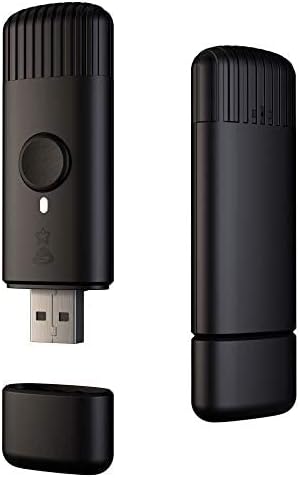
The Twinkly Music sound sensor is an accessory designed to enhance your Twinkly LED lighting experience by synchronizing light effects with ambient sound and music. This device connects to your existing Twinkly smart LED lights (sold separately) via Bluetooth and Wi-Fi, allowing for dynamic audio-visual displays controlled through the Twinkly App.
2. Zer dago kutxan
- Twinkly Music Sound Sensor (USB device)
- Argibide eskuliburua

3. Konfigurazioa
- Piztu: Plug the Twinkly Music USB device into any standard USB power source. Ensure it is placed close to your desired music source for optimal sound detection.
- Aplikazioaren instalazioa: Download the official Twinkly App from the iOS App Store or Google Play Store on your smartphone or tablet.
- Gailuaren parekatzea: Open the Twinkly App and follow the on-screen instructions to pair your Twinkly Music device via Bluetooth and Wi-Fi. Ensure the device is connected to the same network as your Twinkly lights.
- Light Grouping (Optional): If you have multiple Twinkly lights, you can group them within the app to synchronize effects across selected devices.


Konfiguratzeko Bideo Gida
Video 1: Detailed guide on setting up Twinkly lights and the Twinkly Music device, including app pairing and mapping lights for optimal effects.
4. Funtzionamendu-argibideak
- Aktibatu musika modua: Once connected, the Twinkly Music device will analyze nearby music using its highly sensitive digital microphone and powerful multicore DSP.
- Change Effects via Button: Press the physical button on the Twinkly Music USB device to cycle through various pre-programmed music effects.
- Aplikazioen kontrola: Use the Twinkly App to browse and select from a wide array of music-synchronized effects. The app allows for customization of colors, patterns, and intensity.
- Real-time Reaction: The device decodes any sound source in real-time, offering a dynamic sensory experience on your Twinkly lights.


Music Effects Demonstration
Video 2: A demonstration of various music-synchronized lighting effects available with Twinkly Music, showcasing dynamic patterns and color changes.
5. Ezaugarriak
- Musical Lights: Activates Twinkly LED lights based on ambient sound, managed directly from the Twinkly App (iOS and Android). Compatible only with Twinkly smart LED lights.
- Unique Experience: Features a highly sensitive digital microphone and powerful multicore DSP to analyze music and apply synchronized light effects.
- Instalazio sinplea: Easy setup in seconds via Bluetooth and Wi-Fi through the Twinkly App.
- Erabiltzeko erraza: A single button on the USB device allows for changing effects and music lights.
- Bateragarritasuna: Designed for optimal use with Twinkly II generation products. Supports light groups and selection of specific devices.
6. Zehaztapenak
| Atributua | Xehetasuna |
|---|---|
| Modelo zenbakia | TMD01USB |
| Marka | Twinkly |
| Kolorea | Beltza |
| Energia iturria | USBa |
| Kontrol-metodoa | Aplikazioen kontrola |
| Konektibitatea | Bluetooth konexioa, Wi-Fi |
| Elementuaren pisua | 60 gramo (2.12 ontza) |
| Barrutia | 10m / 32.8in |
| Barruko/Kanpoko erabilera | Kanpoan |
7. Arazoak
- Gailua ez da konektatzen: Ensure the Twinkly Music device is powered on and within range of your Wi-Fi network and Twinkly lights. Verify that your smartphone's Bluetooth is enabled and that the device is connected to the same Wi-Fi network as your lights. Try restarting the device and the app.
- Lights Not Syncing with Music: Check that the Twinkly Music device is placed near the sound source. Adjust the microphone sensitivity settings within the Twinkly App if available. Ensure the music mode is activated in the app or via the device button.
- Aplikazioaren arazoak: Ensure your Twinkly App is updated to the latest version. Try force-closing and reopening the app, or reinstalling it if problems persist.
- Firmware eguneraketak: Regularly check the Twinkly App for available firmware updates for your Twinkly Music device and lights to ensure optimal performance and compatibility.
8. Mantentzea
- Garbiketa: Use a soft, dry cloth to clean the Twinkly Music device. Avoid using liquid cleaners or abrasive materials.
- Biltegiratzea: Erabiltzen ez duzunean, gorde gailua leku fresko eta lehor batean, eguzki-argitik eta muturreko tenperaturatik urrun.
- Ingurumen-baldintzak: The device is rated for outdoor use, but prolonged exposure to harsh weather conditions may affect its lifespan.
9. Bermea eta Laguntza
For warranty information, technical support, or further assistance, please refer to the official Twinkly website or contact Twinkly customer service directly. Details can typically be found in the product packaging or on the manufacturer's webgunea.
- Sareko baliabideak: Bisitatu Twinkly Store on Amazon produktuari buruzko informazioa eta laguntza lortzeko.
- Fabrikatzailea Webgunea: Consult the official Twinkly website for the most up-to-date support documentation, FAQs, and contact information.
Ask a question about this manual
Ask about setup, troubleshooting, compatibility, parts, safety, or missing instructions. Manuals+ will review the question and use this page’s manual context to help answer it.