
1. Sarrera
This manual provides essential information for setting up, operating, maintaining, and troubleshooting your Acer Aspire C24-963-UA91 All-in-One Desktop. Please read this manual thoroughly to ensure proper use and to maximize the lifespan of your device.

Figure 1: Acer Aspire C24-963-UA91 All-in-One Desktop
The Acer Aspire C24-963-UA91 is a compact and efficient all-in-one desktop solution, integrating the computer components directly into the monitor. It features a 23.8-inch Full HD display, an Intel Core i3-1005G1 processor, 8GB DDR4 memory, and a 512GB NVMe M.2 SSD, running on Windows 10 Home.
2. Zer dago kutxan
Egiaztatu elementu guztiak ontzian daudela:
- Acer Aspire C24-963-UA91 All-in-One Desktop
- Haririk gabeko teklatua
- Haririk gabeko sagua
- Elikatze kablea
- Hasiera Azkarreko Gida (ez dago eskuliburu digital honetan sartuta)
3. Konfigurazioa
3.1. Hasierako kokapena
Place the desktop on a stable, flat surface. Ensure adequate ventilation around the unit.
3.2. Potentzia konektatzea
Connect the power cord to the desktop's power input port and then to a wall outlet.
3.3. Connecting Wireless Keyboard and Mouse
The wireless keyboard requires two AAA batteries, and the wireless mouse requires one AA battery. The USB receiver for both devices is typically located inside the mouse's battery compartment. Insert the batteries and plug the USB receiver into an available USB port on the desktop.
Figure 2: Desktop with Wireless Keyboard and Mouse
The image displays the Acer Aspire C24-963-UA91 All-in-One Desktop, showcasing its sleek design along with the included wireless keyboard and mouse, ready for setup.
4. Mahaigaina erabiltzea
4.1. Piztu/Itzali
Press the power button, usually located on the bottom bezel of the display, to turn the desktop on or off.
4.2. Webcam Pribatutasun-obturagailua
For enhanced privacy, the integrated 1.0 MP HD webcam features a physical privacy shutter. Slide the shutter to cover or uncover the camera lens as needed.

3. irudia: WebPribatutasun-obturagailua duen kamera
This image shows a close-up of the integrated webcam located at the top of the display, highlighting its convenient privacy shutter mechanism.
4.3. Pantailaren ezaugarriak
The 23.8" Full HD Widescreen Edge-to-Edge LED Back-lit Display offers clear visuals. It also includes BlueLightShield™ technology to reduce blue light exposure for eye comfort.

Figure 4: BlueLightShield™ Technology
The image illustrates the BlueLightShield™ feature on the Acer Aspire C24 display, indicating its capability to filter blue light for user comfort.
5. Konektibitatea
5.1. Portuak
The desktop offers a variety of ports for connecting peripherals:
- 4 x USB 3.2 Gen 1 ataka
- 1 x HDMI ataka
- 1 x Ethernet (RJ-45) ataka
- SD txartelaren irakurgailua
- Audio-portua
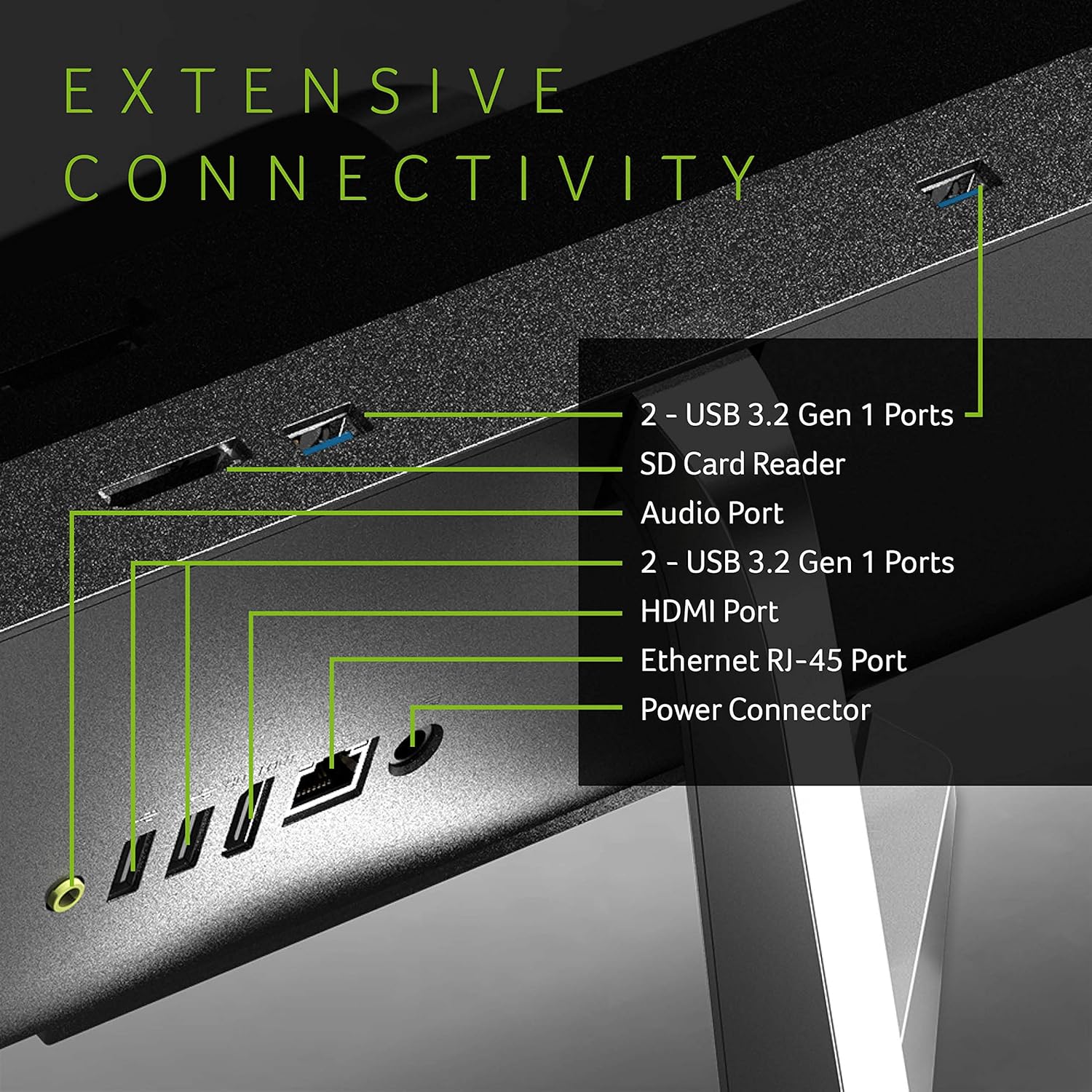
Figure 5: Extensive Connectivity
This diagram highlights the various connectivity options available on the Acer Aspire C24-963-UA91, including USB ports, an SD card reader, audio port, HDMI port, Ethernet RJ-45 port, and power connector.
5.2. Haririk gabeko konexioa
- 802.11ac Wi-Fi 5 for fast wireless internet access.
- Bluetooth 4.2 haririk gabeko osagarriak konektatzeko.
6. Biltegiratzea eta errendimendua
The Acer Aspire C24-963-UA91 is equipped with components designed for efficient daily computing:
- Prozesadorea: 10th Generation Intel Core i3-1005G1 (1.2GHz with Turbo Boost Technology up to 3.4GHz) for responsive performance.
- Memoria: 8GB DDR4 Memory for smooth multitasking.
- Biltegiratzea: 512GB NVMe M.2 SSD provides fast boot times and quick application loading.

Figure 6: Intel Core i3 10th Generation Processor
This image shows the Acer Aspire C24-963-UA91 in a work setting, with a visible sticker indicating the presence of a 10th Generation Intel Core i3 processor, highlighting its processing capabilities.
7. Mantentzea
7.1. Garbiketa
Regularly clean the screen with a soft, lint-free cloth. Use a can of compressed air to clear dust from vents and ports. Avoid liquid cleaners directly on the screen or ports.
7.2. Software eguneraketak
Ensure your Windows 10 Home operating system and drivers are kept up-to-date for optimal performance and security.
8. Arazoak
8.1. Wireless Keyboard/Mouse Not Responding
- Egiaztatu bateriak: Ensure fresh batteries are correctly installed in both the keyboard and mouse.
- Egiaztatu USB hargailua: Confirm the USB receiver is securely plugged into an active USB port on the desktop.
- Gailuak berriro parekatu: If issues persist, consult the quick start guide for instructions on re-pairing the wireless devices.
8.2. Ez dago pantailarik
- Potentzia-konexioa: Ensure the power cord is firmly connected to both the desktop and the power outlet.
- Pizteko botoia: Confirm the power button has been pressed and the power indicator light is on.
9. Zehaztapenak
| Ezaugarri | Xehetasuna |
|---|---|
| Modelo zenbakia | C24-963-UA91 |
| Bistaratzeko tamaina | 23.8 hazbete |
| Pantailaren bereizmena | 1920 x 1080 (HD osoa) |
| Prozesadorea | 10th Gen Intel Core i3-1005G1 (up to 3.4GHz) |
| RAM | 8 GB DDR4 |
| Biltegiratzea | 512 GB NVMe M.2 SSD |
| Koprozesadore grafikoa | Intel UHD grafikoak (integratuak) |
| Sistema eragilea | Windows 10 Home |
| Haririk gabeko mota | 802.11ac Wi-Fi 5, Bluetooth 4.2 |
| USB atakak | 4 x USB 3.0 Ports (Gen 1) |
| HDMI ataka | 1 |
| Ethernet ataka | 1 (RJ-45) |
| Webkamara | Integrated 1.0 MP HD High-Sense Webkamara |
| Hizlariak | Bi bozgorailu estereo txertatuak |
| Elementuaren pisua | 7.04 libra (3.19 kg) |
| Produktuaren neurriak | 21.2 x 1.46 x 15.7 hazbete |
10. Bermea eta Laguntza
Your Acer Aspire C24-963-UA91 All-in-One Desktop comes with a Urtebeteko Piezen eta Lanaren Berme Mugatua. For technical assistance, please contact Acer's Toll-Free Tech Support.
For further support and resources, visit the official Acer webgunea: www.acer.com


