
Makita DMR301
Instruction Manual for Makita DMR301 Construction Site Radio
Modeloa: DMR301
Sarrera
The Makita DMR301 Construction Site Radio is a robust and versatile audio system designed for demanding work environments. It offers multiple power options, including AC and compatibility with Makita 10.8V, 12V, and 18V lithium-ion batteries. Featuring Bluetooth connectivity, DAB+ digital radio, FM/AM tuning, and an MP3 player connection, this radio provides high-quality audio and the added convenience of a battery charging function for compatible Makita batteries.

1 irudia: Aurrealde-ezkerrean view of the Makita DMR301 Construction Site Radio.
Segurtasun Informazioa
Please read all safety warnings and instructions carefully before operating this product to prevent electric shock, fire, and serious injury. Keep this manual for future reference.
- Energia iturria: Only use the specified power adapter or compatible Makita batteries.
- Ura eta hezetasuna: Do not expose the radio to rain or wet conditions. While designed for construction sites (IP64 rated), avoid submerging it in water.
- Aireztapena: Ensure proper ventilation around the radio to prevent overheating. Do not block ventilation openings.
- Garbiketa: Deskonektatu korrontetik garbitu aurretik. Erabili eskuila leun eta lehorra.amp oihal. Ez erabili produktu kimiko gogorrak.
- Bateriaren segurtasuna: Only charge compatible Makita batteries. Do not attempt to charge non-rechargeable batteries. Follow all battery charging safety guidelines provided by Makita.
- Lekua: Jarri irratia gainazal egonkor eta lau batean. Saihestu eguzki-argitan edo bero-iturrietatik gertu jartzea.
- Entzumenaren babesa: Prolonged exposure to loud sounds can cause hearing damage. Adjust volume to a comfortable level.
Paketearen edukia
Egiaztatu behean zerrendatutako elementu guztiak zure paketean sartuta daudela:
- Makita DMR301 Construction Site Radio
- AC Power Adapter (corded charger)
- Argibide eskuliburua (dokumentu hau)
Oharra: Bateriak ez daude barne eta aparte erosi behar dira.
Produktua amaituview
Familiarize yourself with the various parts and controls of your Makita DMR301 radio.
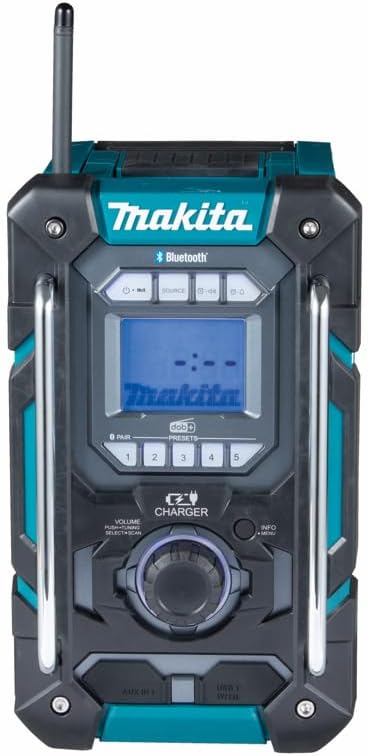
Figure 2: Front panel and controls.
- Pizteko botoia: Irratia pizten edo itzaltzen du.
- Iturriaren botoia: Switches between FM, DAB+, Bluetooth, and AUX modes.
- Bolumen/Sintonizazio botoia: Adjusts volume, navigates menus, and tunes radio frequencies.
- Bistaratzeko pantaila: Shows station information, time, battery status, and menu options.
- Aurrezarritako botoiak (1-5): Gogoko irrati-kateak gordetzen eta berreskuratzen ditu.
- AUX SARTZEKO Ataka: For connecting external audio devices (e.g., MP3 players).
- USB ataka: For charging mobile devices (output only, not for data transfer).
- Bateriaren konpartimendua: Located on the side, for inserting Makita 10.8V/12V/18V batteries.
- CA potentzia sarrera: Emandako korronte-egokigailua konektatzeko.
- Antena: Irrati-harrera hobetzeko luzagarria den antena.

3. irudia: Aurrealdea view irratiarena.

4. irudia: Aldea view irratiarena.

5. irudia: Atzealdea view irratiarena.
Konfigurazioa
Irratia piztu
The DMR301 can be powered by either the supplied AC power adapter or compatible Makita lithium-ion batteries.
Korronte alternoko funtzionamendua
- Connect the supplied AC power adapter to the AC power input port on the radio.
- Konektatu egokigailuaren beste muturra hormako entxufe estandar batera.
- The radio is now ready for use.
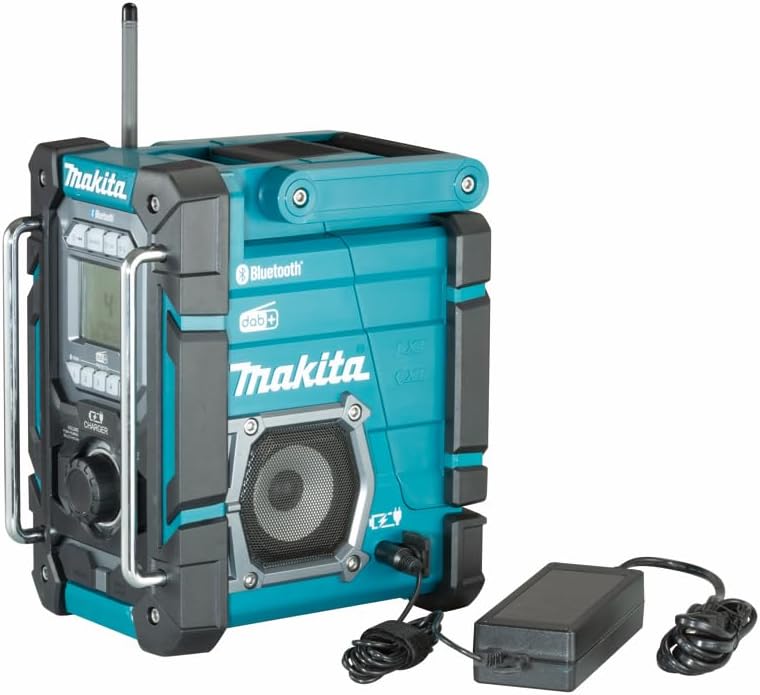
Figure 6: Connecting the AC power adapter.
Bateriaren funtzionamendua eta karga
The radio supports Makita 10.8V, 12Vmax, and 18V LXT lithium-ion batteries. It also functions as a charger for these batteries when connected to AC power.
- Open the battery compartment cover on the side of the radio.
- Insert a compatible Makita battery into the compartment, ensuring it clicks into place.
- Itxi bateriaren konpartimenduaren estalkia ondo.
- To charge a battery, ensure the radio is connected to AC power and a compatible battery is inserted. The charging indicator on the radio's display will show the charging status.

Figure 7: Inserting a battery into the compartment.


Figure 8: Compatible battery types (18V and 12Vmax Lithium-Ion).
Antena konfiguratzea
For optimal radio reception, extend the antenna fully and adjust its direction as needed.
Funtzionamendu-argibideak
Piztu/Itzaltzea
- Sakatu Pizteko botoia () to turn the radio on.
- Eduki sakatuta Pizteko botoia berriro irratia itzaltzeko.
Iturburu bat hautatzea
Sakatu Iturburu-botoia to cycle through available modes: FM, DAB+, Bluetooth, and AUX.
Radio Tuning (FM/DAB+)
FM Irratia
- Hautatu FM modua tekla erabiliz Iturburu-botoia.
- Biratu Volume/Tuning Knob to manually tune to a frequency.
- Sakatu Volume/Tuning Knob eskuragarri dagoen hurrengo geltokia automatikoki bilatzeko.
DAB+ Irrati Digitala
- Hautatu DAB+ modua erabiliz Iturburu-botoia.
- The radio will automatically scan for available DAB+ stations upon first use or if no stations are found.
- Biratu Volume/Tuning Knob to browse through the list of available stations.
- Sakatu Volume/Tuning Knob geltokia hautatzeko.

Figure 9: Digital display showing time and radio information.
Bluetooth parekatzea
- Hautatu Bluetooth modua erabiliz Iturburu-botoia. The display will show "Pairing" or "BT Pairing".
- Bluetooth gaitutako gailuan (smartphone-a, tableta, etab.), gaitu Bluetooth eta bilatu eskuragarri dauden gailuak.
- Select "DMR301" from the list of devices.
- Once paired, the radio will confirm the connection, and you can now stream audio from your device.
Connecting an MP3 Player (AUX-in)
- Konektatu 3.5 mm-ko audio-kable baten mutur bat (ez da hornitzen) irratiaren AUX IN atakara.
- Connect the other end of the audio cable to the headphone jack or audio output of your MP3 player or other audio device.
- Hautatu AUX modua tekla erabiliz Iturburu-botoia.
- Erreproduzitu audioa konektatutako gailutik.
Bolumen kontrola
Biratu Volume/Tuning Knob erlojuaren orratzen noranzkoan bolumena handitzeko eta erlojuaren orratzen kontrako noranzkoan bolumena jaisteko.
Aurrez ezarritako geltokiak
The radio allows you to store up to 5 preset stations for quick access.
Aurrez ezarritako bat gordetzea
- Tune to the desired station (FM or DAB+).
- Eduki sakatuta botoietako bat Aurrezarritako botoiak (1-5) until the display confirms the station has been saved.
Aurrez ezarritako bat gogoratzea
- Sakatu labur dagokion botoia Aurrezarpen botoia (1-5) to recall the stored station.
Mantentzea
- Garbiketa: Garbitu irratia leun batekin, damp cloth. Do not use abrasive cleaners or solvents. Ensure all ports are dry before use.
- Biltegiratzea: When not in use for extended periods, store the radio in a dry, cool place away from direct sunlight. Remove batteries if storing for a long time.
- Antena: Handle the antenna carefully to avoid bending or breaking.
Arazoak konpontzea
| Arazoa | Kausa posiblea | Irtenbidea |
|---|---|---|
| Irratia ez da pizten. | No power supply; battery depleted; AC adapter not connected properly. | Ensure AC adapter is securely plugged in or battery is charged and inserted correctly. |
| Irrati-harrera eskasa. | Antena ez dago luzatuta; seinale ahula dagoen eremua; interferentzia. | Fully extend and adjust the antenna. Try moving the radio to a different location. |
| Bluetooth gailua ez da parekatzen. | Irratia ez dago parekatze moduan; gailua urrunegi dago; gailua beste unitate batekin parekatuta dago dagoeneko. | Ziurtatu irratia Bluetooth parekatze moduan dagoela. Hurbildu gailua. Deskonektatu beste Bluetooth gailuetatik. |
| No sound from AUX-in. | Incorrect source selected; cable not connected properly; volume too low on source device. | Select AUX mode. Check cable connections. Increase volume on both the radio and the connected device. |
| Bateria ez da kargatzen. | Radio not connected to AC power; battery not inserted correctly; incompatible battery. | Ensure AC power is connected. Re-insert battery. Verify battery compatibility. |
Zehaztapenak
| Ezaugarri | Xehetasuna |
|---|---|
| Modelo zenbakia | DMR301 |
| Energia iturria | AC Power Adapter, Makita 10.8V / 12Vmax / 18V Lithium-Ion Batteries |
| Onartutako Irrati Bandak | FM, DAB+, AM |
| Konektibitate Teknologia | Bluetootha |
| Hardware interfazea | Bluetooth, AUX-in (3.5mm), USB (for charging) |
| Gailu bateragarriak | MP3 erreproduzitzailea, telefono adimenduna, tableta |
| Produktuaren neurriak | 11.02 x 7.48 x 12.8 hazbete (268 mm L x 185 mm Z x 305 mm A) |
| Elementuaren pisua | 11.88 libra (5.4 kilogramo) |
| Babes Klasea | IP64 (Hauts eta zipriztinen aurkakoa) |
Bermea eta Laguntza
For warranty information and technical support, please refer to the official Makita webwebgunera edo jarri harremanetan Makita bezeroarentzako arreta-zerbitzuarekin zuzenean. Gorde erosketa-agiria erosketaren frogagiri gisa berme-erreklamazioetarako.
Bisitatu Makita ofiziala website for the latest support resources: www.makitatools.com
Ask a question about this manual
Ask about setup, troubleshooting, compatibility, parts, safety, or missing instructions. Manuals+ will review the question and use this page’s manual context to help answer it.