
Samsung SM-A217FZKOEUB
SAMSUNG Galaxy A21S User Manual
Model: SM-A217FZKOEUB
1. Produktua amaitu daview
The Samsung Galaxy A21S is a feature-rich smartphone designed for everyday communication and multimedia. It boasts a large 6.5-inch Infinity-O display, a versatile 48MP Quad Camera system, and a long-lasting 5000mAh battery. This section provides a visual guide to the phone's components.
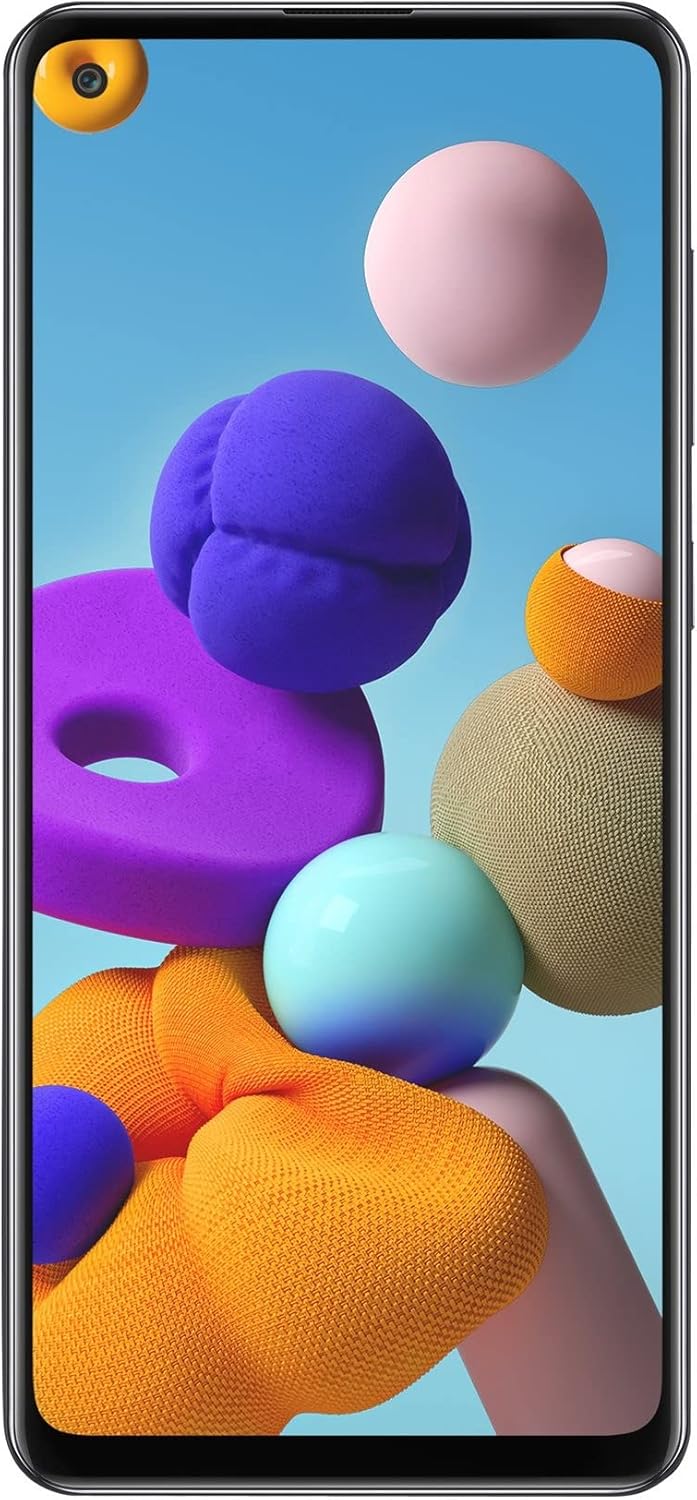


Funtsezko osagaiak:
- Aurrealdeko kamera: Located in the punch-hole cutout on the display.
- Pantaila: 6.5-inch Infinity-O HD+ TFT screen.
- Bolumen-botoiak: Eskuineko aldean, audio mailak doitzeko.
- Pizteko/Blokeatzeko botoia: On the right side, for turning the device on/off and locking/unlocking the screen.
- SIM/SD txartelaren erretilua: On the left side, for inserting Nano-SIM cards and a microSD card.
- Quad Camera Module: On the rear, featuring a 48MP main sensor, ultra-wide, macro, and depth sensors.
- Hatz-marka sentsorea: On the rear, for secure unlocking.
- USB-C ataka: Beheko aldean, kargatzeko eta datuak transferitzeko.
- Hizlaria: At the bottom.
- 3.5 mm aurikularretarako konektua: At the bottom.
2. Konfigurazioa
Follow these steps to set up your new Samsung Galaxy A21S for the first time.
2.1. SIM eta SD txartela sartzea
- Bilatu SIM txartelaren erretilua gailuaren ezkerreko aldean.
- Insert the SIM ejector tool (or a small paperclip) into the small hole on the tray to eject it.
- Kontu handiz atera erretilua.
- Jarri Nano-SIM txartela(k) eta/edo microSD txartela erretiluko zirrikituetan, urre koloreko kontaktuak behera begira daudela ziurtatuz.
- Sartu erretilua astiro-astiro zirrikituan klik egin arte.
2.2. Hasierako pizte eta konfigurazio morroia
- Eduki sakatuta Pizteko/Blokeatzeko botoia on the right side of the phone until the Samsung logo appears.
- Jarraitu pantailan agertzen diren argibideei hasierako konfigurazioa osatzeko:
- Hautatu zure hizkuntza.
- Konektatu Wi-Fi sare batera.
- Review eta onartu Azken Erabiltzailearen Lizentzia Hitzarmena eta Pribatutasun Politika.
- Hasi saioa zure Google kontuarekin edo sortu berri bat.
- Konfiguratu pantailaren blokeoa (PINa, eredua, pasahitza, hatz-marka).
- Berreskuratu datuak aurreko gailu batetik (aukerakoa).
- Configure other settings as prompted.
- Konfigurazioa amaitutakoan, zure gailua erabiltzeko prest dago.
3. Zure gailua funtzionatzea
This section covers the basic operations of your Samsung Galaxy A21S.
3.1. Deiak egitea
- Ireki Telefonoa aplikazioa.
- Enter the phone number using the keypad or select a contact from your address book.
- Sakatu Deitu icon to initiate the call.
3.2. Mezuak bidaltzea
- Ireki Mezuak aplikazioa.
- Sakatu Mezu berria icon (usually a plus sign or a speech bubble).
- Sartu hartzailearen telefono zenbakia edo hautatu kontaktuetatik.
- Idatzi zure mezua testu eremuan.
- Sakatu Bidali ikonoa.
3.3. Kamera erabiliz
Your Galaxy A21S features a versatile quad-camera system.
- Ireki Kamera aplikazioa.
- Select your desired mode (e.g., Photo, Video, Portrait, Pro).
- Markatu zure argazkia.
- Sakatu Pertsiana button to capture a photo or start/stop recording a video.
3.4. Internet eta Konexioa
- Wi-Fi: Joan zaitez Ezarpenak > Konexioak > Wi-Fi eskuragarri dauden sareetara konektatzeko.
- Datu mugikorrak: Ziurtatu datu mugikorrak gaituta daudela Ezarpenak > Konexioak > Datuen erabilera for internet access via your cellular network.
- Bluetootha: Parekatu beste gailuekin honen bidez Ezarpenak > Konexioak > Bluetootha.
4. Mantentzea
Mantentze egokiak zure gailuaren iraupena eta errendimendu optimoa bermatzen ditu.
4.1. Bateria zaintzea
- Saihestu tenperatura muturrekoak, bateriaren iraupena murriztu baitezakete.
- Erabili Samsung-ek onartutako kargagailuak eta kableak soilik.
- Do not let the battery drain completely regularly; charge it before it reaches very low levels.
- Bateriaren egoera optimoa lortzeko, saiatu karga % 20 eta % 80 artean mantentzen.
4.2. Zure gailua garbitzea
- Erabili zapi leun eta lihorik gabeko bat pantaila eta gorputza garbitzeko.
- Orban egoskorretarako, apur bat dampGarbitu zapi bat ur destilatuarekin edo elektronikarako diseinatutako pantaila-garbitzaile batekin.
- Saihestu produktu kimiko gogorrak, material urratzaileak edo gehiegizko hezetasuna erabiltzea.
- Ziurtatu ataka guztiak lehor daudela kargatu aurretik.
4.3. Software eguneraketak
Egiaztatu eta instalatu software eguneraketak aldizka, zure gailuak azken funtzioak, segurtasun adabakiak eta errendimendu hobekuntzak dituela ziurtatzeko. Joan honera Ezarpenak > Software eguneraketa > Deskargatu eta instalatu.
5. Arazoak
This section addresses common issues you might encounter with your Samsung Galaxy A21S.
| Arazoa | Kausa posiblea | Irtenbidea |
|---|---|---|
| Gailua ez da pizten | Bateria baxua; softwarearen matxura | Charge the device for at least 10 minutes. Perform a forced restart by holding the Bolumena jaitsi eta Boterea buttons simultaneously for 7-10 seconds. |
| Aplikazioak huts egiten edo blokeatzen | RAM nahikoa ez; aplikazioen gatazka; aplikazio zaharkitua | Itxi atzeko planoan dauden aplikazioak. Garbitu aplikazioen cachea (Ezarpenak > Aplikazioak > [Aplikazioaren izena] > Biltegiratzea > Garbitu cachea). Eguneratu aplikazioa Google Play Store-tik. Berrabiarazi gailua. |
| Wi-Fi konexio eskasa | Out of range; router issue; interference | Move closer to the Wi-Fi router. Restart your router and modem. Forget the network and reconnect (Settings > Connections > Wi-Fi). |
| Bateria azkar agortzen da | High screen brightness; many background apps; poor signal | Reduce screen brightness. Close unused apps. Turn off Wi-Fi/Bluetooth when not in use. Check battery usage in Settings > Battery and device care. |
| Hatz-marken sentsorea ez dabil | Sentsore zikina; hatz-marka erregistratu gabea; software akatsa | Clean the sensor with a soft cloth. Re-register your fingerprints (Settings > Biometrics and security > Fingerprints). Restart the device. |
If the issue persists, consider performing a factory data reset (backup your data first) or contacting Samsung support.
6. Zehaztapenak
Detailed technical specifications for the Samsung Galaxy A21S (Model: SM-A217FZKOEUB).
| Ezaugarri | Xehetasuna |
|---|---|
| Modelo zenbakia | SM-A217FZKOEUB |
| Bistaratzea | 6.5 inches, HD+ TFT, 720 x 1600 pixels, 20:9 ratio |
| Prozesadorea | Zortzi nukleo (4x2.0 GHz Cortex-A55 eta 4x2.0 GHz Cortex-A55) |
| RAM | 4 GB |
| Barne Biltegiratzea | 64 GB (microSD bidez zabaldu daiteke) |
| Atzeko kamera | 48MP (main) + Ultra-wide + Macro + Depth |
| Aurrealdeko kamera | (Details not explicitly provided in input, but typically 13MP for A21S) |
| Bateria | 5000 mAh, Fast Charging |
| Sistema eragilea | Android 10.0 (One UI 2.0-rekin) |
| Konektibitatea | 4G LTE, Wi-Fi 802.11 a/b/g/n/ac, Bluetooth, GPS, USB Type-C, 3.5mm TRRS |
| SIM mota | Nano SIM bikoitza |
| Segurtasuna | Fingerprint (rear-mounted) |
| Neurriak | 0.35 x 2.96 x 6.44 hazbete |
| Pisua | 8.8 ontza (250 gramo) |
7. Bermea eta Laguntza
Your Samsung Galaxy A21S comes with a manufacturer's warranty. Please refer to the warranty card included in your product packaging for specific terms and conditions.
7.1. Fabrikatzailearen bermea
As stated in the product features, the manufacturer's warranty may not be available for US buyers for this international version. Please verify warranty coverage with your point of purchase or local Samsung service center.
7.2. Bezeroarentzako arreta
Laguntza gehiago, laguntza teknikoa edo zerbitzu-kontsultak egiteko, bisitatu Samsung-en laguntza ofiziala. website or contact their customer service hotline in your region. You can find contact information and FAQs on the Samsung laguntza webgunea.