
1. Sarrera
This manual provides detailed instructions for the installation, operation, and maintenance of your ASRock B550M Steel Legend motherboard. Designed for daily users and mainstream enthusiasts, this motherboard offers robust performance and a comprehensive feature set for AMD AM4 Ryzen processors.
Key features include support for 3rd Gen AMD AM4 Ryzen and future AMD Ryzen processors, a 10 Power Phase Design with Dr. MOS, DDR4 4733+ (OC) memory support, and multiple PCIe slots including PCIe 4.0 x16. It also features a flexible integrated I/O shield, USB 3.2 Gen2 Type-A+C (10Gbps), Dragon 2.5Gb LAN, and premium audio packages.

Figure 1.1: ASRock B550M Steel Legend Motherboard Overview
2. Konfigurazioa eta instalazioa
Instalazioa hasi aurretik, ziurtatu sistema itzalita eta energia-iturritik deskonektatuta dagoela. Plaka baseari ertzetik heldu deskarga estatikoak saihesteko.
2.1 Osagaien identifikazioa
Ezagutu plaka baseko osagai eta konektore desberdinak.
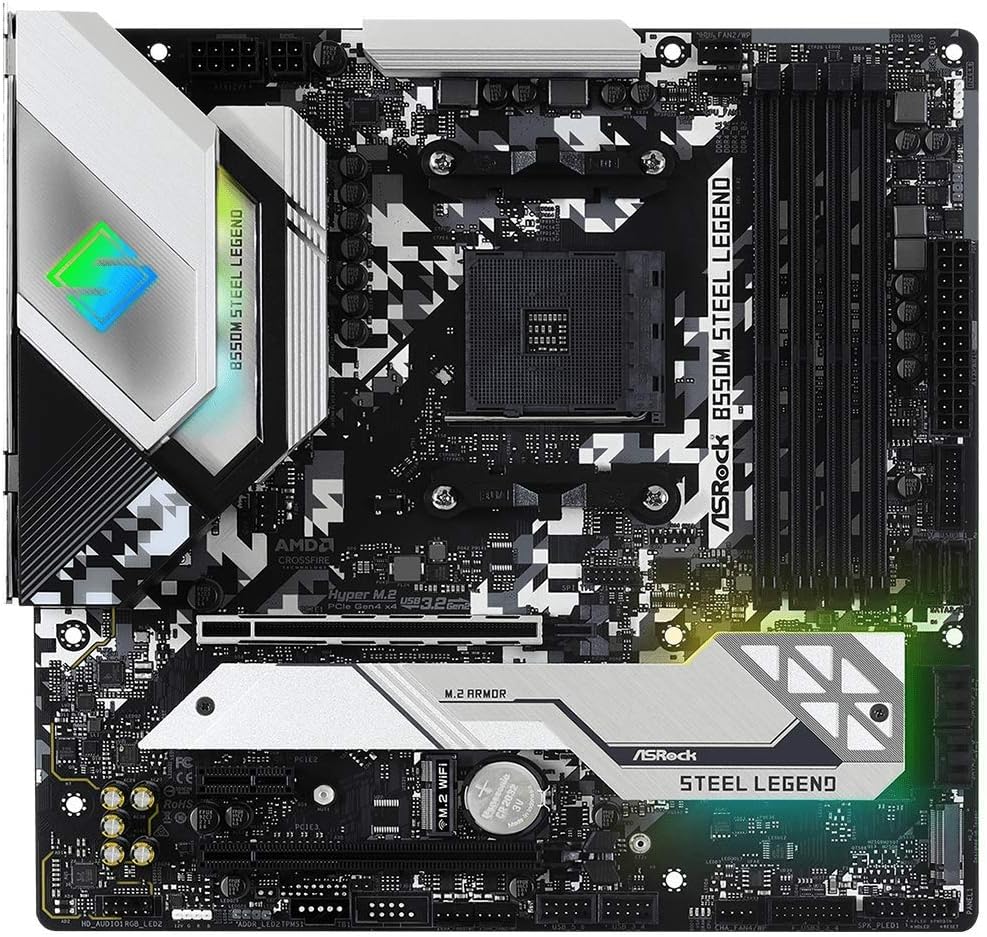
Figure 2.1: Motherboard Layout

Figure 2.2: Key Features - CPU, Memory, and M.2 Sockets

Figure 2.3: Key Features - I/O and Connectivity

Figure 2.4: Key Features - Power Delivery and Cooling
2.2 Prozesadorearen instalazioa
This motherboard supports AMD AM4 socket processors. Carefully align the CPU with the socket, ensuring the golden triangle on the CPU matches the triangle on the socket. Lower the retention arm to secure the CPU.
2.3 Memoriaren (RAM) instalazioa
Insert DDR4 memory modules into the DIMM slots. Ensure the notches on the modules align with the slots. Press down firmly on both ends until the clips lock into place. This motherboard supports DDR4 4733+ (OC) memory.
2.4 Biltegiratze-gailuaren instalazioa
Install M.2 SSDs into the Hyper M.2 sockets (PCIe Gen4x4) and SATA drives into the available SATA 3 ports. Secure M.2 drives with the provided screw.
2.5 Hedapen Txartelaren Instalazioa
Install graphics cards into the PCIe 4.0 x16 slot and other expansion cards into the PCIe 3.0 x16 or PCIe 3.0 x1 slots. Ensure cards are seated firmly and secured with a screw to the chassis.
2.6 Potentzia-konexioak
Connect the 24-pin ATX power connector and the 8+4 pin Hi-Density power connector from your power supply to the motherboard.
2.7 Front Panel and Peripheral Connections
Connect front panel headers (power button, reset button, USB, audio) according to the motherboard manual. Connect peripherals such as USB devices, display cables (HDMI, DisplayPort), and network cables to the rear I/O panel.
2.8 Hasierako abiarazpena eta BIOS konfigurazioa
After all components are installed and connected, power on your system. Access the BIOS/UEFI setup utility by pressing the designated key (usually DEL or F2) during startup. Configure boot order, system time, and other necessary settings. Ensure the latest BIOS version is installed for optimal compatibility with AMD Ryzen 5000/4000/3000 Series processors.
Video 2.1: Product Demonstration Video. This video provides a visual overview of the motherboard and its components, which can assist with initial setup and identification.
3. Funtzionamendu-argibideak
3.1 BIOS/UEFI Interface
The UEFI (Unified Extensible Firmware Interface) provides a graphical interface for system configuration. Navigate using a mouse or keyboard. Key sections include:
- Nagusia: System information, date, and time.
- OC Tweaker: Overclocking settings for CPU and memory.
- Aurreratua: Configuration for CPU, storage, chipset, and onboard devices.
- Tresna: BIOS update utility (Instant Flash), Polychrome RGB.
- Abioa: Boot device priority and boot options.
- Segurtasuna: Pasahitzen ezarpenak.
- Irteera: Save and exit, discard changes.
3.2 Gidariaren instalazioa
After installing your operating system (Windows 10 is supported), install the necessary drivers for the chipset, LAN, audio, and other onboard devices. These can typically be found on the ASRock support webzure plaka basearen modelo espezifikorako gunea.
3.3 ASRock Software Utilities
ASRock provides various software utilities to enhance your experience, including:
- ASRock App Shop: For downloading and updating drivers and utilities.
- ASRock Polychrome SYNC: For controlling the motherboard's RGB lighting and synchronizing with compatible components.
- Nahimic Audioa: Audio esperientzia hobetua lortzeko.
4. Mantentzea
4.1 BIOS eguneraketak
Egiaztatu aldizka ASRock-a website for BIOS updates. BIOS updates can improve system stability, add support for new CPUs, and fix bugs. Follow the instructions provided by ASRock carefully when performing a BIOS update to avoid system damage.
4.2 Gidarien eguneraketak
Keep your system drivers updated to ensure optimal performance and compatibility. Use the ASRock App Shop or visit the ASRock support webgunea azken gidariak deskargatzeko.
4.3 Garbiketa fisikoa
Periodically clean your computer's interior to prevent dust buildup, which can lead to overheating and reduced performance. Use compressed air to remove dust from fans, heatsinks, and motherboard components. Ensure the system is powered off and unplugged before cleaning.
5. Arazoak
5.1 Energiarik ez / Abiarazi ezinik
- Verify all power cables (24-pin ATX, 8+4 pin CPU) are securely connected to the motherboard and power supply.
- Ziurtatu energia-iturri etengailua ON posizioan dagoela.
- Check front panel power button connections.
- Probatu elikatze-iturria beste sistema batekin edo elikatze-iturri probatzaile batekin.
5.2 Ez dago pantaila-irteerarik
- Ensure the monitor is connected to the correct graphics output (either integrated graphics on APU or dedicated graphics card).
- Berriro jarri grafiko-txartela eta memoria-moduluak.
- If using a dedicated graphics card, ensure it is properly powered.
- Saiatu RAM memoria bakarrarekin abiarazten.
5.3 Component Not Detected
- Biltegiratzea: Check SATA data and power cables. For M.2 drives, ensure they are properly seated and secured. Verify settings in BIOS/UEFI.
- RAM: Reseat modules. Ensure they are in the correct slots for dual-channel operation (refer to motherboard manual for specific slot configuration).
- Periferikoak: Try different USB ports. Ensure drivers are installed.
5.4 Sistemaren ezegonkortasuna / Matxura
- Ziurtatu gidari guztiak eguneratuta daudela.
- Check CPU and GPU temperatures to rule out overheating.
- Exekutatu memoriaren diagnostiko tresnak RAM akastuna egiaztatzeko.
- Overclocking-a egiten ari bazara, itzuli lehenetsitako ezarpenetara egonkortasuna egiaztatzeko.
6. Zehaztapenak
Below are the detailed specifications for the ASRock B550M Steel Legend Motherboard:
| Ezaugarri | Xehetasuna |
|---|---|
| Marka | ASRock |
| Ereduaren izena | B550M STEEL LEGEND |
| CPU Socketa | AM4 entxufea |
| Prozesadore bateragarriak | AMD Ryzen 5000/4000/3000 Seriea |
| Txip mota | AMD B550 |
| RAM Memoria Teknologia | DDR4 |
| Memoria Erlojuaren Abiadura | 2400 MHz (Supports up to 4733+ OC) |
| Memoria zirrikituak eskuragarri | 4 (kanal bikoitza) |
| Ram Memory Maximum Size | 128 GB |
| Txartel grafikoen interfazea | PCI Express (1x PCIe 4.0 x16, 1x PCIe 3.0 x16, 1x PCIe 3.0 x1) |
| Total PCIe Ports | 4 |
| Grafikoen irteerako aukerak | HDMI, DisplayPort |
| Total SATA Ports | 6 (SATA 3) |
| M.2 zirrikituak | 2 (Hyper M.2 Sockets, PCIe Gen4x4) |
| USB 2.0 Portuak | 2 (Internal headers) |
| USB portuak guztira | 12 (Includes USB 3.2 Gen2 Type-A+C 10Gbps) |
| Ethernet ataken kopurua | 1 (Dragon 2.5Gb LAN) |
| Audio-kodeka | Realtek ALC1220/ALC1200 Audio Codec, Nahimic Audio |
| Potentzia-konektore mota nagusia | 24-Pin ATX |
| PUZaren konektorea | 8+4 Pin Hi-Density |
| Plataforma | Windows 10 |
| Elementuaren neurriak L x W x H | 11.5"L x 2.8"Z x 12"A |
| Elementuaren pisua | 1 kg |

Figure 6.1: Detailed CPU Support List
7. Bermea eta Laguntza
7.1 Produktuaren bermea
The ASRock B550M Steel Legend motherboard comes with a 3 urteko bermea from the date of purchase. This warranty covers defects in materials and workmanship under normal use. For specific terms and conditions, please refer to the warranty card included with your product or visit the official ASRock webgunea.
7.2 Laguntza Teknikoa
For technical assistance, driver downloads, BIOS updates, or further troubleshooting, please visit the official ASRock support website. You can typically find FAQs, knowledge bases, and contact information for customer service there.
ASRock Ofiziala Webgunea: www.asrock.com