
Sarrera
This manual provides detailed instructions for the installation, operation, and maintenance of your BINIZE Double Din Car Stereo. Please read this manual thoroughly before using the product to ensure proper functionality and to prevent damage. Keep this manual for future reference.
Produktua amaituview
The BINIZE Double Din Car Stereo is a 10.1-inch multimedia player running on an Android 13 system. It offers a range of features designed to enhance your in-car entertainment and navigation experience.
Ezaugarri nagusiak:
- 10.1-inch capacitive touch screen with 1024x600 resolution.
- Android 13 Operating System with Quad-core Coretex-A7 processor (up to 1.3GHz).
- 2 GB RAM + 32 GB barne biltegiratzea.
- Wireless CarPlay and Android Auto support.
- Wired MirrorLink for Android and iOS devices.
- Bluetooth integratua esku libreko deiak eta audio streaming-a egiteko.
- Integrated GPS receiver for online and offline navigation.
- FM Radio tuner.
- Support for AUX, front, and rear camera inputs.
- Steering Wheel Control compatibility (manual learning required).
- Built-in Wi-Fi receiver and support for 4G communication (via external dongle, not included).
- Expandable options for OBD and tire pressure monitoring (accessories sold separately).

Figure 1: BINIZE Double Din Car Stereo Front View ezaugarri nagusiak nabarmenduta.
Konfigurazioa eta Instalazioa
Proper installation is crucial for the optimal performance of your car stereo. If you are unfamiliar with car audio wiring and installation, professional assistance is recommended.
Dimentsio fisikoak:
The unit measures approximately 251mm (width) x 146mm (height) x 56mm (depth). Ensure your vehicle's dashboard opening is compatible with these dimensions.
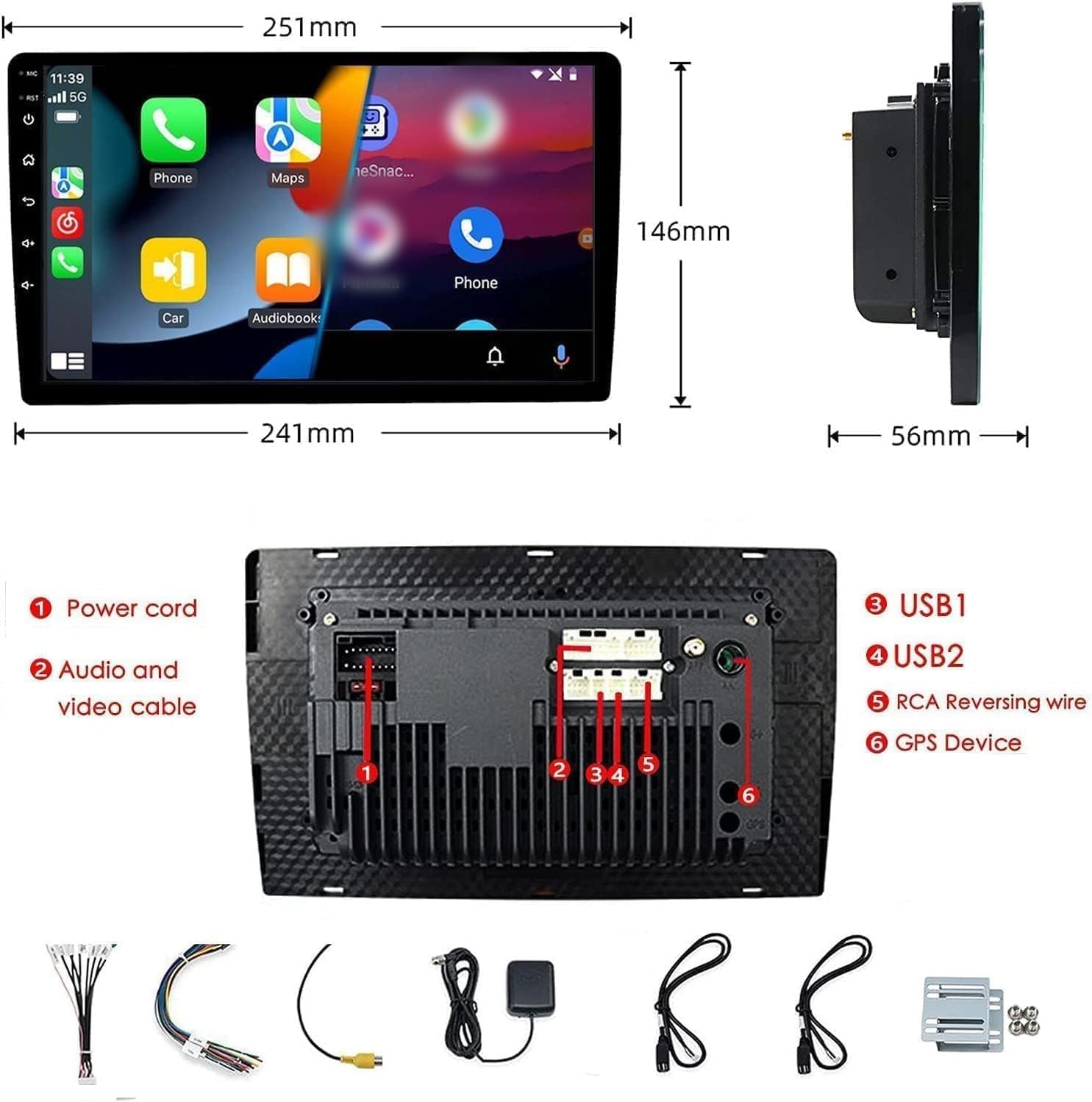
Figure 2: Unit dimensions and rear panel connection points.
Kableatu konexioak:
Refer to the included wiring diagram for specific connections. Key connections include:
- Elikatze kablea: Connect to vehicle's power supply (constant 12V, accessory 12V, ground).
- Audio and Video Cable: For external audio/video devices.
- USB atakak (USB1, USB2): For media playback, phone charging, and wired CarPlay/Android Auto.
- RCA Reversing Wire: Connect to the backup camera trigger wire.
- GPS Device: Connect the external GPS antenna for navigation functionality.
- Steering Wheel Control Wires (Key/SW): Ibilgailuaren bolantearen kontrolekin integratzeko.
Ziurtatu konexio guztiak ondo isolatuta daudela eta zirkuitulaburrak saihesteko.
Funtzionamendu-argibideak
Piztu/Itzali:
The unit will power on automatically when the vehicle's ignition is turned on. To manually power off or restart, use the power button on the front panel.
Ukipen-pantailaren funtzionamendua:
Navigate the interface by tapping, swiping, and pinching on the 10.1-inch capacitive touch screen, similar to a smartphone or tablet.
FM irratia:
Access the FM Radio application from the main menu. You can scan for stations, save presets, and adjust volume. The unit supports standard FM frequencies.

3 irudia: FM irratiaren interfazea.
Bluetooth bidezko lotura
- Ziurtatu Bluetootha gaituta dagoela zure telefono mugikorrean.
- On the car stereo, open the Bluetooth application.
- Bilatu available devices on your phone and select "BINIZE" or a similar device name.
- Eskatzen bazaizu, berretsi parekatze-kodea bi gailuetan.
- Behin parekatuta, esku libreko deiak egin eta audioa erreproduzitu dezakezu.
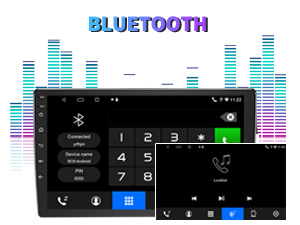
Figure 4: Bluetooth pairing screen.
Bolantearen kontrola:
To use your vehicle's steering wheel controls, manual learning is required. Access the Steering Wheel Control settings in the system menu and follow the on-screen instructions to map your vehicle's buttons to the stereo functions.
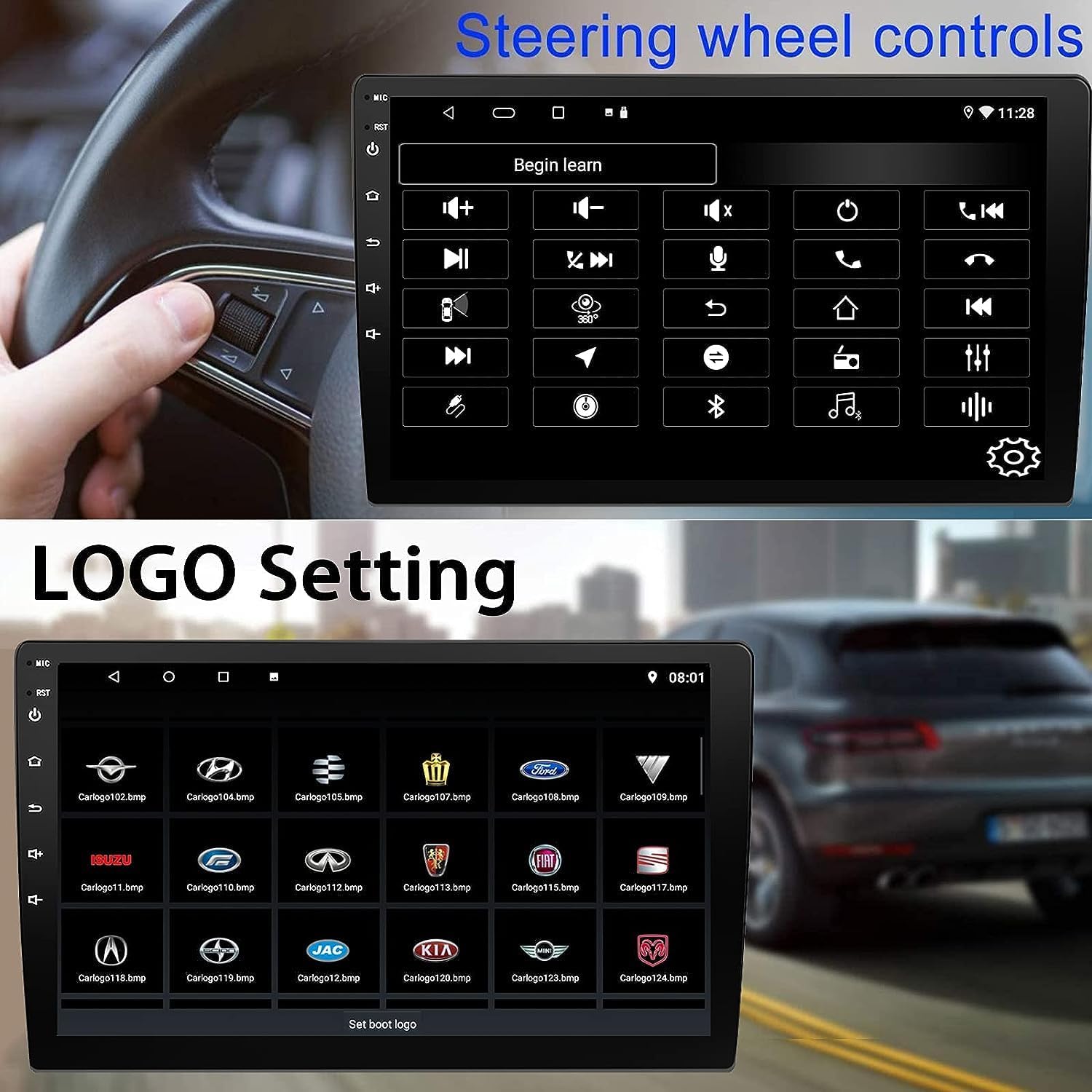
Figure 5: Steering Wheel Control setup screen.
Connectivity: CarPlay, Android Auto, and MirrorLink
Haririk gabeko CarPlay:
Connect your iPhone wirelessly to access CarPlay features such as navigation, music, messages, and calls directly on the stereo display. Ensure Wi-Fi and Bluetooth are enabled on your iPhone.
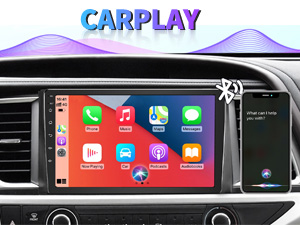
6. irudia: Haririk gabeko CarPlay interfazea.
Haririk gabeko Android Auto:
Connect your Android phone wirelessly to use Android Auto for navigation, communication, and entertainment apps. Ensure Wi-Fi and Bluetooth are enabled on your Android device.

7. irudia: Haririk gabeko Android Auto interfazea.
Ispilu-esteka:
MirrorLink allows you to display your smartphone's screen directly onto the car stereo. This feature works with both Android and iOS devices via a wired connection. Note that CarPlay/Android Auto and MirrorLink cannot be used simultaneously.

Figure 8: MirrorLink feature displaying a phone screen on the stereo.
Nabigazioa
The car stereo features an integrated GPS receiver, supporting both online and offline navigation. Connect to Wi-Fi or a mobile hotspot to use online navigation apps. For offline navigation, you may need to download map data.

Figure 9: GPS navigation map display.
Kameraren sarrera
Backup Kamera:
The unit supports backup camera input. When properly connected, the display will automatically switch to the rear view when the vehicle is put into reverse, providing parking assistance with guidelines.
Aurrealdea View Kamera:
The stereo also supports front view camera input, allowing for enhanced visibility when maneuvering in tight spaces.

Figure 10: Backup camera and front view camera displays.
Mantentzea
To ensure the longevity and optimal performance of your BINIZE car stereo, follow these maintenance guidelines:
- Pantaila garbitzea: Erabili zapi leun eta pelurik gabeko bat ukipen-pantaila astiro-astiro garbitzeko. Orban egoskorrak izanez gero, garbitu apur batampGarbitu zapi bat urarekin edo pantailarako segurua den garbitzaile batekin. Saihestu produktu kimiko gogorrak edo material urratzaileak.
- Garbiketa orokorra: Keep the unit and surrounding areas free from dust and debris. Use a soft brush or compressed air to clean vents and button areas.
- Software eguneraketak: Periodically check for available software updates through the system settings to ensure you have the latest features and performance improvements.
- Saihestu muturreko tenperaturak: Do not expose the unit to extreme heat or cold for extended periods, as this can affect its electronic components.
Arazoak konpontzea
If you encounter issues with your car stereo, refer to the following common problems and solutions:
| Arazoa | Kausa posiblea | Irtenbidea |
|---|---|---|
| Unitatea ez da pizten. | Incorrect wiring; Blown fuse; Vehicle power issue. | Check power connections and vehicle fuses. Ensure constant 12V and accessory 12V are correctly wired. |
| Soinurik ez. | Bolumena baxuegia; Isilarazi aktibatuta; Bozgorailuen kableatu arazoa. | Igo bolumena. Egiaztatu isilaraztea aktibatuta dagoen. Egiaztatu bozgorailuen konexioak. |
| CarPlay/Android Auto ez da haririk gabe konektatzen. | Bluetooth/Wi-Fi off on phone; Pairing issue; Software glitch. | Ensure phone's Bluetooth and Wi-Fi are on. Try re-pairing the device. Restart both phone and stereo. Some users reported needing to open phone's Bluetooth settings each time. |
| Screen too bright/dim at night. | Display settings not optimized. | Adjust brightness settings in the display menu. Consider using a screen dimming app if available. |
| Atzeko kamera ez da bistaratzen. | Camera not connected; RCA reversing wire not connected or faulty. | Check camera and RCA reversing wire connections. Ensure the camera is powered. |
Zehaztapenak
| Ezaugarri | Xehetasuna |
|---|---|
| Marka | BINIZE |
| Modelo zenbakia | Binize |
| Sistema eragilea | Android 13 |
| Pantailaren tamaina | 10.1 hazbete (26 cm-ko diagonal ikusgaia) |
| Ebazpena | 1024x600 |
| Prozesadorea | Quad-core Coretex-A7, 1.3GHz |
| Memoria (RAM) | 2 GB |
| Biltegiratzea (ROM) | 32 GB |
| Konektibitatea | Bluetooth, Wi-Fi, USB, Auxiliary |
| Ezaugarri bereziak | Wireless CarPlay, Wireless Android Auto, MirrorLink, GPS Navigation, Touchscreen, Built-In Bluetooth |
| Audio irteera modua | Stereo (2.0 Surround Sound Channel Configuration) |
| Elementuaren pisua | 2.94 kilo |
| Kolorea | Beltza |
Bermea eta Laguntza
Bermearen informazioa:
The BINIZE Double Din Car Stereo comes with a 1 urteko doako bermea erosketa-datatik aurrera. Berme honek fabrikazio-akatsak eta erabilera normalaren ondoriozko matxurak estaltzen ditu. Gorde erosketaren egiaztagiria berme-erreklamazioetarako.
Laguntza teknikoa:
For any technical assistance, questions, or issues not covered in this manual, please contact our professional technical support team. You can reach us via Amazon email for 24/7 online technical support. Our team is available to assist with system upgrades and parts replacement.
We are committed to providing enthusiastic customer service and ensuring your satisfaction with the BINIZE product.