
1. Produktua amaitu daview
The KOQICALL Window Intercom System E370 Silver is a dual-way counter intercommunication device designed for clear and efficient communication across barriers such as windows or partitions. It is ideal for environments like banks, securities companies, hospitals, post offices, ticket offices, and railway stations, facilitating conversation between staff and customers.
Key features include hands-free two-way talkback, a microcomputer-controlled circuit with squelch function to minimize echo and squeal, powerful and clear sound output from built-in speakers, and a 360° pointing sound pickup design for effective recording.

The system features an all-metal body for durability and includes a 1.8m cable for the external speaker, along with a 1m extension cable. Both the main station and external speaker volumes can be adjusted independently, and mute switches are provided for enhanced privacy and control.
2. Paketearen edukia
Mesedez, markatu laukitxoa elementu hauetarako:
- 1 x Dual-way counter interphone (Main Unit)
- 1 x External speaker (Sub-station)
- 1 x Extension cord (1m)
- 1 x Power adapter (Input AC 100-240V 60Hz; Output DC 12V 0.5A)
- 1 x ingelesezko eskuliburua
- 1 x Double-side tape

3. Konfigurazioa eta instalazioa
Follow these steps to set up your KOQICALL Window Intercom System:
- Unitate Nagusiaren kokapena: Place the main unit (with the gooseneck microphone) on the staff side of the counter or window.
- Kanpoko bozgorailua kokatu: Mount the external speaker (sub-station) on the customer side of the glass or partition using the provided double-sided tape. Ensure it is securely attached.
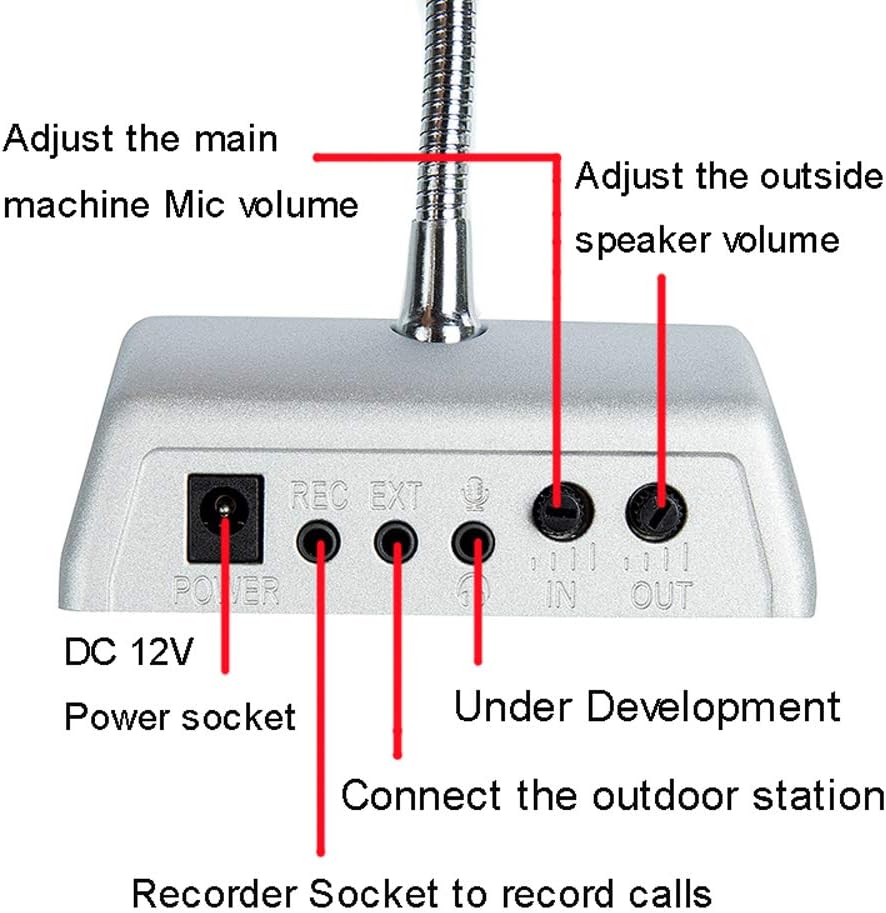
- Kanpoko bozgorailua konektatu: Connect the cable from the external speaker to the EXT port on the back of the main unit.
- Konektatu energia: Entxufatu korronte-egokigailua BOTEREA socket on the back of the main unit, then plug the adapter into a standard electrical outlet.
- Piztu: Press the red Power ON/OFF button on the main unit to turn on the system. A red indicator light will illuminate.
Only one wire is needed to connect the main unit and the external speaker, simplifying installation.
4. Funtzionamendua
The intercom system provides hands-free, two-way communication. Here’s how to operate it:
- Bi norabideko komunikazioa: Once powered on, the system allows for simultaneous conversation between the main unit (staff side) and the external speaker (customer side).
- Bolumenaren doikuntza: Use the volume knobs on the back of the main unit to adjust the microphone volume for the main unit and the speaker volume for the external speaker independently.
- Mutu funtzioa:
- The I-MUTE button (left, silver) mutes the main unit's microphone, preventing the customer from hearing the staff.
- The O-MUTU button (right, silver) mutes the external speaker, preventing the staff from hearing the customer.
- Grabaketa funtzioa: The system includes a 'REC' socket on the back for connecting an external recording device to record conversations, if desired.

For a visual demonstration of the system's operation, please refer to the video below:
5. Mantentzea
To ensure the longevity and optimal performance of your intercom system, follow these maintenance guidelines:
- Garbiketa: Use a soft, dry cloth to clean the surfaces of the main unit and external speaker. Avoid using abrasive cleaners or solvents.
- Ingurumena: Keep the system in a dry environment, away from direct sunlight, extreme temperatures, and excessive dust.
- Kableen zainketa: Ensure all cables are not kinked or pinched, which could damage the wiring.
6. Arazoak
If you encounter issues with your intercom system, please refer to the following common problems and solutions:
- Soinurik ez:
- Ensure the power adapter is securely connected and the unit is powered on (red indicator light).
- Check that the external speaker cable is firmly plugged into the EXT portua.
- Verify that the volume knobs for both the main unit and external speaker are not set to minimum.
- Ensure neither the I-MUTE ezta O-MUTU buttons are activated unintentionally.
- Soinu distortsionatua edo lausoa:
- Adjust the volume levels on both the main unit and external speaker.
- Ensure the microphone on the main unit is positioned correctly towards the user.
- Check for any obstructions around the speakers or microphones.
- The system has a special sidetone processing chip and movement noise function to improve noise effectively. If distortion persists, ensure the environment is not excessively noisy.
- Etengabeko konexioa:
- Egiaztatu kable-konexio guztiak solteak diren.
- Kableak ikus daitezkeen kalterik dagoen egiaztatu.
Konponbide hauek saiatu ondoren arazoa konpontzen ez bada, jarri harremanetan bezeroarentzako arreta-zerbitzuarekin.
7. Zehaztapenak
| Ezaugarri | Xehetasuna |
|---|---|
| Ereduaren izena | E370 Silver |
| Materiala | Metala |
| Potentzia-moldagailuaren sarrera | AC 100-240V 60Hz |
| Potentzia-egokigailuaren irteera | DC 12V 0.5A |
| Desktop Unit Dimensions | 130 x 110 x 38mm (5.12"H x 4.33"W x 1.5"D) |
| Wall Mount Unit Dimension (External Speaker) | 80 x 20 mm |
| External Speaker Cable Length | 1.8m (with metal sleeve) |
| Luzapen-kablearen luzera | 1m |
| Bozgorailuaren irteera-potentzia maximoa | 3 Watt |
| Konektibitate Teknologia | Kableatua |
| Audio irteera modua | Mono |
| Muntatze Mota | Window Mount (for external speaker) |
| Elementuaren pisua | 1.8 kilo |
| UPC | 661757250379 |
8. Bermea eta Laguntza
The KOQICALL Window Intercom System E370 Silver comes with a limited warranty. Please refer to the warranty information provided in your package for specific terms and conditions.
For technical support, troubleshooting assistance, or warranty claims, please contact KOQICALL customer service through their official channels or the retailer from whom you purchased the product.