
Sarrera
This manual provides detailed instructions for the installation, operation, and maintenance of your XVIM 8CH 1080P Home Security Camera System. Please read this manual thoroughly before using the product to ensure proper setup and functionality. Keep this manual for future reference.
Produktua amaituview
The XVIM 8CH 1080P Home Security Camera System includes an 8-channel Digital Video Recorder (DVR) with a 1TB hard drive and four 2MP HD outdoor IP66 waterproof cameras. The system is designed for reliable surveillance with features such as night vision and remote access capabilities.

Irudia: Gainetikview of the XVIM 1080P HD Security Camera System, showing a camera and a smartphone displaying live view.
Kameraren Ezaugarriak
- IP66 Metalezko Karkasa: Durable and weatherproof construction.
- 3.6 mm-ko HD lentea: Provides a 75° viewangelua.
- IR-Mozketa Iragazkia: Ensures clear day and night vision.
- 24 LED: Offers up to 65ft night vision range.

Image: Diagram highlighting key camera features: IP66 metal housing, 3.6mm HD lens, IR-cut filter, and 24 LEDs.
Day and Night Monitoring
The cameras are equipped with an IR-Cut filter and infrared LEDs to provide clear surveillance both during the day and at night. During the day, images are colorful and high definition. At night, the cameras automatically switch to infrared mode for clear black and white vision in low-light conditions.
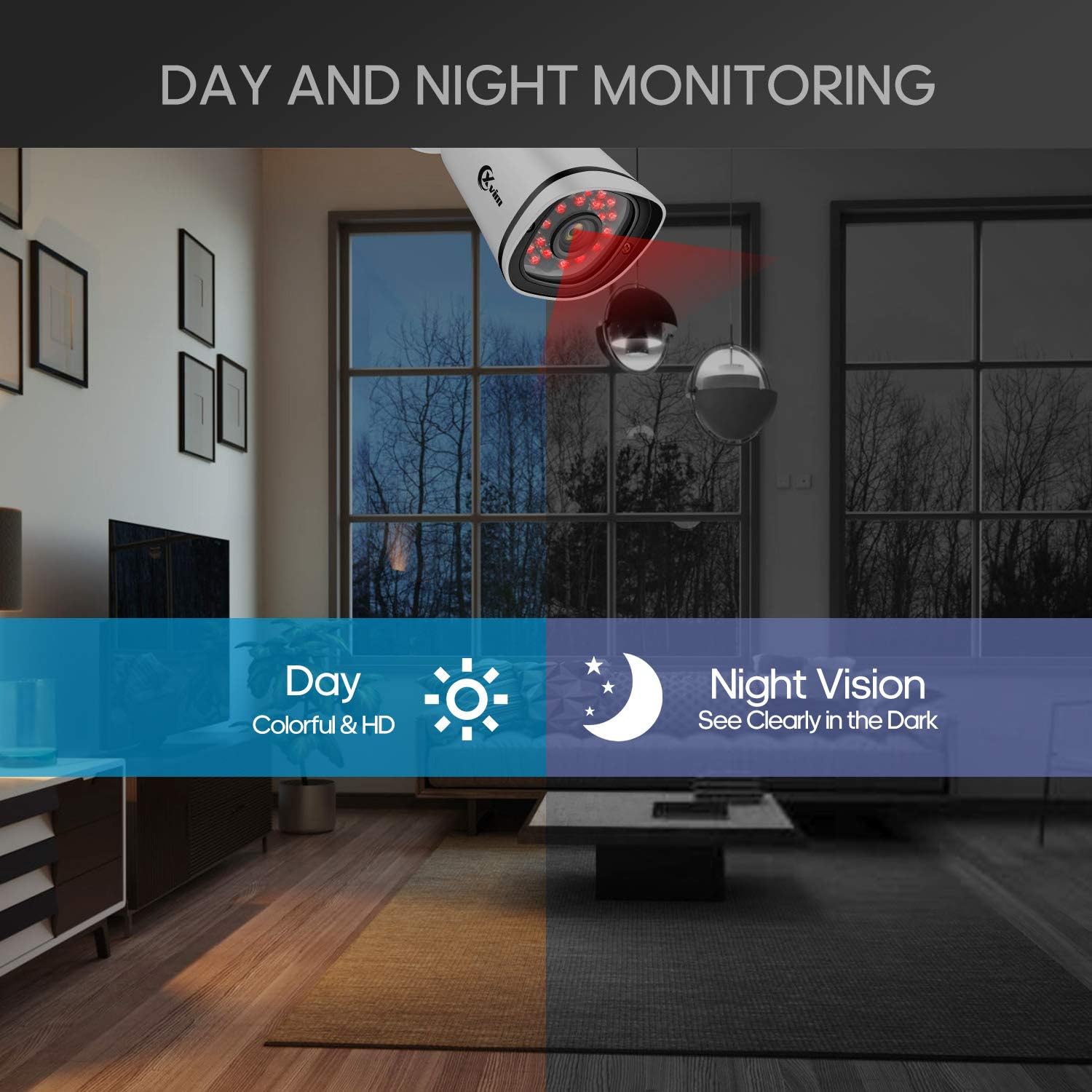
Image: Illustration showing the camera's ability to monitor both during the day (colorful HD) and at night (clear vision in the dark).
Diseinu Iragazgaitza
The cameras feature an IP66-rated metal housing, ensuring they are protected against dust and powerful water jets, making them suitable for outdoor installation in various weather conditions.
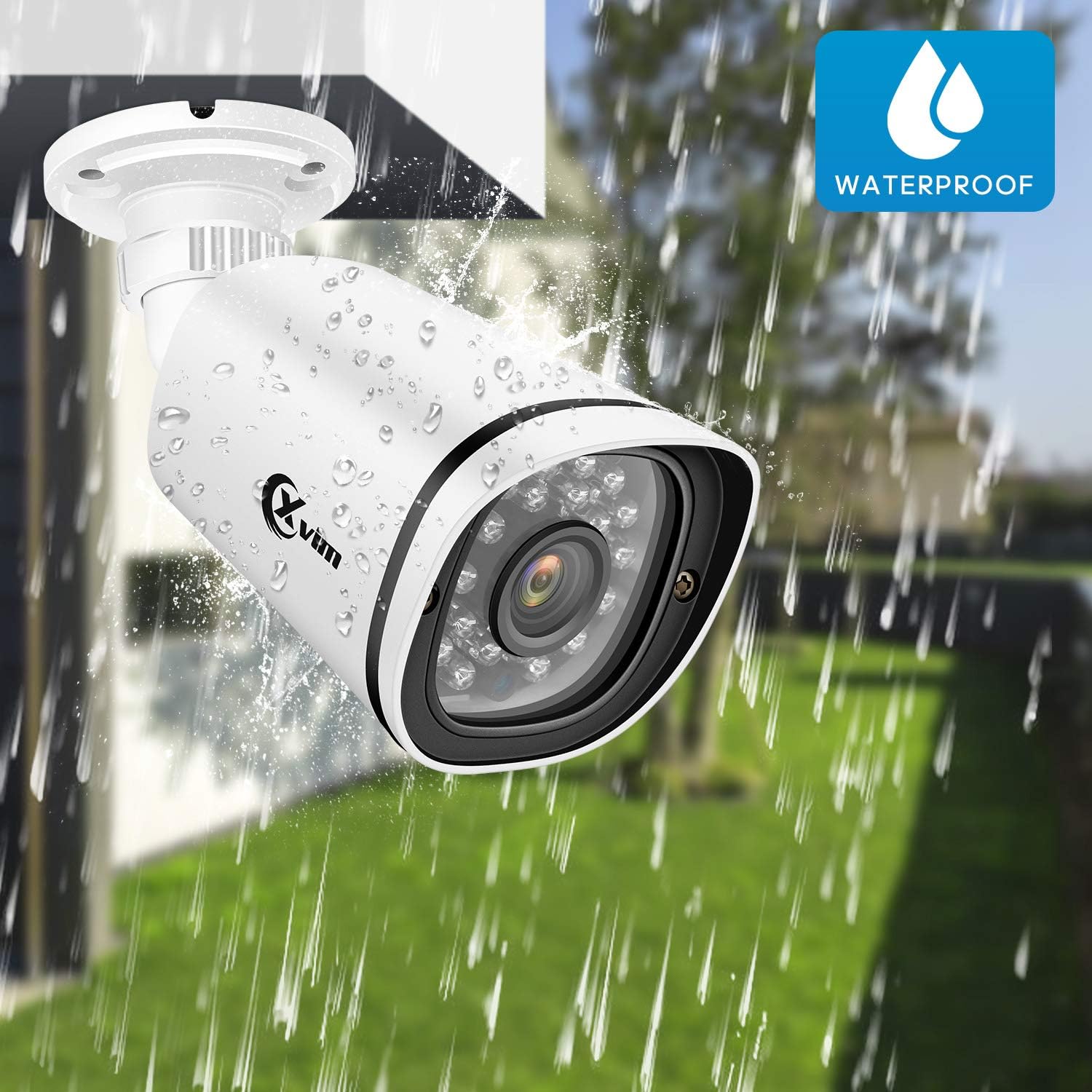
Image: An XVIM camera being sprayed with water, illustrating its waterproof design.
DVR Back Panel Overview
The DVR unit provides multiple ports for connecting cameras, a monitor, audio input/output, and network connectivity. Familiarize yourself with the ports before installation.
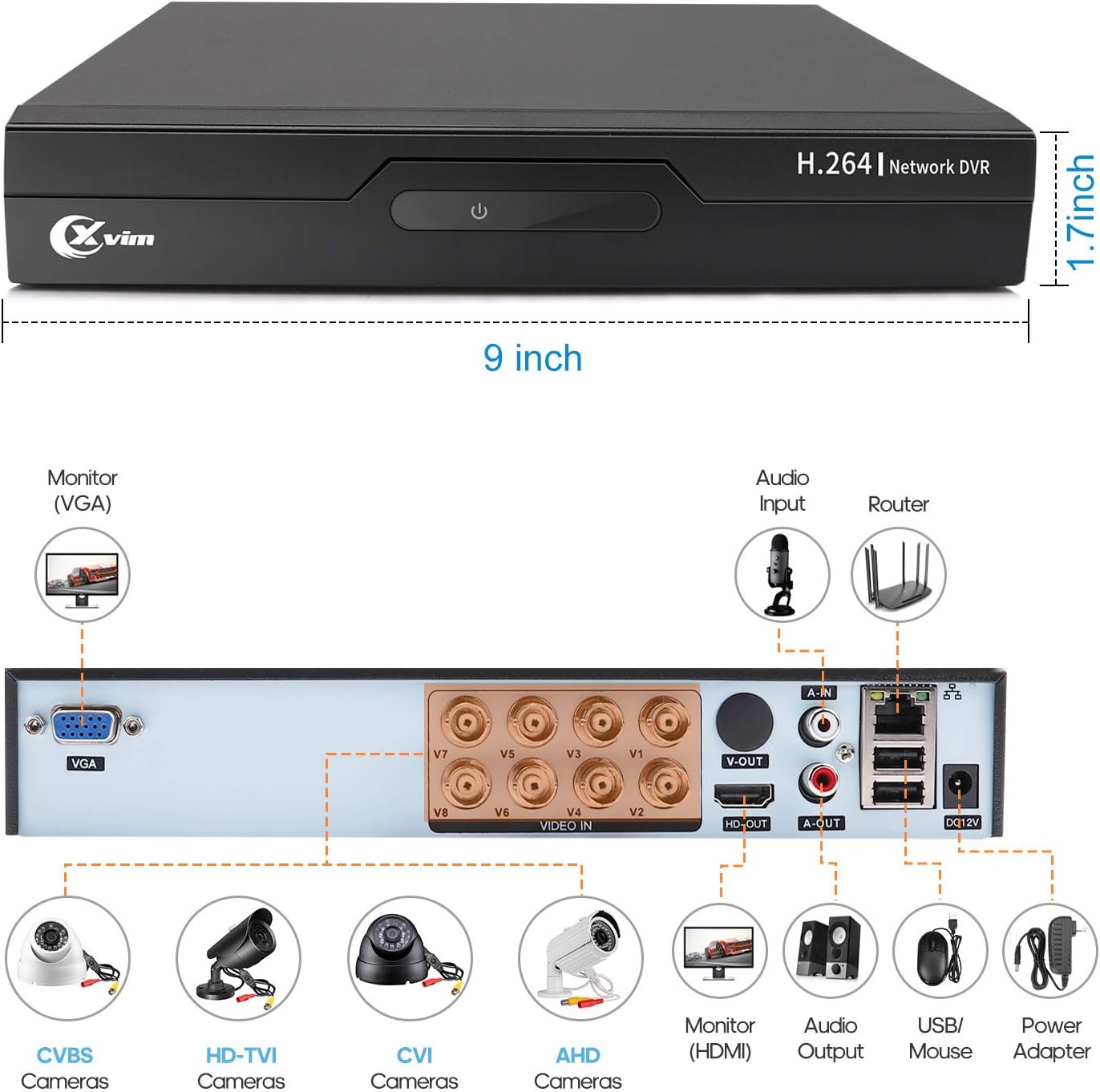
Image: Diagram of the DVR's back panel, showing ports for VGA, HDMI, video input (BNC), audio input/output, USB, and power.
Konfigurazio Argibideak
- Konektatu kamerak DVRra: Connect each camera to the corresponding video input (BNC) port on the DVR using the provided cables. Ensure secure connections.
- Konektatu DVRa monitorearekin: Connect the DVR to a monitor using either the VGA or HDMI port.
- Konektatu DVR sarera: Urruneko sarbidea lortzeko, konektatu DVR-a zure routerrari Ethernet kable bat erabiliz.
- Konektatu energia: Connect the power adapters to the cameras and the DVR, then plug them into a power outlet. The system will power on automatically.
- Hasierako konfigurazioa: Follow the on-screen prompts on your monitor to complete the initial DVR setup, including setting up a password and configuring basic settings.
- Mugikorretarako aplikazioaren konfigurazioa:
- Download the "XVR Pro" app from your smartphone's app store.
Deskargatu Androiderako
Deskargatu iOSerako - Register for an account within the app.
- Add your DVR device by scanning the QR code displayed on the DVR's monitor or by manually entering the device ID.
- Behin gehituta, egin dezakezu view your cameras remotely from anywhere.
- Download the "XVR Pro" app from your smartphone's app store.

Image: Step-by-step guide for connecting the system components and setting up the XVR Pro mobile application.
Funtzionamendu-argibideak
Zuzenean View
Konfigurazio arrakastatsuaren ondoren, egin dezakezu view bizi footage from your cameras on the connected monitor or through the XVR Pro mobile app. The DVR interface allows you to switch between single-camera view eta kamera anitzeko sareta view.
Grabaketa moduak
Sistemak hainbat grabazio modu onartzen ditu:
- Eskuzko grabaketa: Start and stop recording manually via the DVR interface.
- Mugimendua detektatzeko grabazioa: Configure the system to record automatically when motion is detected in specified areas. This helps conserve hard drive space.
- Programatutako grabazioa: Set specific times for continuous recording.
Refer to the DVR's on-screen menu for detailed configuration of recording schedules and motion detection zones.
Urruneko Sarbidea
The XVR Pro app enables you to:
- View Interneteko konexioa duen edozein lekutatik zuzeneko kameraren jarioak.
- Erreprodukzioa grabatutako footage stored on the DVR.
- Jaso mugimenduak hautemateko alertak.
- Control certain DVR settings remotely.
Camera Mode Switching (OSD Menu)
Each camera features an OSD (On-Screen Display) button on its cable, allowing you to switch between different video modes (Analog, AHD, TVI, CVI) to ensure compatibility with various DVRs. To access the OSD menu and switch modes:
- Analog (CVBS) Mode: Sakatu OSD botoia Gorantz 5 segundoz.
- AHD Mode: Sakatu OSD botoia Ezkerrerantz 5 segundoz.
- TVI Mode: Sakatu OSD botoia Eskuin aldera 5 segundoz.
- CVI Mode: Sakatu OSD botoia Behera 5 segundoz.
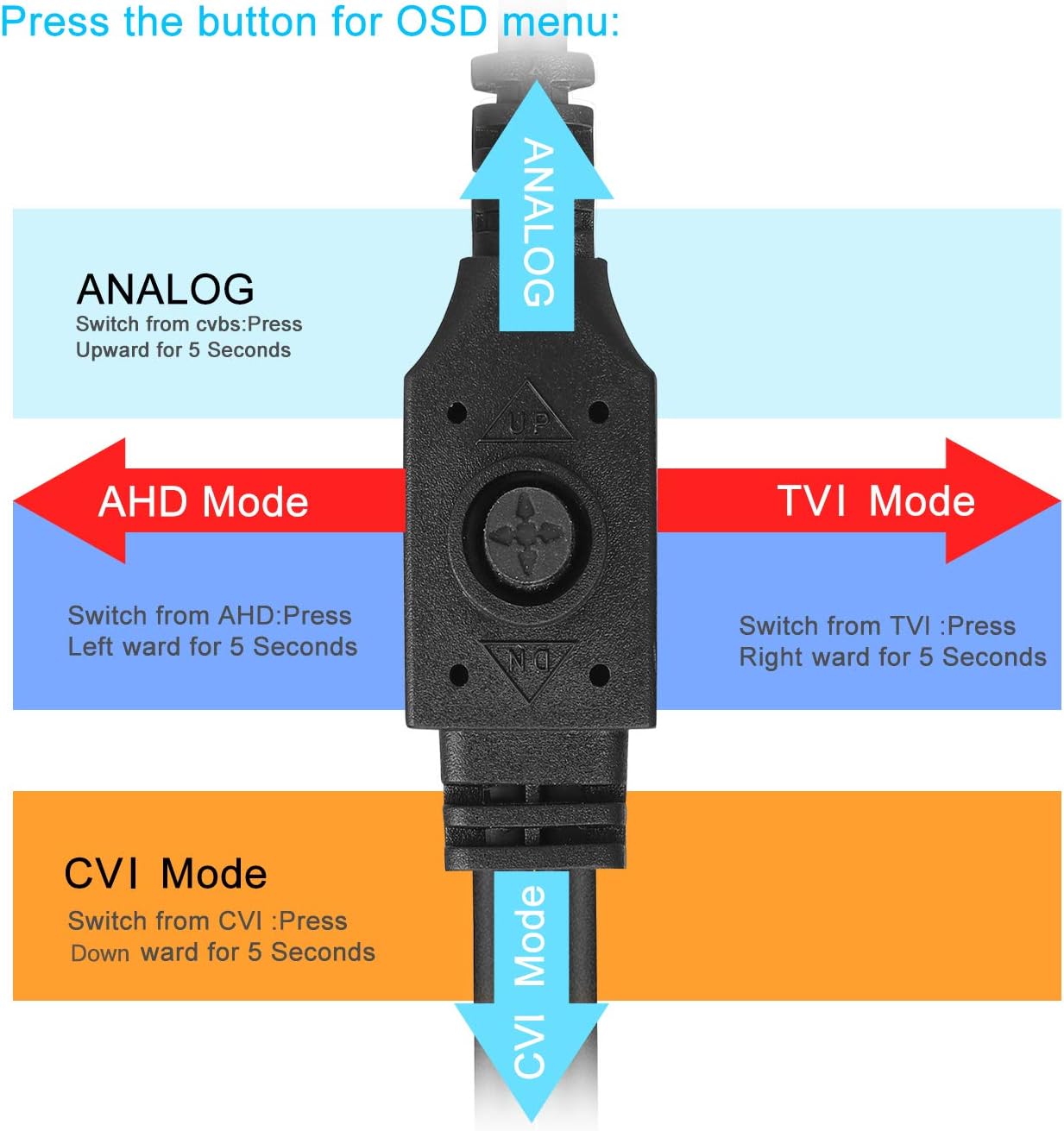
Image: Diagram illustrating how to use the OSD button on the camera cable to switch between Analog, AHD, TVI, and CVI video modes.
Mantentzea
- Kameraren garbiketa: Garbitu kameraren lenteak aldizka zapi leun eta lehor batekinamp oihal bat erabili irudiaren kalitate garbia bermatzeko. Saihestu garbitzaile urratzaileak.
- Kableen ikuskapena: Periodically check all cables and connections for wear, damage, or loose connections.
- DVR aireztapena: Ensure the DVR unit has adequate ventilation to prevent overheating. Keep vents clear of obstructions.
- Disko gogorraren kudeaketa: 1 TB-ko disko gogorrak automatikoki gainidatziko ditu fitxategi zaharrenak.tage when full. Regularly back up important recordings if needed.
- Firmware eguneraketak: Check the XVIM official webwebgunea bisitatu zure DVRrako firmware eguneratze eskuragarri daudenak ikusteko, errendimendu eta segurtasun optimoa bermatzeko.
Arazoak konpontzea
No Video Display
- Check all power connections for the DVR and cameras.
- Verify that the monitor is correctly connected to the DVR via VGA or HDMI and is set to the correct input source.
- Ensure camera cables are securely connected to the DVR's video input ports.
- If a specific camera has no video, try switching its video mode using the OSD button (refer to "Camera Mode Switching" section).
Remote Access Issues
- Confirm the DVR is connected to your router and has internet access.
- Egiaztatu zure bideratzailearen Interneteko konexioa.
- Ensure the XVR Pro app is updated to the latest version.
- Verify that the device ID is correctly added in the app and your login credentials are correct.
Gaueko ikusmen eskasa
- Ziurtatu kameraren lentea garbi eta oztoporik gabe dagoela.
- Check for strong light sources near the camera that might interfere with the infrared LEDs.
DVR Not Recording
- Check the hard drive status in the DVR's system settings. Ensure it is detected and functioning.
- Egiaztatu grabazio ordutegiak edo mugimendu detektatzeko ezarpenak behar bezala konfiguratuta daudela.
- Ensure there is sufficient hard drive space (though the system typically overwrites old footageta).
If you encounter persistent issues not covered here, please contact XVIM customer support for assistance.
Zehaztapenak
| Marka | XVIM |
| Modelo zenbakia | US-D8-4AHD7-1T-203 |
| Konektibitate Teknologia | Kableatua |
| Bideo Harrapaketa Ebazpena | 1080p |
| Ezaugarri bereziak | Image, Motion Sensor, Night Vision, Waterproof |
| Kanal kopurua | 4 (cameras included, DVR supports 8 channels) |
| Memoria Biltegiratzeko Ahalmena | 1 TB (Disko gogorra) |
| Energia iturria | Kable elektrikoa |
| Elementuaren neurriak (L x W x H) | 13.94 x 11.85 x 6.93 hazbete |
| Gaueko Ikusmenaren barrutia | 85 Oin |
| Grabaketa modua | Manual, Motion Detection |
| Hardware interfazea | USB 3.0 B motakoa |
| Lente mota | Finkoa |
| Bideo Sarrera | BNC, RCA (CVBS) |
| Viewangelua | 81 gradu |
Bermea eta Laguntza
XVIM products are designed for reliability and performance. For specific warranty details, please refer to the warranty card included with your product or visit the official XVIM website. For technical support, troubleshooting assistance, or any inquiries, please contact XVIM customer service through their official channels.
Sareko baliabideak: For additional support, FAQs, and software downloads, please visit the XVIM Store on Amazon or the official XVIM webgunea.