
1. Sarrera
This manual provides essential information for setting up, operating, maintaining, and troubleshooting your AVITA Essential NE14A2INC433-MB laptop. Please read this manual thoroughly before using your device to ensure proper functionality and longevity.
2. Produktua amaitu daview
The AVITA Essential NE14A2INC433-MB is a thin and light 14-inch laptop designed for everyday use. It features an aluminum body and a unique cloth design on the palm rest.

Figure 2.1: AVITA Essential Laptop (Matt Black) with screen and keyboard visible.
2.1 Bistaratzeko Ezaugarriak
The laptop is equipped with a 14-inch Full HD (1920x1080) anti-glare IPS display. The ultra-narrow bezels provide an immersive viewesperientzia.

Figure 2.2: Close-up of the AVITA Essential display, showcasing the FHD IPS Anti-Glare Panel and 4mm Narrow Bezels.
2.2 Portuak eta Konexioa
The AVITA Essential laptop offers various ports for connectivity, including two USB 3.0 Type A ports, one full-size HDMI port, and a Micro SD card reader.
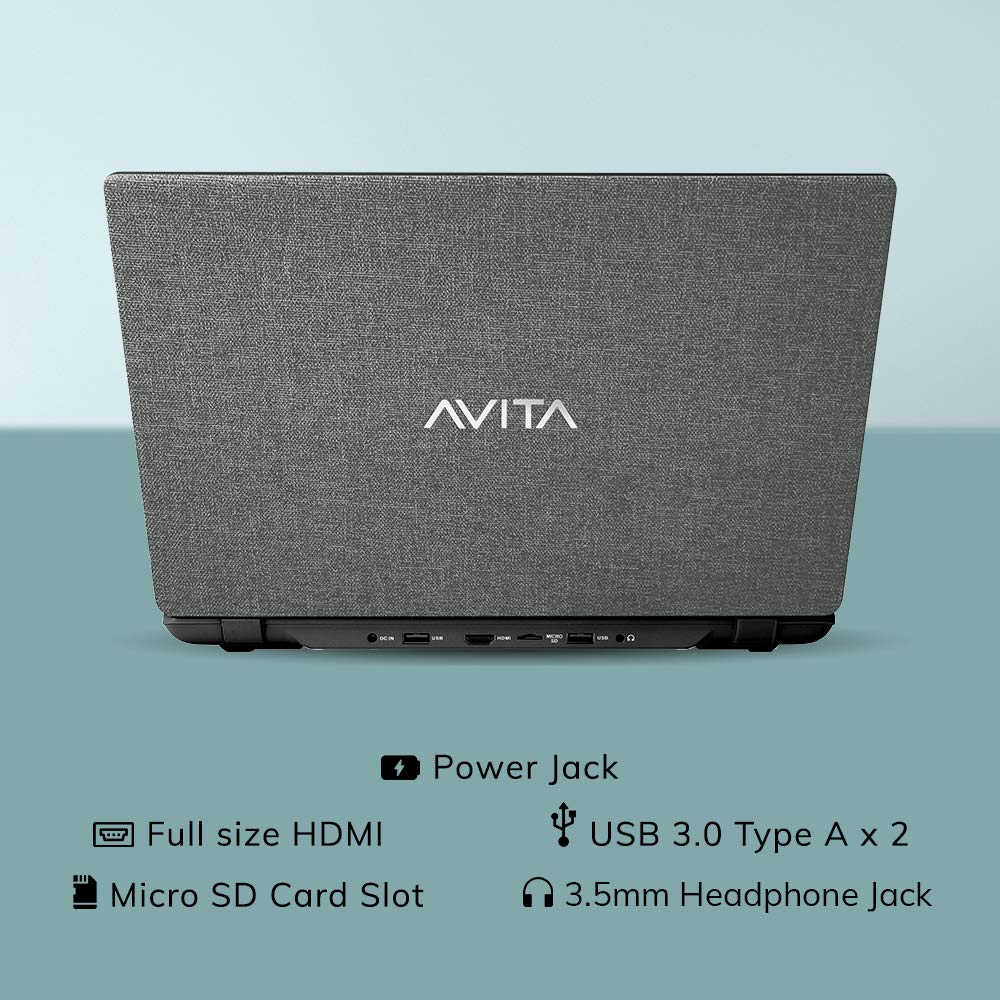
2.3. Irudia: Atzealdea view of the laptop detailing the available ports for external devices and power.
2.3 Keyboard and Webkamara
The laptop features a full-size island-style keyboard for comfortable typing and an integrated webbideokonferentziarako kamera.

2.4. irudia: Goitik behera view of the laptop's island-style keyboard and integrated webkamara.
2.4 Diseinua
The AVITA Essential boasts a unique cloth design, contributing to its aesthetic appeal.

Figure 2.5: The laptop in a closed position, highlighting its distinctive cloth design.
3. Konfigurazioa
- Deskargatzea: Kontu handiz atera ordenagailu eramangarria eta osagarri guztiak paketetik. Ziurtatu "Zer dago kutxan" atalean zerrendatutako elementu guztiak daudela.
- Hasierako karga: Connect the AC adapter to the laptop's power jack and then to a power outlet. Allow the laptop to charge for at least 30 minutes before the first use, or until the battery indicator shows a sufficient charge.
- Piztu: Open the laptop lid and press the power button. The laptop will begin the initial boot process.
- Windows 10 Home in S Mode Setup: Follow the on-screen instructions to complete the Windows 10 Home in S Mode setup. This includes selecting your region, language, connecting to a Wi-Fi network, and creating a user account.
- Software eguneraketak: After initial setup, connect to the internet and allow Windows to download and install any available updates. This ensures optimal performance and security.
4. Funtzionamendu-argibideak
4.1 Windows 10 Home in S Mode
Your AVITA Essential laptop comes with Windows 10 Home in S Mode, which is designed for security and performance. In S Mode, you can only install apps from the Microsoft Store and must use Microsoft Edge for safe browsing. You can switch out of S Mode to regular Windows 10 Home at any time, but you cannot switch back.
The laptop is eligible for a free upgrade to Windows 11 when available. The upgrade rollout plan is scheduled to begin late in 2021 and continue into 2022, with specific timing varying by device.
4.2 Errendimendua eta biltegiratzea
Powered by an Intel Celeron N4000 processor and 4GB DDR4 RAM, combined with a 128GB SSD, the laptop offers responsive performance for daily tasks. The Solid State Drive (SSD) ensures faster boot times and quicker application loading compared to traditional hard disk drives.
Video 4.1: This video highlights key features of the AVITA Essential laptop, including its FHD IPS display, narrow bezels, island-style keyboard, integrated webcam, and fast SSD storage. It demonstrates the laptop's sleek design and quick performance for everyday computing tasks.
Video 4.2: This video illustrates the benefits of a modern PC with Windows 10 and an SSD, emphasizing thin and light design, faster startups, improved efficiency, longer battery life, and enhanced durability and security due to fewer moving parts.
5. Mantentzea
- Garbiketa: Erabili zapi leun eta lihorik gabeko bat pantaila eta kanpoaldea garbitzeko. Orban egoskorrak izanez gero, garbitu apur batampGarbitu zapi bat urarekin edo pantailarako segurua den garbitzaile batekin. Saihestu produktu kimiko gogorrak.
- Bateria zaintzea: To maximize battery life, avoid fully discharging the battery frequently. It is recommended to keep the battery charged between 20% and 80%. Store the laptop in a cool, dry place when not in use for extended periods.
- Software eguneraketak: Egiaztatu eta instalatu aldizka sistema eragilearen eta kontrolatzaileen eguneraketak errendimendu eta segurtasun optimoak bermatzeko.
- Biltegiratze kudeaketa: Aldian behin berriroview eta beharrezkoak ez direnak ezabatu files to free up storage space on the 128GB SSD. Consider using external storage or cloud services for large files.
- Aireztapena: Ensure the laptop's vents are not obstructed to prevent overheating. Use the laptop on a hard, flat surface rather than soft furnishings.
6. Arazoak
6.1 Ohiko arazoak eta irtenbideak
- Ordenagailu eramangarria ez da pizten:
- Ziurtatu korronte-egokitzailea ondo konektatuta dagoela ordenagailu eramangarrira eta funtzionatzen duen entxufe batera.
- Egiaztatu entxufea funtzionatzen duela beste gailu bat konektatuz.
- If the battery is completely drained, allow it to charge for some time before attempting to power on.
- Errendimendu motela:
- Itxi atzeko planoan exekutatzen ari diren beharrezkoak ez diren aplikazioak.
- Begiratu eta instalatu zain dauden Windows eguneratzeak.
- Ziurtatu SSDan nahikoa leku libre dagoela.
- Exekutatu sistemaren eskaneatzea malware edo birusen bila.
- Wi-Fi konexio-arazoak:
- Berrabiarazi zure Wi-Fi bideratzailea eta ordenagailu eramangarria.
- Egiaztatu Wi-Fi gaituta dagoen Windows ezarpenetan.
- Update Wi-Fi drivers from the AVITA support webgunea.
- Windows 10 S Mode App Restrictions:
- Remember that in S Mode, only apps from the Microsoft Store can be installed.
- If you need to install apps from other sources, you must switch out of S Mode. This is a one-way process.
7. Zehaztapenak
| Ezaugarri | Xehetasuna |
|---|---|
| Marka | AVITA |
| Ereduaren izena | Ezinbestekoa |
| Modelo zenbakia | NE14A2INC433-MB |
| Pantailaren tamaina | 14 hazbete (35 cm) |
| Bistaratzeko ebazpena | 1920 x 1080 (HD osoa) |
| Bistaratzeko mota | FHD Anti-Glare IPS LED |
| Prozesadorea | Intel Celeron N4000 (1.10 GHz base, 2.60 GHz Max) |
| RAM Memoria | 4 GB DDR4 |
| Biltegiratzea | 128 GB SSD |
| Sistema eragilea | Windows 10 Home S moduan |
| Grafikoak | Intel Integrated UHD Graphics 600 |
| Bateriaren iraupena | Up to 6 Hours (as per MobileMark) |
| Pisua | 1.37 kg |
| Portuak | 2x USB 3.0 Type A, 1x Full Size HDMI, Micro SD Card Reader |
| Haririk gabeko konexioa | 802.11 b/g/n/ac Wi-Fi, Bluetooth 4.0 |
| Webkamara | Integrated Front Camera |
8. Bermea eta Laguntza
8.1 Bermearen informazioa
Your AVITA Essential laptop comes with an 18+6 months onsite domestic warranty from AVITA. This warranty covers manufacturing defects and does not cover physical damage. For detailed terms and conditions, please refer to the warranty section provided with your product or visit the official AVITA support webgunea.
8.2 Zer dago kutxan
Deskargatzean, elementu hauek aurkitu beharko dituzu:
- AVITA Essential Laptop
- AC egokigailua
- Erabiltzailearen Gida
- Eskuliburuak