
1. Sarrera
The Samsung Galaxy Tab S6 Lite is a versatile and portable tablet designed for note-taking, drawing, and entertainment. Featuring a large 10.4-inch display and an included S Pen, it offers a seamless experience for both productivity and creative tasks. This manual provides essential information to help you get started and make the most of your device.

Figure 1: Samsung Galaxy Tab S6 Lite with S Pen
2. Zer dago kutxan
Zure Samsung Galaxy Tab S6 Lite kaxa irekitzean, ziurtatu elementu hauek guztiak bertan daudela:
- Samsung Galaxy Tab S6 Lite Tablet
- S Pen
- Wall/USB Charger
- Hasierako gida azkarra
3. Hasierako konfigurazioa
Follow these steps to set up your new tablet:
- Kargatu tableta: Connect the provided Wall/USB Charger to your tablet's USB-C port and plug it into a power outlet. Allow the tablet to charge fully before first use.
- Piztu: Press and hold the Power button (located on the side) until the Samsung logo appears on the screen.
- Hasierako konfigurazioa: Follow the on-screen prompts to select your language, connect to a Wi-Fi network, accept terms and conditions, and sign in with your Samsung or Google account.
- Attach S Pen: The S Pen magnetically attaches to the right side of the tablet for convenient storage and charging.

Figure 2: Tablet Front View

Figure 3: Tablet Rear View
4. Funtzionamendua
4.1 Pantaila eta audioa
The Galaxy Tab S6 Lite features a 10.4-inch WUXGA+ (2000x1200) display, providing clear visuals for all your content. The tablet is equipped with dual speakers tuned by AKG and supports Dolby Atmos technology, delivering rich, immersive 3D sound for an enhanced viewentzuteko eta entzuteko esperientzia.
4.2 S boligrafoaren erabilera
The included S Pen transforms your tablet into a powerful tool for creativity and productivity. Its natural grip, low latency, and impressive pressure sensitivity make it ideal for:
- Oharrak hartzea: Jot down notes during lectures or meetings, with the ability to change colors and add searchable tags.
- Drawing and Illustration: Utilize various drawing applications for detailed artwork.
- Dokumentuen edizioa: Write directly onto PDFs and other documents for easy annotation.
- Nabigazioa: Use the S Pen to navigate the tablet interface, reducing finger fatigue.
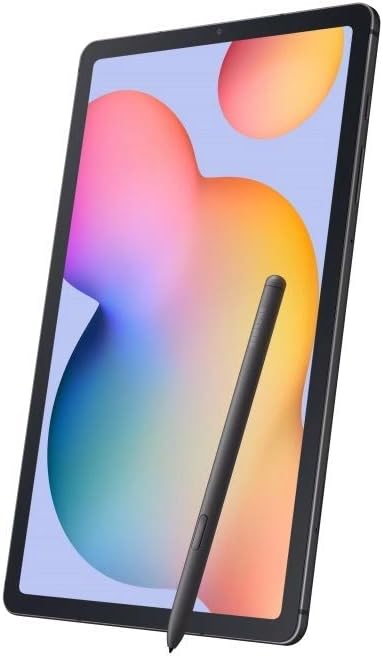
Figure 4: S Pen in Use for Drawing
4.3 Samsung DeX
Samsung DeX allows you to connect a keyboard and mouse to your tablet, transforming it into a more desktop-like environment for enhanced productivity. This feature is particularly useful for tasks requiring more precise input or multitasking with multiple windows.
4.4 Konektibitatea
The tablet supports Wi-Fi connectivity (802.11ac) for internet access. It also features Bluetooth 5.0 for connecting wireless accessories and a USB 2.0 Type-C port for charging and data transfer. A 3.5mm headphone jack is included for wired audio connections.
5. Mantentzea
- Bateriaren iraupena: The 7040mAh battery provides approximately 13 hours of average usage. For optimal battery longevity, avoid extreme temperatures and prolonged full charges.
- Garbiketa: Erabili zapi leun eta lihorik gabeko bat tabletaren pantaila eta gorputza garbitzeko. Saihestu material urratzaileak edo produktu kimiko gogorrak.
- Software eguneraketak: Regularly check for and install software updates to ensure your device has the latest features and security enhancements.
6. Arazoak
If you encounter issues with your tablet, consider the following general troubleshooting steps:
- Gailuak ez du erantzuten: Berrabiarazteko, sakatu eta eutsi pizteko botoia 10 segundo inguru.
- Konektibitate arazoak: Ensure Wi-Fi and Bluetooth are enabled and that you are within range of a strong signal. Try restarting your router or pairing your Bluetooth device again.
- Aplikazioaren matxura: Itxi aplikazioa eta ireki berriro. Arazoak jarraitzen badu, garbitu aplikazioaren cachea edo instalatu berriro.
- Errendimendu motela: Itxi erabiltzen ez diren aplikazioak, garbitu cachea edo askatu biltegiratze espazioa.
- Fabrikaren berrezarpena: Azken aukera gisa, fabrika berrezarpena egin dezakezu. Abisua: Honek zure gailuko datu guztiak ezabatuko ditu. Jarraitu aurretik, egin datu garrantzitsuen babeskopia. Navigate to Settings > General management > Reset > Factory data reset.
7. Zehaztapenak
| Ezaugarri | Zehaztapena |
|---|---|
| Pantaila zutik bistaratzeko tamaina | 10.4 hazbete |
| Pantailaren bereizmena | 2000x1200 (WUXGA+) |
| RAM | 4 GB |
| Disko gogorraren / Flash memoriaren tamaina | 64 GB |
| Prozesadorea | Exynos 9611 (10nm), Octa-core |
| Txartel grafikoa | Mali-G72 MP3 |
| Sistema eragilea | Android 10 (One UI 2-rekin) |
| Atzeko kameraren bereizmena | 8 MP AF (F1.9) |
| Aurrealdeko kameraren bereizmena | 5 MP (F2.0) |
| Haririk gabeko mota | 802.11ac (Wi-Fi soilik) |
| Bluetootha | Bluetooth 5.0 |
| USB ataka | USB 2.0 C motakoa |
| Bateria Edukiera | 7040mAh |
| Bateriaren batez besteko iraupena | 13 ordu |
| Elementuaren pisua | 7 ontza |
| Produktuaren neurriak | 10 x 8 x 1.5 hazbete |
| Kolorea | Oxford grisa |
8. Bermea eta Laguntza
Kontuan izan hau dela International Version Without US Warranty. For support, software updates, and additional information, please visit the official Samsung support webzure eskualderako gunea.
For further assistance or to explore more about your device's capabilities, refer to the comprehensive resources available on the Samsung support portal.