
Shark AV1010AE
Shark IQ Robot Vacuum with XL Self-Empty Base Instruction Manual
Model: AV1010AE | Brand: Shark
Your guide to automated home cleaning.
Produktua amaituview
The Shark IQ Robot Self-Empty XL combines the convenience of a self-empty base with IQ Navigation total home mapping for complete, efficient cleaning. It features powerful suction and a self-cleaning brushroll, designed for homes with pets to capture dust, dander, and pet hair from carpets and hard floors. After each cleaning session, the robot automatically empties into the bagless base, which holds up to 45 days of dirt and debris.

Image: The Shark IQ Robot Vacuum and its XL Self-Empty Base, alongside a smartphone displaying the SharkClean app.
Konfigurazio Gida
Follow these steps to set up your Shark IQ Robot Vacuum for optimal performance.
1. Kutxatik ateratzea eta hasierako prestaketa
Carefully remove all components from the packaging. Ensure all protective films and tapes are removed from the robot and the self-empty base. Locate the power switch on the side of the robot and turn it to the ON position before charging.
Video: An unboxing demonstration of the Shark IQ Robot Vacuum, showing all included components and initial preparation steps.
2. Base Setup and Placement
Place the self-empty base against a wall on a bare floor. Plug in the base power cord. For best results, leave at least 3 feet of open space on both sides of the base and 5 feet in front of it. When the base is plugged in, the power indicator light will turn GREEN.
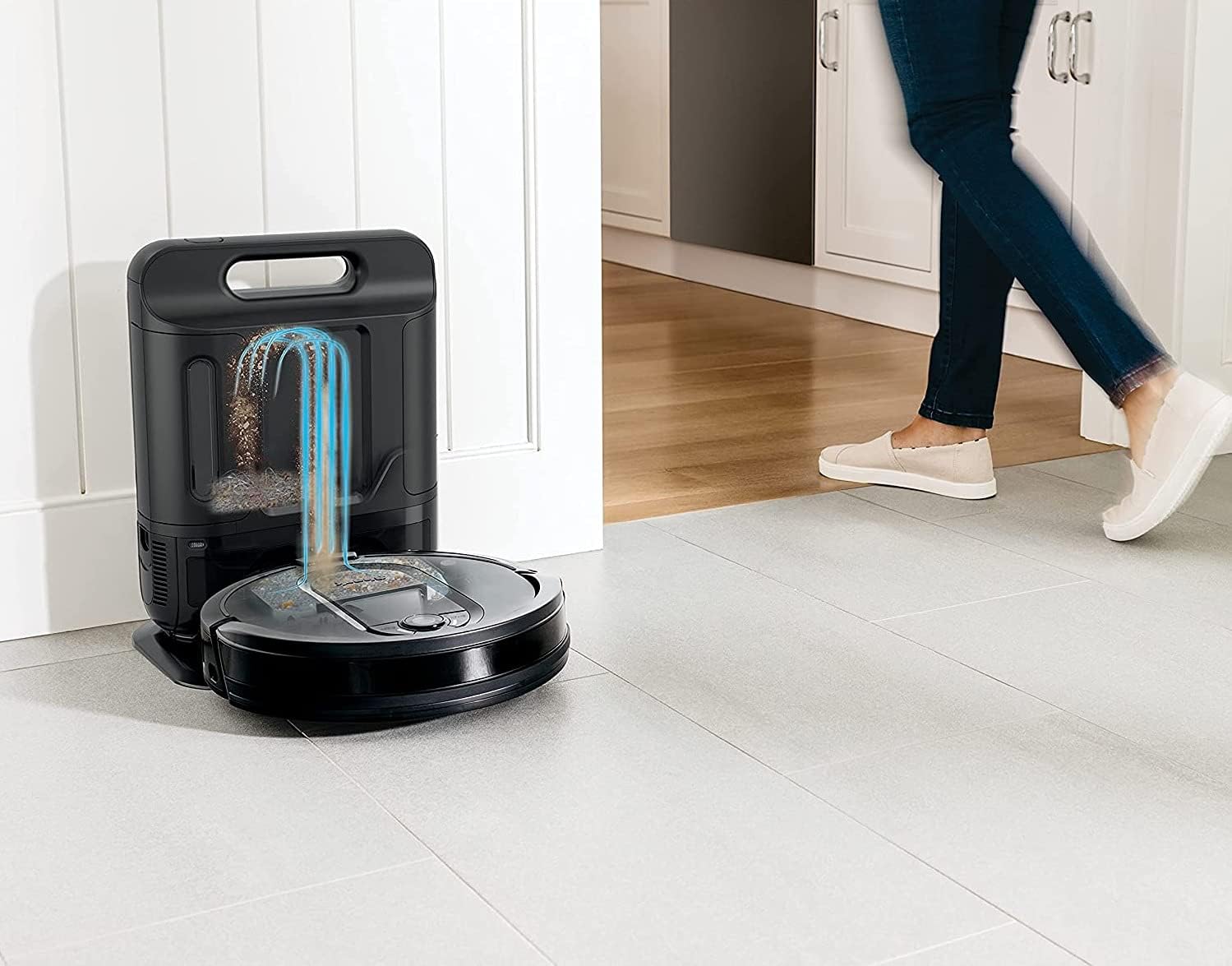
Image: The Shark IQ Robot Vacuum returning to its self-empty base, illustrating the automatic emptying process.
Video: A step-by-step guide on how to set up the Shark IQ Robot Vacuum, including base placement and initial charging.
3. App Integration and Mapping
Download the SharkClean app to unlock advanced features. The robot will run several cleaning cycles to map your home's layout, identifying walls and open areas. Once mapped, you can view and edit the map within the app, defining rooms and setting "No-Go Zones" to restrict the robot from certain areas (e.g., around cords or delicate items).

Image: The SharkClean app displaying a mapped floor plan with defined rooms and no-go zones.
Funtzionamendu-argibideak
Starting a Clean
You can initiate a cleaning session using the physical buttons on the robot (Clean or Dock) or through the SharkClean app. The app allows for scheduling whole-home cleaning or targeting specific rooms/areas. The robot methodically cleans row by row and then navigates room to room for complete coverage.
Garbiketa moduak
Select from different power levels: Eco, Normal, or Max, depending on your cleaning needs. Higher power levels provide deeper cleaning but may consume battery faster.
Nabigazioa eta oztopoak saihestea
The Shark IQ Robot uses advanced navigation to efficiently clean your home. It is designed to avoid obstacles and will automatically turn if it encounters an object. If the battery runs low during a cleaning cycle, the robot will return to its base to recharge and then resume cleaning from where it left off.
Mantentzea
Regular maintenance ensures your Shark IQ Robot continues to perform optimally.
1. Emptying the Dustbin/Canister
The XL Self-Empty Base holds up to 45 days of dirt and debris, reducing the frequency of manual emptying. To empty the base canister, simply press the release button and remove the canister. Empty its contents into a trash bin. The bagless design makes this process clean and easy.
2. Iragazkiaren garbiketa eta ordezkapena
Both the robot's internal dustbin filter and the base's foam filter should be cleaned periodically. The base's foam filter is reusable and can be cleaned with water, but ensure it is completely dry before reinserting. Replace filters as needed to maintain suction performance.
3. Brushroll Cleaning
The multi-surface brushroll is designed to minimize hair wrap, but occasional cleaning may be necessary, especially in homes with pets or long hair. Access the brushroll compartment on the underside of the robot to remove any tangled hair or debris.
4. Sentsoreen garbiketa
Wipe the robot's sensors periodically with a clean, dry cloth to ensure accurate navigation and obstacle detection.
Arazoak konpontzea
If your Shark IQ Robot encounters an issue, consider the following common solutions:
- Robot Stuck: If the robot gets stuck, check for obstructions around the wheels and brushroll. Clear any tangled hair or debris.
- Aplikazioen konexioa: Ensure your robot and smartphone are connected to a stable 2.4 GHz Wi-Fi network. Restarting the app or robot may resolve connectivity issues.
- Xurgapen eskasa: Check and clean the dustbin, filters, and brushroll. Ensure the self-empty base's canister is not full.
- Mapping Issues: Allow the robot to complete several full cleaning cycles to improve map accuracy. Ensure the base is placed in an open area as recommended.
Zehaztapenak
| Marka | Marrazoa |
| Ereduaren izena | Shark AV1010AE |
| Ezaugarri Berezia | Smart Mapping, Bagless, Self-Emptying |
| Kolorea | Grisa |
| Produktuaren neurriak | 14.69"L x 10.24"Z x 19.37"A |
| Elementuaren pisua | 16.96 kilo |
| Energia iturria | Bateriaren bidez |
| Kontrol-metodoa | Voice (Amazon Echo, Google Home) |
| Dakarten osagaiak | (1) Shark IQ Robot, (1) Self-Empty Base, (2) Side Brushes, (1) Filter |
Bermea eta Laguntza
For warranty information or technical support, please refer to the official Shark website or contact their customer service. A digital version of the user manual is available for download at esteka hau.
Erlazionatutako dokumentuak - AV1010AE
 |
Shark AV1010AE IQ Robot Vacuum Quick Start Guide Get started with your Shark AV1010AE IQ Robot Vacuum. This quick start guide provides instructions on setup, charging, app connection, and optimizing your home for cleaning. |
 |
Shark RV2620WAEU robot xurgagailuaren erabiltzailearen eskuliburua This user manual provides comprehensive instructions for the Shark RV2620WAEU Robot Vacuum, including setup, operation, maintenance, and troubleshooting. Learn how to prepare your home, use AI Laser Navigation, and perform various cleaning modes like Whole-Home Cleaning and Spot Clean Matrix. |
 |
Shark IQ Robot® SELF-EMPTY XL User Manual and Setup Guide Comprehensive user manual for the Shark IQ Robot® SELF-EMPTY XL robot vacuum. Includes setup instructions, safety guidelines, maintenance tips, troubleshooting, and warranty information for model AV1010AE/AV1110ARUS. |
 |
Shark Cordless Detect Auto-Empty System IW4000 Series: Quick Start Guide & Safety Instructions Comprehensive guide for the Shark Cordless Detect Auto-Empty System IW4000 Series, covering safety instructions, assembly, maintenance, and manufacturer's guarantee. Learn how to set up and care for your Shark vacuum. |
 |
Shark AI Robot Vacuum 2500 (RV2502AE seriea) Erabiltzailearen gida: Konfigurazioa, ezaugarriak eta mantentze-lanak This comprehensive owner's guide for the Shark AI Robot Vacuum 2500 (RV2502AE Series) provides detailed instructions for setup, operation, and maintenance. Learn about its AI Laser Navigation™, Self-Empty Base, voice control compatibility, and safety features to ensure optimal performance and a cleaner home. |
 |
Shark Cordless Clean & Empty Stick Vacuum & Auto-Empty System Owner's Guide This owner's guide provides instructions for the Shark Cordless Clean & Empty Stick Vacuum & Auto-Empty System, including safety information, assembly, usage, maintenance, and troubleshooting. |
Ask a question about this manual
Ask about setup, troubleshooting, compatibility, parts, safety, or missing instructions. Manuals+ will review the question and use this page’s manual context to help answer it.