
Temtop LKC-1000S+
Temtop LKC-1000S+ 2nd Air Quality Monitor User Manual
Model: LKC-1000S+ 2nd
1. Sarrera
The Temtop LKC-1000S+ 2nd is a professional air quality monitor designed to measure various indoor and outdoor air pollutants. This device provides real-time data for PM2.5, PM10, Formaldehyde (HCHO), Total Volatile Organic Compounds (TVOC), Air Quality Index (AQI), temperature, and humidity. It features a histogram function for PM2.5 trends and a data export capability for detailed analysis. This manual provides essential information for the proper use and maintenance of your air quality monitor.
2. Produktua amaitu daview
The Temtop LKC-1000S+ 2nd air quality monitor is equipped with advanced sensors for accurate readings and a clear TFT display for easy data interpretation.

Image 2.1: The Temtop LKC-1000S+ 2nd Air Quality Monitor, showing its sleek design and digital display.
2.1 Ezaugarri nagusiak
- Measures PM2.5, PM10, HCHO, TVOC, AQI, Temperature, and Humidity.
- Advanced 3rd generation laser particle sensor with a lifespan of up to 20,000 hours.
- Factory-calibrated electrochemical sensors for high-precision formaldehyde detection.
- New bar graph function displays PM2.5 changes over the past 12 hours.
- Data export function via USB.
- Large TFT screen for clear readability.

2.2. irudia: Amaituview of the Temtop LKC-1000S+ 2nd's measurement capabilities, including PM2.5, PM10, particles, temperature, humidity, AQI, TVOC, formaldehyde, histogram, and data export.
2.2 Gailuaren osagaiak

Image 2.3: Diagram illustrating the main components of the monitor: Air Outlet, Air Inlet, LCD Screen, and control buttons for AQI/Temp/Humi, PM2.5/PM10/Particles, and HCHO/TVOC.
- Aireko sarrera: Where air samples are drawn into the device.
- Aire irteera: Where processed air exits the device.
- LCD pantaila: Displays all measurement data and device status.
- Kontrol-botoiak: For navigating menus and selecting measurement parameters.
- USB ataka: Kargatzeko eta datuak esportatzeko.

2.4. irudia: Lehertua view showing the internal sensors: DART Electrochemical HCHO Sensor, Sensirion Temp & Humi Sensor, and Temtop Laser PM2.5 Sensor (3rd Gen).
3. Konfigurazioa
3.1 Desontziratzea eta hasierako ikuskapena
Upon receiving your Temtop LKC-1000S+ 2nd, carefully unpack all components. The package should include:
- Temtop LKC-1000S+ 2nd Air Quality Monitor
- USB kargatzeko kablea
- Erabiltzailearen eskuliburua
- Biltegiratze-kutxa

Image 3.1: Contents of the Temtop LKC-1000S+ 2nd package, including the monitor, USB charging cable, and manual.
Inspect the device for any signs of damage. If any components are missing or damaged, contact customer support.
3.2 Gailua kargatzea
The monitor is powered by a built-in 3000mAh rechargeable Lithium-ion battery. Before first use, fully charge the device.
- Connect the provided USB charging cable to the monitor's USB port.
- Konektatu USB kablearen beste muturra USB elikatze-egokitzaile bateragarri batera (ez dago barne) edo ordenagailuaren USB atakara.
- The battery indicator on the screen will show the charging status. A full charge typically takes several hours.
- Guztiz kargatuta dagoenean, deskonektatu kargatzeko kablea.

Image 3.2: The monitor connected via USB cable, illustrating both charging and data export capabilities.
4. Funtzionamendu-argibideak
4.1 Piztu/Itzaltzea
- To power on: Press and hold the power button (usually the central button) until the screen illuminates.
- To power off: Press and hold the power button until the screen turns off.
4.2 Pantaila ulertzea
The large TFT screen displays real-time measurements for various air quality parameters. The main screen typically shows PM2.5, PM10, and particle count, along with an overall air quality indicator (e.g., "Good").
- PM2.5 (µg/m³): Particulate matter less than 2.5 micrometers in diameter.
- PM10 (µg/m³): Particulate matter less than 10 micrometers in diameter.
- HCHO (mg/m³): Formaldehidoaren kontzentrazioa.
- TVOC (mg/m³): Konposatu organiko lurrunkor guztien kontzentrazioa.
- AQI: Air Quality Index, an overall indicator of air quality.
- Tenperatura (°C/°F): Giro-tenperatura.
- Hezetasuna (%): Hezetasun erlatiboa.
4.3 Navigating Measurements and Functions
Use the dedicated buttons to switch between different measurement displays and access functions:
- PM2.5 botoia: Egin klik bakarrean view the pollutant index for PM2.5.
- HCHO/TVOC Button: Egin klik bakarrean view HCHO and TVOC readings. Double-click to view the corresponding histogram.
- AQI Button: Egin klik bakarrean view AQI, temperature, and humidity.
- Pizteko/Menu botoia: Press to power on/off, or short press to enter/exit menu options.
4.4 Interpreting Air Quality Levels (EPA Standards)
The device provides a visual indication of air quality based on EPA standards, often using color codes:
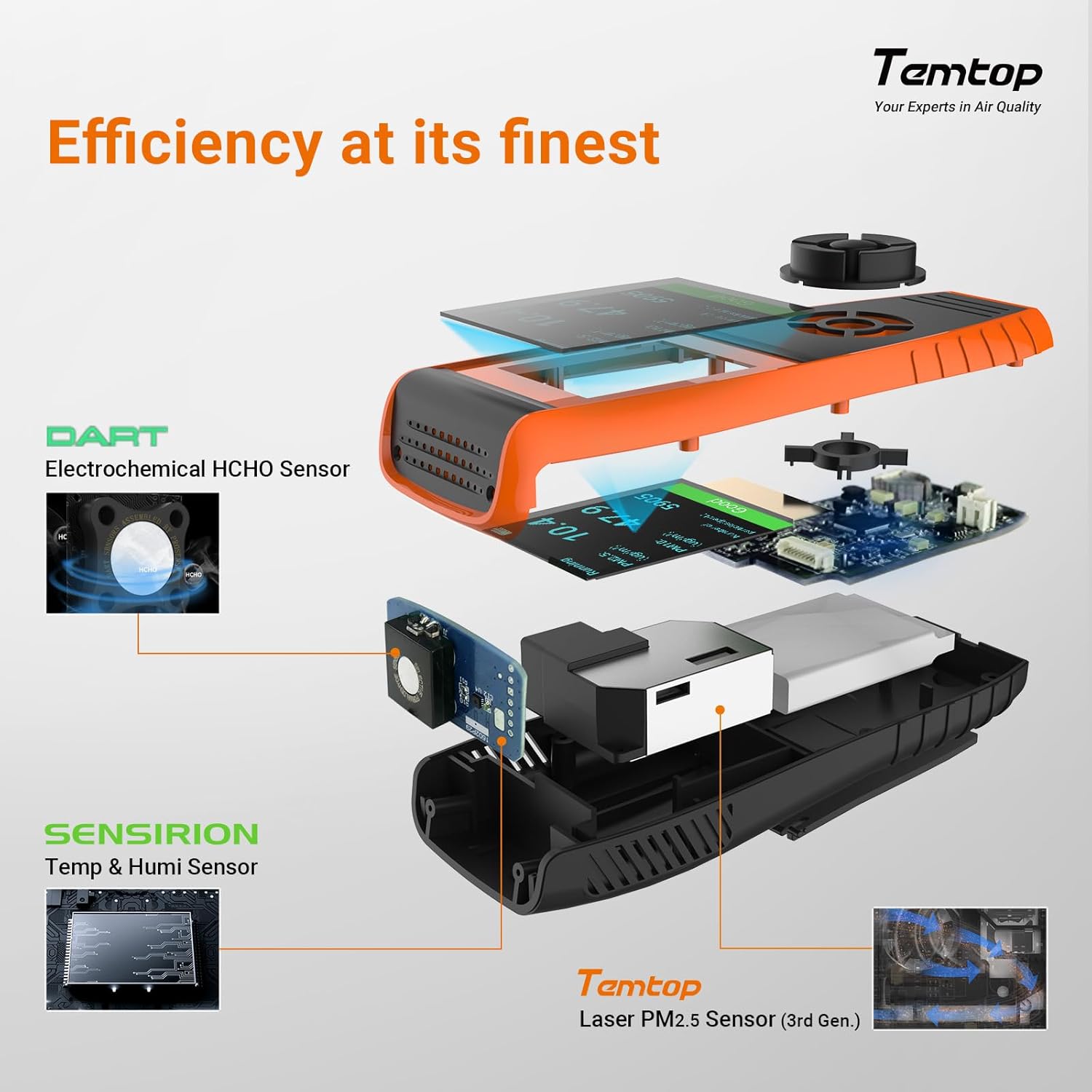
Image 4.1: The monitor's display showing air quality levels categorized by color, referencing EPA standards for Good/Safe, Moderate, Unhealthy for Sensitive Groups, Unhealthy, Very Unhealthy, and Hazardous.
- Berdea: Good/Safe
- Horiak: Moderatua
- Laranja: Osasungaitza talde sentikorrentzat
- Gorria: Osasungaitza
- Morea: Oso Osasungaitza
- Maroon: Arriskutsuak
4.5 Datuen esportazioa
The monitor supports data export via its USB port, allowing for detailed analysis of recorded measurements.
- Connect the monitor to a computer using the provided USB cable.
- The device should appear as a removable storage device.
- Access the stored data files (e.g., CSV format) and copy them to your computer for analysis.
The device's memory allows for at least 3 months of continuous data recording.
5. Mantentzea
5.1 Garbiketa
To clean the device, use a soft, dry cloth. Do not use abrasive cleaners, solvents, or immerse the device in water. Keep the air inlet and outlet free from dust and obstructions.
5.2 Sensor Care
The advanced laser particle sensor has a long lifespan of up to 20,000 hours. The electrochemical sensors are factory-calibrated for accuracy. Avoid exposing the device to extreme temperatures, high humidity, or corrosive gases, as this can affect sensor performance and lifespan.
5.3 Bateria zaintzea
Bateriaren iraupena luzatzeko, saihestu bateria maiz erabat deskargatzea. Kargatu gailua aldizka, batez ere denbora luzez gordeko bada.
6. Arazoak
If you encounter issues with your Temtop LKC-1000S+ 2nd, refer to the following common problems and solutions:
| Arazoa | Kausa posiblea | Irtenbidea |
|---|---|---|
| Gailua ez da pizten. | Bateria baxua edo gailuaren matxura. | Charge the device for at least 2 hours. If it still doesn't power on, contact support. |
| Irakurketa okerrak. | Sensor obstruction, environmental factors, or calibration issue. | Ensure air inlets/outlets are clear. Move the device to a stable environment. Allow 5-10 minutes for readings to stabilize. If issues persist, contact support. |
| Ezin dira datuak esportatu. | Incorrect USB connection or driver issue. | Ensure the USB cable is securely connected to both the device and the computer. Try a different USB port or computer. |
| Pantaila hutsik edo izoztuta dago. | Softwarearen akatsa. | Berrabiarazteko, sakatu eta eutsi pizteko botoia 10-15 segundoz. |
For problems not listed here or if solutions do not resolve the issue, please contact Temtop customer support.
7. Zehaztapenak
| Parametroa | Balioa |
|---|---|
| Modelo zenbakia | LKC-1000S+2nd |
| Fabrikatzailea | Elitech (Brand: Temtop) |
| Produktuaren neurriak | 6.55 x 3.2 x 17.55 cm |
| Pisua | 408.23 g |
| Bateria mota | 1 litio-ioizko bateria (barne) |
| Bateria Edukiera | 3000mAh (recyclable) |
| Energia iturria | Bateria |
| liburukiatage | 5 Volt |
| Sentsore mota | Electrochemical (HCHO), Laser (PM2.5/PM10), Sensirion (Temp/Humi) |
| PM2.5 Sensor Lifespan | Gehienez 20,000 ordu |
| Neurketak | PM2.5, PM10, HCHO, TVOC, AQI, Temperature, Humidity |
| Datuen esportazioa | Bai, USB bidez |
| UPC | 757233346244 |
8. Bermea eta Laguntza
8.1 Bermearen informazioa
Specific warranty details for the Temtop LKC-1000S+ 2nd Air Quality Monitor are not provided in this manual. Please refer to the warranty card included with your product or visit the official Temtop webwebgunea berme-politika eguneratuena ikusteko.
8.2 Bezeroarentzako laguntza
For technical assistance, troubleshooting, or any questions regarding your device, please contact Temtop customer support. Contact information can typically be found on the product packaging, the official Temtop webgunea edo berme-txartela.
Ask a question about this manual
Ask about setup, troubleshooting, compatibility, parts, safety, or missing instructions. Manuals+ will review the question and use this page’s manual context to help answer it.