
Sarrera
The MAIDeSITe T1 Pro Electric Height Adjustable Desk Frame is designed to provide a versatile and ergonomic workspace. This frame features an all-steel structure and a robust support system, ensuring stability and durability. Its powerful motor system allows for smooth and quiet height adjustments, promoting a healthier work environment by enabling seamless transitions between sitting and standing postures.
This manual provides essential information for the proper assembly, operation, and maintenance of your MAIDeSITe T1 Pro desk frame. Please read it thoroughly before use to ensure safe and efficient operation.

Image: The MAIDeSITe T1 Pro desk frame integrated into a modern workspace.
Segurtasun-abisuak
Segurtasun informazio garrantzitsua:
- Do not exceed the total authorized weight capacity of 80 kg (176 lbs). Overloading can cause damage to the desk frame and potential injury.
- Ensure the desk frame is properly assembled according to the instructions to guarantee stability and safety during use.
- The desk frame is designed to be water-resistant, but it is not waterproof. Avoid exposing the electrical components or the frame to direct water or excessive moisture.
- Keep children and pets away from the desk during height adjustments to prevent accidents.
- Before adjusting the height, ensure there are no obstacles above or below the desk that could impede its movement.
Konfigurazioa eta Muntaketa
The MAIDeSITe T1 Pro desk frame is designed for straightforward assembly. It is recommended to have two people for certain steps, especially when positioning the desktop and flipping the assembled desk.
Paketearen edukia:
- Mahaiaren egituraren osagaiak (hankak, zeharkako euskarria, oinak)
- Kontrol Kutxa
- Kontrol-panela LED pantailarekin
- Korronte egokitzailea eta kablea
- Muntaketa-tresneria (torlojuak, azkoinak, Allen giltza)
- Argibide eskuliburua
Muntatzeko urratsak:
- Deskonprimitu osagaiak: Kontu handiz atera pieza guztiak paketetik eta egiaztatu eskuliburuan agertzen den piezen zerrendarekin.
- Muntatu hankak eta oinak: Attach the feet to the bottom of each leg using the provided screws.
- Konektatu barra gurutzatua: Secure the crossbar between the two leg assemblies. Ensure all connections are tight.
- Motorra eta kontrol-kutxa instalatu: Mount the motor and control box to the designated positions on the frame using the appropriate hardware.
- Kontrol panela erantsi: Secure the control panel to the underside of the desktop (desktop sold separately) in an easily accessible location.
- Mahaigaina muntatu: Carefully place your chosen desktop (recommended size: 120-140 cm long, 60-70 cm wide) onto the assembled frame. Align and secure it using screws.
- Konektatu kableak: Connect all motor and control panel cables to the control box, and then connect the power adapter.
- Hasierako Kalibrazioa: Follow the specific calibration instructions in the included manual for first-time use. This typically involves lowering the desk to its lowest point and holding the down button for a few seconds.

Image: Detail of the desk frame assembly process, highlighting ease of installation.
Funtzionamendu-argibideak
The MAIDeSITe T1 Pro features an intuitive control panel for easy height adjustment and memory functions.
Kontrol panelaren funtzioak:

Image: The advanced touchscreen control panel with its various functions.
- LCD pantaila: Displays the current desk height in centimeters.
- Gora/Behera geziak (▲ / ▼): Press and hold to manually adjust the desk height up or down. Release to stop.
- Memoria aurrezarpenak (1, 2, 3, 4): Botoi hauek nahiago dituzun lau mahaigaineko altuera gorde eta berreskuratzeko aukera ematen dute.
- Memoria Ezartzeko Botoia (M): Used to program a desired height into a memory slot.
- Haurren segurtasun blokeoa: Activates or deactivates the control panel to prevent accidental adjustments.
- USB ataka: Provides a convenient charging point for mobile devices.
Memoria aurrezarpenak ezartzea:
- Egokitu mahaia nahi duzun altuerara Gora/Behera geziak erabiliz.
- Press the 'M' button. The LCD display will flash 'S-'.
- Within 3 seconds, press the desired memory button (1, 2, 3, or 4). The display will show 'S-1', 'S-2', etc., indicating the height is saved.
Memoria aurrezarpenak berreskuratzea:
Simply press the corresponding memory button (1, 2, 3, or 4). The desk will automatically move to the saved height.
Talkaren aurkako funtzioa:
The desk frame is equipped with a highly sensitive anti-collision system. If the desk encounters an obstacle during adjustment, it will automatically stop and reverse slightly to prevent damage. This feature is adjustable for sensitivity.
Mantentzea
Regular maintenance ensures the longevity and optimal performance of your MAIDeSITe T1 Pro desk frame.
- Garbiketa: Garbitu mahaiaren markoa zapi leun batekin,amp cloth. Avoid using abrasive cleaners or solvents that could damage the powder-coated finish.
- Kableen kudeaketa: Periodically check all cables for any signs of wear or damage. Ensure cables are neatly routed and not pinched or tangled.
- Loturaren egiaztapena: Every few months, inspect all screws and bolts to ensure they are tight. Re-tighten if necessary.
- Pisuaren banaketa: Distribute weight evenly across the desktop. Avoid placing heavy items predominantly on one side.
- Ingurumen-baldintzak: Operate the desk in a dry environment. Avoid extreme temperatures or high humidity.
Arazoak konpontzea
If you encounter issues with your MAIDeSITe T1 Pro desk frame, refer to the following common problems and solutions:
| Arazoa | Kausa posiblea | Irtenbidea |
|---|---|---|
| Mahaia ez da mugitzen | Power cable disconnected; Control panel locked; Overload; Motor error. | Check power connections; Unlock control panel; Reduce weight on desk; Perform reset (see manual). |
| Mahaia modu irregularrean mugitzen da | Uneven weight distribution; Loose connections. | Banatu pisua uniformeki; egiaztatu eta estutu muntaketa-torloju guztiak. |
| Anti-collision feature triggers frequently | High sensitivity setting; Obstacles. | Adjust anti-collision sensitivity (refer to full manual); Clear any potential obstacles. |
| Funtzionamenduan zarata | Normal motor sound; Loose components. | A slight motor sound is normal (<45 dB); Check for any loose screws or components and tighten. |
If the problem persists after attempting these solutions, please refer to the comprehensive troubleshooting guide in your full product manual or contact customer support.
Zehaztapenak
Detailed technical specifications for the MAIDeSITe T1 Pro Electric Height Adjustable Desk Frame.
- Marka: MAIDESITE
- Modelo zenbakia: T1 Pro
- Materiala: Hautsez estalitako altzairua
- Altuera doitzeko tartea: 72 cm eta 120 cm (28.3 hazbete eta 47.2 hazbete)
- Width Adjustment Range: 96 cm eta 160 cm (37.8 hazbete eta 63 hazbete)
- Altxatzeko abiadura: 30 - 60 mm/sec
- Gehienezko karga-gaitasuna: 80 kg (176 lb)
- Zarata maila: <45 dB
- Lifting Column: 2-stage
- Recommended Desktop Size: 100-180 cm (length) x 50-80 cm (depth)
- Ezaugarriak: Electric height adjustment, 4 programmable memory presets, anti-collision system, child safety lock, USB charging port.

Image: Visual representation of the desk's height adjustment capabilities.
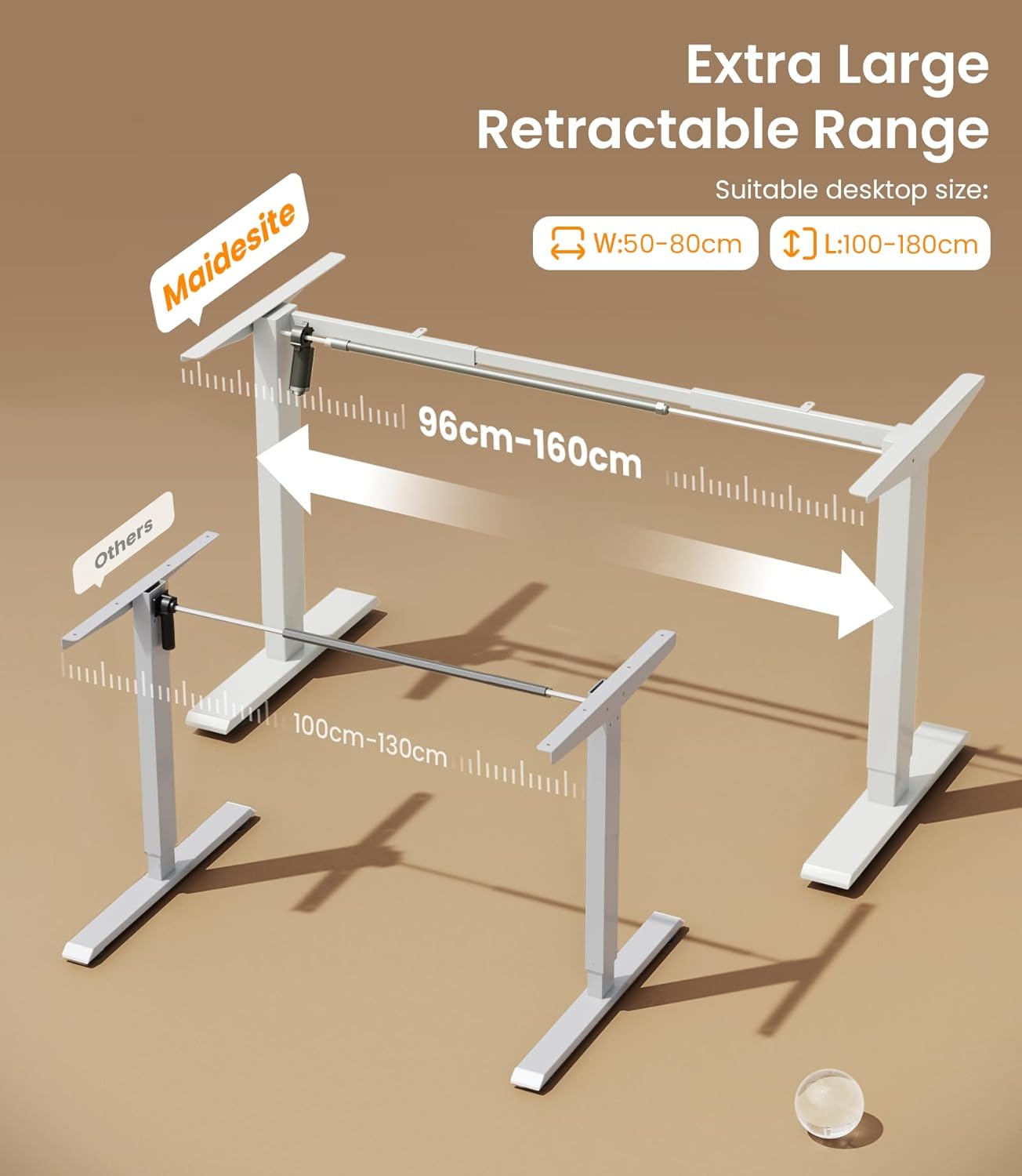
Image: Illustration of the adjustable width range for various desktop sizes.

Image: The desk frame supporting a significant load, highlighting its 80 kg capacity.
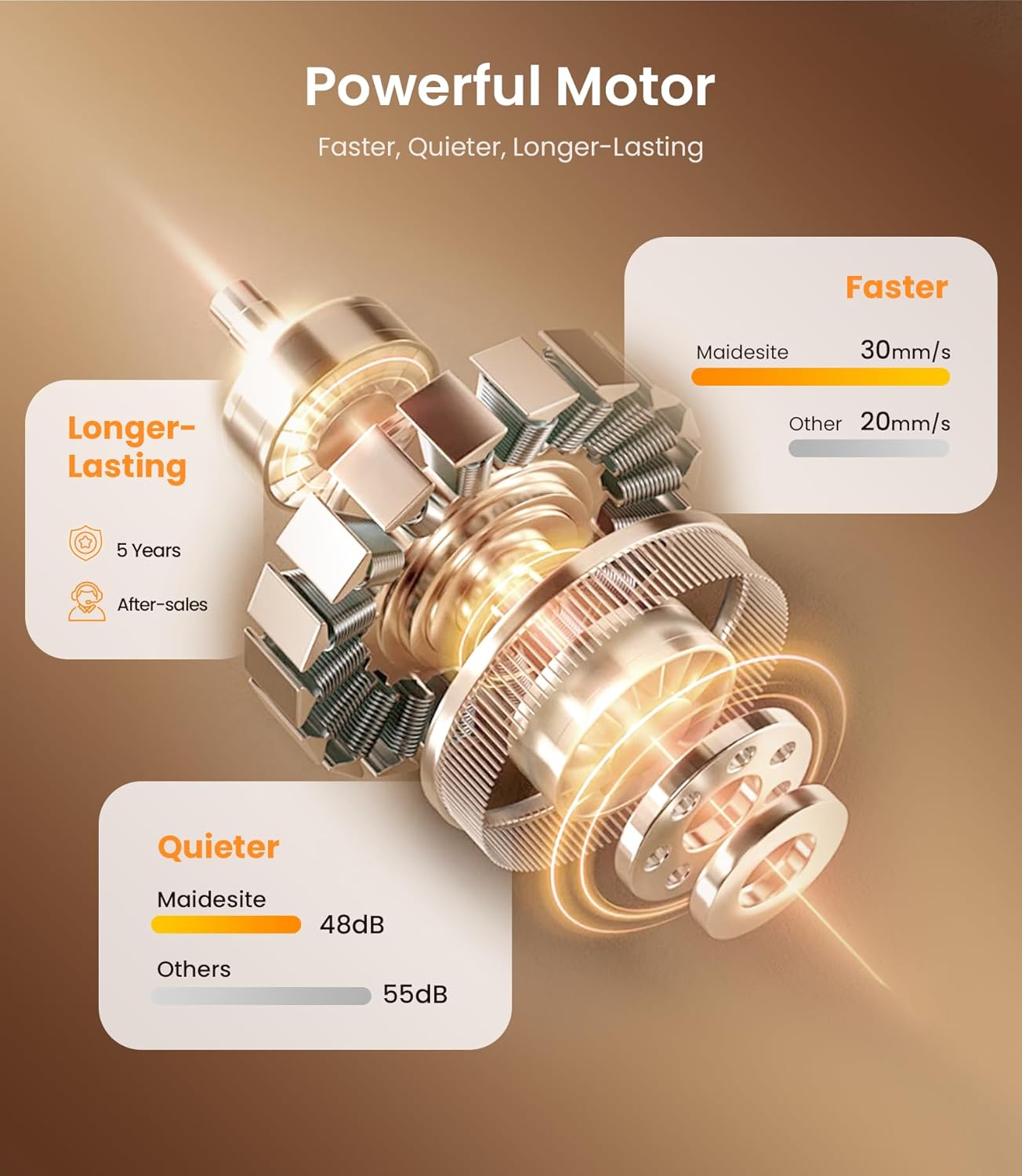
Image: Infographic detailing the powerful and quiet motor system.
Bermea eta Laguntza
Bermearen informazioa:
The MAIDeSITe T1 Pro Electric Height Adjustable Desk Frame comes with a 5 urteko berme osoa. This warranty covers manufacturing defects and ensures reliable performance under normal use conditions. Please retain your proof of purchase for warranty claims.
Bezeroarentzako laguntza:
For any questions, technical assistance, or warranty claims, please contact MAIDeSITe customer support. Refer to the contact information provided in your product packaging or visit the official MAIDeSITe webwebgunea laguntza-xehetasun eguneratuenak lortzeko.
Our support team is available to assist you with any issues you may encounter during the setup or operation of your desk frame.


