
GOKOO B08FMBHSWD
GOKOO Smart Watch B08FMBHSWD User Manual
Sarrera
This manual provides essential information for the proper setup, operation, and maintenance of your GOKOO Smart Watch B08FMBHSWD. Please read it thoroughly before using the device to ensure optimal performance and longevity.
The GOKOO Smart Watch is a versatile fitness tracker and smartwatch designed to monitor various health metrics and assist with daily activities. It features a full touch screen, heart rate and blood oxygen monitoring, sleep tracking, multiple sports modes, and notification capabilities.
Produktua amaituview
The GOKOO Smart Watch B08FMBHSWD is equipped with advanced features to support your active lifestyle and health monitoring needs.
- All-day Activity Tracking: Records steps, calories, and mileage. Supports 10 sports modes including walking, running, yoga, and swimming.
- Osasunaren Jarraipen Integrala: Continuously monitors heart rate and blood oxygen levels. Features automatic sleep tracking, breathing training, and sedentary reminders.
- Durable and Waterproof Design: IP68 waterproof rating suitable for daily use and swimming.
- Pantaila pertsonalizagarria: 1.3-inch round high-definition screen with personalized UI interfaces.
- Jakinarazpen adimendunak: Synchronizes messages and allows management of incoming calls.
- Bateriaren iraupen luzea: Up to 10 days of usage on a single charge (200MA battery).
- Bateragarritasun zabala: Works with Android 5.0+ and iOS 9.0+ devices.

Figure 1: GOKOO Smart Watch highlighting its design and core functionalities.
Konfigurazioa
1. Gailua kargatzea
Before initial use, fully charge your GOKOO Smart Watch. Connect the magnetic charging cable to the charging contacts on the back of the watch and plug the USB end into a power adapter (not included) or a computer's USB port. The watch display will indicate charging status.
A full charge typically takes approximately 2 hours and provides up to 10 days of usage, depending on individual use patterns.

Figure 2: Illustration of the watch's IP68 waterproof capability and its extended battery life.
2. Aplikazioaren instalazioa eta parekatzea
- Deskargatu aplikazioa: Bilatu the official GOKOO companion app in your smartphone's app store (Apple App Store for iOS, Google Play Store for Android).
- Install and Register: Instalatu aplikazioa eta jarraitu pantailan agertzen diren argibideei kontu bat sortzeko edo saioa hasteko.
- Gaitu Bluetootha: Ziurtatu Bluetootha gaituta dagoela zure telefonoan.
- Parekatu erlojua: Open the GOKOO app, navigate to the device pairing section, and select your GOKOO Smart Watch from the list of available devices. Confirm the pairing request on both your phone and the watch if prompted.
- Eman baimenak: Eman beharrezko baimenak (adibidez, jakinarazpenak, kokapena, osasun datuak) aplikazioak behar bezala funtziona dezan.
The watch will synchronize its language with your phone upon successful connection.
Funtzionamendu-argibideak
1. Oinarrizko nabigazioa
- Ukipen-pantaila: The watch features a full touch screen for interaction.
- Irristatu gora/behera: Joan menuetan eta jakinarazpenetan zehar.
- Irristatu ezkerrera/eskuinera: Access different widgets or quick functions.
- Sakatu: Hautatu elementu bat edo berretsi ekintza bat.
- Alboko botoia: Typically used to return to the home screen or activate/deactivate the display.

Figure 3: The watch interface displaying multiple functions and touch screen interaction methods.
2. Jardueren jarraipena
The watch automatically tracks your daily steps, calories burned, and distance traveled. For specific activities, you can select from 10 sports modes:
- Oinez
- Korrika
- Yoga
- Igeriketa
- Txirrindularitza
- Eskalada
- Saskibaloia
- Futbola
- Badmintona
- Saltatzea
To start a workout, navigate to the 'Sports' menu on your watch, select the desired activity, and tap to begin. The watch will record your exercise data, which can be reviewlaguntzaile aplikazioan editatua.

Figure 4: The watch interface showing available sports monitoring modes.

Figure 5: The watch tracking an outdoor run, displaying distance, calories, and a trajectory map.
3. Osasunaren jarraipena
- Bihotz-taupadak: Erlojuak etengabe zure bihotz-maiztasuna kontrolatzen du. View erlojuan denbora errealeko datuak edo aplikazioan datu historiko zehatzak.
- Odoleko oxigenoa (SpO2): Monitor your blood oxygen levels throughout the day.
- Loaren jarraipena: The watch automatically records your sleep quality, including deep sleep, light sleep, and wake times. Review sleep patterns in the app to help adjust your habits.
- Arnasketa entrenamendua: Access guided breathing exercises on the watch to help reduce stress and improve relaxation.
- Sedentarioen abisuak: Set reminders in the app to prompt you to move after periods of inactivity.

Figure 6: The watch displaying real-time heart rate and blood oxygen data during exercise.
4. Jakinarazpenak eta Ezaugarri Adimendunak
Once paired with your smartphone, the GOKOO Smart Watch can display notifications for incoming calls, messages, and various app alerts. You can read messages directly on your wrist and manage incoming calls (answer/reject) without reaching for your phone.
- Deien kudeaketa: Swipe on the watch screen to accept or reject incoming calls.
- Mezuaren bistaratzea: View text messages and app notifications.
- Eguraldi Iragarpena: Access current weather information.
- Musika kontrola: Kontrolatu musika erreprodukzioa zure telefonoan.
- Kameraren urrunekoa: Erabili erlojua telefonoaren kamerarentzako urrutiko obturadore gisa.
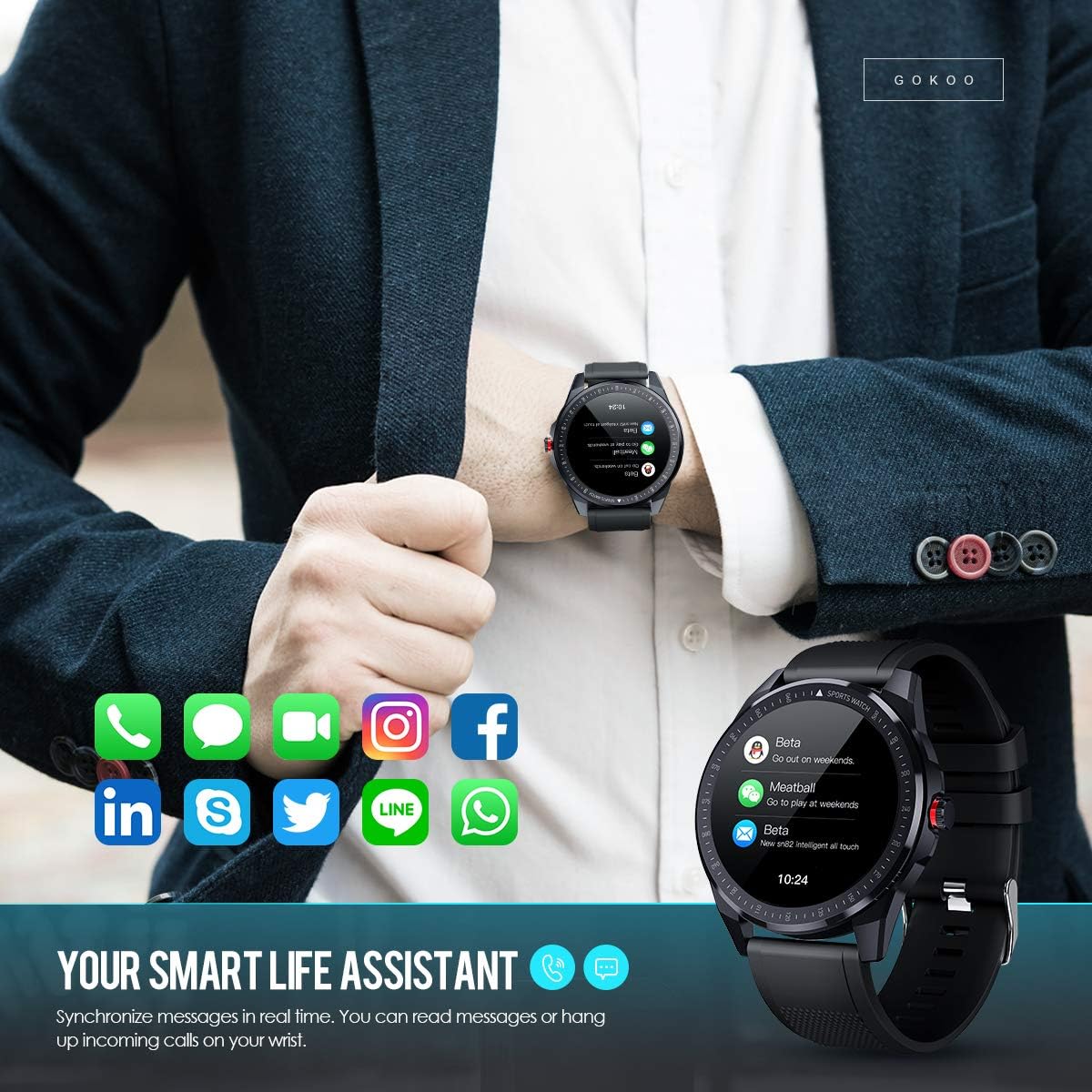
Figure 7: The watch showing synchronized notifications from a smartphone.
5. Pertsonalizazioa
The GOKOO Smart Watch allows for personalization of its interface. You can select from various pre-installed watch faces or download additional styles through the companion app to match your preference.
Mantentzea
1. Garbiketa
Garbitu aldizka erlojua eta uhala larruazaleko narritadura saihesteko eta gailuaren higiene mantentzeko. Erabili zapi leun eta pelusik gabekoa. Beharrezkoa bada, lehortu pixka bat.ampGarbitu zapi urarekin. Saihestu produktu kimiko gogorrak, garbitzaile urratzaileak edo aerosolak erabiltzea.
2. Urarekiko erresistentziari buruzko jarraibideak
The GOKOO Smart Watch has an IP68 waterproof rating, meaning it is resistant to dust and can withstand immersion in water up to 1.5 meters for 30 minutes. It is suitable for daily use, hand washing, rain, and swimming.
Garrantzitsua: Do not use the watch in hot water baths, saunas, or during diving. High temperatures and high pressure can compromise the waterproof seals and cause damage.
3. Bateria zaintzea
- Saihestu bateria maiz erabat deskargatzea.
- Kargatu erlojua emandako kargatzeko kable magnetikoa erabiliz.
- Gorde erlojua leku fresko eta lehor batean denbora luzez erabiltzen ez duzunean.
Arazoak konpontzea
- Erlojua ez da pizten: Ziurtatu erlojua guztiz kargatuta dagoela. Konektatu kargagailura gutxienez 30 minutuz.
- Ezin da telefonoarekin parekatu:
- Ziurtatu Bluetootha gaituta dagoela telefonoan.
- Ziurtatu erlojua telefonoaren Bluetooth-aren eremuan dagoela.
- Berrabiarazi telefonoa eta erlojua.
- Check if the app has necessary permissions.
- Osasun-datu okerrak: Ziurtatu erlojua eskumuturrean ondo estututa dagoela, eskumuturreko hezurra baino hatz baten zabalerara gutxi gorabehera. Garbitu erlojuaren atzealdeko sentsorea.
- Ez dira agertzen jakinarazpenak:
- Verify that notification permissions are granted in the app and your phone's settings.
- Ziurtatu erlojua Bluetooth bidez konektatuta dagoela.
- Check if 'Do Not Disturb' mode is active on either the watch or phone.
- Bateriaren iraupen laburra: Reduce screen brightness, disable continuous heart rate monitoring if not needed, and limit the number of active notifications.
Zehaztapenak
| Ezaugarri | Xehetasuna |
|---|---|
| Marka | GOKOO |
| Eredua | B08FMBHSWD |
| Pantailaren tamaina | 1.3 hazbete |
| Sistema eragilea | Android 5.0 edo berriagoa, iOS 9.0 edo berriagoa |
| Gailu bateragarriak | Smartphone |
| Bateriaren iraupena | Gehienez 10 egun (erabileraren arabera) |
| Bateria mota | Litio Polimeroa |
| Uraren Erresistentzia | IP68 |
| Haririk gabeko konexioa | Bluetootha |
| Giza Interfazearen Sarrera | Ukipen-pantaila |
| Produktuaren neurriak | 27 x 5 x 1.08 cm; 168 g |

Figure 8: Detailed product dimensions of the GOKOO Smart Watch.
Bermea eta Laguntza
For warranty information or technical support, please refer to the contact details provided with your purchase or visit the official GOKOO website. If you require a copy of this manual or have any questions regarding your GOKOO Smart Watch B08FMBHSWD, please contact customer service.
Ask a question about this manual
Ask about setup, troubleshooting, compatibility, parts, safety, or missing instructions. Manuals+ will review the question and use this page’s manual context to help answer it.