
1. Sarrera
This manual provides essential information for setting up, operating, maintaining, and troubleshooting your Samsung Galaxy A71 smartphone. Please read this manual thoroughly to ensure proper use and to maximize the device's capabilities.
The Samsung Galaxy A71 (Model A715F) features a 6.7-inch Super AMOLED Plus display, a 64MP Quad Camera system, a 4500 mAh battery with 25W fast charging, and runs on Android 10.0 with One UI 2. It is an international model designed for GSM carriers.
2. Gailuaren diseinua
Familiarize yourself with the physical components of your Galaxy A71.

2.1. irudia: Aurrealdea view of the Samsung Galaxy A71, showing the display and front camera.
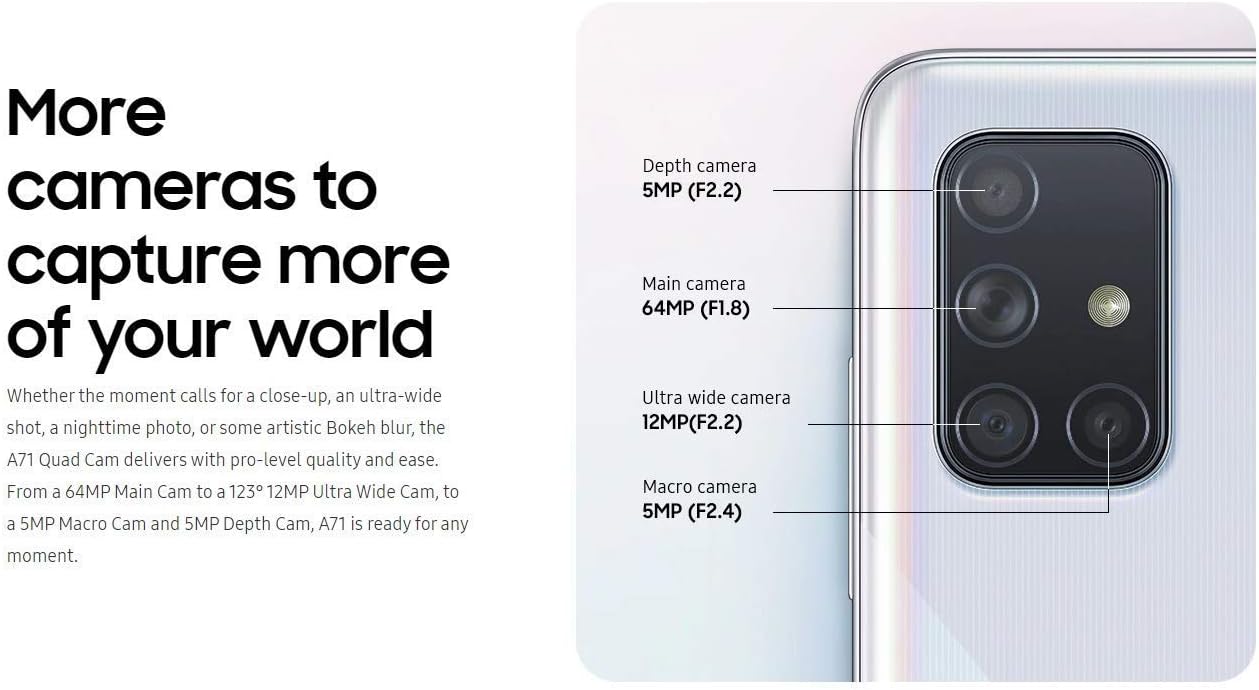
2.2. irudia: Atzealdea view of the Samsung Galaxy A71, highlighting the quad camera module and Samsung branding.
3. Konfigurazioa
3.1. SIM txartela sartzea
The Galaxy A71 uses a single Nano-SIM card. Ensure the device is powered off before inserting or removing the SIM card.
- Bilatu SIM txartelaren erretilua gailuaren alboan.
- Insert the ejection pin into the hole on the SIM card tray to open it.
- Jarri Nano-SIM txartela erretiluan, urre-koloreko kontaktuak behera begira dituela.
- Sartu erretilua astiro-astiro zirrikituan, gailuarekin berdindu arte.
3.2. Hasierako piztea eta konfigurazioa
- Sakatu eta eutsi pizteko tekla Samsung logotipoa agertu arte.
- Jarraitu pantailan agertzen diren argibideei zure hizkuntza hautatzeko, Wi-Fi sare batera konektatzeko eta zure Google kontua konfiguratzeko.
3.3. Hatz-marken sentsorearen konfigurazioa
The Galaxy A71 features an in-display optical fingerprint sensor for secure unlocking.
- Nabigatu Ezarpenak > Biometria eta segurtasuna > Hatz-markak.
- Follow the on-screen instructions to register your fingerprint. You will be prompted to lift and press your finger multiple times on the designated area of the screen.
- Ensure your finger is clean and dry for accurate recognition.

Image 3.1: Illustration of the in-display fingerprint sensor for unlocking the device.
4. Zure gailua funtzionatzea
4.1. Pantaila eta nabigazioa
The 6.7-inch Super AMOLED Plus display offers vibrant colors and deep blacks. Navigate the interface using touch gestures, including tap, swipe, pinch-to-zoom, and long press.
4.2. Kameraren erabilera
Galaxy A71-ak atzealdean lau kamerako sistema polifazetiko bat eta aurreko kamera bereizmen handiko bat ditu.
- Atzeko kamera: 64 MP (F1.8) Main, 12 MP (F2.2) Ultra Wide, 5 MP (F2.4) Macro, 5 MP (F2.2) Depth.
- Aurrealdeko kamera: 32 MP (F2.2).
To open the camera, tap the Camera icon on the home screen or double-press the Power key. Select different modes like Photo, Video, Pro, Panorama, Food, Night, Macro, and Live Focus from the camera interface.

4.1 irudia: Xehetasun zehatza view of the Galaxy A71's quad camera system, indicating the function of each lens.
4.3. Bateria eta kargatzea
The device is powered by a 4500 mAh battery and supports 25W Super Fast Charging.
- Use the included 25W fast charger for optimal charging speeds.
- To charge, connect the USB-C cable to the phone's charging port and the adapter to a power outlet.
- Avoid using damaged chargers or cables, as this can harm the device and void the warranty.

Image 4.2: Information on the 4500mAh battery and 25W Super Fast Charging capability.
4.4. Biltegiratzea eta memoria
The Galaxy A71 comes with 128GB of internal storage and 6GB of RAM. Storage can be expanded up to 512GB using a MicroSD card (sold separately).
4.5. Konektibitatea
Gailuak hainbat konexio aukera onartzen ditu:
- Zelularra: GSM, HSDPA, and 4G LTE bands (refer to specifications for detailed band information).
- Wi-Fi: Konektatu haririk gabeko sareetara interneterako sarbidea izateko.
- Bluetootha: Haririk gabeko osagarrietara konektatzeko.
- USB-C: Kargatzeko eta datuak transferitzeko.
- Audio Jack: 3.5mm port for wired headphones.
5. Mantentzea
5.1. Bateria zaintzea
- Saihestu tenperatura muturrekoak, bateriaren iraupena murriztu baitezakete.
- Ez utzi gailua denbora luzez kargatzen %100era iritsi ondoren.
- Epe luzerako biltegiratzeko, kargatu bateria % 50 ingurura eta itzali gailua.
5.2. Software eguneraketak
Egiaztatu eta instalatu software eguneraketak aldizka errendimendu, segurtasun eta funtzio berrietarako sarbidea optimoa bermatzeko. Joan honera Ezarpenak > Software eguneratzea > Deskargatu eta instalatu.
5.3. Zure gailua garbitzea
- Erabili zapi leun eta lihorik gabeko bat pantaila eta gorputza garbitzeko.
- Saihestu produktu kimiko gogorrak, material urratzaileak edo gehiegizko hezetasuna.
- Orban egoskorretarako, arinki garbituampBusti oihala ur destilatuarekin.
6. Arazoak
6.1. Gailua ez da pizten
- Ziurtatu bateria kargatuta dagoela. Konektatu kargagailua eta itxaron minutu batzuk pizten saiatu aurretik.
- Press and hold the Power key for at least 10 seconds to perform a forced restart.
6.2. Sarearen konexio arazoak
- Verify that your SIM card is correctly inserted and activated with a compatible GSM carrier.
- Check your network settings: Ezarpenak > Konexioak > Sare mugikorrak.
- Berrabiarazi gailua.
- Note: This is an international model and may not be compatible with all carriers, especially CDMA networks like Verizon, Sprint, or Boost in the US.
6.3. Hatz-marken sentsorea ez dabil
- Ensure your finger and the screen are clean and dry.
- Re-register your fingerprint if issues persist.
- Ensure you are pressing firmly on the correct area of the screen.
7. Zehaztapenak
| Ereduaren izena | Galaxy A71 |
| Modelo zenbakia | A715F |
| Bistaratzea | 6.7 inches Super AMOLED Plus, FHD+ (1080 x 2400 pixels) |
| Prozesadorea | Qualcomm SDM730 Snapdragon 730 (8 nm), Octa-core (2x2.2 GHz + 6x1.8 GHz) |
| RAM | 6 GB |
| Barne Biltegiratzea | 128 GB |
| Biltegiratze zabalgarria | MicroSD (512 GB arte) |
| Atzeko kamera | 64 MP (F1.8) Main + 12 MP (F2.2) Ultra Wide + 5 MP (F2.4) Macro + 5 MP (F2.2) Depth |
| Aurrealdeko kamera | 32 MP (F2.2) |
| Bateria Edukiera | 4500 mAh |
| Kargatzen | 25W-ko kargatze super azkarra |
| Sistema eragilea | Android 10.0, One UI 2 |
| SIM mota | Nano-SIM bakarra |
| Konektibitatea | 4G LTE, Wi-Fi, Bluetooth, GPS, USB-C |
| Audio Jack | 3.5 mm |
| Neurriak (gutxi gorabehera) | 163.6 x 76.0 x 7.7 mm (6.44 x 2.99 x 0.30 hazbete) |
| Pisua (gutxi gorabehera) | 179 g (6.31 oz) |
8. Bermea eta Laguntza
Kontuan izan hau dela Nazioarteko bertsioa of the Samsung Galaxy A71 (Model A715F). As such, there is Ez dago bermerik AEBetan provided by the manufacturer for this specific model.
This international model is compatible with most GSM carriers, including T-Mobile, AT&T, and MetroPCS. It will EZ work with CDMA carriers such as Verizon, Sprint, or Boost.
For further support or detailed product information, please refer to the official Samsung support website for international models or contact your point of purchase.
For general information about Samsung products, you may visit: www.samsung.com