
Sarrera
This manual provides comprehensive instructions for setting up, operating, and maintaining your Macally Bluetooth Keyboard. Designed for multi-device compatibility, this wireless keyboard features a built-in stand, a rechargeable battery, and 78 keys for efficient typing across various devices including tablets, smartphones, and computers.

Image: The Macally Bluetooth Keyboard in white, with a tablet securely docked in its integrated stand, showcasing its compact design and functionality.
Kutxan dagoena
Upon unboxing your Macally Bluetooth Keyboard, please ensure all the following items are present:
- Macally Bluetooth Keyboard
- USB kargatzeko kablea
- Erabiltzailearen eskuliburua (dokumentu hau)
If any items are missing or damaged, please contact Macally customer support.
Produktuaren Ezaugarriak
The Macally Bluetooth Keyboard is designed for versatility and convenience, offering several key features:
- Gailu anitzeko konexioa: Seamlessly switch between up to 3 Bluetooth-enabled devices (e.g., tablet, smartphone, computer).
- Gailu integratua: Features a built-in 10.5-inch slot to securely hold your smartphone or tablet.
- Trinkoa eta eramangarria: Small enough to fit into most bags, making it ideal for on-the-go use.
- Bateria kargagarria: 280 mAh-ko bateria kargagarri batekin hornituta, erabilera luzerako.
- Diseinu eraginkorra: Includes 78 quiet scissor-switch keys and 13 convenient shortcut/media keys for enhanced productivity.

Image: The keyboard demonstrating seamless Bluetooth connectivity with a 30ft wireless range, compatible with Apple, Windows, iOS, and Android operating systems.

Image: A visual representation of the keyboard's multi-device capability, showing it paired with a laptop, a desktop computer, and a smartphone simultaneously.

Image: The keyboard positioned on a desk, with both a tablet and a smartphone docked in its integrated 10.5-inch stand, highlighting its "setup anywhere" convenience.
Konfigurazioa
Teklatua kargatzen
Before first use, fully charge your Macally Bluetooth Keyboard. Connect the provided USB charging cable to the keyboard's charging port and the other end to a USB power source (e.g., computer USB port, USB wall adapter). The charging indicator light will show the charging status.

Image: The keyboard with its charging cable connected, illustrating the rechargeable 280mAh battery and the included charging cable.
Bluetooth parekatzea
Follow these steps to pair your keyboard with a device:
- Ensure the keyboard is charged and powered on. The power switch is located on the top right of the keyboard.
- Zure gailuan (tableta, telefono adimenduna, ordenagailua), gaitu Bluetooth-a.
- Eduki sakatuta Fn tekla eta Bluetooth kanalaren tekletako bat (B1, B2, edo B3) simultaneously for a few seconds until the corresponding Bluetooth indicator light starts blinking rapidly. This indicates the keyboard is in pairing mode.
- On your device, search for "Macally Keyboard" or a similar name in the Bluetooth device list and select it to connect.
- Once connected, the indicator light will stop blinking and remain solid for a moment before turning off, indicating successful pairing.
To pair additional devices, repeat steps 3-5 using a different Bluetooth channel key (B1, B2, or B3).
Funtzionamendu-argibideak
Gailuen artean aldatzea
Parekatutako gailuen artean aldatzeko, sakatu besterik ez duzu egin behar Fn tekla dagokion Bluetooth kanalaren teklarekin batera (B1, B2, edo B3) for the desired device. The keyboard will quickly connect to the selected device.
Using Shortcut Keys
The keyboard features 13 dedicated shortcut/media keys for quick access to common functions. These keys are typically located on the top row (F1-F12 and an additional key). Functions may vary slightly depending on the operating system of your connected device.
Common shortcut functions include:
- Multimedia erreprodukzio-kontrolak (erreproduzitu/pausatu, hurrengo/aurreko pista)
- Bolumenaren kontrola (isilarazi, bolumena igo/jaitsi)
- Pantailaren distira doitzea
- Home screen/desktop access
- Bilaketa funtzioa
Refer to your device's operating system documentation for specific compatibility and functionality of these keys.

Irudia: Xehetasun zehatza view of the keyboard's layout, emphasizing its 78 quiet scissor-switch keys and the 13 dedicated shortcut/media keys for efficient use.
Mantentzea
Zure Macally Bluetooth teklatuaren iraupena eta errendimendu optimoa bermatzeko, jarraitu mantentze-jarraibide hauek:
- Garbiketa: Erabili zapi leun, lehor eta lihorik gabeko bat teklatuaren gainazala garbitzeko. Zikinkeria egoskorra bada, garbitu pixka bat.ampGarbitu zapi bat urarekin edo garbitzaile leun eta ez-urratzaile batekin. Saihestu gehiegizko hezetasuna.
- Biltegiratzea: Denbora luzez erabiltzen ez duzunean, gorde teklatua leku fresko eta lehor batean, eguzki-argitik eta muturreko tenperaturetatik babestuta.
- Bateria zaintzea: To preserve battery life, avoid fully discharging the keyboard frequently. Recharge it when the low battery indicator appears. If storing for a long time, charge it to about 50% every few months.
- Saihestu isurketak: Keep liquids away from the keyboard to prevent internal damage.
Arazoak konpontzea
If you encounter issues with your Macally Bluetooth Keyboard, try the following solutions:
| Arazoa | Irtenbide posiblea |
|---|---|
| Teklatua ez da pizten. | Ensure the keyboard is charged. Connect it to a power source using the USB cable. |
| Unable to pair the keyboard. |
|
| Teklatua maiz deskonektatzen da. |
|
| Giltzek ez dute erantzuten. |
|
If these solutions do not resolve the issue, please contact Macally customer support for further assistance.
Zehaztapenak
| Ezaugarri | Xehetasuna |
|---|---|
| Modelo zenbakia | BTTABKEYBAT |
| Konektibitate Teknologia | Bluetootha |
| Gako kopurua | 78 |
| Bateria mota | 1 litio ioizko bateria (barne) |
| Elementuaren pisua | 1.92 kilo |
| Paketearen neurriak | 13.98 x 7.91 x 2.48 hazbete |
| Fabrikatzailea | Mace Group Inc / Macally Peripherals |
| Gailu bateragarriak | PC, Tablet, Apple devices, Windows Desktop/Laptop, Surface, Chromebook, Smartphones, TVs (any device with Bluetooth) |
| Gomendatutako Erabilerak | Office, School, Everyday Use, Personal, Education, Business |
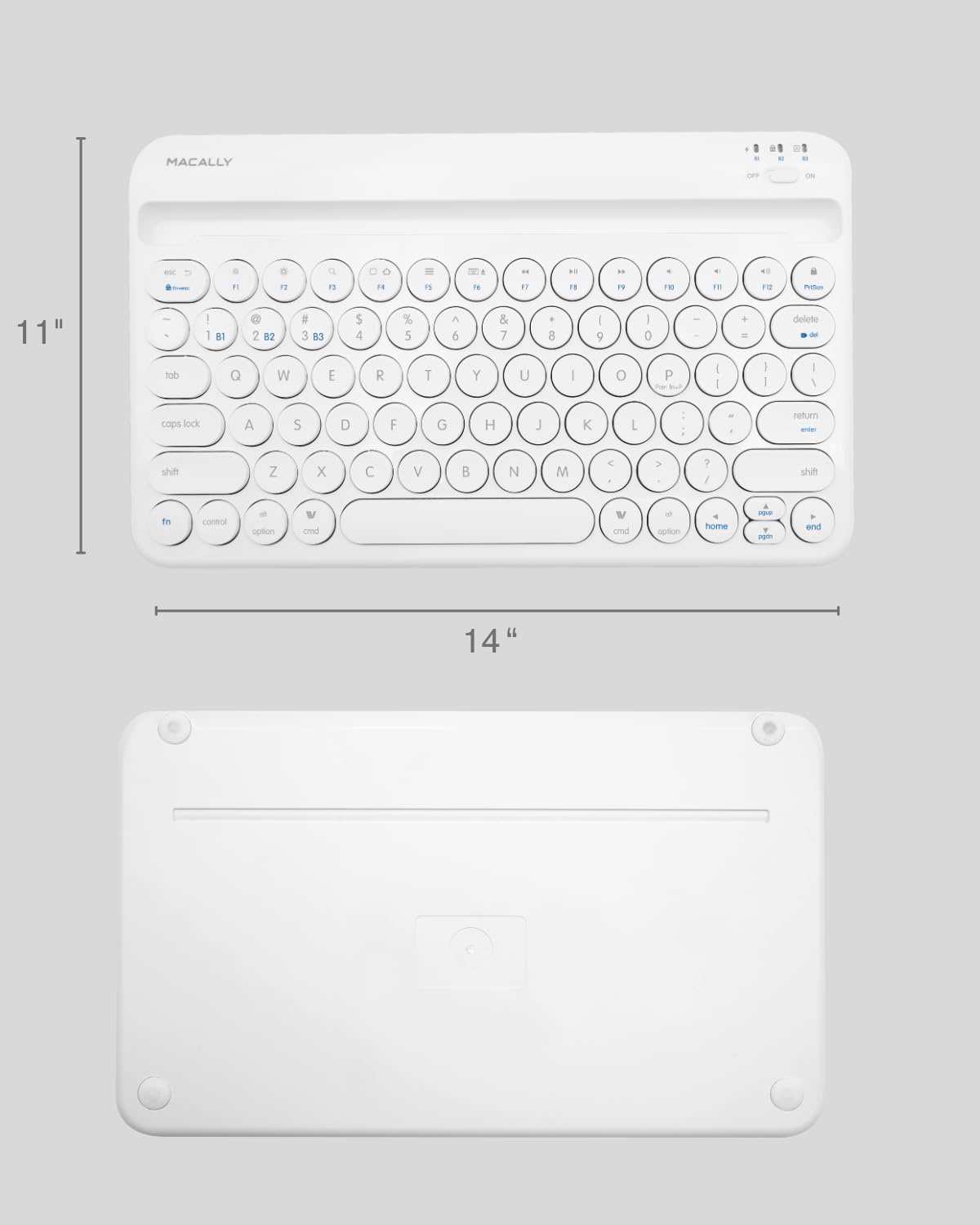
Image: The physical dimensions of the keyboard, measuring approximately 11 inches in width and 14 inches in length.

Image: The keyboard fitting easily into a backpack, demonstrating its compact size and suitability for travel and on-the-go use.
Bermea eta Laguntza
Macally products are designed for quality and reliability. For information regarding product warranty, technical support, or service, please visit the official Macally webwebgunera edo jarri harremanetan bezeroarentzako arreta-zerbitzuarekin. Gorde erosketa-agiria erosketaren frogagiri gisa berme-erreklamazioetarako.
Informazio eta laguntza gehiago aurki dezakezu hemen: Macally denda Amazonen.