
Sarrera
Thank you for choosing the WEKOME D6 Desktop Mini Bluetooth Speaker. This compact and portable speaker delivers clear sound quality and offers versatile connectivity options. This manual provides detailed instructions on how to set up, operate, and maintain your speaker to ensure optimal performance.
Produktua amaituview

1. irudia: Aurrealdea view of the WEKOME D6 Mini Bluetooth Speaker, highlighting its compact cylindrical design and control panel.
The WEKOME D6 is a palm-sized desktop speaker designed for portability and ease of use. It features Bluetooth connectivity for wireless audio streaming and a TF card slot for direct music playback. Its robust design ensures clear audio output for various compatible devices.
Ezaugarri nagusiak:
- Bluetooth konexioa: Seamless wireless pairing with smartphones, tablets, and laptops.
- Diseinu trinkoa: Palm-sized for easy portability.
- Soinu kalitate garbia: Delivers crisp and clear audio.
- Bateriaren iraupen luzea: 500 mAh battery provides approximately 4-5 hours of playback.
- Barruti hedatua: Bluetooth transmission distance of up to 10 meters (33 feet).
- TF Txartelaren euskarria: Maximum support for 32GB TF (MicroSD) cards for direct music playback.
- Irteera potentzia: Speaker maximum output power of 10 Watts.
Paketearen edukia
Mesedez, egiaztatu paketea elementu hauek dituen:
- WEKOME D6 Desktop Mini Bluetooth Speaker
- USB kargatzeko kablea
- Erabiltzailearen eskuliburua (dokumentu hau)
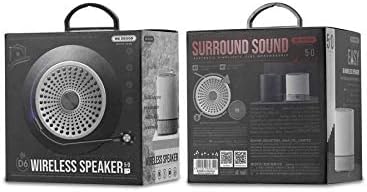
2. irudia: Retail packaging of the WEKOME D6 Mini Bluetooth Speaker, illustrating the product's branding and key information on the box.
Konfigurazioa
1. Bozgorailua kargatzea:
- Konektatu USB kargatzeko kablearen mutur txikia bozgorailuaren kargatzeko atakara.
- Konektatu USB kablearen beste muturra USB elikatze-egokitzaile batera (ez dago barne) edo ordenagailuaren USB ataka batera.
- The charging indicator light will illuminate during charging and turn off once fully charged. A full charge typically takes 2-3 hours.
2. Piztu/Itzaltzea:
- Pizteko: Eduki sakatuta Pizteko botoia for a few seconds until you hear an audible prompt or see an indicator light.
- Itzaltzeko: Eduki sakatuta Pizteko botoia again for a few seconds.
3. Bluetooth parekatzea:
- Ensure the speaker is powered on and in Bluetooth pairing mode (it will usually enter this mode automatically upon first power-on or if no device is connected). The indicator light will typically flash rapidly.
- Zure gailuan (smartphone-a, tableta, ordenagailu eramangarria), gaitu Bluetooth-a eta bilatu eskuragarri dauden gailuak.
- Select "WEKOME D6" from the list of found devices.
- Once paired, the speaker will provide an audible confirmation, and the indicator light will stop flashing and remain solid.
- Bozgorailuak automatikoki konektatuko da azken parekatutako gailura piztean, gailuaren Bluetooth-a gaituta badago eta haren irismen-eremuan badago.
4. TF Card Insertion:
- Locate the TF card slot on the speaker.
- Gently insert a TF (MicroSD) card (up to 32GB) with pre-loaded music files into the slot until it clicks into place.
- The speaker will automatically switch to TF card playback mode if a card is detected.
Bozgorailua funtzionatzea
Kontrol-botoiak:
Refer to Figure 1 for the location of the control buttons.
- Pizteko botoia: Eduki sakatuta pizteko/itzaltzeko.
- Volume Up / Next Track Button (+):
- Sakatu laburra: Bolumena igo.
- Long press: Skip to the next track.
- Erreproduzitu/Pausatu botoia (||): Sakatu laburra musika erreproduzitzeko edo eteteko.
- Volume Down / Previous Track Button (-):
- Sakatu laburra: Bolumena jaitsi.
- Luze sakatuta: Aurreko abestira joan.
- Mode Button (Dot between + and Play/Pause): Short press to switch between Bluetooth mode and TF card mode (if a TF card is inserted).
Mantentzea
- Garbiketa: Erabili zapi leun eta lehor bat bozgorailuen gainazala garbitzeko. Ez erabili garbitzaile urratzailerik, alkoholik edo bestelako disolbatzaile kimikorik, hauek akabera kaltetu baitezakete.
- Biltegiratzea: Gorde bozgorailua leku fresko eta lehor batean, eguzki-argitik eta muturreko tenperaturetatik babestuta.
- Bateria zaintzea: Bateriaren iraupena luzatzeko, saihestu bozgorailua maiz erabat deskargatzea. Kargatu bozgorailua aldizka, denbora luzez erabiltzen ez baduzu ere.
- Uraren erresistentzia: Bozgorailu hau ez da urarekiko erresistentea. Saihestu likidoekin kontaktuan jartzea.
Arazoak konpontzea
| Arazoa | Kausa posiblea | Irtenbidea |
|---|---|---|
| Bozgorailuak ez du pizten. | Bateria baxua. | Kargatu bozgorailua guztiz. |
| Soinurik ez. | Volume too low; Speaker not paired; Incorrect mode. | Increase volume; Ensure speaker is paired; Switch to correct mode (Bluetooth/TF card). |
| Ezin da Bluetooth gailuarekin parekatu. | Bozgorailua ez dago parekatze moduan; Gailuaren Bluetooth itzalita; Bozgorailutik urrunegi. | Ensure speaker is in pairing mode; Turn on device Bluetooth; Move device closer to speaker (within 10M). |
| Music stops playing from TF card. | TF card not inserted correctly; Corrupted files; Unsupported format. | Reinsert TF card; Check TF card for errors; Ensure music filek formatu onartu batean daude (adibidez, MP3). |
Zehaztapenak
| Marka | WEKOME |
| Ereduaren izena | D6 |
| Konektibitate Teknologia | Bluetootha |
| Hizlari mota | Desktop Mini Speaker |
| Bozgorailuaren irteera-potentzia maximoa | 10 Watt |
| Bateria Edukiera | 500 mAh (approx. 4-5 hours playback) |
| Transmisio Distantzia | 10 metro (33 oin) |
| TF txartelaren euskarria | Gehienez 32 GB |
| Gailu bateragarriak | Ordenagailu eramangarria, telefono adimenduna, tableta |
| Muntatze Mota | Mahaigaina |
| Paketearen neurriak | 12.4 x 11.4 x 7.6 cm |
| Pisua | 210 g |
Bermea eta Laguntza
For warranty information and technical support, please refer to the warranty card included with your product or contact WEKOME customer service through their official website or authorized retailers. Keep your purchase receipt as proof of purchase for warranty claims.


