
1. Sarrera
Eskerrik asko Sinopé TH1310WF Wi-Fi termostato adimenduna aukeratzeagatik. Gailu hau zure zoruko berogailu sistemaren kontrol zehatza eta eraginkorra eskaintzeko diseinatuta dago, erosotasuna eta energia aurrezpena hobetuz. Etxe adimenduneko hainbat plataformarekin integratzen da ezin hobeto, mugikorretarako aplikazioen eta ahots-komandoen bidez kontrol erosoa eskainiz.
Eskuliburu honek TH1310WF termostatoa instalatzeko, erabiltzeko eta mantentzeko argibide zehatzak eskaintzen ditu. Mesedez, irakurri arretaz instalazioa egin aurretik eta gorde etorkizunean erreferentzia gisa.

1. irudia: Sinopé TH1310WF Wi-Fi termostato adimenduna
Irudiak Sinopé TH1310WF termostatoaren aurrealdea erakusten du, ordua, barneko tenperatura eta kanpoko tenperatura erakusten dituen pantaila digital beltza duen gailu zuri angeluzuzena. Pantailaren azpian, Sinopé logotipoa ikusten da, bi botoi zirkularrekin batera.
2. Segurtasun informazioa
OHARRA: Deskarga elektrikoaren arriskua. Produktu hau elektrizista kualifikatu batek instalatu behar du, tokiko eta estatuko araudi elektrikoen arabera. Deskonektatu korrontea zirkuitu-hauslean instalazioa edo mantentze-lanak egin aurretik.
- Ziurtatu energia-iturria itzalita dagoela kableatua manipulatu aurretik.
- Ez instalatu termostatoa esku bustiekin edo gainazal bustien gainean zutik zauden bitartean.
- Termostato hau barruko erabilerarako soilik diseinatuta dago.
- Egiaztatu termostatoaren bolumenatage eta wattage balorazioak zure berogailu sistemaren eskakizunekin bat datoz (240V, 3600W gehienez).
3. Produktua amaitu daview
3.1 Ezaugarri nagusiak
- Ez da beharrezkoa zentroa: Zure Wi-Fi sarera zuzenean konektatzen da.
- Zoruko berogailuaren bateragarritasuna: Berogailu-kableekin eta berogailu-kableen alfonbrekin funtzionatzen du. 15 metroko zoru-sentsore bat barne hartzen du.
- Irteera laguntzailea: Bigarren irteera bat dauka berogailu osagarri bat kontrolatzeko edo 15 A-tik gorako sistemetarako 10 hedapen-unitate (TR1310) konektatzeko.
- Etxe adimendunaren integrazioa: Apple HomeKit, Amazon Alexa, Google Home eta Nevi-rekin bateragarriaweb.
- Neviweb Aplikazioa: Ezaugarri aurreratuak eskaintzen ditu, hala nola automatizazioak, eszenak, geofencing-a eta denbora errealeko energia-txostenak.

2. irudia: Etxe Adimendunen Plataformaren Bateragarritasuna
Irudi honek Sinopé TH1310WF termostatoa erakusten du, etxe adimendunetako plataforma bateragarrien logotipoekin batera: Neviweb, SmartThings, Apple HomeKit, Amazon Alexa eta Google Home, bere integrazio gaitasun polifazetikoak azpimarratuz.
3.2 Osagaiak
- TH1310WF Termostato Unitatea
- 15 oineko zoru-sentsorea
- Muntatzeko Torlojuak
4. Konfigurazioa
4.1 Instalazioa eta kableatzea
TH1310WF termostatoaren instalazioak kableatu elektrikoa dakar eta elektrizista kualifikatu batek bakarrik egin behar du. Ziurtatu korrontea deskonektatuta dagoela zirkuitu-hausle nagusian edozein kableatu hasi aurretik.
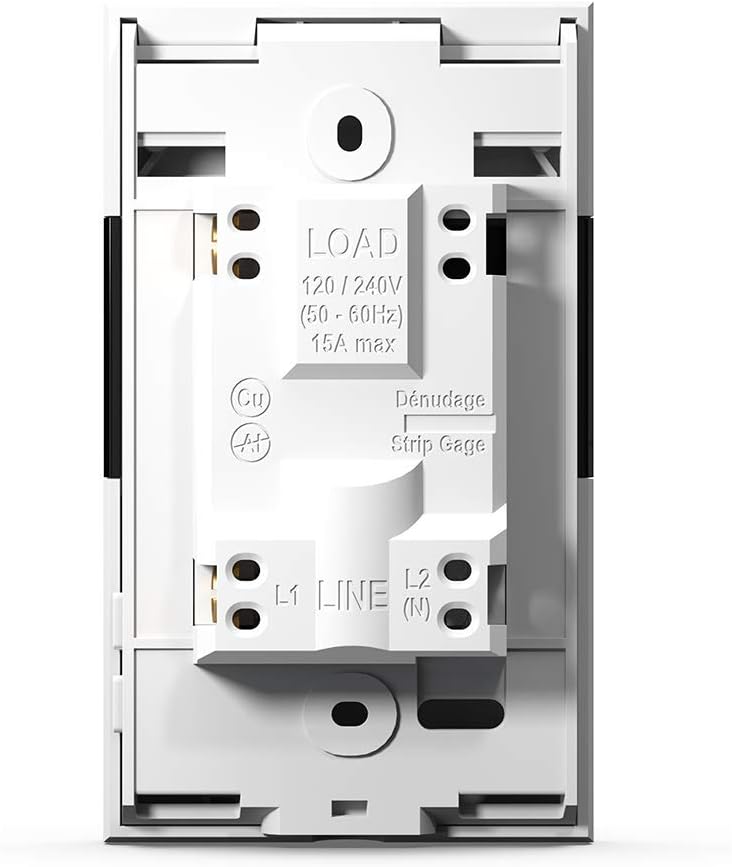
Termostatoa 240V AC elikatze-iturri baterako diseinatuta dago eta 3600 watt arteko potentzia kudea dezake. Konektatu berogailu-kableak edo alfonbrak LOAD terminaletara eta elikatze-iturria LINE terminaletara. Zoruko sentsorea berogailu-alfonbraren eremuan instalatu behar da zoruko tenperatura zehatz-mehatz neurtzeko.

3 irudia: Termostatoaren kableatu terminalak
Irudi honek Sinopé TH1310WF termostatoaren atzealdea erakusten du, LOAD (120/240V, 15A max) eta LINE (L1, L2(N)) kableatu terminalak nabarmenduta. Kablea behar bezala prestatzeko, tira-neurgailu bat ere ikusten da.

4. irudia: Termostatoaren atzeko panela eta sentsoreen atakak
Irudiak Sinopé TH1310WF termostatoaren atzeko panela erakusten du, araudi-informazioa (FCC, IC, cETLus ziurtagiria) eta laguntzaileen (Aux 1, Aux 2) eta sentsoreen (Sonde) konexio-ataka erakusten dituena.
4.2 Hasierako konfigurazioa eta Wi-Fi konexioa
Instalazio fisikoa egin ondoren, piztu termostatoa. Jarraitu pantailan agertzen diren argibideei data, ordua eta hasierako funtzionamendu modua ezartzeko. Funtzio adimendunak gaitzeko, konektatu termostatoa zure Wi-Fi sarera.
- Deskargatu Neviweb aplikazioa zure telefonoaren aplikazio dendatik (iOS eta Androiderako eskuragarri).
- Nevi bat sortuweb kontua edo hasi saioa dagoeneko baduzu.
- Jarraitu aplikazio barruko argibideei zure TH1310WF termostato berria zure kontuan gehitzeko. Horrek normalean termostatoa parekatze moduan jartzea eta etxeko Wi-Fi sarera konektatzea dakar.
5. Funtzionamendua
5.1 Gailuan bertan kontrolatzeko oinarrizko funtzioa
Termostatoak LCD pantaila argi bat eta oinarrizko kontrolerako bi botoi fisiko ditu. Ezarritako tenperatura doi dezakezu, funtzionamendu moduen artean aldatu (adibidez, Eskuzkoa, Programa) eta view uneko tenperaturaren irakurketak zuzenean gailuan.
5.2 Nebiakweb Aplikazioen kontrola
Nevi ibaiaweb aplikazioak kontrol integrala eta funtzio aurreratuak eskaintzen ditu zure termostatoarentzat:
- Urruneko kontrola: Doitu ezarpenak edonondik.
- Programazioa: Sortu berogailu ordutegi pertsonalizatuak eguneko eta asteko ordu desberdinetarako.
- Automatismoak: Konfiguratu abiarazleak eta ekintzak ordutegietan edo beste gertaera batzuetan oinarrituta.
- Eszenak: Aktibatu giro pertsonalizatuak ukitu bakarrarekin.
- Geofencing: Berogailua automatikoki egokitu etxetik hurbil zaudenaren arabera.
- Energia txostenak: Jarrai ezazu zure energia-kontsumoa eta aurrezkiak denbora errealean.
- Kokapen anitzeko kudeaketa: Kontrolatu hainbat propietatetako termostatoak kontu bakar batetik.

5. irudia: Nebiakweb Aplikazioaren gailuen zerrenda
Irudi honek Nevi erakusten duen telefono baten pantaila erakusten du.web aplikazioaren interfazea, konektatutako hainbat gailu adimendun eta haien uneko egoera zerrendatzen dituena, erabiltzaileei beren etxe adimendunaren ekosistema kudeatzeko aukera emanez.

6. irudia: Nebiakweb Aplikazioen kokapen anitzeko kudeaketa
Irudiak Nevi duen telefono baten pantaila erakusten du.web aplikazioa 'Kokapenak' atalean irekita, 'Etxea', 'Kabina' eta beste propietate batzuen ikonoak erakusten ditu, kontu bakar batetik hainbat kokapen kudeatzeko gaitasuna erakusten duena.
7. irudia: Nebiakweb Aplikazioaren Energia Txostena
Irudi honek Nevi erakusten duen telefono adimendun bat erakusten du.web aplikazioaren energia-txostenaren funtzioa, denboran zehar energia-kontsumoaren barra-grafiko bat eta kostu estimatuak aurkezten dituena, erabiltzaileei energia-aurrezkien jarraipena egiteko aukera emanez.
5.3 Ahots kontrola
TH1310WF termostatoa ahots-komandoekin kontrola daiteke, laguntzaile adimendun bateragarrien bidez:
- Amazon Alexa: "Alexa, jarri egongelako termostatoa 72 gradutan."
- Google Home: "Hey Google, zein da sukaldeko tenperatura?"
- Apple HomeKit: Erabili Siri termostatoa kontrolatzeko HomeKit-era gehitu ondoren.

8. irudia: Ahots-laguntzailearen integrazioa
Irudiak Amazon Echo Dot bozgorailu adimendun bat erakusten du sukaldeko apal batean, erabiltzaileek termostatoarekin nola elkarreragin dezaketen erakusten duena, ahots-komandoak erabiliz ahots-laguntzaile bateragarrien bidez.
6. Mantentzea
Sinopé TH1310WF termostatoak mantentze-lan minimoa behar du. Mantendu gailua garbi zapi leun eta lehor batekin garbituz. Ez erabili garbitzaile edo disolbatzaile urratzailerik. Ziurtatu aireztapen-zuloetan hautsik ez dagoela funtzionamendu egokia mantentzeko.
Ez dago erabiltzaileak konpondu beharreko piezarik termostatoaren barruan. Konponketa guztiak langile kualifikatuek egin behar dituzte.
7. Arazoak
| Arazoa | Kausa posiblea | Irtenbidea |
|---|---|---|
| Termostatoaren pantaila hutsik dago. | Ez dago elikadura hornidurarik. | Egiaztatu zirkuitu-hauslea. Ziurtatu kableatu-konexio egokiak daudela. |
| Ezin da wifira konektatu. | Wi-Fi pasahitz okerra; Termostatoa bideratzailetik urrunegi; Bideratzailearen arazoak. | Egiaztatu Wi-Fi pasahitza. Gerturatu termostatoa bideratzailera edo erabili Wi-Fi luzagailu bat. Berrabiarazi bideratzailea. |
| Berokuntza-sistemak ez du erantzuten. | Termostatoa itzalita; Kableatu arazoa; Berokuntza sistemaren matxura. | Egiaztatu termostatoaren modua. Egiaztatu kableatua. Kontsultatu elektrizista edo HVAC teknikari kualifikatu bati. |
| Tenperaturaren irakurketa okerra. | Zoruko sentsorea ez dago behar bezala instalatuta edo hondatuta. | Ziurtatu zoruko sentsorea berogailu-alfonbraren barruan behar bezala kokatuta dagoela. Egiaztatu sentsorea kalterik duen. |
8. Zehaztapenak
| Ezaugarri | Zehaztapena |
|---|---|
| Modelo zenbakia | TH1310WF |
| liburukiatage | 240 Volt |
| Wattage | 3600 watt |
| Oraingoa | 15A gehienez |
| Konektibitatea | Wi-Fi |
| Kontrolagailu mota | Amazon Alexa, Apple HomeKit, Google Assistant, Neviweb |
| Tenperatura tartea | 41 eta 97 gradu Fahrenheit artean |
| Dakarten osagaiak | Zoruko sentsorea - 15 m |
| Neurriak | 4.8 x 2.83 x 1.02 hazbete |
| Elementuaren pisua | 13 ontza |
| Materiala | Plastikoa |
| Bistaratzeko mota | LCDa |
| Muntatze Mota | Hormako Muntaia |
9. Bermea eta Laguntza
9.1 Bermearen informazioa
Sinopé TH1310WF Wi-Fi termostato adimenduna honako hauekin estalita dago: 3 urteko fabrikatzailearen bermea erosketa-datatik aurrera. Berme honek materialen eta fabrikazioaren akatsak estaltzen ditu erabilera normalaren pean. Ez ditu estaltzen instalazio desegokiaren, istripuaren, erabilera okerraren, gehiegikeriaren edo baimenik gabeko aldaketen ondoriozko kalteak.
Mesedez, gorde zure erosketa-froga berme-erreklamazioetarako.
9.2 Bezeroarentzako laguntza
Laguntza teknikoa, arazoak konpontzea edo bermeari buruzko kontsultak egiteko, jarri harremanetan Sinopé Technologies bezeroarentzako arreta-zerbitzuarekin:
- Webgunea: www.sinopetech.com
- Posta elektronikoa: laguntza@sinopetech.com
- Telefonoa: Kontaktu atala kontsultatu Sinopé ofizialean. webeskualdeko telefono zenbakien webgunea.
Laguntzarekin harremanetan jartzean, eduki eskura zure produktuaren modelo zenbakia (TH1310WF) eta erosketa data.