
Sarrera
The UMAX Air Mouse M1 is a versatile wireless controller designed to enhance your interaction with various devices. Featuring a built-in gyroscope for precise air mouse functionality, a full QWERTY keyboard for easy text input, and voice control capabilities, it offers a comprehensive solution for navigation and command. Its ergonomic design ensures comfortable handling, and the integrated Li-Ion battery provides extended usage time. This manual will guide you through the setup, operation, and maintenance of your Air Mouse M1.

1. irudia: Aurrealdea view of the UMAX Air Mouse M1, showing the directional pad, OK button, volume controls, and voice button.
Paketearen edukia
Mesedez, ziurtatu elementu guztiak paketean daudela:
- UMAX Air Mouse M1
- USB hargailua
- Kargatzeko kablea
- Erabiltzailearen eskuliburua (dokumentu hau)
Konfigurazioa
1. Gailua kargatzea
The UMAX Air Mouse M1 comes with a built-in Li-Ion battery. Before first use, it is recommended to fully charge the device. Connect the charging cable to the charging port on the Air Mouse and the other end to a standard USB power source (e.g., computer USB port, USB wall adapter).
2. USB hargailua konektatzea
The Air Mouse M1 connects wirelessly via a USB receiver. Locate the USB receiver, typically stored within the battery compartment or a dedicated slot on the device itself. Insert the USB receiver into an available USB port on your target device (e.g., Smart TV, PC, Android TV Box).
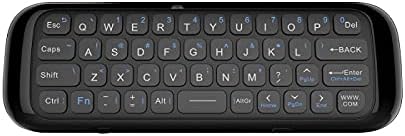
2. irudia: Atzealdea view of the UMAX Air Mouse M1, showing the full QWERTY keyboard.
3. Initial Pairing (Automatic)
Once the USB receiver is plugged in, the Air Mouse M1 should automatically pair with your device. No manual pairing steps are typically required. The device should be ready for use within a few seconds.
Funtzionamendu-argibideak
1. Aireko saguaren funtzioa
The Air Mouse M1 utilizes a gyroscope for cursor control. Hold the remote in your hand and move your wrist to control the on-screen cursor. The cursor will follow your hand movements. Press the OK button to click.
2. Keyboard Input
Flip the Air Mouse M1 over to access the full QWERTY keyboard. Use the keys to type text as you would on a standard keyboard.
3. Ahots kontrola
Press and hold the dedicated Ahotsa button (often indicated by a microphone icon) to activate voice input. Speak clearly into the microphone located on the device. Release the button when you have finished speaking. This feature requires compatible software or operating system support on your connected device.
4. Botoiaren funtzioak
- Pizteko botoia: Gailua piztu/itzali edo lo moduan jartzen du.
- Ados botoia: Confirms selection, acts as left-click.
- Norabideko Pad: Menuetan eta aukerekin nabigatzen du.
- Volume Buttons (V+/V-): Audioaren bolumena doitzen du.
- Hasierako botoia: Returns to the home screen of the connected device.
- Atzera botoia: Menuetan edo aplikazioetan atzera nabigatzen du.
- Menuko botoia: Testuinguruaren araberako menuak irekitzen ditu.
Mantentzea
1. Bateria zaintzea
The UMAX Air Mouse M1 is equipped with a rechargeable Li-Ion battery. To prolong battery life:
- Saihestu bateria maiz erabat deskargatzea.
- Charge the device when the low battery indicator appears.
- Denbora luzez erabiltzen ez baduzu, gorde gailua leku fresko eta lehor batean.
2. Garbiketa
Gailua garbitzeko, erabili zapi leun eta lehor bat. Zikinkeria egoskorra bada, garbitu zapi pixka bat.amp cloth can be used, but ensure no moisture enters the device's ports or openings. Do not use harsh chemicals or abrasive cleaners.
Arazoak konpontzea
| Arazoa | Kausa posiblea | Irtenbidea |
|---|---|---|
| Gailuak ez du erantzuten | Low battery; USB receiver not connected; Device not paired. | Charge the device; Ensure USB receiver is securely plugged in; Re-insert USB receiver to re-establish connection. |
| Kurtsorea irregularra edo ez da leunki mugitzen | Interference; Low battery. | Move closer to the USB receiver; Ensure no strong electromagnetic interference; Charge the device. |
| Teklatua ez da idazten | Device in air mouse mode; Low battery. | Ensure the device is flipped to the keyboard side; Charge the device. |
| Ahots kontrola ez dabil | Microphone blocked; No internet connection on host device; Host device does not support voice input. | Ensure microphone is clear; Check host device's internet connection; Verify host device's compatibility with voice input. |
Zehaztapenak
- Eredua: UMAX Air Mouse M1 (laishutin)
- Mugimenduak hautemateko teknologia: Egonkortze giroskopikoa
- Konektibitatea: Haririk gabeko (USB hargailua)
- Bateria: 1 litio ioizko bateria (barne)
- Kolorea: Laranja (Note: Product images show a black device, but specifications list 'Orange'.)
- Elementuaren pisua: 7 ontza (0.2 kilogramo)
- Paketearen neurriak: 7.09 x 3.94 x 0.79 hazbete
- Sistema eragile bateragarriak: Android, Windows, Linux
Laguntza eta Bermea
For technical support or inquiries regarding your UMAX Air Mouse M1, please refer to the official UMAX website or contact their customer service. Specific warranty details may vary by region and retailer. Please retain your proof of purchase for warranty claims.
Informazio gehiago lortzeko, bisitatu: UMAX Official Webgunea