
Produktua amaituview
The XIAOMI Redmi 9I is a feature-rich smartphone designed for everyday use. This manual provides essential information for setting up, operating, maintaining, and troubleshooting your device.
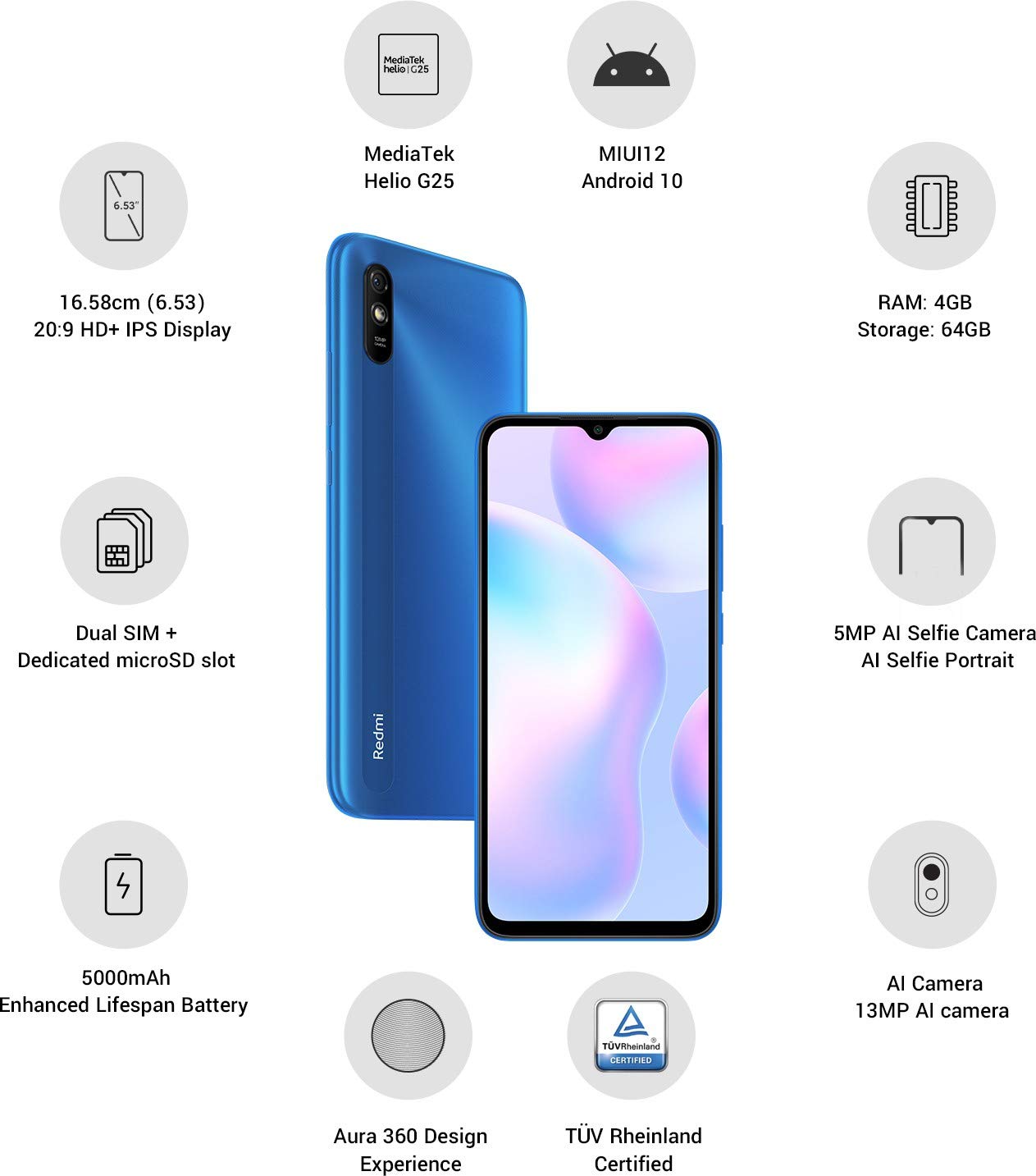
Irudia: Gainetikview of the Xiaomi Redmi 9I highlighting key features such as the 6.53-inch HD+ IPS Display, MediaTek Helio G25 processor, MIUI12 Android 10, 4GB RAM, 64GB Storage, Dual SIM + dedicated microSD slot, 5000mAh battery, 5MP AI Selfie Camera, 13MP AI Camera, Aura 360 Design Experience, and TÜV Rheinland Certification.
Konfigurazio Gida
1. Unboxing eta Hasierako Ikuskapena
Kontu handiz atera elementu guztiak paketetik. Ziurtatu osagai hauek daudela:
- XIAOMI Redmi 9I Smartphone
- Elikatze-moldagailua
- USB motako kablea
- SIM kanporatzeko tresna
- Hasiera Azkarreko Gida (barne badago)
2. SIM txartela(k) eta MicroSD txartela sartzea
Locate the SIM card tray on the side of your device. Use the provided SIM ejector tool to open the tray. Insert your Nano SIM card(s) and/or a microSD card into the designated slots. Ensure the cards are correctly oriented as shown in the diagram below. Gently push the tray back into the phone until it clicks into place.

Irudia: Albokoa view of the Xiaomi Redmi 9I, illustrating the location of the SIM card tray. The tray is designed to hold dual Nano SIM cards and a dedicated microSD card.
3. Gailua kargatzea
Before first use, fully charge your Redmi 9I. Connect the USB Type-C cable to the phone's charging port (located at the bottom) and the other end to the power adapter. Plug the adapter into a wall outlet. The charging indicator will appear on the screen.

Irudia: Behealdea view of the Xiaomi Redmi 9I, showing the USB Type-C charging port and speaker grille.
4. Piztea eta hasierako konfigurazioa
Press and hold the Power button (located on the right side of the device) until the XIAOMI logo appears. Follow the on-screen instructions to complete the initial setup, including language selection, Wi-Fi connection, Google account setup, and security settings.

Irudia: Albokoa view of the Xiaomi Redmi 9I, clearly showing the power button and volume rocker on the right edge of the device.
Funtzionamendu-argibideak
Oinarrizko Nabigazioa
- Ukitu: Sakatu ikonoak aplikazioak irekitzeko, elementuak hautatzeko edo ekintzak berresteko.
- Pasatu hatza: Slide your finger across the screen to scroll, switch between home screens, or navigate within apps.
- Pixka bat: Erabili bi hatz argazkiak handitu edo txikitzeko eta web orrialdeak.
- Prentsa luzea: Press and hold an item for additional options or to move icons.
Deiak egitea eta mezuak bidaltzea
Tap the Phone icon to access the dialer. Enter a number or select a contact. Tap the Messages icon to compose and send text messages.
Sareetara konektatzea
- Wi-Fi: Joan zaitez Ezarpenak > Wi-Fi, piztu Wi-Fi-a eta hautatu nahi duzun sarea. Sartu pasahitza eskatzen bazaizu.
- Bluetootha: Joan zaitez Ezarpenak > Bluetootha, turn Bluetooth on, and pair with compatible devices.
- Datu mugikorrak (4G): Ziurtatu SIM txartela aktibo dagoela eta datu mugikorrak gaituta daudela Ezarpenak > SIM txartelak eta sare mugikorrak.
Kamera erabiliz
Tap the Camera icon to open the camera application. The Redmi 9I features a 13MP rear camera and a 5MP front camera. Switch between modes (Photo, Video, Portrait, etc.) by swiping across the screen. Tap the shutter button to capture photos or start/stop video recording.

Irudia: Atzealdea view of the Xiaomi Redmi 9I, showcasing the 13MP AI camera module and the Redmi branding.
Mantentzea
Zure gailua garbitzea
Use a soft, lint-free cloth to clean the screen and body of your phone. Avoid using harsh chemicals or abrasive materials, which can damage the display or finish. For stubborn smudges, slightly dampGarbitu oihal bat urarekin edo elektronikarako diseinatutako pantaila-garbitzaile batekin.
Software eguneraketak
Egiaztatu eta instalatu software eguneraketak aldizka errendimendu, segurtasun eta funtzio berrietarako sarbidea optimoa bermatzeko. Joan honera Ezarpenak > Telefonoari buruz > MIUI bertsioa eguneraketak ikusteko.
Bateria zaintzea
The Redmi 9I is equipped with a 5000 mAh Lithium-Polymer battery. To prolong battery life:
- Saihestu muturreko tenperaturak.
- Ez utzi bateria guztiz agortzen maiz kargatu aurretik.
- Erabili jatorrizko kargagailua eta kablea.
- Optimize battery usage in Settings > Battery & performance.
Biltegiratze kudeaketa
Zure gailuak 64 GB-ko barne biltegiratzea du. Biltegiratzea eraginkortasunez kudeatzeko:
- Ezabatu beharrezkoak ez direnak aldizka fileak, argazkiak eta bideoak.
- Desinstalatu erabiltzen ez diren aplikazioak.
- Erabili hodeiko biltegiratze zerbitzuak.
- Mugitu handia files to an inserted microSD card.
Arazoak konpontzea
This section addresses common issues you might encounter with your Redmi 9I.
Gailua ez da pizten
- Ensure the battery is charged. Connect the phone to its charger for at least 30 minutes.
- Berrabiarazteko, sakatu eta eutsi pizteko botoia 10-15 segundoz.
Sare konexio eskasa
- Egiaztatu zure SIM txartela behar bezala sartuta dagoen.
- Toggle Airplane Mode on and off (swipe down from the top for Quick Settings).
- Berrabiarazi gailua.
- Verify your mobile data plan is active and you are in an area with network coverage.
Applications Crashing or Freezing
- Itxi eta ireki berriro arazoa duen aplikazioa.
- Garbitu aplikazioaren cachea eta datuak (Ezarpenak > Aplikazioak > Aplikazioak kudeatu > [Aplikazioaren izena] > Garbitu datuak).
- Ziurtatu aplikazioa azken bertsiora eguneratuta dagoela.
- Berrabiarazi telefonoa.
Pantailak ez du erantzuten
- Berrabiarazi gailua behartuta pizteko botoia sakatuta edukiz.
- If the issue persists, consider a factory reset (Warning: This will erase all data on your phone. Back up important data first. Joan zaitez Ezarpenak > Telefonoari buruz > Fabrika berrezarri).
Zehaztapenak
| Ezaugarri | Xehetasuna |
|---|---|
| Marka | XIAOMI |
| Eredua | Redmi 9I |
| Sistema eragilea | Android 9.0 (MIUI12) |
| RAM | 4 GB |
| Barne Biltegiratzea | 64 GB |
| Prozesadorea | Snapdragon (2 GHz-ko CPU abiadura) |
| Bistaratzeko mota | LCDa |
| Pantailaren tamaina | 6.53 hazbete |
| Atzeko kamera | 13 MP |
| Aurrealdeko kamera | 5 MP |
| Bateria Edukiera | 5000 milioiamp Hours (Lithium-Polymer) |
| SIM txartelaren zirrikitua | Dual SIM (Nano) |
| Konektibitatea | 4G, Wi-Fi, Bluetooth, USB Type C |
| GPSa | GLONASA |
| Materiala | Plastikoa |
| Uraren Erresistentzia Maila | Urarekiko erresistentea |
Bermearen informazioa
The XIAOMI Redmi 9I comes with a 1 urteko fabrikatzailearen bermea from the date of purchase. This warranty covers manufacturing defects under normal use. For detailed terms and conditions, please refer to the warranty card included in your product packaging or visit the official XIAOMI support webgunea.
Bezeroarentzako Arreta
If you encounter issues not covered in this manual or require further assistance, please contact XIAOMI customer support. You can typically find contact information (phone numbers, email, chat support) on the official XIAOMI webgunearen bidez edo zure gailuaren ezarpenetako laguntza atalaren bidez.
Before contacting support, please have your device's model number (Redmi 9I) and serial number ready. The serial number can usually be found in Ezarpenak > Telefonoari buruz > Egoera.