
1. Sarrera
Thank you for choosing the Braun Series 7 70-N1000 Electric Shaver. This device is engineered for a smooth and efficient shave, featuring 360° Flex adaptation and AutoSense technology. Designed for both wet and dry use, it offers convenience and performance. Please read this manual thoroughly before first use to ensure safe operation and optimal results. Keep this manual for future reference.
2. Segurtasun-argibide garrantzitsuak
Etxetresna elektrikoa erabiltzean, oinarrizko neurriak jarraitu behar dira beti, besteak beste:
- Ura eta elektrizitatea: This appliance is suitable for use in a bath or shower. For safety reasons, the shaver can only be operated cordless. Do not immerse the charging stand or power cord in water.
- Elikatze-iturria: Use only the special cord set provided with your appliance. Do not use with a damaged foil or cord.
- Haurrak: Tresna hau 8 urtetik gorako haurrek eta gaitasun fisiko, sentsorial edo psikiko murriztua duten pertsonek edo esperientzia eta ezagutzarik ez duten pertsonek erabil dezakete, baldin eta aparatua modu seguruan erabiltzeko gainbegiratzea edo argibideak eman badituzte eta arriskuak ulertzen badituzte. inplikatuta. Haurrek ez dute aparatuarekin jolastuko. Garbiketa eta erabiltzaileen mantentze-lanak ez dituzte umeek egingo 8 urtetik gorakoak ez badira eta gainbegiratuta.
- Tenperatura: Do not expose the shaver to temperatures above 50°C (122°F) for extended periods.
- Kalteak: If the appliance is damaged, do not use it. Contact an authorized Braun service center for repair.
3. Produktua amaitu daview eta Osagaiak
Your Braun Series 7 70-N1000 electric shaver comes with several components designed for a complete shaving experience.
3.1 Kutxaren edukia
- Braun Series 7 Electric Shaver (Model 70-N1000)
- Bidaia kasua
- Smart Plug (for automatic 100-240 voltage doikuntza)
- Garbiketa eskuila
3.2 Shaver Components
Familiarize yourself with the main parts of your shaver:
- Flexible Shaving Head: Adapts 360° to facial contours.
- Foil and Cutter Block: The shaving elements that capture and cut hair.
- Pizteko botoia: Bizarra pizteko eta itzaltzeko.
- LED pantaila: Shows battery status, cleaning indicator, and travel lock.
- Doitasun-mozgailua: (If included as an attachment or integrated) For shaping sideburns and mustaches.
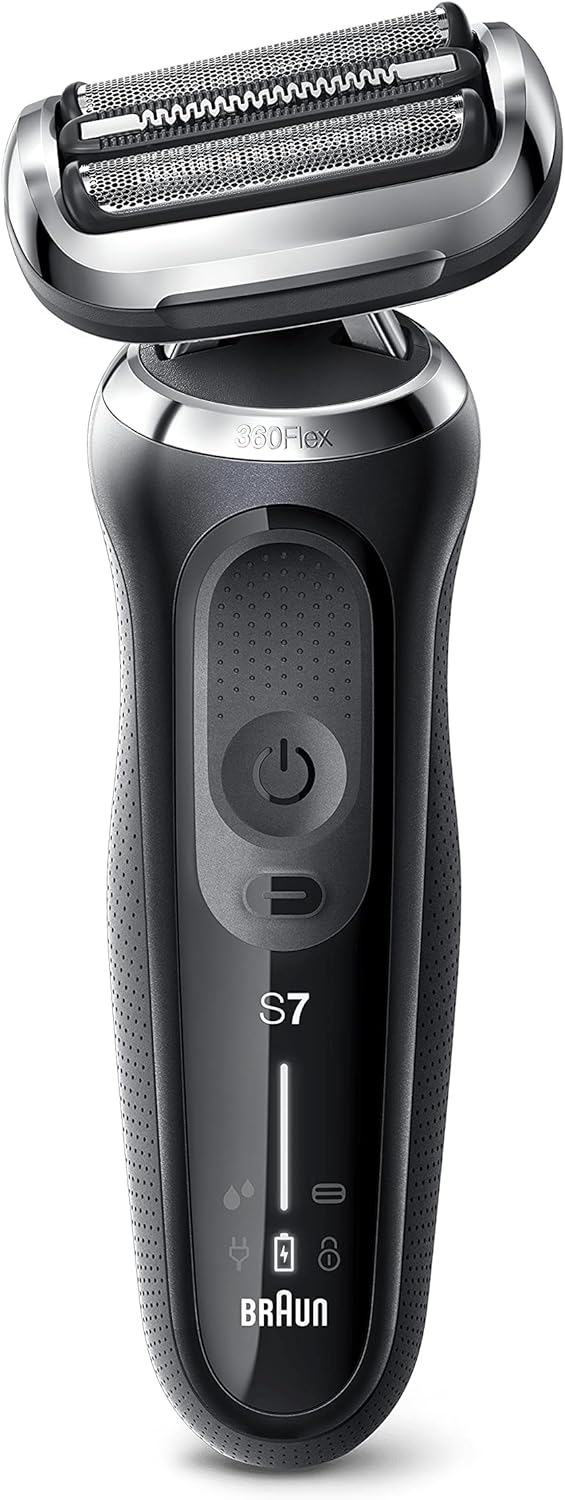
1. irudia: Aurrealdea view of the Braun Series 7 electric shaver. This image displays the Braun Series 7 electric shaver from the front. Visible features include the flexible shaving head with foil and cutter block, the power button, and LED indicators for battery status and cleaning.

Figure 2: Braun Series 7 shaver with its retail box and travel case. This image shows the complete package: the Braun Series 7 electric shaver, its original retail packaging, and a protective travel case. These are the primary components included with your purchase.
4. Konfigurazioa
4.1 Hasierako karga
- Before using your shaver for the first time, connect it to the power outlet using the provided Smart Plug.
- Charge the shaver for approximately 1 hour to ensure a full charge. The LED display will indicate charging progress and a full battery. A full charge provides up to 50 minutes of cordless shaving.
- A 5-minute quick charge is sufficient for one shave.
4.2 Attaching/Detaching Attachments (if applicable)
If your model includes a precision trimmer attachment or other EasyClick accessories, ensure the shaver is turned off before attaching or detaching them. Simply click the attachment onto the shaver head until it locks into place. To remove, pull the attachment off.
5. Funtzionamendu-argibideak
5.1 Piztu/Itzaltzea
- To turn the shaver on, press the power button once.
- To turn the shaver off, press the power button again.
5.2 Shaving Tips
Emaitza onenak lortzeko, jarraitu jarraibide hauek:
- Bizarra lehorra: Ensure your face is dry before shaving. Hold the shaver at a right angle (90°) to your skin and shave against the direction of hair growth.
- Bizarra hezea: You can use the shaver with foam or gel for a refreshing shave. Apply shaving foam/gel to your face, then shave as usual. Rinse the shaver head under running water during and after use.
- 360° Flex Adaptation: The shaver head automatically adapts to your facial contours, ensuring maximum skin contact for a close shave. Apply gentle pressure.
- AutoSense Teknologia: The shaver reads your beard density and adjusts its power accordingly, removing more hairs in every stroke, even with dense beards.

Figure 3: Illustration of the 360° Flex head movement. This image illustrates the 360 Flex adaptation feature of the Braun Series 7 shaver, showing how the head pivots to maintain contact with facial contours. The travel case is also visible.
5.3 Zehaztasun-ebakitzailea erabiltzea
If your shaver has an integrated precision trimmer, slide it upwards to activate. Use it for precise shaping of sideburns, mustaches, or for pre-trimming longer hairs before shaving.
6. Garbiketa eta Mantentze-lanak
Garbiketa erregularrak bizarra egiteko makinaren errendimendu eta higiene optimoa bermatzen du.
6.1 Daily Cleaning (Rinsing)
- Bizarra moztu ondoren, itzali bizarra egiteko makina.
- Hold the shaver head under warm running water until all residue is rinsed away. You can use liquid soap for a more thorough clean.
- Shake off excess water and let the shaver head air dry.
6.2 Thorough Cleaning (Brush)
- Ensure the shaver is turned off and disconnected from the power supply.
- Remove the foil and cutter block.
- Use the provided cleaning brush to remove any loose hairs from the shaver head and the inner housing. Do not use the brush on the foil as it may damage it.
- Reattach the foil and cutter block.
6.3 SmartCare Center (if applicable)
If your Series 7 model includes a SmartCare Center, refer to its separate instruction manual for detailed cleaning and charging procedures. The SmartCare Center automatically cleans, lubricates, dries, and charges your shaver at the touch of a button.
6.4 Replacing Shaver Parts
To maintain 100% shaving performance, replace the foil and cutter block every 18 months, or when worn. Replacement parts are available from Braun retailers or service centers. The shaver's LED display may indicate when replacement is due.
7. Arazoak
If you encounter issues with your Braun Series 7 shaver, consult the following table:
| Arazoa | Kausa posiblea | Irtenbidea |
|---|---|---|
| Bizarra mozteko makina ez da pizten. | Battery is empty; Travel lock is activated. | Charge the shaver; Deactivate travel lock by pressing the power button for 3 seconds. |
| Bizarra egiteko makinak ez du kargatzen. | Smart Plug not properly connected; Faulty power outlet. | Ensure the Smart Plug is securely connected to both the shaver and the power outlet; Try a different power outlet. |
| Bizarra mozteko errendimendu eskasa. | Foil and cutter block are worn; Shaver head is dirty; Incorrect shaving technique. | Replace foil and cutter block; Clean the shaver head thoroughly; Ensure shaving against hair growth with gentle pressure. |
| Larruazaleko narritadura bizarra egin ondoren. | Skin not accustomed to electric shaving; Excessive pressure; Worn shaving parts. | Allow a few weeks for skin to adapt; Use gentle pressure; Replace foil and cutter block if worn. |
8. Zehaztapen Teknikoak
- Marka: Braun
- Ereduaren izena: 7. seriea
- Modelo zenbakia: 70-N1000S
- Energia iturria: Bateriaz elikatua (Li-Ion)
- Bateriaren iraupena: Up to 50 minutes of shaving
- Karga azkarra: 5 minutu bizarra mozteko
- Iragazgaitza: 100% waterproof for Wet & Dry use
- Ezaugarri bereziak: 360° Flex Adaptation, AutoSense Technology
- Elementuaren pisua: 353 gramo
- Pala materiala: Altzairu herdoilgaitza
- Buru mota: Foil (Testine a lamina)
9. Bermea eta bezeroarentzako laguntza
Your Braun Series 7 shaver comes with a manufacturer's warranty. For detailed warranty information, terms, and conditions, please refer to the warranty card included in your product packaging or visit the official Braun website. For customer support, service, or to purchase replacement parts, please contact Braun customer service or visit their official webgunea:
Braun Ofiziala Webgunea: www.braun.com
Please have your model number (70-N1000S) and proof of purchase ready when contacting support.