
Sarrera
This manual provides instructions for the VINABTY RC-1034 replacement remote control. This remote is designed to function as a direct replacement for original remote controls used with DENON audio receivers and home cinema systems. It is compatible with various models, including the DENON DRA-F102.
Konfigurazioa
1. Bateriaren instalazioa
The VINABTY RC-1034 remote control requires two AAA alkaline batteries (not supplied). Follow these steps to install them:
- Kokatu bateriaren konpartimentuaren estalkia urrutiko agintearen atzealdean.
- Irristatu estalkia beherantz edo sakatu giltza irekitzeko.
- Sartu bi AAA pila, ziurtatuz terminal positiboa (+) eta negatiboa (-) konpartimentuaren barruko markekin behar bezala lerrokatuta daudela.
- Jarri bateriaren konpartimentuaren estalkia berriro bere lekuan, ondo klik egin arte irristatuz.

1 irudia: Baterien konpartimentua bateriak sartuta dituela.
2. Hasierako Erabilera
No programming or pairing is required for this remote control. Once batteries are installed, it is ready for immediate use with compatible DENON devices. Ensure there is a direct line of sight between the remote control's infrared emitter and the device's IR sensor, without any obstructions.
Funtzionamendu-argibideak
The VINABTY RC-1034 remote control provides comprehensive control over your compatible DENON audio receiver or home cinema system. Below is a general overview botoi funtzio ohikoenak:
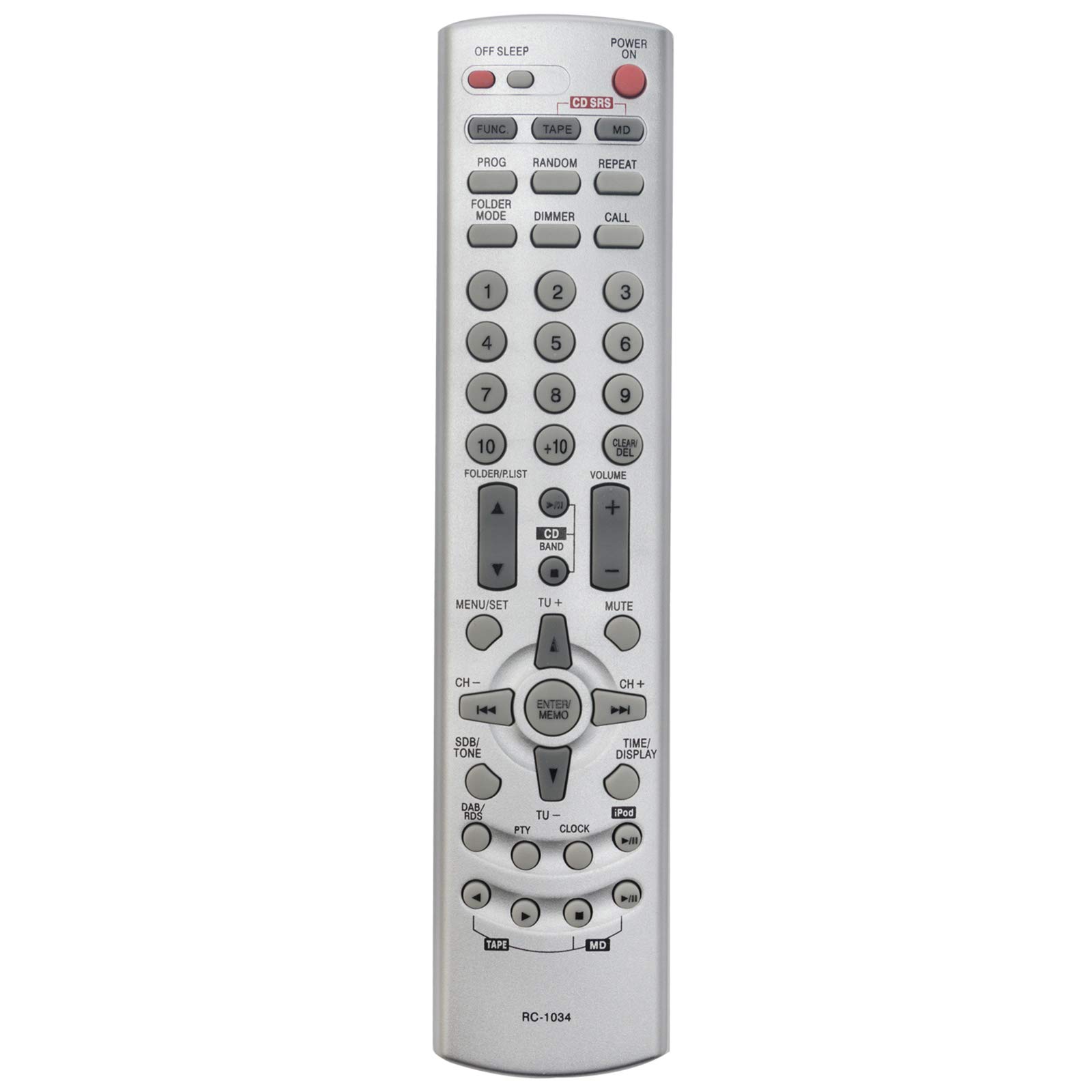
2. irudia: Aurrealdea view of the VINABTY RC-1034 remote control.
- ENERGIA / ITZALPENA: Gailua pizten edo itzaltzen du.
- OFF SLEEP: Lo egiteko tenporizadorearen funtzioa aktibatzen du.
- FUNC / TAPE / CD / MD: Selects the input source (Function, Tape, CD, MiniDisc).
- PROG / RANDOM / REPEAT: Controls playback modes such as program, random, or repeat.
- FOLDER MODE / DIMMER / CALL: Accesses folder navigation, display dimmer, or call functions.
- Numeric Keypad (0-9, +10): Directly selects tracks, radio presets, or enters numerical values.
- FOLDER/LIST: Navigates through folders or lists.
- CLEAR/DEL: Clears entries or deletes items.
- BOLUMENA +/-: Bolumen nagusiaren maila doitzen du.
- MUTU: Audio irteera isilarazten du.
- MENU/SET: Accesses the device's menu and confirms selections.
- CD BAND / TU+/-: Selects CD band or tunes radio frequencies up/down.
- Nabigazio geziak (Gora, Behera, Ezkerra, Eskuina): Menuetan eta aukeretan nabigatzen du.
- ENTER/MEMO: Confirms selections or stores settings in memory.
- CH +/-: Changes channels or presets.
- SDB/TONE: Adjusts sound balance or tone settings.
- DAB/RDS: Accesses Digital Audio Broadcasting or Radio Data System functions.
- PTY / CLOCK / TIME/DISPLAY / iPod: Accesses Program Type, Clock settings, Time/Display information, or iPod controls.
- Playback Controls (Play, Pause, Stop, Skip, Fast Forward/Rewind): Ohiko multimedia erreprodukzio funtzioak.
For specific functions, refer to your DENON device's original user manual.
Mantentzea
To ensure the longevity and optimal performance of your VINABTY RC-1034 remote control, follow these maintenance guidelines:
- Bateria ordezkatzea: Ordeztu pilak urrutiko agintearen erantzuna motela denean edo funtzionatzeari uzten dionean. Ordeztu beti bi pilak aldi berean berriekin.
- Garbiketa: Garbitu urrutiko agintea oihal leun eta lehor batekin. Zikinkeria egoskorra bada, garbitu pixka bat.ampGarbitu oihalak urarekin edo garbitzaile leun eta ez-urratzaile batekin. Saihestu produktu kimiko edo disolbatzaile gogorrak erabiltzea.
- Biltegiratzea: Gorde urrutiko agintea leku fresko eta lehor batean, eguzki-argitik eta muturreko tenperaturetatik babestuta. Urrutiko agintea denbora luzez erabiliko ez baduzu, kendu pilak isuriak saihesteko.
- Saihestu tantoak: Babestu urrutiko agintea kolpe fisikoetatik, erorketek barneko osagaiak kaltetu baititzakete.
Arazoak konpontzea
If you encounter issues with your VINABTY RC-1034 remote control, try the following troubleshooting steps:
- Urrunekoek ez dute erantzuten:
- Egiaztatu bateriak behar bezala instalatuta dauden eta nahikoa karga duten. Beharrezkoa bada, ordezkatu itzazu.
- Ensure there are no obstructions between the remote control and the device's infrared sensor.
- Verify that you are pointing the remote directly at the device.
- Botoi espezifikoak ez dira funtzionatzen:
- This may indicate a dirty contact under the button. Try gently pressing the button multiple times. If the issue persists, the remote may require professional cleaning or replacement.
- Device Not Responding to Any Remote:
- Check the power status of your DENON device.
- Ensure the device's IR sensor is not covered or damaged.
If these steps do not resolve the issue, or if you are unsure about the remote's compatibility with your specific DENON model, please contact customer support for further assistance.
Zehaztapenak
| Marka | VINABTY |
| Modelo zenbakia | RC-1034 |
| Konektibitate Teknologia | Infragorriak (IR) |
| Ezaugarri Berezia | Haririk gabekoa |
| Kolorea | Beltza |
| Gehienez onartzen diren gailuak | 1 |
| Gailu bateragarriak | DENON Audio Receivers, Home Cinema Systems (e.g., DRA-F102) |
| Botoi kopurua | Multiple function buttons |
| Gehienezko irismena | 10 metro |
| Bateria mota | AAA alkalinoak (ez dira barne hartzen) |
Bermearen informazioa
A 60-day warranty is provided for this VINABTY RC-1034 replacement remote control, covering manufacturing defects from the date of purchase. Please retain your proof of purchase for warranty claims.
Bezeroarentzako Arreta
For any questions, technical assistance, or warranty inquiries regarding your VINABTY RC-1034 remote control, please do not hesitate to contact VINABTY customer support. We are committed to responding to your messages within 24 hours to provide prompt and helpful service.