
Yaheetech YTwy4o0001001
Yaheetech YTwy4o0001001 Corner Computer Desk Instruction Manual
Model: YTwy4o0001001
1. Sarrera
Thank you for choosing the Yaheetech Wood Triangle Computer Desk Corner Table. This manual provides detailed instructions for the assembly, operation, and maintenance of your new desk. Please read all instructions carefully before assembly and use to ensure safe and proper functionality.

Image 1: Yaheetech Wood Triangle Computer Desk Corner Table.
2. Segurtasun-argibide garrantzitsuak
- Irakurri argibide guztiak: Aurrera jarraitu aurretik, ziurtatu muntaketa-urrats eta segurtasun-abisu guztiak ulertzen dituzula.
- Utzi haurrak urrun: Mantendu haurrak eta maskotak muntaketa-eremutik urrun. Pieza txikiek itotzea eragin dezakete.
- Erabili tresna zuzenak: Use only the tools specified in the assembly guide. Do not overtighten screws.
- Pisu muga: Ez gainditu gehienezko pisu-muga 110 libra (50 kg) seguru erabiltzeko.
- Azalera egonkorra: Assemble the desk on a clean, flat, and stable surface to prevent damage or injury.
- Bi pertsonako muntaketa gomendatua: For optimal safety and ease, assembly by two people is recommended.
- Ohiko mantentze-lanak: Aldian-aldian egiaztatu konexio eta lotura guztiak ondo estututa daudela ziurtatzeko.
3. Paketearen edukia
Before beginning assembly, verify that all parts and hardware are present. Refer to the parts list provided in your package. If any parts are missing or damaged, please contact customer support.

2 irudia: Produktuaren neurrien diagrama.
4. Muntatzeko jarraibideak
Follow these step-by-step instructions to assemble your Yaheetech Corner Computer Desk. It is recommended to have a second person assist with assembly.
Video 1: Official Yaheetech assembly guide for the Corner Computer Desk. This video demonstrates the full assembly process from unboxing to final setup.
- Prestatu oinarria: Lay out the base frame components. Attach the side support bars to the main base using the provided screws and an Allen wrench. Ensure all connections are secure but do not fully tighten until all parts are aligned.
- Hankak erantsi: Connect the four desk legs to the assembled base frame. Use the designated screws and dowels to ensure a stable connection.
- Beheko apalak instalatu: Slide the triangular lower shelves into place within the leg structure. Secure them using the provided fasteners. These shelves form the corner storage area.
- Tiradera-kutxa muntatu: Construct the drawer box by attaching the side panels to the front and back panels. Ensure the drawer slides are correctly oriented.
- Attach Drawer Handle: Secure the semilunar metal handle to the front of the drawer using the small screws.
- Install Drawer into Desk: Carefully slide the assembled drawer into the desk frame. Ensure it glides smoothly.
- Place Desktop: Position the main desktop panel onto the assembled frame. Align the pre-drilled holes and secure the desktop using the remaining screws.
- Azken estutzea: Once all components are in place and aligned, fully tighten all screws and fasteners.
5. Funtzionamendu-argibideak
Your Yaheetech Corner Computer Desk is designed for versatile use in various small spaces. Here’s how to best utilize its features:
- Lan-estazioaren konfigurazioa: Place your laptop, monitor, or other work essentials on the spacious desktop. The triangular shape is ideal for corner placement, maximizing your room’s layout.
- Tiraderaren erabilera: The smooth-sliding drawer provides convenient, out-of-sight storage for office supplies, documents, or personal items. Pull the semilunar metal handle to open and close.
- Biltegiratze apalategiak: Utilize the two bottom open shelves for books, binders, decorative items, or small storage bins. These shelves help keep your workspace organized and clutter-free.
- Kokapen polifazetikoa: This desk can be positioned against a corner, a flat wall, or even in the center of a room, adapting to your specific needs.
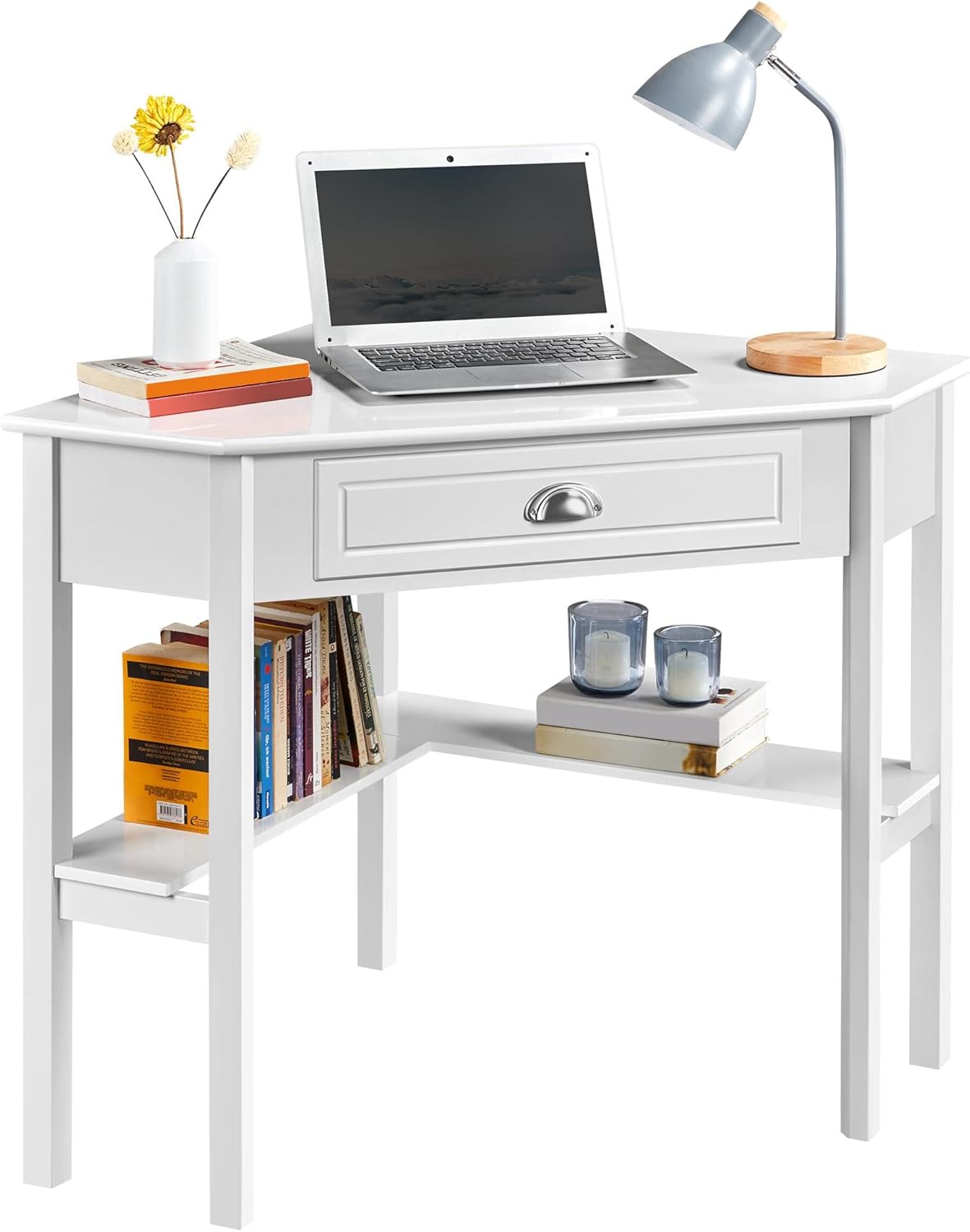
Image 3: Desk configured as a workstation with a laptop and books.
6. Mantentzea
Zure mahaiaren iraupena eta itxura bermatzeko, jarraitu mantentze-jarraibide hauek:
- Garbiketa: Garbitu mahaigaina leun batekin, damp cloth. Avoid harsh chemicals or abrasive cleaners, as they may damage the finish. The surface is waterproof and moisture-proof, making it easy to clean.
- Isurketak: Promptly clean up any spills to prevent staining or damage to the wood.
- Eguzkiaren argia saihestu: Eguzki-argiaren eraginpean denbora luzez egoteak kolorea galtzea edo deskoloratzea eragin dezake.
- Lotzeko elementuak egiaztatu: Periodically inspect all screws and connections. Tighten any loose fasteners to maintain stability.

Image 4: Waterproof surface for easy cleaning.
7. Arazoak
Zure mahaiarekin arazorik baduzu, jo ezazu honako arazo eta irtenbide ohikoenei:
- Desk Wobbles:
- Ziurtatu torloju eta lokailu guztiak ondo estututa daudela.
- Verify that the desk is placed on a level surface. Adjust if necessary.
- Drawer Sticks or Doesn't Close Properly:
- Egiaztatu tiraderaren irristagailuak behar bezala lerrokatuta daudela eta oztoporik gabe daudela.
- Ensure the drawer box was assembled correctly and is not warped.
- Falta diren piezak:
- Carefully re-check the packaging and all contents.
- Contact Yaheetech customer support for assistance with missing components.
8. Zehaztapenak
| Ezaugarri | Xehetasuna |
|---|---|
| Marka | Yaheetech |
| Modelo zenbakia | YTwy4o0001001 |
| Forma | Triangelua |
| Produktuaren neurriak (L x W x H) | 29.5" L x 41.7" W x 30" H |
| Kolorea | Zuria |
| Estiloa | Modernoa |
| Material Mota | Engineered Wood (MDF Desktop & Pine Legs) |
| Tiradera kopurua | 1 |
| Apalategi kopurua | 2 (apal irekiak) |
| Elementuaren pisua | 32.4 kilo |
| Gehienezko pisuaren gomendioa | 110 libra (50 kg) |
| Beharrezko muntaia | Bai |
| Batzarrerako Gomendatutako Pertsona Kopurua | 2 |
9. Bermea eta Laguntza
Yaheetech produktu honek honako hauekin dator: Berme mugatua. Please refer to your purchase documentation for specific terms and conditions. A 30 eguneko fabrikatzailearen bermea covers parts and labor for defects in materials or workmanship.
For any questions, missing parts, or support needs, please contact Yaheetech customer service through the retailer where the product was purchased or visit the official Yaheetech webharremanetarako informazioa lortzeko gunea.
Ask a question about this manual
Ask about setup, troubleshooting, compatibility, parts, safety, or missing instructions. Manuals+ will review the question and use this page’s manual context to help answer it.