
1. Sarrera
The Ewent EW1538 Dual Monitor Desk Mount is designed to create an ergonomic and space-saving workspace. This gas spring-powered desk mount allows you to position two monitors (13-27 inches, 2-7 kg each) at your ideal height and viewing angle with ease. Its flexible adjustments help reduce strain on your neck, back, and shoulders, promoting a more comfortable and productive environment. The integrated cable management system keeps your workspace tidy.

Image 1.1: Ewent EW1538 Dual Monitor Desk Mount without monitors.
2. Segurtasun informazioa
Please read all instructions carefully before assembly and use. Failure to follow these instructions may result in property damage, serious injury, or death.
- Pisu-gaitasuna: Do not exceed the maximum weight capacity of 7 kg (15.4 lbs) per monitor. Ensure your monitors are within the specified weight range.
- Monitorearen tamaina: This mount is suitable for monitors between 13 and 27 inches.
- VESA bateragarritasuna: Ensure your monitors have VESA mounting patterns (75x75mm or 100x100mm).
- Mahaiaren lodiera: Verify your desk is thick enough and structurally sound to support the combined weight of the mount and monitors.
- Pintza puntuak: Be aware of moving parts and potential pinch points during assembly and adjustment. Keep hands clear.
- Muntaia: Assemble the product exactly as described in this manual. Do not modify the mount.
- Haurrak: Mantendu haurrak muntaketa-eremutik urrun. Pieza txikiek itotzea eragin dezakete.
3. Paketearen edukia
Before assembly, ensure all parts are present and undamaged. If any parts are missing or damaged, contact your retailer for assistance.
- Mahaiaren oinarria
- Polo Nagusia
- Dual Monitor Arm Assembly
- VESA Mounting Plates (x2)
- Hardware kita (torlojuak, arandelak, tartekatzaileak)
- Allen Keys / Wrenches
- Kableak kudeatzeko klipak
4. Konfiguratzeko argibideak
Follow these steps to assemble and install your Ewent EW1538 Dual Monitor Desk Mount.
4.1. Attach Base to Pole
- Place the desk base on a stable surface.
- Insert the main pole into the designated slot on the desk base.
- Secure the pole to the base using the provided screws and an Allen key from underneath the base. Tighten firmly.
4.2. Attach Monitor Arm Assembly to Pole
- Slide the dual monitor arm assembly onto the main pole.
- Adjust the arm to your desired initial height and secure it by tightening the locking screw on the back of the arm assembly with an Allen key.

4.1. irudia: Amaituview of the monitor mount components and assembly.
4.3. VESA plakak monitoreei lotu
- Jarri kontu handiz monitorearen aurpegia behera gainazal leun eta garbi batean.
- Attach a VESA mounting plate to the back of each monitor using the appropriate screws and washers from the hardware kit. Ensure the screws are tightened securely but do not overtighten.

Image 4.2: Detail of VESA plate attachment to a monitor.
4.4. Monitoreak besoetan muntatu
- With assistance, carefully lift each monitor and slide the VESA plate attached to the monitor onto the corresponding arm bracket.
- Ensure the monitor is securely seated on the bracket. Some brackets may have a quick-release or locking mechanism; engage it if present.
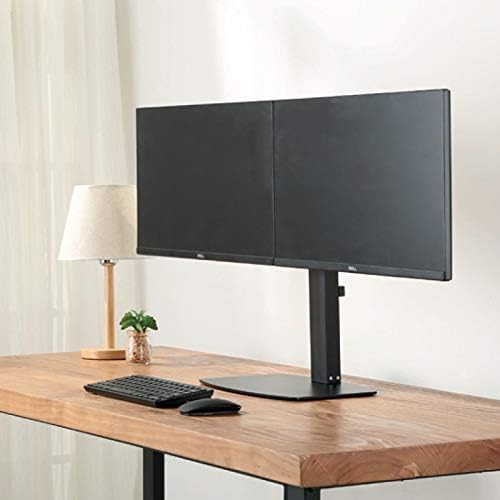
4.3. irudia: Aurrealdea view of two monitors mounted on the desk stand.
4.5. Egokitu gas malgukiaren tentsioa
- The gas spring tension may need adjustment to properly support your monitor's weight.
- Locate the tension adjustment screw on the arm (usually near the VESA plate or the arm pivot point).
- If the monitor sags, turn the screw clockwise to increase tension. If the monitor floats up too easily, turn the screw counter-clockwise to decrease tension. Adjust until the monitor stays in place when moved.
4.6. Kableen kudeaketa
- Route your monitor cables (power, video) through the integrated cable management clips or channels on the monitor arms and down the main pole.
- This helps keep your workspace organized and prevents cable clutter.
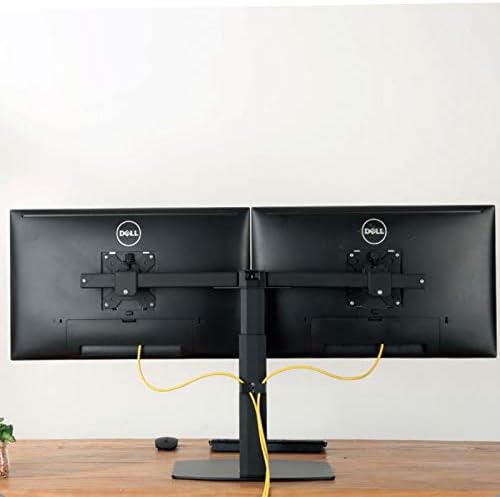
4.4. irudia: Atzekoa view illustrating cable management with monitors mounted.
5. Funtzionamendu-argibideak
The Ewent EW1538 offers various adjustments for optimal viewerosotasuna.
- Altuera doitzea: Monitorea gora edo behera bultzatu edo tira astiro altuera doitzeko. Gas malguki mekanismoak bere lekuan eutsiko dio.
- Inklinazio doikuntza: Tilt the monitor screen up or down to reduce glare and find your preferred viewangelua.
- Birako doikuntza: Biratu monitorearen ezkerrera edo eskuinera pantaila partekatzeko edo doitzeko viewposizioa.
- Errotazioa: Biratu monitorearen pantaila 360 gradu horizontalaren eta bertikalaren orientazioaren artean aldatzeko.

Image 5.1: Monitors adjusted to different orientations (landscape and portrait).
6. Mantentzea
Regular maintenance ensures the longevity and proper function of your monitor mount.
- Garbiketa: Garbitu euskarria zapi leun batekin,amp oihal. Saihestu garbitzaile edo disolbatzaile urratzaileak.
- Egiaztatu konexioak: Aldian-aldian egiaztatu torloju eta konexio guztiak ondo estututa daudela ziurtatzeko. Beharrezkoa bada, berriro estutu.
- Gas malgukia: The gas spring is designed for long-term use and generally requires no maintenance. If adjustment becomes difficult, re-check the tension setting.
7. Arazoak
If you encounter issues with your monitor mount, refer to the following common solutions:
| Arazoa | Kausa posiblea | Irtenbidea |
|---|---|---|
| Beherapenak edo jaitsierak kontrolatu | Gas malgukiaren tentsioa baxuegia da monitorearen pisurako. | Increase gas spring tension by turning the adjustment screw clockwise. |
| Monitor floats up too easily | Gas malgukiaren tentsioa altuegia da monitorearen pisurako. | Decrease gas spring tension by turning the adjustment screw counter-clockwise. |
| Monitors are not level | Minor height discrepancy between arms or VESA plates. | Adjust the individual VESA plate height or arm tilt to level the monitors. |
| Mendia ezegonkorra sentitzen da | Base screws are loose or desk is not sturdy. | Ensure all assembly screws are tightened. Verify desk stability. |
8. Zehaztapenak
- Eredua: EW1538
- Marka: Ewent
- Pantailaren tamainaren bateragarritasuna: 13 - 27 hazbete
- Pisu-gaitasuna: 2 - 7 kg (4.4 - 15.4 lbs) per monitor
- VESA bateragarritasuna: 75x75mm, 100x100mm
- Mugimendua: Height adjustment (gas spring), Tilt (up to 15 degrees), Swivel, 360° Rotation
- Materiala: Metalezko eta plastikozko eraikuntza iraunkorra
- Kolorea: Beltza
- Produktuaren pisua: Gutxi gorabehera 6 kg (13.2 lb)
9. Bermea eta Laguntza
For warranty information or technical support, please refer to the documentation provided with your purchase or visit the official Ewent webgunea. Bezeroarentzako arreta-zerbitzuko harremanetarako datuak normalean bertan aurki daitezke.


