
SUNMI TF700
SUNMI M2 MAX Industrial Tablet User Manual
Eredua: TF700
Sarrera
This manual provides comprehensive instructions for the safe and efficient use of your SUNMI M2 MAX Industrial Tablet, model TF700. Please read this manual thoroughly before operating the device and retain it for future reference.

1. irudia: Aurrealdea view of the SUNMI M2 MAX Industrial Tablet, showing its display with various application icons.
Konfigurazioa
1. Unboxing eta Hasierako Ikuskapena
Kontu handiz atera osagai guztiak paketetik. Egiaztatu behean zerrendatutako elementu guztiak daudela eta kalterik gabe daudela:
- SUNMI M2 MAX Industrial Tablet (TF700)
- Elikatze-moldagailua
- USB motako kablea
- Hand Strap (optional, if included with your model)
2. Gailua kargatzea
Before first use, fully charge the tablet. Connect the USB Type-C cable to the tablet's charging port and the other end to the power adapter. Plug the power adapter into a wall outlet. The charging indicator will illuminate.
The tablet is equipped with an 8360mAh non-removable lithium polymer battery. A full charge can provide over 12 hours of continuous operation.
3. Installing SIM Card and MicroSD Card (Optional)
The device supports MicroSIM or NanoSIM cards (Config 1) and an eSIM (Config 2). It also supports MicroSD cards up to 128GB for expanded storage.
- Bilatu SIM/MicroSD txartelaren zirrikitua tabletaren alboan.
- Use the provided SIM ejector tool (if applicable) or a small paperclip to open the tray.
- Carefully place the SIM card(s) and/or MicroSD card into the tray according to the diagram on the tray.
- Sartu erretilua astiro-astiro zirrikituan klik egin arte.

2. Irudia: Atzealdea view of the SUNMI M2 MAX, highlighting the camera, pogo pin charging interface, and the location of the SIM/MicroSD card slot.
4. Attaching the Hand Strap (Optional)
If your model includes a hand strap, attach it to the designated points on the back of the tablet for secure handling during mobile operations.
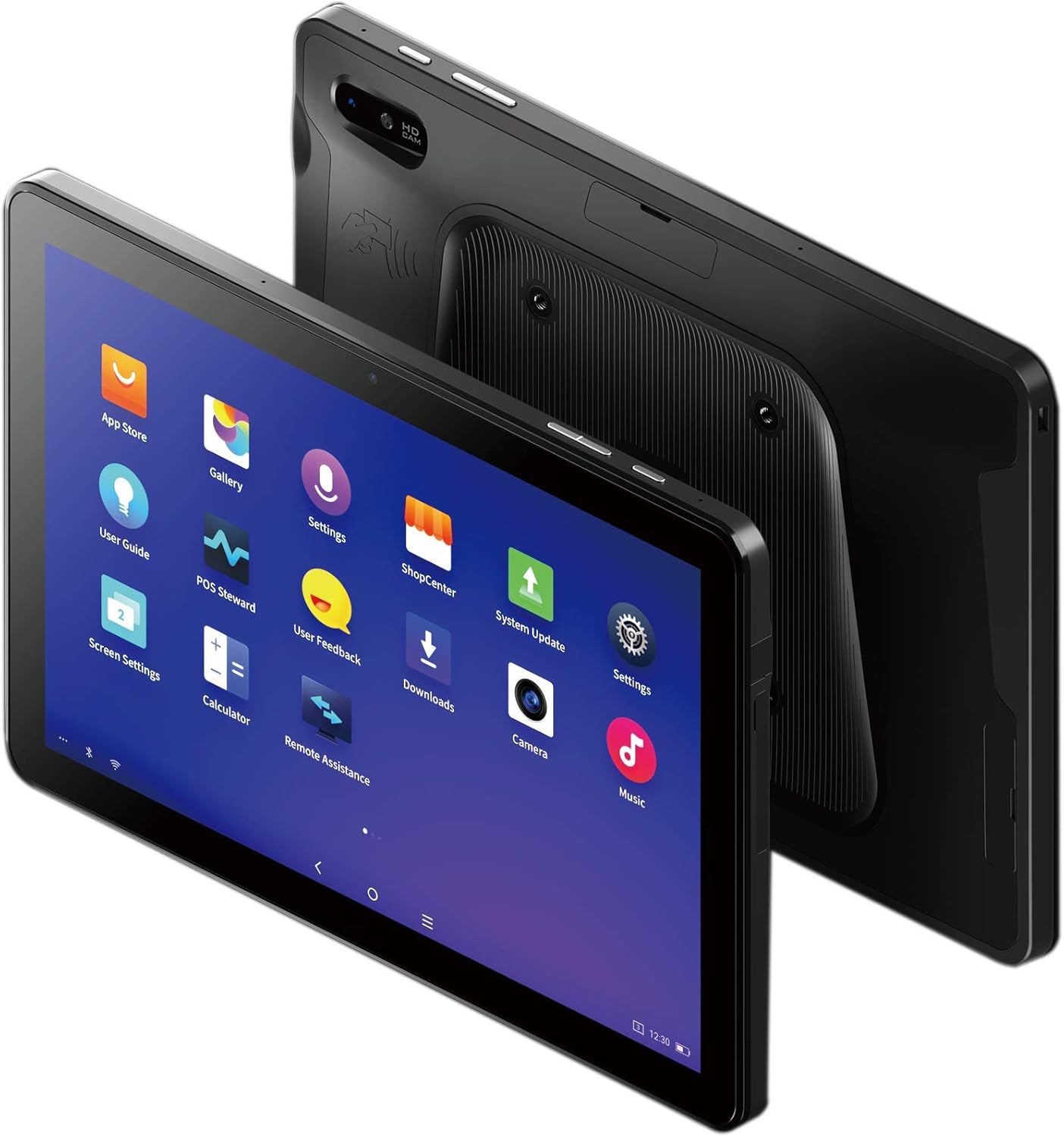
Figure 3: The SUNMI M2 MAX Industrial Tablet being held with an optional hand strap, demonstrating enhanced portability and secure grip.
Gailuaren funtzionamendua
1. Piztu/Itzali
- Piztu: Press and hold the Power button (located on the side) until the SUNMI logo appears on the screen.
- Itzali: Press and hold the Power button until a power-off menu appears. Select "Power Off" and confirm.
- Berrabiarazi: From the power-off menu, select "Restart" to reboot the device.
2. Oinarrizko nabigazioa
The SUNMI M2 MAX runs on the Android operating system. Navigation is primarily touch-based:
- Sakatu: Elementu bat hautatzeko edo aplikazio bat irekitzeko.
- Pasatu hatza: Zerrendetan zehar mugitzeko edo pantaila artean aldatzeko.
- Zoom egiteko apur bat egin: Irudiak handitu edo txikitzeko edo web orrialdeak.
- Hasierako botoia: Hasierako pantailara itzultzen da.
- Atzera botoia: Aurreko pantailara itzultzen da.
- Azken aplikazioen botoia: Erabilitako azken aplikazioak bistaratzen ditu.
3. Sareetara konektatzea
The tablet supports Wi-Fi (2.4GHz/5GHz, 802.11 a/b/g/n/ac) and cellular networks (2G, 3G, 4G).
- Wi-Fi: Joan zaitez Ezarpenak > Sarea eta internet > Wi-Fi. Turn Wi-Fi on, select your desired network, and enter the password if required.
- Datu zelularrak: Ensure a valid SIM card is inserted. Go to Ezarpenak > Sarea eta Internet > Sare mugikorra to enable mobile data and configure APN settings if necessary.
- Bluetootha: Joan zaitez Ezarpenak > Konektatutako gailuak > Bluetooth to pair with Bluetooth devices (supports Bluetooth 5.0).
4. Using NFC
The SUNMI M2 MAX is equipped with NFC (Near Field Communication) for contactless transactions and data exchange. To use NFC, ensure it is enabled in settings and hold the tablet near a compatible NFC reader or device.
5. Kameraren funtzionamendua
The tablet features a 13 MP rear camera with flash and autofocus, and a 5 MP front camera. Open the "Camera" application to capture photos or record videos.
Mantentzea
1. Gailua garbitzea
Erabili lipurrik gabeko zapi leun bat dampened with water or a screen cleaner to wipe the display and exterior. Avoid using harsh chemicals, abrasive cleaners, or excessive moisture.
2. Bateria zaintzea
- Avoid exposing the tablet to extreme temperatures (below -20°C or above 70°C).
- Ez utzi bateria maiz erabat deskargatzen.
- Use only the original or certified compatible power adapter and cable.
3. Software eguneraketak
Egiaztatu eta instalatu sistemaren eguneraketak aldizka errendimendu eta segurtasun optimoa bermatzeko. Joan honera Ezarpenak > Sistema > Sistemaren eguneraketa.
4. Ingurumena babestea
The SUNMI M2 MAX is designed with IP68 protection and a 1m drop specification, making it suitable for demanding environments. However, avoid intentional drops or prolonged submersion in water.
Arazoak konpontzea
| Arazoa | Kausa posiblea | Irtenbidea |
|---|---|---|
| Gailua ez da pizten. | Bateria baxua; softwarearen kraskadura. | Kargatu gailua gutxienez 30 minutuz. Berrabiaraztea behartzeko, sakatu eta eutsi pizteko botoia 10-15 segundoz. |
| Ezin da wifira konektatu. | Incorrect password; Wi-Fi disabled; router issue. | Verify password. Ensure Wi-Fi is enabled in settings. Restart router. Forget and reconnect to the network. |
| Ukipen-pantailak ez du erantzuten. | Softwarearen aldi baterako akatsa. | Berrabiarazi gailua behartuta pizteko botoia sakatuta edukiz. |
| Applications crashing. | Insufficient RAM; app bug. | Close background apps. Clear app cache/data (Settings > Apps). Update the app. |
Zehaztapenak
The following table outlines the key technical specifications of the SUNMI M2 MAX Industrial Tablet (Model: TF700).

Figure 4: Comprehensive technical specifications for the SUNMI M2 MAX Industrial Tablet.
- Eredua: TF700
- Sistema eragilea: Android 9.0 (SUNMI OS)
- Prozesadorea: Kryo-260, Octa-core 2.2GHz (Qualcomm)
- Memoria: 3GB RAM + 32GB ROM (eMMC)
- Pantaila: 10.1-inch FHD, 1920x1200, Capacitive multitouch, Corning Gorilla Glass 3
- Kamerak: Front: 5MP FF; Rear: 13MP AF + Flashlight, supports 1D/2D barcode recognition
- NFC: Type-A&B card, Mifare card, Felica card, ISO/IEC 14443 and ISO/IEC 15693 compliant
- Speaker/MIC: 1W Speaker, 2x MIC
- PSAM txartelaren zirrikitua: 1x PSAM
- SIM txartelaren zirrikitua: 1x MicroSD (TF), 1x MicroSIM or 1x NanoSIM (TF700 Config 1), eSIM (TF700 Config 2)
- Sarea: 2G & 3G & 4G
- Wi-Fi: 2.4GHz/5GHz, 802.11 a/b/g/n/ac
- Bluetootha: Supports Bluetooth 2.1/3.0/4.2/5.0 (BLE)
- GPSa: Supports AGPS, GPS, GLONASS, Beidou (Config 2)
- Sentsore: Gravity sensor, light sensor, compass, Hall
- Botoiak: 1x Power (lock screen), 2x Volume (+/-)
- Portuak: 1x Type-C (supports OTG), 1x Audio Jack, 1x MicroSD (up to 128GB expansion)
- Bateria: Non-removable Lithium Polymer battery, 8360mAh
- Elikadura egokitzailea: Input: AC 100-240V, Output: DC 5V/2A
- Neurriak (LxWxH): 249.8 x 160 x 9.9 mm (0.39 x 6.3 x 9.84 hazbete)
- Pisu osoa: 673 g (1.48 libra)
- Babesa: IP68, 1m drop spec
- Funtzionamendu-tenperatura: -20°C eta 55°C artean
- Biltegiratze tenperatura: -40°C eta 70°C artean
Bermea eta Laguntza
For warranty information and technical support, please refer to the documentation provided with your purchase or visit the official SUNMI webgunea. Gorde erosketaren egiaztagiria bermearen erreklamazioetarako.
SUNMI Official Webgunea: www.sunmi.com
Erlazionatutako dokumentuak - TF700
 |
Sunmi Order Pad 3 User Manual User manual and safety guide for the Sunmi Order Pad 3. Includes device overview, safety instructions, and regulatory compliance information. |
 |
Sunmi Order Pad 3 User Manual (TF41AH1) Comprehensive user manual for the Sunmi Order Pad 3 (Model TF41AH1). Includes device overview, safety warnings, regulatory compliance, and support information. |
 |
Sunmi C PAD (TFB1AN1) User Manual Comprehensive user manual for the Sunmi C PAD (Model: TFB1AN1) tablet, including device overview, setup instructions, safety warnings, regulatory compliance, and software management. |
 |
Sunmi Order Pad 3 (M3L) User Manual Official user manual and safety guide for the Sunmi Order Pad 3 (M3L). Includes device overview, operating instructions, safety warnings, and regulatory compliance information. |
 |
Sunmi Order Pad 3 User Manual Comprehensive user manual for the Sunmi Order Pad 3, covering safety guidelines, technical specifications, regulatory compliance, and operating instructions for retail and catering environments. |
 |
SUNMI CPAD TF31AN1 Tablet User Manual User manual for the SUNMI CPAD TF31AN1 tablet, detailing features, operation, safety guidelines, technical specifications, and regulatory compliance. |
Ask a question about this manual
Ask about setup, troubleshooting, compatibility, parts, safety, or missing instructions. Manuals+ will review the question and use this page’s manual context to help answer it.