
1. Sarrera
This manual provides essential information for the safe and efficient use of your iiyama G2470HSU-B1 23.8-inch IPS Full HD 165Hz Gaming Monitor. Please read these instructions thoroughly before operating the device and retain them for future reference.
2. Segurtasun informazioa
- Ez jarri monitoreari euri edo hezetasun eraginpean sute edo deskarga elektrikoen arriskuak saihesteko.
- Ez ireki monitorearen casing. Ez dago erabiltzaileak konpondu beharreko piezarik barruan. Konponketa guztiak zerbitzu-langile kualifikatuei eskatu.
- Ziurtatu aireztapen egokia dagoela. Ez blokeatu aireztapen-irekidurak.
- Erabili monitorearekin hornitutako korronte-kablea soilik.
- Jarri monitoreak gainazal egonkor eta lau batean, eror ez dadin.
- Ez jarri objektu astunak korronte-kablean.
3. Paketearen edukia
Egiaztatu behean zerrendatutako elementu guztiak zure paketean daudela:
- iiyama G2470HSU-B1 Monitor
- Monitorearen euskarria (oinarria eta lepoa)
- Elikatze-kablea
- HDMI kablea
- DisplayPort kablea
- USB Upstream kablea
- Erabiltzailearen eskuliburua (dokumentu hau)
4. Konfigurazioa
4.1 Standa muntatzea
- Kontu handiz jarri monitorearen aurpegia behera oihal leun eta garbi baten gainean, marradurak saihesteko.
- Lotu euskarriaren lepoa monitorearen atzealdean. Ziurtatu ondo sartzen dela klik eginez.
- Attach the stand base to the neck and tighten the screw at the bottom of the base.

4.1. irudia: Aurrealdea view monitorearen euskarria duena.
4.2 Monitorea konektatzea
Konektatu monitorea zure ordenagailura edo beste gailu batzuetara kable egokiak erabiliz.
- Bideoaren sarrera: Connect either an HDMI cable or a DisplayPort cable from your computer's graphics card to the corresponding port on the monitor.
- USB Hub: Connect the USB upstream cable from your computer to the USB-B port on the monitor to enable the monitor's USB 2.0 ports.
- Audio irteera: If desired, connect headphones or external speakers to the 3.5mm audio output jack.

Figure 4.2: Monitor input ports.
4.3 Energia-konexioa
Konektatu elikatze-kablea monitorearen elikatze-sarrerara eta, ondoren, konektatu beste muturra lurrera konektatutako entxufe elektriko batera.
5. Funtzionamendu-argibideak
5.1 Piztu/Itzali
Press the power button located on the rear of the monitor to turn it on or off. The power indicator light will illuminate when the monitor is on.
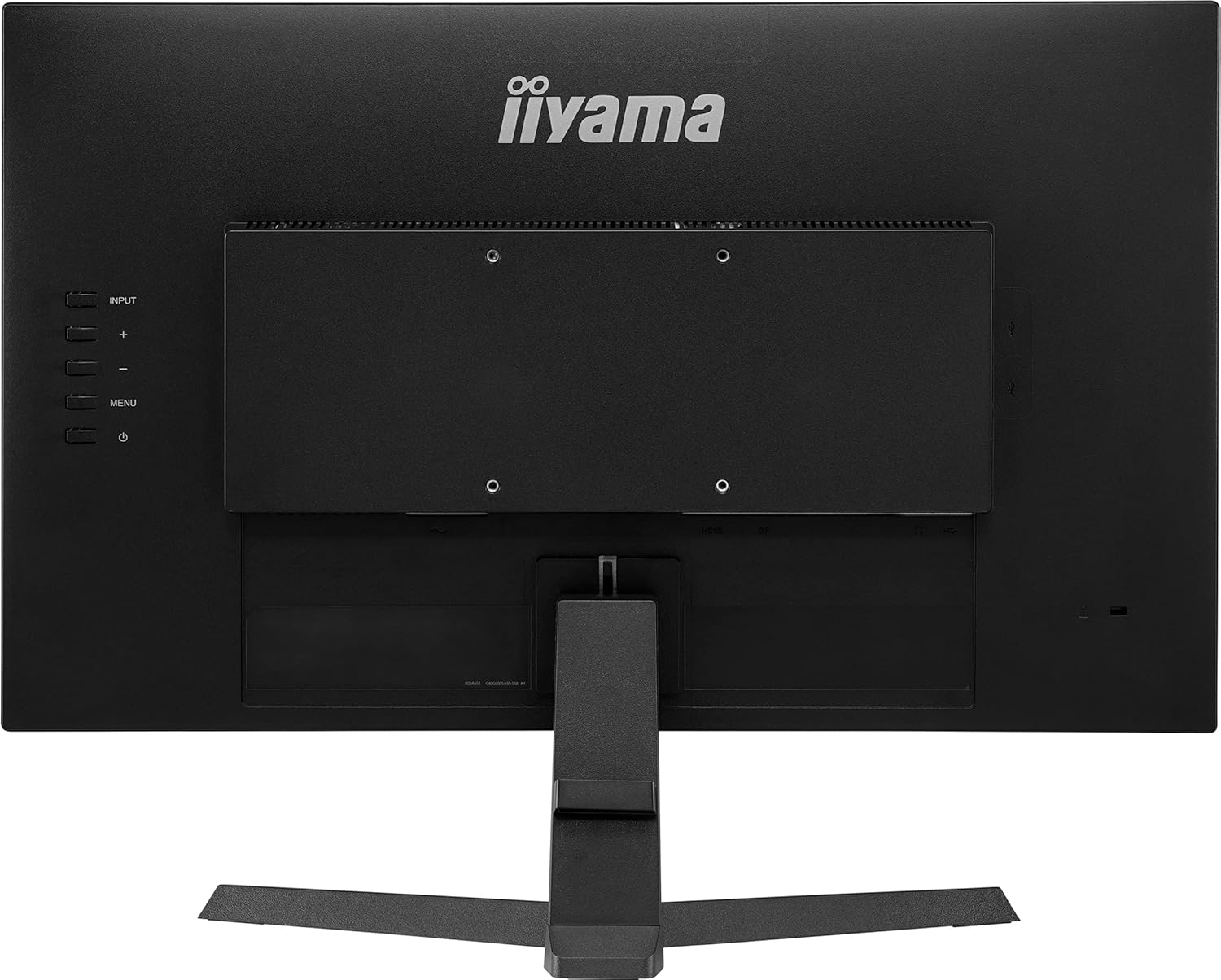
5.1. Irudia: Atzealdea view kontrol botoiekin.
5.2 Pantailan bistaratzeko (OSD) menua
The OSD menu allows you to adjust various monitor settings. Use the buttons on the rear of the monitor to navigate and select options.
- Sarrera: Select the video input source (HDMI, DisplayPort).
- Irudia: Doitu distira, kontrastea, zorroztasuna eta kolore-tenperatura.
- Audioa: Control volume and mute settings.
- OSD konfigurazioa: Configure OSD language, position, and timeout.
- Jokoen ezarpenak: Access features like Black Tuner, FreeSync, and response time overdrive.
5.3 Adjusting Refresh Rate
To utilize the 165Hz refresh rate, ensure your graphics card and connection cable (DisplayPort recommended) support it. Adjust the refresh rate through your computer's display settings:
- Windows: Right-click on the desktop > Display settings > Advanced display settings > Display adapter properties > Monitor tab > Screen refresh rate.
- MacOS: System Settings > Displays > Refresh Rate.
5.4 FreeSync Technology
This monitor supports AMD FreeSync technology, which synchronizes the monitor's refresh rate with your graphics card's frame rate to reduce screen tearing and stuttering. Ensure FreeSync is enabled in the monitor's OSD menu and your graphics card software.
6. Mantentzea
6.1 Pantaila garbitzea
Garbitu pantaila astiro-astiro zapi leun eta pelusik gabeko batekin. Orba egoskorrak kentzeko, garbituampGarbitu zapia pantaila-garbitzaile leun eta ez-urratzaile batekin. Ez ihinztatu garbitzailea zuzenean pantailan.
6.2 C garbitzeaasing
Erabili zapi leun eta lehor bat monitorearen garbiketa egiteko.asing. Saihestu detergente edo disolbatzaile indartsuak erabiltzea.
7. Arazoak
| Arazoa | Kausa posiblea | Irtenbidea |
|---|---|---|
| Ez dago irudirik pantailan | Kable elektrikoa deskonektatuta; bideo-kablea deskonektatuta; sarrera-iturri okerra hautatuta. | Egiaztatu elikadura eta bideo kablearen konexioak; hautatu sarrera-iturri zuzena OSD menuaren bidez. |
| Irudia lausoa edo distortsionatua dago | Bereizmen okerra; Grafikoen kontrolatzailearen arazoa. | Set resolution to 1920x1080; Update graphics drivers. |
| Pantaila keinuka | Freskatze-tasa desadostasuna; Kablearen arazoa; FreeSync ez dago behar bezala konfiguratuta. | Ensure refresh rate is set correctly (165Hz); Try a different video cable; Verify FreeSync settings. |
| Ez dago soinurik bozgorailuetatik/aurikularretatik | Volume too low; Audio cable disconnected; Incorrect audio output selected on PC. | Adjust volume in OSD and PC; Check audio cable connection; Select monitor as audio output on PC. |
8. Zehaztapenak
| Ezaugarri | Zehaztapena |
|---|---|
| Marka | iiyama |
| Modelo zenbakia | G2470HSU-B1 |
| Pantailaren tamaina | 24 hazbete (23.8" viewgai) |
| Bistaratzeko mota | IPS LEDak |
| Ebazpena | 1920x1080 (HD osoa) |
| Freskatze tasa | 165 Hz |
| Erantzun Denbora | 0.8 milisegundo |
| Aspektu-erlazioa | 16:9 |
| Kontraste-erlazioa | 1100:1 |
| Distira | 250 cd/m² |
| Viewangelua | 178 Degrees (Horizontal/Vertical) |
| Konektibitatea | 1x HDMI, 1x DisplayPort, 2x USB 2.0, Audio Out |
| Sinkronizazio egokitzailea | FreeSync |
| Ezaugarri gehigarriak | Flicker-Free, Black Tuner |
| Muntatze Mota | Hormako euskarria (VESA bateragarria) |
| Elementuaren pisua | 3.2 kilogramo |
| Energia-kontsumoa | 20 Watt |
8.1 Energiari buruzko informazioa

Figure 8.1: Energy Label.
Produktuari eta energia-eraginkortasunari buruzko informazio zehatza lortzeko, jo ezazu EPREL datu-base ofizialera: https://eprel.ec.europa.eu/qr/160426
9. Bermea eta Laguntza
The iiyama G2470HSU-B1 monitor comes with a limited warranty. Please refer to the warranty card included in your package or visit the official iiyama webwebgunean bermearen baldintza zehatzak ikusteko.
For technical support, service inquiries, or further assistance, please contact iiyama customer support through their official channels.