
Sarrera
Thank you for choosing the FLEXISPOT EN2 Electric Height Adjustable Standing Desk. This manual provides essential information for the proper assembly, operation, and maintenance of your new workstation. Please read it thoroughly before use to ensure optimal performance and safety.

Figure 1: The FLEXISPOT EN2 60x24 Inch Electric Height Adjustable Standing Desk.
Konfigurazioa eta Muntaketa
Your FLEXISPOT EN2 desk will arrive in two separate packages, which may be shipped independently. Ensure all components are present before beginning assembly.
Dakarten osagaiak:
- Mahaiaren egitura
- Motorra
- 6 botoiko kontrolatzaile digitala
- Kableak Kudeatzeko Sistema
- Mahaia Clamp Power Strip
- 60x24 Inch Whole-Piece Desktop (White)
Assembly may require an electric drill, which is not included in the package. Please refer to the detailed assembly instructions provided in the box for step-by-step guidance. Avoid using a power drill for all screws to prevent stripping, especially for pre-drilled holes. Hand tools are often sufficient and recommended for certain steps.

2 Irudia: Gainetikview of all components included for assembly.

Figure 3: The desk components are shipped in two separate packages.
Batzarraren bideoa:
Video 1: Official FLEXISPOT Standing Desk Frame Installation Guide. This video provides visual instructions for assembling the desk frame.
Funtzionamendu-argibideak
Altuera doitzea:
The FLEXISPOT EN2 desk features a 6-button digital controller with 4 programmable memory presets. The motorized system allows for smooth height adjustments from 28.1 inches to 45.7 inches. The motor operates quietly, producing less than 50 dB of noise.
- Erabili Up eta Behera arrow buttons to manually adjust the desk height.
- Eduki sakatuta botoietako bat 4 memory preset buttons (1, 2, 3, 4) to save your preferred sitting or standing heights.
- Tap a saved preset button to automatically move the desk to your desired height.
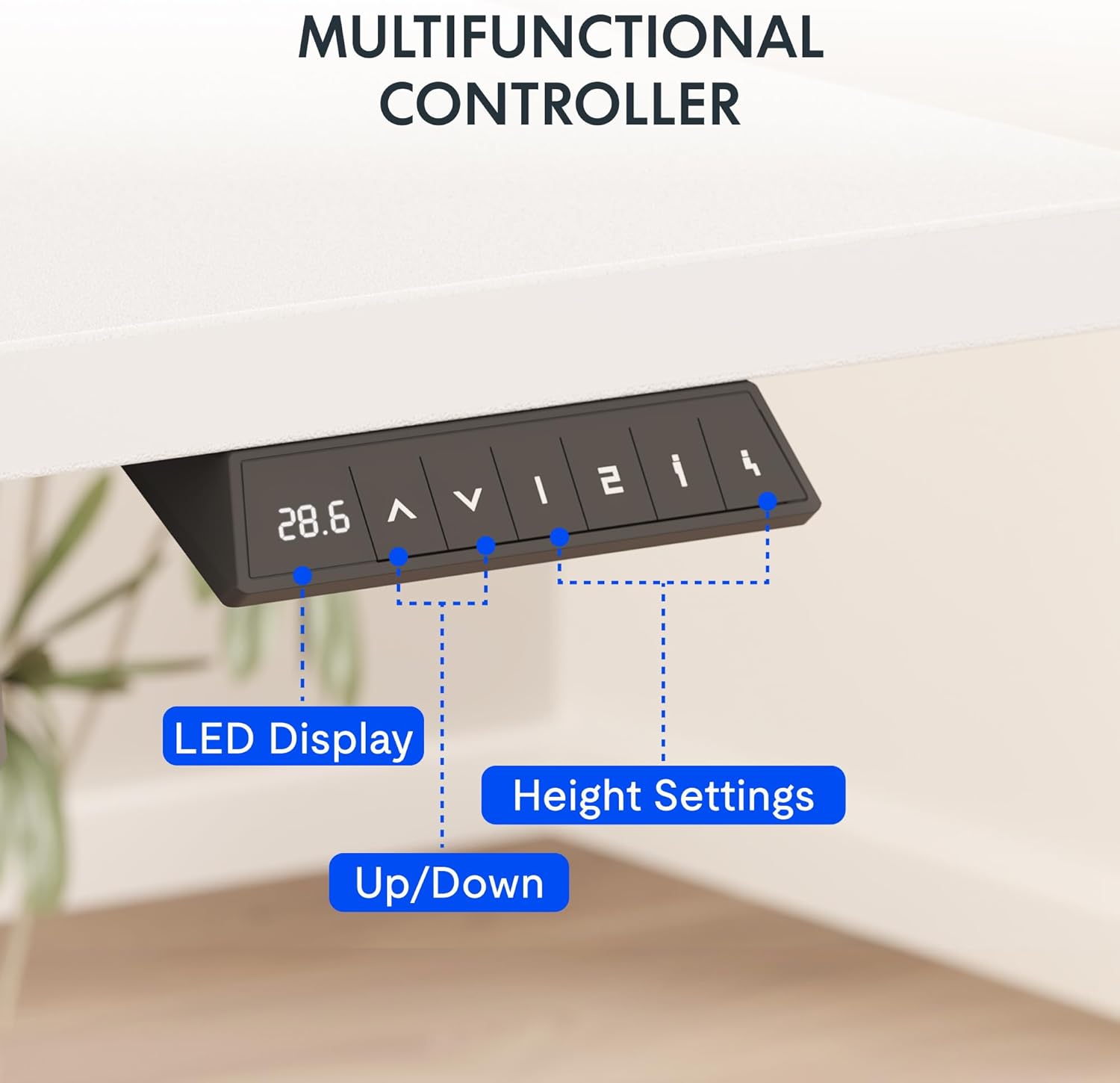
Figure 4: The multifunctional digital controller for height adjustment.
Integratutako entxufea:
The desktop includes a removable clamp power strip with 3 AC outlets (125V/12A) and 2 USB charging ports (5V/2A). This allows for convenient charging of electronic devices directly from your desk. The power strip can be clipped to the back or side of the desk.

Figure 5: The built-in power outlet for convenient charging.
Kableen kudeaketa:
Utilize the included cable management system to keep your workspace tidy and organized, preventing cable clutter.

6. irudia: Kableen kudeaketa eraginkorra lan-eremu garbi bat lortzeko.
Operazioaren bideoa:
Video 2: Showcase of the FLEXISPOT EN1 Electric Stand Up Desk. This video demonstrates the desk's operation, including height adjustment and features.
Mantentzea eta zaintzea
Pisu-gaitasuna:
The desk is constructed with an industrial-grade steel frame and a solid FSC-Certified wood tabletop, capable of holding up to 176 pounds (69.9 kilograms). Ensure the desk is not loaded with more than 176 lbs to maintain stability and structural integrity.
Garbiketa:
For general cleaning, wipe the desktop and frame with a soft, damp cloth. Avoid using harsh chemicals or abrasive cleaners that may damage the finish.
Arazoak konpontzea
Desk Stability:
The desk is designed for high stability. If you experience any wobbling, ensure all assembly screws are tightened correctly. Avoid overloading the desk beyond its 176 lbs weight capacity.
Altuera doitzeko arazoak:
If the desk does not adjust smoothly or encounters an obstruction, the built-in Smart Anti-Collision System will stop movement to prevent damage. Clear any obstructions and try again. If issues persist, refer to the full troubleshooting guide on the FLEXISPOT webwebgunean edo jarri harremanetan bezeroarentzako laguntzarekin.
Stripped Screws during Assembly:
To prevent stripped screws, it is recommended to use hand tools for assembly, especially for attaching components to the desktop. An electric drill may apply too much torque, leading to damage. If a pre-drilled hole is not present, a thin nail and lightweight hammer can be used to create a starter hole before inserting the screw manually.
Zehaztapenak
| Ezaugarri | Xehetasuna |
|---|---|
| Marka | FLEXISPOT |
| Modelo zenbakia | MAH0002873 |
| Produktuaren neurriak | 24" L x 60" W x 28" H |
| Mahaigainaren Tamaina | 60x24" |
| Mahaigaineko materiala | FSC ziurtagiridun egurra |
| Markoaren materiala | Altzairu aleazioa |
| Kolorea | Goiko aldea zuria + marko zuria |
| Gutxieneko Altuera | 28.1 hazbete |
| Gehienezko Altuera | 45.7 hazbete |
| Gehienezko pisuaren gomendioa | 176 lb (69.9 kilogramo) |
| Zarata Maila | < 50 dB |
| Korrontea | 3 AC Outlets (125V/12A), 2 USB Charging Ports (5V/2A) |
| Altxatzeko Mekanismoa | Elektrikoa |
| Kontrolatzailea | 6-button digital with 4 memory presets |
Bermearen informazioa
FLEXISPOT provides the following warranty for your peace of mind:
- 5 urteko bermea: Markoak, motorrak eta bestelako gailu mekanikoak estaltzen ditu.
- 2 urteko bermea: Kontrolatzaileak, etengailuak eta elektronika hartzen ditu barne.
Bezeroarentzako Arreta
For any questions, assistance, or warranty claims, please contact FLEXISPOT customer support. You can find more information and contact details on the official FLEXISPOT webgunea.
Bisitatu FLEXISPOT denda Amazonen for additional products and support resources.