
Sarrera
This manual provides essential instructions for the safe and efficient operation, maintenance, and troubleshooting of your Brother LB7000 Computerized Embroidery and Sewing Machine. Please read this manual thoroughly before using the machine to ensure proper function and to prevent damage.
The Brother LB7000 is a versatile machine designed for both sewing and embroidery tasks, offering a range of features to enhance your creative projects.

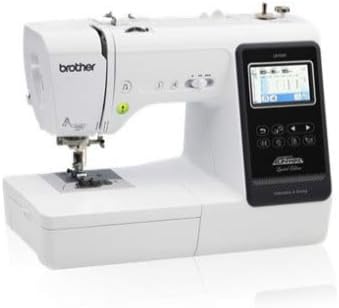
Image: The Brother LB7000 Computerized Embroidery and Sewing Machine in its standard configuration.
1. Konfigurazioa
1.1 Desontziratzea eta kokatzea
- Kontu handiz atera makina bere ontzitik. Gorde ontziratzeko material guztiak etorkizunean garraiatzeko edo biltegiratzeko.
- Place the machine on a stable, level surface. Ensure adequate space around the machine for comfortable operation and ventilation.
- Konektatu elikatze-kablea makinara eta gero entxufe elektriko egoki batera.
1.2 Attaching the Embroidery Unit
For embroidery functions, the embroidery unit must be attached.
- Ziurtatu makina itzalita dagoela.
- Slide the embroidery unit onto the machine's free arm until it clicks securely into place.
- Turn on the machine. The display will show embroidery mode options.

Image: The Brother LB7000 machine with the embroidery unit and hoop attached, ready for embroidery.
1.3 Makina hariztatzea
Proper threading is crucial for optimal sewing and embroidery performance.
- Place the spool of thread on the spool pin.
- Jarraitu makinan adierazitako hari-bide zenbakitua, haria tentsio-disko eta gida guztietatik gidatuz.
- Use the automatic needle threader for convenience, or manually thread the needle from front to back.
1.4 Bobina harilkatzea
- Place an empty bobbin onto the bobbin winder shaft.
- Gidatu haria bobinatik bobina hazteko tentsio-diskotik.
- Wrap the thread around the bobbin a few times, then push the bobbin winder shaft to the right.
- Press the Start/Stop button to begin winding. The machine will stop automatically when the bobbin is full.
2. Funtzionamendu-argibideak
2.1 Basic Sewing Operations
- Selecting Stitches: Use the touch screen display to navigate and select desired utility or decorative stitches.
- Ezarpenak doitzea: Modify stitch length and width using the dedicated buttons or touch screen controls.
- Jostuntzen hastea: Place fabric under the presser foot, lower the presser foot, and press the Start/Stop button or use the foot controller.
- Alderantzizko jostura: Press and hold the reverse stitch button to sew in reverse for securing seams.
Irudia: Gertuko planoa view of the Brother LB7000's control panel and LCD screen, showing sewing stitch selection.
2.2 Embroidery Operations
- Hooping Fabric: Securely place your fabric and stabilizer within the embroidery hoop. Ensure the fabric is taut and wrinkle-free.
- Selecting Designs: Choose from built-in embroidery designs or load designs via USB (if applicable).
- Kokalekua: Use the touch screen to adjust the design's position, rotation, and size within the hoop area.
- Starting Embroidery: Attach the hooped fabric to the embroidery unit. Confirm thread color and press the Start/Stop button. The machine will prompt for thread changes as needed.
3. Mantentzea
3.1 Makina garbitzea
- Ohiko garbiketa: After each use, or every few hours of operation, remove the needle plate and bobbin case. Use the provided brush to remove lint and dust from the feed dogs and bobbin area.
- Kanpoko garbiketa: Garbitu makinaren kanpoaldea oihal leun eta lehor batekin. Ez erabili produktu kimiko gogorrik edo garbitzaile urratzailerik.
3.2 Orratzaren ordezkapena
Replace the needle regularly (approximately every 8-10 hours of sewing) or if it becomes bent, dull, or damaged.
- Itzali makina.
- Askatu orratza clamp torlojua.
- Remove the old needle and insert a new needle with the flat side facing the back of the machine, pushing it up as far as it will go.
- Orratza clamp torlojuak ongi.
3.3 Olioztatzea
The Brother LB7000 is designed to be largely maintenance-free regarding oiling. Do not oil any part of the machine unless specifically instructed by Brother service personnel or an authorized service center. Improper oiling can damage the machine.
4. Arazoak
| Arazoa | Kausa posiblea | Irtenbidea |
|---|---|---|
| Makina ez da pizten. | Kable elektrikoa ez dago behar bezala konektatuta. | Check power cord connection to machine and outlet. Ensure outlet is functional. |
| Upper thread breaks. | Incorrect threading, needle bent/dull, tension too high, poor quality thread. | Re-thread the machine correctly. Replace needle. Adjust upper thread tension. Use good quality thread. |
| Saltatu puntuak. | Incorrect needle type/size, bent needle, improper threading. | Use appropriate needle for fabric. Replace needle. Re-thread machine. |
| Oihal marmeladak. | Incorrect presser foot, feed dogs not engaged, fabric too thick/thin. | Use correct presser foot. Ensure feed dogs are up. Use appropriate needle and stabilizer for fabric. |
| Poor embroidery quality. | Improper hooping, wrong stabilizer, incorrect tension, dull needle. | Re-hoop fabric tautly. Use correct stabilizer for fabric and design. Adjust tension. Replace needle. |
5. Zehaztapenak
| Ezaugarri | Xehetasuna |
|---|---|
| Marka | Anaia |
| Modelo zenbakia | LB7000 |
| Energia iturria | Kable elektrikoa |
| Elektrikoa da | Bai |
| UPC | 012502649830 |
| GTIN | 012502649830 |
6. Bermea eta Laguntza
For detailed warranty information, please refer to the warranty card included with your product or visit the official Brother webgunea. Gorde erosketaren egiaztagiria bermearen erreklamazioetarako.
If you encounter issues not covered in this troubleshooting section or require technical assistance, please contact Brother Customer Support. You can find contact information on the official Brother webgunearen edo bidez Brother denda Amazonen.